
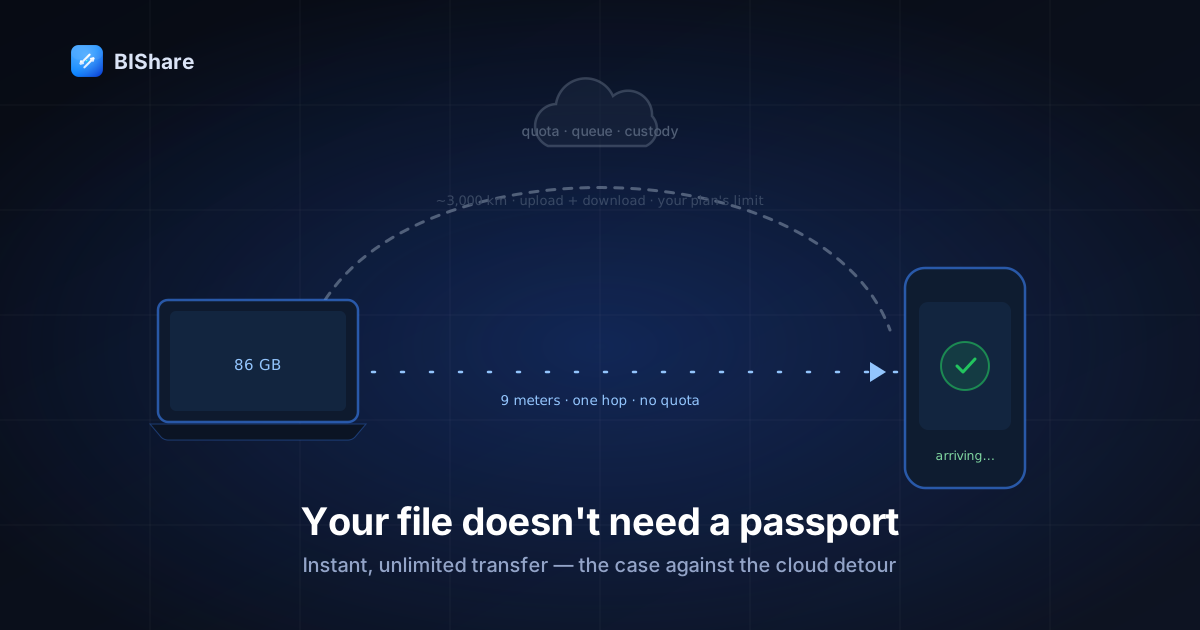
Here is a sentence that should sound absurd, and doesn't, because we've all stopped noticing: to move a video from the laptop on your desk to the phone in your hand, the file will travel to a building you will never see, in a city you may not be able to name, and travel all the way back — metered, queued, and counted against a quota — in order to cross nine meters of your living room.
That's the cloud detour — and it has become such a reflex that "send a file" and "upload a file" now mean the same thing in most people's heads. This essay makes the opposite case, from first principles: for a huge class of everyday transfers, the fastest, most private, least limited path is the one with no cloud in it at all — and the three limits that plague large-file sharing (storage quotas, upload crawls, and someone else holding your data) aren't laws of nature. They're properties of the detour, every one. Remove the detour, and they remove themselves.
We build a tool that works this way, so you know where we stand. But the argument here isn't "use our app" — it's a way of seeing transfers that stays true whatever you use, ours or anyone's. The objections get their turn too, and some of them win.
How the detour became the default
Nobody decided files should commute. No standards body voted that the shortest path between two devices on one desk should route through a coastal data center. It happened in three accidental steps, each reasonable alone, absurd only in sum.
First, email trained us: the original "send a file" was an attachment, and attachments go through a server because that's what email is. Twenty-five megabytes of headroom shaped a generation's instincts. Second, the cloud-storage boom gave everyone a magic folder, and the magic folder became a hammer: got a file somewhere else to be? Put it in the folder. That the folder lived a continent away was invisible — until file sizes grew teeth. Third, phones killed the cable, and with the cable went the last mainstream habit of moving data directly between two devices you own.
The result is a default with real costs at large-file scale — and the costs compound precisely when files get big, which is exactly when you can least afford them:
- The quota wall. Free tiers of 2–15 GB, totals not per-file, shared with your email and your backups. One camera weekend fills it; then the detour starts charging rent — a subscription whose deliverable is permission to move your own data between your own machines.
- The double journey. Every byte goes up at your uplink's pace, then down at theirs — the arithmetic turns a 50 GB folder into an afternoon even on decent broadband.
- The custody question. Between upload and download, your file lives somewhere, under someone's terms of service, in someone's jurisdiction, on someone's retention schedule. Usually fine. Never nothing.
The direct route, from first principles
Now rebuild "send a file" from scratch, with 2026 hardware and no habits.
Two devices. Both have Wi-Fi radios capable of hundreds of megabits. Both sit on the same router. The shortest path between them is one hop — device, router, device — and that path has three properties the detour can't offer at any price:
It's bounded by physics, not pricing. No server means no server's business model. There's no quota because there's no storage; no cap because no one is paying to hold your bytes; no queue because no free tier needs a paid tier to upsell. The only limit is the receiver's disk — which is the correct limit, the one that was always really there.
"Instant" becomes literal. On the local hop, tens of megabytes per second is routine — faster than most home uplinks by an order of magnitude. The 86 GB archive that would monopolize a day of uploading crosses the room in under an hour; the everyday gigabyte, in under a minute. And here's the part people don't expect: at this speed, discovery matters more than bandwidth. "Instant" lives or dies in the two seconds where devices find each other — which is why we've spent absurd engineering hours on exactly that unglamorous moment. Our discovery watches the device's own network identity and re-announces itself the moment you hop networks, so your laptop reappears on your phone without anyone restarting anything. When transfer is this fast, the app's real job is making finding feel like nothing.
Privacy stops being a policy and becomes a topology. End-to-end encryption protects the bytes in flight; the local route adds something stronger — there is no "at rest" anywhere else. No copy on a server, no retention schedule, no jurisdiction question, no breach surface. The file went from one device you own to another device you own, and the universe contains exactly the copies you think it does.
The speed ledger, in human units
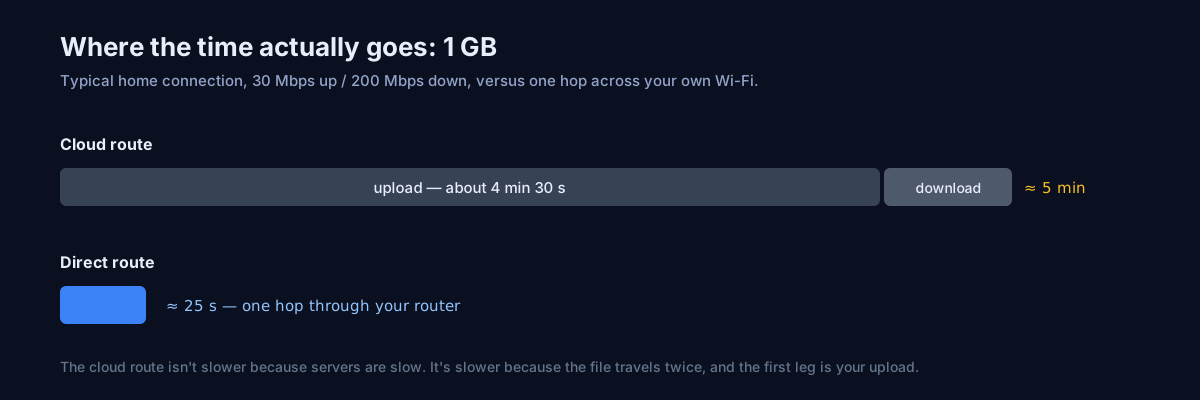
"Tens of megabytes per second" is an abstraction; deadlines aren't. The same three payloads, both routes, honest clocks — cloud figures assume a healthy 20 Mbit/s uplink and count only the upload half of the double journey:
- A 1 GB video: direct, ~25 seconds — the transfer ends before the conversation about it does. Detour: ~7 minutes up, then the download besides.
- A 10 GB shoot: direct, ~4 minutes — pour a coffee, don't drink it all. Detour: ~70 minutes up, a scheduling decision.
- The 86 GB archive: direct, ~35–50 minutes depending on your Wi-Fi's mood — an errand. Detour: ~9.5 hours of uploading — a shift, before anyone downloads a byte.
Read the ledger's shape, not its digits — your Wi-Fi and uplink will move the numbers, never the ratio: the direct route scales like an errand, the detour scales like a workday. And the gap widens with size — precisely the direction your files are growing. Fiber narrows the detour's absolute times but never the doubling, the quota, or the custody; physics discounts, it doesn't forgive.
The objections, taken seriously
An argument this tidy deserves pushback. Here's the honest version of each objection, and where each one lands.
"But the cloud is easier — everything's already set up." Half true, and the half matters. The detour's first use is easier (you have the account already); its hundredth use is not (quota juggling, link management, the upload crawl). Direct transfer inverts this: a two-minute setup once, then every subsequent transfer is tap-device-accept. Habit, not ease, is what the cloud actually owns — and habits are cheap to replace when the replacement is genuinely better every single time after the first.
"But I need the file available everywhere, later." Then you need sync, and this objection wins — for that job. A standing library on all your devices is exactly what cloud drives are for, and no direct transfer replaces it. The distinction to keep: transfer is a delivery (this file, there, now); sync is a subscription (these files, everywhere, always). The pillar guide draws the full line. Use the cloud for the library; stop using it as a courier.
"But my recipient is in another city." The objection wins again — geography is real, and the local route needs a shared network. This is what encrypted transfer links are for: the internet route done properly (E2E, resumable, expiring). The essay's claim was never "the cloud detour is always wrong"; it's that the detour is wrong when there's no distance to cross — which, count your own last month of transfers, is most of the time.
"But what about backup? If it never touches the cloud, nothing's saved." Sharp — and it cuts the other way too. A transfer was never a backup: the cloud copy in a transfer service expires; the Drive copy mirrors your deletions. Backup is its own discipline (two places before deleting the third), owed to your files regardless of how they travel. The direct route doesn't weaken your backups; it just declines to impersonate one.
"But peer-to-peer sounds complicated — ports, IPs, pairing." It did, in 2009, and the reputation was earned: the era's tools really did hand civilians port-forwarding homework. The modern experience is: open app on both devices, see the other device's name, tap it. Discovery is automatic, encryption is default, and the browser covers the device that can't install anything. The complexity didn't disappear — we and others moved it inside the tools, which is where complexity belongs. (Power users who want the knobs still have rsync and friends; the knobs became optional, not extinct.)
"But my office Wi-Fi blocks device-to-device." True in many offices — client isolation is real policy, not superstition, and it exists for defensible reasons that have nothing to do with your file. The counter is in your pocket: a phone hotspot builds a private two-device network in fifteen seconds, no infrastructure required. Where even that's barred, the internet route exists. Every rule in this essay bends to the network in front of you; the point is knowing which rule you're bending and why.
"Isn't this just AirDrop?" In spirit, exactly — and the spirit is the concession: Apple decided twelve years ago that room-scale transfers shouldn't commute, and AirDrop's existence is the industry admitting the detour was absurd. The letter is narrower: AirDrop stops at Apple's fence, Quick Share at Google-and-Windows', and the pairings that cross fences — most real households — get nothing native. Cross-platform direct transfer is AirDrop's idea, extended to the mixed-device world everyone actually lives in. We didn't invent the insight; we refused its boundary.
Setting up the direct route (the whole ceremony)
For an essay accused of idealism, the practice is disappointingly small:
- Install once, everywhere. BIShare on each device you own — phones, laptops, the Linux box; five platforms, free, no accounts. Grant the two prompts that matter (Local Network on iOS, the firewall allowance on desktop) the first time they appear, and name each device like a human.
- Learn the tap. Open the app on both ends; the other device appears by name in a breath or two; select files, tap the name, receiver accepts. That's the entire operating manual — the per-pairing wrinkles live in the pillar guide when a specific duo misbehaves.
- Pocket the two fallbacks. No shared network? A hotspot builds one in fifteen seconds. A device that can't install? The browser tool sends and receives against the app on the same network. Between the three, "we couldn't transfer it" stops being a sentence you say.
- Keep the one habit. Size on the sender, size on the receiver, numbers match — the ten-second verification that every guide in this series ends up preaching, because it's the whole difference between "sent" and "delivered."
Done. The detour remains available, of course — it just stops being the reflex. And notice what the ceremony didn't include: no account creation, no plan selection, no credit card "for verification," no storage tier chosen. The direct route's setup is short partly because there's nothing to sell you during it.
What "no limits" looks like in practice
Concretely, the direct route's daily texture — the peer-to-peer idea wearing modern clothes:
- The 86 GB archive handoff — laptop to laptop before a colleague's last day. No plan upgrade, no overnight upload, no link to babysit. Router speed for as long as it takes; both machines on power; done before lunch.
- The camera-roll amnesty — three years of phone photos onto the desktop, structure preserved, verified by count and size, deleted from the phone with a clear conscience.
- The client in the room — a delivery playbook's whole stage three compressed to: their laptop appears, tap, accept, the master lands, the meeting continues.
- The dead-zone handoff — festival, basement, airplane: hotspot up, transfer runs, no bars required. The detour needs civilization; the direct route needs a radio.
Each is the same sentence with different nouns: the file crossed the room, because the room is where the file was going. Notice, too, what's absent from all four vignettes — progress-bar anxiety, quota mathematics, the tab you're afraid to close. The direct route doesn't just change the speed; it deletes an entire genre of low-grade dread from the task.
The custody argument, slowed down
Of the three limits, custody gets the least airtime because it's the least visible — so give it ninety seconds of slow thought.
Every file on the detour has an interval: the time between upload and final download when it exists on infrastructure you don't control. For a transfer link, days; for the magic folder, indefinitely. In that interval, the file's fate is governed by documents you didn't read — retention policies, law-enforcement processes, breach disclosures, acquisition clauses — all almost certainly benign, all entirely outside your hand. Multiply a small probability by everything you've ever transferred, and "usually fine" becomes an actuarial statement about your own archive.
The direct route's answer isn't better policies; it's no interval. There is no moment when the file exists anywhere but the two endpoints — nothing to retain, subpoena, breach, or migrate. For the family archive and the client's unreleased work alike, this is the difference between trusting well and not needing to trust. Both are legitimate positions; only one of them is free.
And one honest mirror-image: the no-interval property means we can't help you recover a direct transfer either — there's no server-side copy to re-issue. The custody you keep is also the responsibility you keep; the backup discipline stops being optional advice and becomes the other half of the deal.
The honest scorecard
For symmetry with everything we write: where each route genuinely wins.
The direct route wins whenever both devices can share a network — on speed (one short hop), limits (none but disk), and custody (no third holder). Which covers the household, the office, the shoot, the meeting, and every "it's literally right there" transfer that currently commutes through a data center. It also wins a criterion nobody lists: predictability. No service status page, no peak-hour throttling, no policy change next quarter — a router either works or it doesn't, and you own the router.
The internet route wins on distance (obviously), on fan-out (one link, many recipients), and on asynchrony (send now, they fetch Thursday) — done properly, with encryption and expiry, it's the right tool for exactly those shapes. One tool carrying both routes, so the choice is a tap rather than an app-switch, is the quiet convenience this whole series keeps circling back to.
The cloud-sync route wins for the standing library and the collaborative folder — the jobs that are subscriptions, not deliveries.
Scored honestly, the scorecard isn't close in frequency: audit a normal month and the same-room, same-house, same-office transfers outnumber the cross-country ones several times over. The detour earned its place as a route. It was never entitled to be the default one.
The mistake was never using the cloud. It was using the detour by default, for deliveries it was never shaped for, and calling the resulting quotas, queues, and waits "just how file transfer is." It isn't. It's how the detour is.
Who this changes the most
The argument lands differently by household, so aim it:
The creator — photographer, videographer, streamer — lives at the intersection of huge files and same-room devices: camera to edit rig, rig to archive drive, archive to the client in the meeting. The direct route converts their single most repeated chore from a scheduling problem into a background hum, and the quota line-item from their software budget simply leaves.
The family moves photos more than anything else — phone to parent's laptop, old phone to new phone, everyone to the shared archive. Every transfer is same-roof by definition, none of it needs a data center, and the grandparents' machine that can't install anything is what the browser fallback was built for. Families also hit quota walls hardest, because nobody in a family is going to become the quota administrator — a role the direct route simply abolishes.
The office has the most to gain and the most rules in the way: client isolation, install policies, compliance. The counterintuitive pitch: the direct route inside a trusted LAN is more auditable than scattered cloud links — the file demonstrably never left the building, which for regulated material is a sentence compliance officers dream about. IT departments warm to it once it's phrased that way. Start with the hotspot trick in the meeting room; policy follows demonstration.
The traveler learns the deepest version of the lesson: on the road, connectivity is scarce, roaming is metered, and the detour is often simply unavailable. Hotspot plus direct transfer works identically in a hotel, a train, and a field — the only transfer stack that doesn't assume civilization. Travelers also rediscover the custody argument viscerally: on foreign networks, "the file never left my two devices" stops being a philosophy and becomes plain common sense.
The bottom line
Three limits opened this essay: quotas, upload crawls, and custody. Trace each back and they share one root — a server that was never necessary for the transfer in front of you. The next time a progress bar tells you "uploading… 4 hours remaining" for a file whose destination is visible from where you're sitting, hear the sentence properly: the file is leaving the building to cross the room. You're allowed to decline the trip. Put the direct route on your devices — two minutes, once — and the phrase "storage limit" quietly exits your transfer vocabulary; keep the encrypted link for actual distance, and the cloud for the library it's good at.
Nine meters is not a journey. Stop booking flights for it — your files, your rooms, your router. The infrastructure for sane transfer has been sitting in your house all along.