
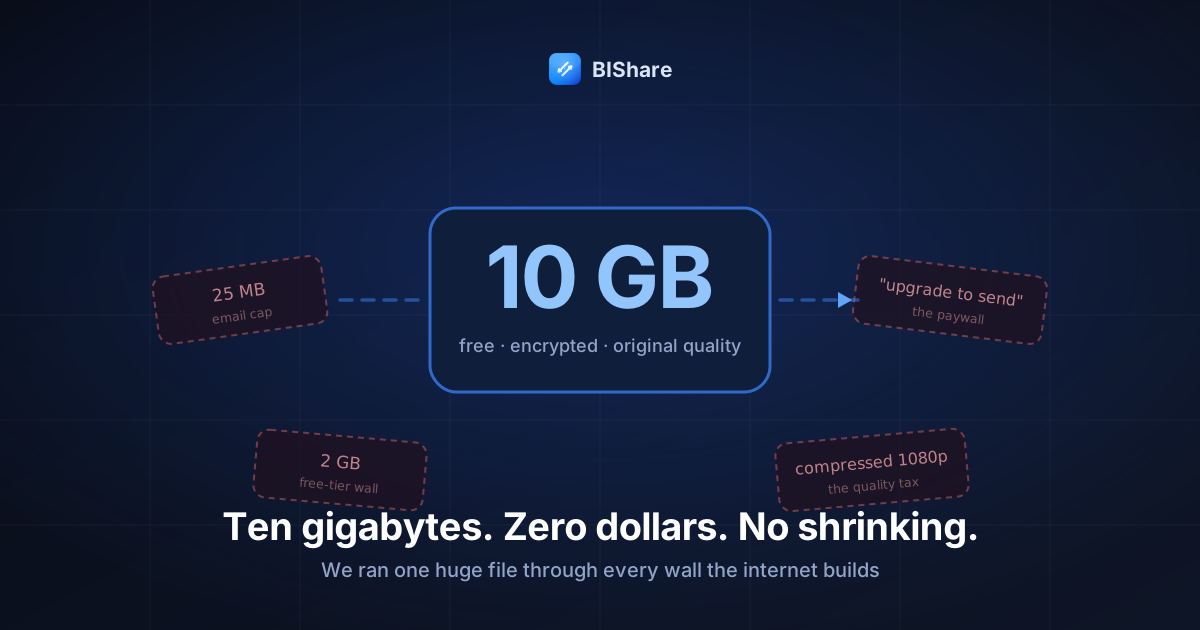
Meet the payload: a 10.4 GB folder from a wedding shoot — one long 4K ceremony file, a handful of highlight clips, three hundred RAW photos. Real work, real deadline, a real person on the other end waiting for it. Our job in this article is simple to state and instructive to watch: send it online, free, without compressing anything — and document every wall it slams into on the way.
Because that's the honest shape of this problem. Sending 10 GB isn't hard because the internet can't carry it; the internet carries far stranger things before breakfast. It's hard because most of the tools in front of you were shaped — by design or by pricing — to stop a file this size. Each wall below is real, each has a reason, and knowing the reasons is what turns "large files are a nightmare" into a five-minute routine. So let's run the gauntlet, wall by wall, and then take the doors that actually open.
In a hurry? The short version: BIShare's browser transfer takes files up to 100 GB free — encrypted before upload, resumable if your connection hiccups, no account, link expires on its own. The rest of this article is the why, the honest alternatives, and the craft of doing it well.
Wall one: email, eliminated in one sentence
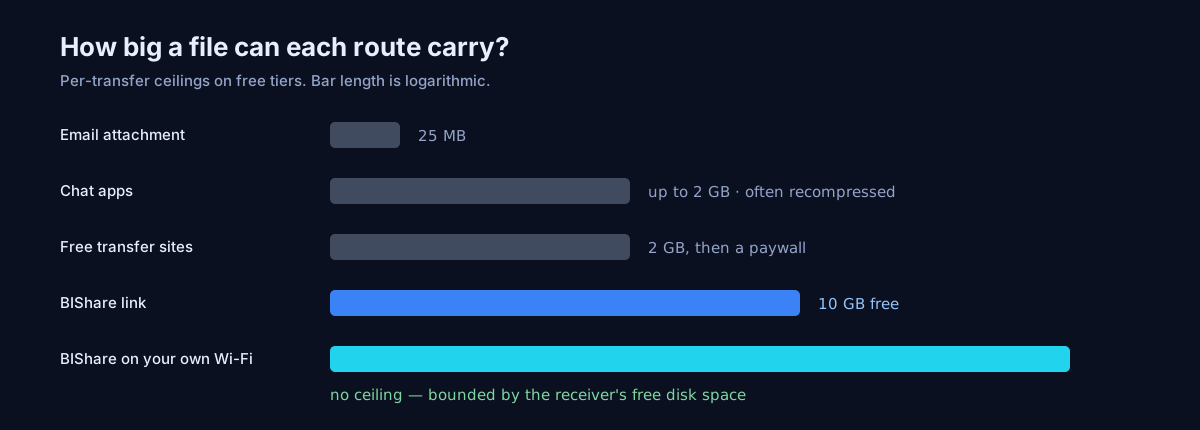
Gmail's attachment limit is 25 MB — the payload is four hundred times that — and every major provider sits in the same neighborhood. Email providers know it, which is why oversized attachments get silently converted into Drive or OneDrive links: email has formally outsourced this job. Respect the referral and move on; the gauntlet has barely started, and email was never going to be the door.
Wall two: chat apps, and the two ways they fail
Messaging apps fail big files twice, in opposite directions:
- The hard stop. File-size ceilings — commonly around the 2 GB mark, sometimes higher with premium tiers — end the attempt outright. Our single 7.8 GB ceremony file doesn't fit through any mainstream chat app's door, subscription or not. The ceilings exist because chat infrastructure is tuned for a billion small messages, not single huge objects; it's the wrong machine for the job, not a stingy one.
- The soft betrayal. Media small enough to pass gets "helped": recompressed for delivery. This is the trap this article's title is about — without compression isn't a preference, it's the whole assignment when the payload is professional work. A chat app that shrinks a client's film into a smaller, softer file hasn't sent the file; it has sent a summary of it.
The workaround from our phone-pair guide applies here in reverse: chat apps are excellent at carrying links. Let them carry the link; never the media.
Wall three: cloud drives, where the wall is your own quota
Cloud drives will happily accept a 10 GB upload — into your storage allowance. And there's the squeeze: free tiers run 2–15 GB total, shared across everything you already store. Our payload alone fills or breaks most of them, and even where it squeaks in, you've converted a one-time handoff into a standing storage bill and a cleanup chore. Sharing pains follow: recipient sign-in requirements on some platforms, permission dialogs, and the eternal "requesting access" email while your client waits.
Cloud drives are the right tool for the library — the standing collection synced across your devices. As a courier for one huge delivery, they're a moving truck you have to buy to use once. And remember sync's sharp edge from wall three's cousin: a shared drive folder mirrors deletions, so "cleaning up" your side after the client downloads can quietly clean up their side too. Couriers shouldn't have that power. (The pillar guide draws this transfer-vs-sync line in full.)
Wall four: the free-tier gates of transfer sites
Now the tools actually built for this job — and the gauntlet's most interesting wall, because it isn't technical at all.
Classic transfer services gate their free tiers around a couple of gigabytes and sell the rest. Some competitors take other trade-offs: a few offer generous or even unlimited sizes for free, paid for with slower queues, ads, retention limits, or — the quiet one — no end-to-end encryption, meaning the operator can technically read what you sent. To be specific and fair: SwissTransfer offers a genuinely large free allowance and deserves the mention; its trade against BIShare is the encryption model and resume behavior rather than the size number. Our full teardowns of the category live in the WeTransfer and Smash alternative guides — every service is a bundle of trade-offs, and honest shopping means knowing which trade you're making.
Here's the part we can add as people who run such a service: the size caps are pricing decisions, not physics. A transfer architecture that streams uploads straight into storage in chunks — no intermediate servers holding whole files — makes a 10 GB transfer cost the operator pennies. That's the entire secret of how our free tier carries 100 GB per file: the design keeps it cheap, so the wall was never necessary. When a service caps you at 2 GB, it isn't protecting its infrastructure; it's positioning its paywall.
Wall five: the physical world, given its due
Complete the gauntlet honestly and you must pass the oldest option: copy to a USB stick and hand it over. For our payload, with both people in one city, it's genuinely competitive — a decent flash drive swallows 10 GB in a few minutes, and "I'll drop it by at lunch" beats a 70-minute upload on slow cable. Computer scientists have a beloved aphorism for this, usually credited to Andrew Tanenbaum: never underestimate the bandwidth of a station wagon full of tapes hurtling down the highway. At terabyte scale it still wins — studios courier drives for a reason.
Its honest losses: distance (a stick doesn't email itself), immediacy (lunch is not now), the errand itself, and the small ritual of never seeing that drive again. Physical media is the right answer when the payload is enormous and the people are near and nobody's in a hurry — three conditions that align less often than nostalgia suggests. When they do align and both devices share a network anyway, the local transfer usually beats the stick without the errand.
What 10 GB actually is, for scale
Numbers land better with furniture around them. Ten gigabytes holds roughly:
- ~25–30 minutes of 4K30 phone video, or two-plus hours of 1080p
- 300–500 RAW photos from a modern mirrorless, or several thousand JPEGs
- ~2,000 songs at streaming-grade quality — a decade of listening
- Entire careers of documents — PDFs and spreadsheets round to zero at this scale
Two readings of that list. First, 10 GB is professional media territory — ordinary document life never gets here, which is why email's fax-era cap rarely hurts until the day you shoot something. Second, the ceiling is per-file generosity: most real payloads over 10 GB are actually collections that split naturally (by day, by scene, by album) into several sends — a workflow note we'll return to at the end.
The door: what surviving the gauntlet looks like
So the payload goes through bishare.app/transfer, and it's worth narrating what happens, because each step answers a failure from the walls above:
- Drop the folder in. Files are encrypted in the browser before a byte leaves — the relay stores ciphertext it cannot read, and the key travels only inside the link you'll share. (The encryption explainer has the full model.) No account precedes this; nobody's inbox is involved.
- The upload streams in chunks. Big files go up as a sequence of parts rather than one fragile monolith. This is the unglamorous engineering that changes everything at 10 GB scale: when your Wi-Fi blips at part 143 of 200, the upload resumes at part 143 — not at zero. Refresh the tab, re-pick the same file: it continues. We built it this way after watching exactly one too many multi-hour uploads die at 97%.
- You get a link, a QR, and a 6-character code. Send whichever suits the recipient — the link through the chat app that couldn't carry the file, the code read aloud on a call, the QR across a desk.
- They download in any browser. No app, no account, original bytes — the 4K file arrives at its full bitrate, RAW files arrive bit-identical. The link expires after 6, 12 or 24 hours, whichever you picked, or after the first download if you flipped the one-time toggle. The handoff leaves no standing storage anywhere.
That's the gauntlet, completed: free, uncompressed, encrypted, resumable — and nothing to clean up afterward.
The math nobody posts: how long 10 GB actually takes
The internet route's honest cost is upload time, and it's pure arithmetic — 10 GB is 80 gigabits, divided by your uplink (the small number in your speed test, not the big one):
- 20 Mbit/s uplink (common cable/DSL): ~70 minutes
- 50 Mbit/s: ~28 minutes
- 100 Mbit/s (typical fiber): ~14 minutes
- 500 Mbit/s+: a coffee's worth of minutes
(For the mathematically tidy: megabits and megabytes differ by 8, which is exactly the factor that makes speed-test numbers look flattering next to transfer clocks. The speed test says 100; the transfer says 12.5 MB/s; both are telling the truth.)
Three practical consequences. First, check your uplink before promising a delivery time — thirty seconds of speed test converts "soon" into a number. Second, wire in or sit near the router for the duration; a weak Wi-Fi link can halve your real uplink, and at this scale halving means an extra half hour. Third — and this is the one that reorganizes people's habits — if the recipient is on your network, don't use the internet at all. A direct local transfer moves the same 10 GB in minutes at router speed, upload legs not applicable. The internet route is for distance; never pay its toll when there's no distance to cross.
"Should I zip it first?" — the compression sidebar
A ritual as old as attachments, and mostly a superstition at this scale. The payload's contents — H.265 video, RAW photos — are already compressed by their own formats; wrapping them in a ZIP shaves a percent or two while adding an unpack step for a busy recipient. The rule:
- Zip for bundling: three hundred loose RAWs travel more politely as one archive than as three hundred downloads, and one checksum-able object beats a folder of maybes. (Transfer tools that bundle folders automatically — ours zips a multi-file share into one stream — do this for you.)
- Never zip for shrinking media: the bytes barely move, and you've spent twenty minutes proving it.
- The one real exception: text-adjacent payloads — logs, CSVs, project files, uncompressed audio — compress dramatically. If your 10 GB is a database dump rather than a wedding, zip enthusiastically and send a fraction of the bytes.
And keep the habit from our video-quality guide: whatever the path, verify the received byte count matches the original. It's the ten-second test that catches every silent shrink in this article.
The pre-flight checklist for a double-digit send
Everything above, compressed into the ritual we actually follow before a big handoff:
- Total the payload honestly — right-click, Get Info/Properties, and note the number down to the decimal. Surprises at 97% start with guesses at 0%.
- Speed-test the uplink and translate to minutes (the table above). Tell the recipient a real ETA.
- Pick the route: same network → local transfer, done in minutes; distance → encrypted link.
- Start the upload on stable footing — Ethernet or strong Wi-Fi, laptop on power, tab left open. Resume has your back on blips; don't make it carry the whole plan.
- Set the expiry deliberately — default 24 h, or one-time download for anything sensitive.
- Send the link through any channel — it's just text; even the chat apps from wall two carry it perfectly.
- Confirm the landing: recipient's byte count matches yours. Delivery is a number, not a feeling.
When the payload is sensitive, not just big
Our wedding folder is private in the ordinary way; plenty of 10 GB payloads are private in the contractual way — client deliverables under NDA, footage of someone's home, datasets with names in them. Size and sensitivity compound: the bigger the file, the longer it sits in transit surfaces, the more places a lazy path leaves copies. The discipline for the double-digit and sensitive send:
- End-to-end or don't. For material with obligations attached, TLS-only services put the operator inside your trust boundary — an easy no when zero-knowledge alternatives cost the same (nothing).
- One-time download plus short expiry turns a link from a standing exposure into a single event. The file evaporates behind the first fetch; there is no "old link floating in a thread" problem because the link stopped existing.
- Move the key out-of-band when stakes are real. The pragmatic version: send the link in one channel and, for one-time material, the download code in another. Two ordinary messages; one meaningfully higher bar.
- Local route when it's possible at all. The most secure server is the one never involved: same-network device-to-device transfer keeps regulated material inside the room it already lives in.
None of this is paranoia pricing — every item is free and adds seconds. It's the difference between "sent it somehow" and being able to say, in a professional sentence, exactly how it traveled.
The professional wrapper: sending big like you've done it before
The last mile of a 10 GB handoff is social, and the craft shows. Three habits that make the delivery feel like a delivery:
- Name files like evidence.
ceremony_4k_final_v2.mp4survives a client's Downloads folder;VID_0083(1).mp4becomes archaeology by Thursday. Rename before sending; the link inherits the dignity. - Send a manifest with the link. One message: what's inside (4 files), total size (10.4 GB), the expiry (24 h), and what to do ("download tonight, confirm the sizes match"). Thirty seconds of writing eliminates every follow-up question you'd otherwise answer tomorrow.
- Close the loop explicitly. "Got all four, 10.4 GB, plays great" is the sentence that ends the job. Ask for it. Deliveries that end in silence get re-sent next week by someone who wasn't sure.
The receiver's half of the handoff
Every guide obsesses over sending; half the failed 10 GB handoffs we've seen died on the receiving end. The craft on that side:
- Disk first. A laptop with 6 GB free cannot catch a 10 GB file, and the error arrives at the worst moment. "Do you have 12 GB free?" is a perfectly professional question to ask before sending the link.
- Real browser, real computer, ideally. Phones can receive huge files, but a phone at 80% storage on hotel Wi-Fi is the hard mode of this task. When a desktop is available, aim the link there.
- Downloads folder ≠ destination. A 10 GB file that lands in Downloads and stays there is a future storage mystery. Move it to its project home, then report success.
- The byte-count confirmation, both directions. The sender knows the size; the receiver confirms the size; the handoff is done when the numbers agree. Everything else — thumbnails loading, "seems fine" — is a feeling, and feelings don't survive audits.
- One-time links and preview bots — the sneaky one. Chat platforms often prefetch links to render previews, and a prefetch can consume a strictly one-time download before any human clicks. If a one-time link ever arrives "already used," that's usually the culprit, not a thief. The craft: send one-time links as a QR or split the URL across two messages — or reserve the one-time flag for channels that don't preview.
When 10 becomes 100: scaling the craft
The techniques above stretch further than the number in the title:
- Split by natural seams, not arbitrary chunks. A 60 GB shoot sends better as six day-or-scene batches than one heroic monolith — each batch verifiable, each resumable, the recipient started on batch one while batch two uploads.
- Below ~10 GB per piece, links stay pleasant; far above it, reconsider the route. The upload math scales linearly: 100 GB at 20 Mbit/s is half a day of uploading. At that scale, same-network local transfer or the station wagon reclaim the crown — the large-file guide maps the crossover points.
- Recurring big handoffs deserve standing infrastructure. If every Friday ends with 40 GB to the same editor, stop hand-carrying links: a synced folder (Syncthing for the self-hosted, a paid drive for the corporate) turns the ritual into plumbing. Links are for deliveries; plumbing is for routines.
The bottom line
Run the tally from the top: five walls, and not one of them was the internet itself — a protocol cap from 2004, infrastructure tuned for small messages, a quota model, a paywall's placement, and geography. Ten gigabytes stopped being a technical problem years ago — what's left standing are walls of policy: attachment limits from the fax era, chat apps that shrink what they touch, storage quotas dressed up as sharing, and paywalls placed exactly where files get interesting. Once you can name the walls, the route through is short: local transfer when there's no distance, an encrypted, resumable 10 GB link when there is — free, uncompressed, and finished with nothing to clean up.
The wedding folder made it, by the way — one link, one download, byte counts matching, client happy, and the link was ash by morning exactly as designed. Yours will too: run your own gauntlet, or put the app on your devices and skip the walls permanently. Ten gigabytes is only intimidating until the first time it isn't.