
Android → iPhone
Как передать файлы с Android на iPhone
Годами честный ответ звучал так: приложение на обоих телефонах или обход через облако. В 2026 году появились три встроенных способа: некоторые Android-смартфоны теперь видны в списке AirDrop на iPhone, любой Pixel или Galaxy может показать iPhone QR-код Quick Share, а Android 17 переносит весь телефон на новый iPhone без приложения «Перенос на iOS». У каждого есть предел, о котором лучше знать заранее. Ниже восемь способов, которые действительно работают, где каждый упирается в ограничения, куда файлы попадают на iPhone и как BIShare связывает любой Android и любой iPhone, в одной комнате или нет. Бесплатно, с открытым кодом, без регистрации для всех.
BIShare является нашим продуктом. Три способа на этой странице бесплатно встроены в телефоны, и для быстрой отправки фото на iPhone рядом их может хватить; в разделах об этом сказано прямо.
Короткий ответ
- У вас Pixel 8a или новее либо свежий Galaxy: откройте Quick Share и выберите iPhone, когда его AirDrop переключён на «Для всех на 10 минут». Фото сразу попадут в приложение «Фото».
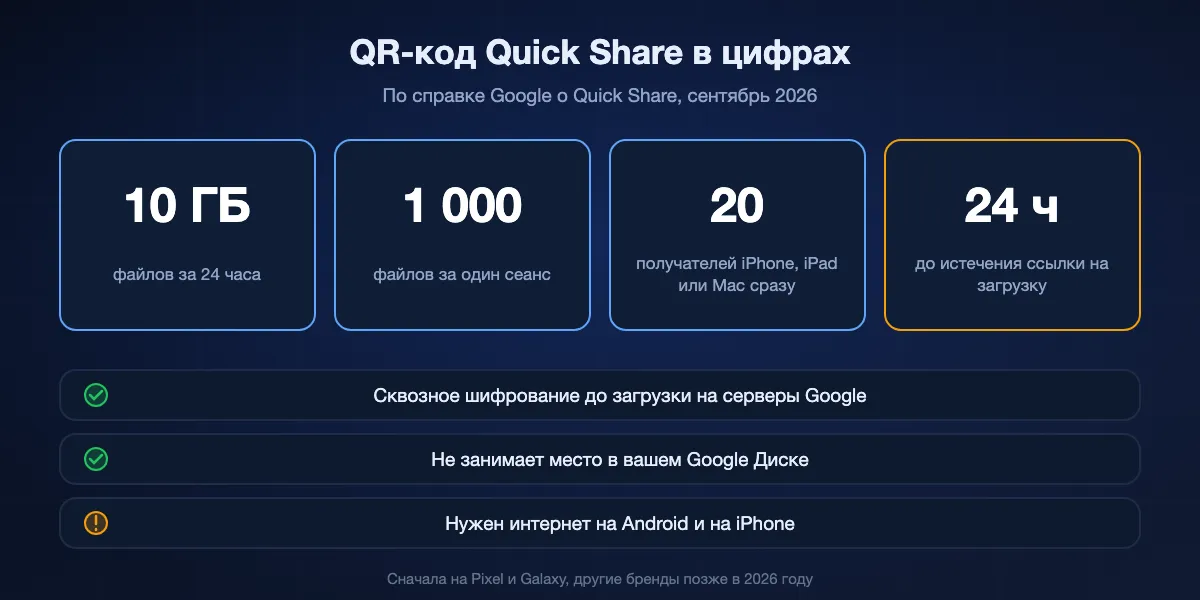
- iPhone не виден или не рядом: на Pixel или Galaxy нажмите «Использовать QR-код» в Quick Share. iPhone сканирует код камерой и скачивает в Safari, до 10 ГБ за 24 часа.
- Любой Android, одна Wi-Fi-сеть: установите BIShare на оба, и нетронутые оригиналы уйдут по Wi-Fi в зашифрованном виде, любого размера.
- Много гигабайт для человека далеко: создайте ссылку BIShare; она вмещает 100 ГБ, а iPhone нужен только Safari, чтобы забрать файлы.
- Настраиваете новый iPhone: используйте перенос Apple во время настройки. Android 17 справится без приложения, более старым версиям нужен «Перенос на iOS». Кабель USB-C между телефонами ускоряет процесс.
- Перед большой загрузкой в Safari: проверьте «Настройки», «Приложения», Safari, «Загрузки». По умолчанию файлы идут в iCloud Drive и занимают место в iCloud.
Три новых способа 2026 года
За последний год сдвинулись и Apple, и Google, поэтому встроенных путей с Android на iPhone сейчас больше, чем когда-либо. Ни один не подходит всем, так что полезный вопрос один: какой из них доступен вашим двум телефонам.
Quick Share умеет отправлять в AirDrop
Справка Google называет Pixel 8a и новее, а также отдельные модели Samsung, Oppo, OnePlus, Vivo, Xiaomi, Honor, Transsion и Motorola. На этих телефонах iPhone появляется в Quick Share, пока его AirDrop стоит на «Для всех на 10 минут». На Galaxy ещё нужно включить обмен с устройствами Apple в настройках Quick Share. Обоим телефонам нужны Bluetooth и Wi-Fi, и они должны быть рядом.
QR-код для любого iPhone
Распространяется с мая 2026 года, сначала на Pixel и Galaxy: выберите «Использовать QR-код» в Quick Share, iPhone сканирует его камерой, и в Safari открывается ссылка на загрузку. По словам Google, файлы защищены сквозным шифрованием, загружаются на серверы Google без расхода вашего места в Drive, доступны 24 часа и ограничены 10 ГБ за 24 часа и 1000 файлами за сеанс. Обоим телефонам нужен интернет, но не AirDrop и не приложение.
Android 17 переносит весь телефон на iPhone
В инструкции Apple по переносу теперь сказано, что поддерживаемое устройство на Android 17 может передать данные на новый iPhone без установки «Перенос на iOS», а кабель USB-C между телефонами работает быстрее Wi-Fi. Это инструмент настройки для тех, кто меняет телефон, а не способ отправить файл на iPhone, которым уже пользуются.
Восемь способов с Android на iPhone по порядку
BIShare
Лучший в целом: любой Android, любой iPhone, рядом или далеко
Android, iOS, компьютер · лицензия Apache 2.0, бесплатно · с телефона на телефон без лимита · ссылки на 100 ГБ · сквозное шифрование · без аккаунтов
Неважно, флагман у вас или бюджетная модель пятилетней давности. Установите приложение на оба телефона, подключите их к одной Wi-Fi-сети или точке доступа, и iPhone появится на стороне Android; нажмите на него, примите на iPhone, и файлы пойдут напрямую по сети. На iPhone они ждут во входящих приложения, где кнопка «Сохранить в Фото» переносит фото и видео в медиатеку по одному или все сразу. Если iPhone в другом месте, приложение на Android создаёт ссылку с QR-кодом и запасным 6-значным кодом. iPhone открывает её в Safari и сохраняет до 100 ГБ без установки; файл зашифрован ещё на Android, а ссылка перестаёт работать через 6, 12 или 24 часа.
Учтите: Прямой путь требует приложения и на iPhone. Ссылка служит передачей, а не хранилище: скачайте до истечения срока.
Quick Share в AirDrop
Лучший встроенный вариант для поддерживаемого телефона рядом с iPhone
Pixel 8a и новее, отдельные Samsung, Oppo, OnePlus, Vivo, Xiaomi, Honor, Transsion, Motorola · любой iPhone · только рядом · ничего не устанавливать
На поддерживаемом Android это ощущается как AirDrop, потому что на стороне iPhone это и есть AirDrop. Владелец iPhone открывает Пункт управления и ставит AirDrop на «Для всех на 10 минут»; вы выбираете файлы в Quick Share и нажимаете на iPhone. Фото и видео попадают в «Фото», как при любом AirDrop, а остальные файлы предлагают открыться в подходящем приложении. Без аккаунта и загрузки в облако, и работает без интернета, потому что телефоны связываются напрямую.
Учтите: iPhone во время приёма должен быть виден всем вокруг, потому что режим «Только контакты» между платформами не работает. Большинства Android-смартфонов в ходу пока нет в списке.
QR-код Quick Share
Лучший встроенный вариант, когда AirDrop не видит телефон
Сначала Pixel и Galaxy, другие бренды в течение 2026 года · любой iPhone с камерой · до 10 ГБ за 24 часа · ссылка действует 24 часа · сквозное шифрование
Там, где моста к AirDrop нет или iPhone не появляется, Quick Share может показать QR-код. iPhone сканирует его обычной «Камерой», и в Safari открывается защищённая страница с файлами для скачивания. На iPhone ничего не устанавливается, и ничего не ложится на ваш Google Drive. На Galaxy есть и собственный обмен Samsung по ссылке и QR-коду: ему нужен аккаунт Samsung у отправителя, он пропускает 10 ГБ на файл и в день, а ссылки истекают через два дня.
Учтите: Интернет нужен с обеих сторон, есть дневной лимит 10 ГБ, и файлы оказываются в загрузках Safari, а не в «Фото».
Google Фото или Google Диск
Лучший, если снимки должны остаться в общей библиотеке
Встроено в Android, бесплатные приложения для iPhone · до 15 ГБ бесплатно на Gmail, Диск и Фото вместе · аккаунт Google у отправителя · общие ссылки открываются в Safari
Если Android уже делает резервную копию в Google Фото, снимки на полпути. Поделитесь альбомом или несколькими кадрами по ссылке, и iPhone откроет их в Safari или войдёт в приложение Google Фото и сохранит в «Фото». Для документов и больших видео Диск делает то же самое с папками. Очевидный выбор для семейного альбома, который пополняют обе стороны.
Учтите: Сначала загрузка, потом скачивание, поэтому большие видео идут долго, расходуются бесплатные 15 ГБ, а полное разрешение зависит от качества копирования «Исходное».
LocalSend
Бесплатное приложение с открытым кодом для двух телефонов в одной сети
Android, iOS и компьютер · открытый код · только локальная сеть · шифрование · без аккаунтов
LocalSend: хороший честный инструмент для случая «одна Wi-Fi-сеть»: оба телефона запускают его, находят друг друга, и файлы переходят без сервера. Если Android и iPhone живут в одном доме и обмениваются файлами только лично, этого хватит.
Учтите: До iPhone в другой сети не дотянуться, и установить нужно обоим.
WhatsApp или Telegram, отправка файлом
Нормально в уже существующем чате
Приложение и аккаунт на обоих телефонах · файлы до 2 ГБ · фото, отправленные обычным способом, сжимаются
Мессенджеры переносят большую часть фото с Android на iPhone, и почти все приходят меньше, чем ушли. Прикрепляйте изображение как документ или файл, а не через выбор фото, и оно сохранит исходный размер. На iPhone откройте файл в чате и сохраните в «Фото» через меню «Поделиться».
Учтите: Потолок 2 ГБ, постоянная копия в чате и лёгкая ошибка, из-за которой резкое фото становится мыльным.
Флешка USB-C
Передача без сети, только iPhone 15 и новее
Android с USB-C · iPhone 15 или новее · флешка в exFAT · приложение «Файлы» на iPhone
Скопируйте файлы на флешку в файловом менеджере Android, вставьте её в iPhone с USB-C и откройте «Файлы», где флешка появится как место хранения. Отформатируйте в exFAT, чтобы поместились файлы больше 4 ГБ. Из «Файлов» фото и видео сохраняются в медиатеку кнопкой «Поделиться».
Учтите: iPhone с Lightning нужен адаптер для камеры и совместимая с ним флешка, а сохранение в «Фото» остаётся ручным шагом для каждой партии.
Электронная почта
Для документа, а не для медиатеки
Любой телефон · вложения около 20–25 МБ · без приложения · копия остаётся в обоих ящиках
PDF или пара фото, прикреплённых в Gmail, открываются в «Почте» или в приложении Gmail на iPhone. Работает везде без настройки, поэтому многие до сих пор так пересылают отдельные файлы.
Учтите: Лимит вложений отсекает видео, и каждый файл потом лежит в двух ящиках.
Коротко в таблице
| Возможность | BIShare | Quick Share → AirDrop | QR-код Quick Share | Google Фото / Диск | Файл в WhatsApp | Флешка USB-C |
|---|---|---|---|---|---|---|
| Работает с любого Android | ||||||
| Работает с любым iPhone | ||||||
| Ничего не устанавливать на iPhone | ||||||
| Достаёт до iPhone не рядом | ||||||
| Сохраняет исходное качество | ||||||
| Работает без интернета | ||||||
| Больше 10 ГБ за раз | ||||||
| Сквозное шифрование |
Данные на сентябрь 2026 года. Отметка BIShare в строке «ничего не устанавливать» относится к ссылке для Safari на 100 ГБ; с телефона на телефон приложение нужно на обоих устройствах, без лимита размера. Quick Share в AirDrop требует поддерживаемого Android и iPhone в режиме «Для всех на 10 минут»; лимит размера Google не публикует. QR-код Quick Share приходит сначала на Pixel и Galaxy, требует интернета с обеих сторон и пропускает 10 ГБ за 24 часа. Google Фото и Диск сохраняют оригиналы при качестве «Исходное» и делятся по ссылке в пределах бесплатных 15 ГБ. WhatsApp шифрует файлы сквозным шифрованием и ограничен 2 ГБ на файл. Колонка USB-C предполагает iPhone 15 или новее.
Настройка нового iPhone с Android
Если iPhone заменяет Android, перенос при настройке заберёт гораздо больше, чем любой способ обмена файлами, включая историю сообщений. Сделайте его до того, как начнёте пользоваться iPhone.
Android 17: без приложения
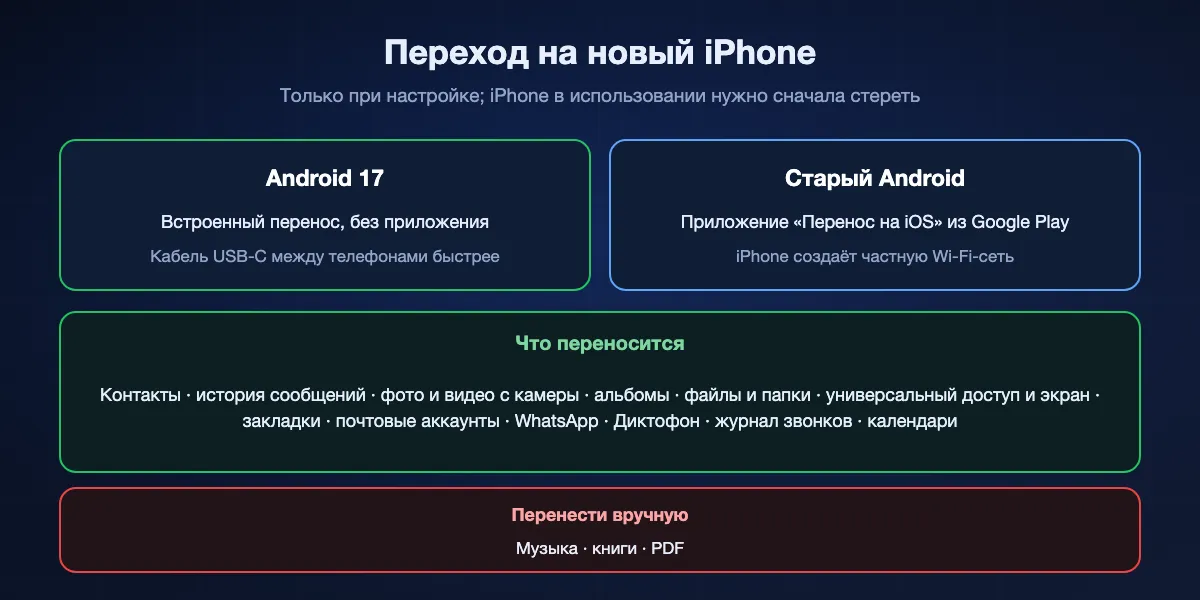
По инструкции Apple, поддерживаемое устройство на Android 17 может передать данные прямо на новый iPhone во время настройки. Подключите оба телефона к зарядке с включённым Wi-Fi и следуйте подсказкам на обоих экранах. Кабель USB-C между ними ускоряет перенос.
Старый Android: «Перенос на iOS»
На более ранних версиях Android установите приложение Apple «Перенос на iOS» из Google Play, выберите «Перенести данные с Android» на экране «Приложения и данные» iPhone и введите код, который покажет iPhone. Для переноса iPhone создаёт собственную частную Wi-Fi-сеть.
Что переносится, а что нет
Apple перечисляет контакты, историю сообщений, фото и видео с камеры, альбомы, файлы и папки, настройки универсального доступа и экрана, закладки, почтовые аккаунты, сообщения и медиа WhatsApp, диктофонные записи, журнал звонков и календари, а также бесплатные приложения, которые есть в обоих магазинах и поддерживают перенос. Музыку, книги и PDF придётся переносить вручную. Уже настроенный iPhone для переноса нужно стереть.
Куда попадают файлы на iPhone
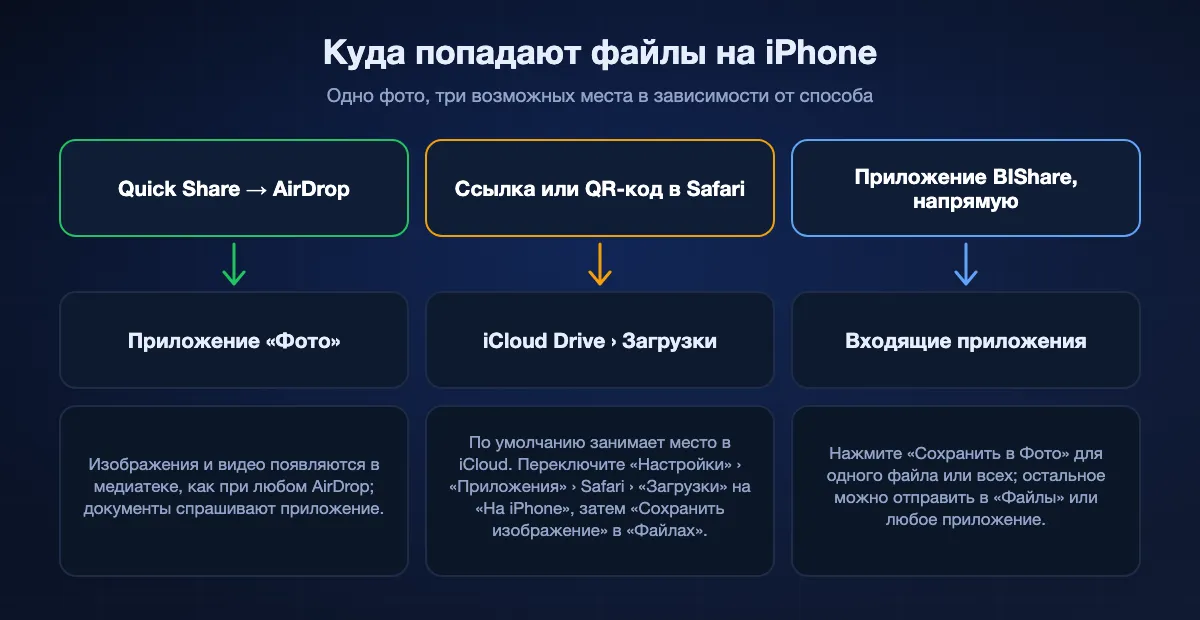
Одно и то же фото может оказаться в трёх разных местах на iPhone в зависимости от способа, и отсюда большая часть путаницы в духе «ничего не пришло».
AirDrop: сразу в «Фото»
Изображения и видео через Quick Share в AirDrop попадают в приложение «Фото», как любой AirDrop. Документы спрашивают, в каком приложении открыться.
Загрузки Safari: по умолчанию iCloud Drive
Ссылки и QR-коды скачиваются через Safari в папку «Загрузки» в iCloud Drive, а значит файл выгружается в iCloud и занимает место. Перед большой передачей переключите «Настройки», «Приложения», Safari, «Загрузки» на «На iPhone». Чтобы отправить скачанное фото или видео в «Фото», откройте его в «Файлах», нажмите «Поделиться» и выберите «Сохранить изображение» или «Сохранить видео».
Приложение BIShare: его входящие
Файлы, полученные напрямую, лежат во входящих приложения, пока вы не решите, что с ними делать. «Сохранить в Фото» добавляет изображения и видео в медиатеку, остальное можно передать в «Файлы» или другое приложение.
С Android на iPhone через BIShare
Установите на оба и подключите к одной сети
Установите BIShare из Google Play и App Store, затем подключите оба телефона к одной Wi-Fi-сети или включите точку доступа на Android и подключите к ней iPhone. На iPhone разрешите BIShare искать устройства в локальной сети, когда iOS спросит.
Отправьте с Android
Выберите фото, видео или файлы, нажмите на iPhone в списке устройств и примите на iPhone. Ничего не пересжимается. На iPhone откройте входящие и нажмите «Сохранить в Фото» для изображений и видео.
Или создайте ссылку
Если iPhone в другом месте, нажмите «Ссылка» в приложении или откройте bishare.app/transfer в Chrome и добавьте файлы там. Отправьте адрес или 6-значный код любым способом; Safari на iPhone скачает до 100 ГБ в течение 6, 12 или 24 часов.
Живые фото Android и другие странности на iPhone
Живые фото приходят неподвижными
«Живые фото» Samsung и фото с движением Pixel прячут короткое видео внутри JPEG. iPhone показывает картинку и игнорирует движение. Чтобы его сохранить, экспортируйте заранее: «Галерея» Samsung умеет экспортировать в видео или GIF, и такой файл нормально воспроизводится на iPhone.
Документы открываются в «Файлах»
PDF, ZIP и файлы Office не попадают в «Фото». Они открываются в «Файлах», которые распаковывают архивы и показывают большинство документов без других приложений.
Мессенджеры уменьшают отправленное
Фото, выбранное через галерею мессенджера, сжимается для сети, поэтому детальный снимок с Android может выглядеть мыльным на iPhone. Прямая передача, ссылка или отправка файлом в мессенджере сохраняют оригинал в полном размере.
Сколько это займёт
Локальные способы работают так быстро, как позволяет радиоканал между телефонами. Всё, что сначала идёт через сервер, упирается в скорость отдачи отправителя.
Одна Wi-Fi-сеть
Свежие телефоны в зоне роутера выдают около 40–50 МБ/с по Wi-Fi 5 или 70–110 МБ/с по Wi-Fi 6; ролик на гигабайт проходит за секунды. Точка доступа на Android обычно даёт 10–30 МБ/с.
Quick Share в AirDrop
Телефоны соединяются напрямую, так что роутер роли не играет. При длинных партиях держите оба экрана включёнными, а телефоны рядом.
QR-коды, ссылки и облако
При отдаче 50 Мбит/с Android тратит около трёх минут на гигабайт, прежде чем iPhone вообще сможет начать скачивание, а партия на 10 ГБ занимает больше получаса.
Если файлы не доходят до iPhone
iPhone нет в Quick Share
Проверьте, что модель Android есть в списке Google и обновлена, что AirDrop на iPhone стоит на «Для всех на 10 минут», что на Galaxy включён обмен с устройствами Apple и что на обоих телефонах включены Bluetooth и Wi-Fi. Если iPhone так и не появился, используйте QR-код.
Оба телефона дома в сети, но приложение никого не видит
На iPhone в «Настройки», «Конфиденциальность и безопасность», «Локальная сеть» приложению должен быть разрешён доступ. Гостевые и гостиничные сети часто изолируют устройства; используйте точку доступа Android. VPN на любом из телефонов тоже может скрыть второй.
Большая загрузка заполнила iCloud
Safari сохранил её в iCloud Drive. Перенесите файл в «На iPhone» в приложении «Файлы», удалите копию в iCloud и смените папку загрузок Safari на будущее.
Фото скачано, но его нет в «Фото»
Загрузки попадают в «Файлы», а не в «Фото». Откройте файл, нажмите «Поделиться» и выберите «Сохранить изображение» или «Сохранить видео».
QR-ссылка пишет, что истекла
Отправки Google по QR-коду живут 24 часа, ссылки Samsung живут два дня. Попросите новый код или передайте напрямую, если телефоны рядом.
Как сохранить передачу приватной
Фото детей, сканы паспорта и подписанные договоры: именно то, что люди пересылают между телефонами. Вот как распределяются компромиссы по приватности.
Напрямую между телефонами
Прямой путь BIShare, LocalSend и Quick Share в AirDrop никогда не кладут файл на сервер, а соединение между телефонами зашифровано.
Через сервер, в запечатанном виде
Ссылки BIShare и QR-коды Quick Share от Google шифруют файлы сквозным шифрованием до загрузки, поэтому промежуточный сервер хранит данные, которые не может прочитать. Файлы WhatsApp тоже защищены сквозным шифрованием, но остаются в истории обоих чатов.
Через сервер, в читаемом виде
Google Фото, Диск, собственные ссылки Samsung и почта защищают файлы в пути, но провайдер имеет доступ к хранимому. Для фото из отпуска приемлемо; для документов подумайте дважды.
С Android на iPhone: частые вопросы
Можно ли отправить AirDrop с Android на iPhone?
С некоторых Android можно. Quick Share умеет отправлять в AirDrop на Pixel 8a и новее и на отдельных моделях Samsung, Oppo, OnePlus, Vivo, Xiaomi, Honor, Transsion и Motorola. AirDrop на iPhone должен стоять на «Для всех на 10 минут». Для остальных Android используйте приложение или ссылку.
Как отправить фото с Android на iPhone без приложения?
Через Quick Share в AirDrop на поддерживаемом телефоне, QR-код Quick Share на Pixel или Galaxy либо ссылку Google Фото. С любого Android страница bishare.app/transfer в Chrome создаёт ссылку, которую iPhone откроет в Safari.
Что такое QR-код Quick Share для iPhone?
Функция Quick Share на Pixel и Galaxy, которая показывает QR-код. iPhone сканирует его камерой и скачивает файлы в Safari. По данным Google, файлы защищены сквозным шифрованием, доступны 24 часа и ограничены 10 ГБ за 24 часа.
Можно ли передать файлы с Android на iPhone по Bluetooth?
Нет. iPhone не принимает передачу файлов по Bluetooth с Android. Используйте Quick Share в AirDrop, QR-код, приложение для Wi-Fi или ссылку.
Как отправить большое видео с Android на iPhone?
Рядом и по Wi-Fi BIShare отправит его любого размера. На расстоянии ссылка BIShare вмещает 100 ГБ, QR-код Google до 10 ГБ в день, файл в WhatsApp до 2 ГБ.
Куда сохраняются скачанные файлы на iPhone?
Загрузки Safari попадают в папку «Загрузки» в iCloud Drive, если не переключить «Настройки», «Приложения», Safari, «Загрузки» на «На iPhone». Чтобы добавить скачанное фото в «Фото», откройте его в «Файлах» и выберите «Сохранить изображение».
Можно ли использовать «Перенос на iOS» после настройки iPhone?
Нет. Перенос Apple работает только при настройке; уже настроенный iPhone сначала нужно стереть. Для нескольких файлов потом используйте прямое приложение, QR-код или ссылку.
Нужно ли ещё приложение «Перенос на iOS»?
Только для Android до версии 17. По словам Apple, поддерживаемые устройства на Android 17 переносят данные на новый iPhone без него, а кабель USB-C между телефонами ускоряет процесс.
Почему живые фото не двигаются на iPhone?
Живые фото Samsung и Pixel прячут видео внутри JPEG, а iPhone показывает только картинку. Сначала экспортируйте такое фото в видео или GIF на Android.
Передача файлов с Android на iPhone бесплатна?
Да. BIShare, LocalSend, Quick Share в AirDrop, QR-код Quick Share и Google Фото в пределах бесплатных 15 ГБ ничего не стоят.
С любого Android на любой iPhone
Открытый код и бесплатно, без регистрации на обоих телефонах. Передавайте файлы по домашней Wi-Fi, когда сидите на одном диване, и отправляйте ссылку для Safari, когда между вами часовой пояс.