Nearby Share alternative

The best Nearby Share alternatives

Nearby Share was Google's answer to AirDrop: tap Share on an Android phone, pick a device close by, and the file arrives over Bluetooth and Wi-Fi with no cable. Since 2024 it goes by another name, Quick Share, after Google folded it into Samsung's feature of that name, which is why so many searches for Nearby Share end on a settings screen that no longer uses the words. The service grew as well: a Windows app, and from late 2025 a bridge to AirDrop on some phones. What it still lacks is an official app for Mac or Linux, support on phones without Google services, and any way to reach someone who is not in the room. This guide untangles the names, maps where Quick Share reaches in 2026, ranks seven alternatives including two unofficial Quick Share clients, and shows how to fix the built-in feature before replacing it. BIShare is on the list: free, MIT-licensed, and available for Android, iPhone, Windows, macOS and Linux. No Google account needed.

We build BIShare, so read the ranking with that in mind. Where Quick Share is already the better choice, such as between two Android phones with Google services, this page says so.

Quick answer

  • Looking for Nearby Share on your phone: it is called Quick Share now. It sits in the Android share sheet, and its settings have a Quick Share entry of their own.
  • Android to a Mac or a Linux PC: BIShare or LocalSend on both ends, or the unofficial NearDrop (Mac) and RQuickShare (Linux and Mac) if you want the phone's built-in Quick Share to do the sending.
  • Android to iPhone: Quick Share reaches AirDrop only from phones on Google's list. BIShare, LocalSend and PairDrop work from any Android.
  • A PC without Bluetooth, or on 32-bit Windows: Google's app will not run there, so send over the network with BIShare or LocalSend.
  • A phone without Google services: Quick Share ships inside Google Play services, so pick an app that installs by itself, such as BIShare, LocalSend or KDE Connect.
  • Someone in another city: Quick Share only works nearby. Send a BIShare link, which holds up to 100 GB for 24 hours, or pair two browsers with PairDrop.
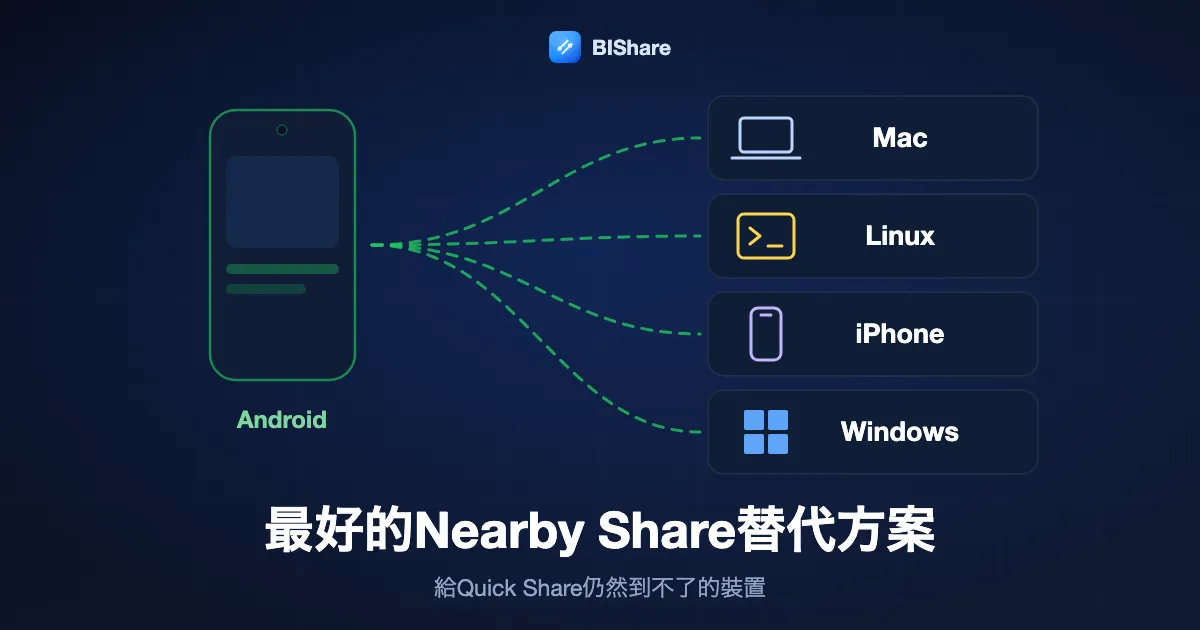
An Android phone sending to a Mac, a Linux PC, an iPhone and a Windows PC, titled the best Nearby Share alternatives, for the devices Quick Share misses.
An Android phone sending to a Mac, a Linux PC, an iPhone and a Windows PC, titled the best Nearby Share alternatives, for the devices Quick Share misses.Tap to enlarge

What happened to Nearby Share

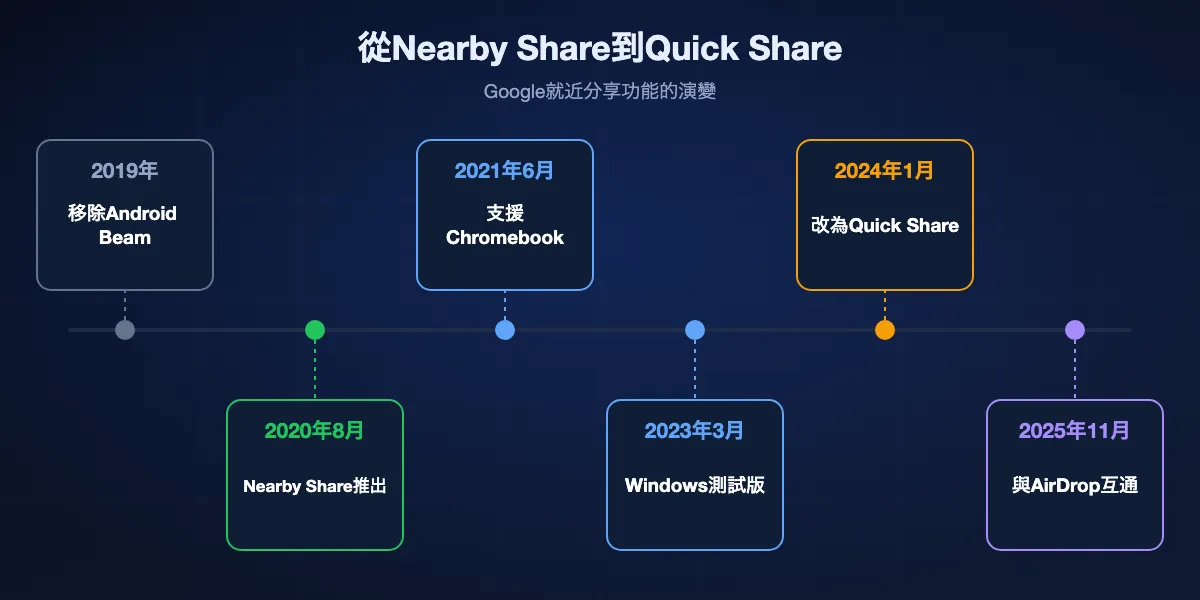
Nearby Share did not disappear. It changed names, gained platforms and absorbed a rival, and each step left outdated guides and screenshots behind. Here is the sequence.

Timeline from Nearby Share to Quick Share: Android Beam removed in 2019, Nearby Share launched in August 2020, Chromebooks with ChromeOS 91 in June 2021, the Windows app beta in March 2023, the merger into Quick Share in January 2024, and AirDrop support from November 2025.
Timeline from Nearby Share to Quick Share: Android Beam removed in 2019, Nearby Share launched in August 2020, Chromebooks with ChromeOS 91 in June 2021, the Windows app beta in March 2023, the merger into Quick Share in January 2024, and AirDrop support from November 2025.Tap to enlarge

2011 to 2019: Android Beam comes and goes

Google's first attempt, Android Beam, began a transfer when two phones touched back to back over NFC, then handed the file to Bluetooth. Lining the phones up was fiddly and big files crawled. Google dropped Beam from Android 10 in 2019, and for a year Android shipped with nothing native for passing a file to the phone across the table.

August 2020: Nearby Share launches

Nearby Share arrived on 4 August 2020 for phones running Android 6.0 or later. It came through Google Play services rather than a system update, so a huge base of older handsets gained it at once. It picked the best link available, Bluetooth Low Energy to find the other device and peer-to-peer Wi-Fi to carry the data, and it needed no internet connection.

2021 to 2023: Chromebooks, then Windows

Chromebooks joined with ChromeOS 91 in June 2021. Google announced a Windows app at CES 2022, released a beta on 31 March 2023 and opened it to everyone that July. Until then the official routes from an Android phone to a PC were a cable or Microsoft's own Phone Link.

January 2024: merged into Samsung's Quick Share

Samsung had launched its own Quick Share with the Galaxy S20 in February 2020, and it could not see Nearby Share devices. At CES 2024 the two companies announced a single feature under Samsung's name. Pixels and other Android phones renamed Nearby Share to Quick Share over the following weeks, and Galaxy phones could finally trade files with other brands.

November 2025 onward: talking to AirDrop

Google taught Quick Share to speak AirDrop, first on the Pixel 10 late in 2025 and spreading to more Pixels, Galaxy flagships and several Chinese brands during 2026. The receiving iPhone, iPad or Mac has to have AirDrop open to Everyone for 10 Minutes. Phones missing from Google's list still cannot do it.

Three features people call Nearby Share

Part of the confusion is that more than one company used almost the same name. Before replacing anything, check which of these you mean.

Google Nearby Share, now Quick Share

The Android and Chromebook feature this page is about. It shows up in the share sheet as Quick Share, and its visibility settings sit under a Quick Share entry whose exact place in the Settings app varies by phone maker. The icon changed, the service underneath did not.

Samsung Quick Share

On Galaxy phones, Quick Share was Samsung's own feature before 2024 and now speaks to Google's version too. Google's help page notes that its settings and features can differ on Galaxy devices with One UI 2.1 or later, and Samsung PCs use Samsung's Quick Share app rather than Google's.

Nearby sharing in Windows

Microsoft built a separate feature with a near-identical name into Windows 10 and Windows 11. It passes files between PCs close to each other and cannot send to an Android phone at all. If you want to reach a phone from a PC, Nearby sharing is the wrong switch; Google's Quick Share app for Windows or a cross-platform app is the right one.

Where Quick Share reaches in 2026, and where it stops

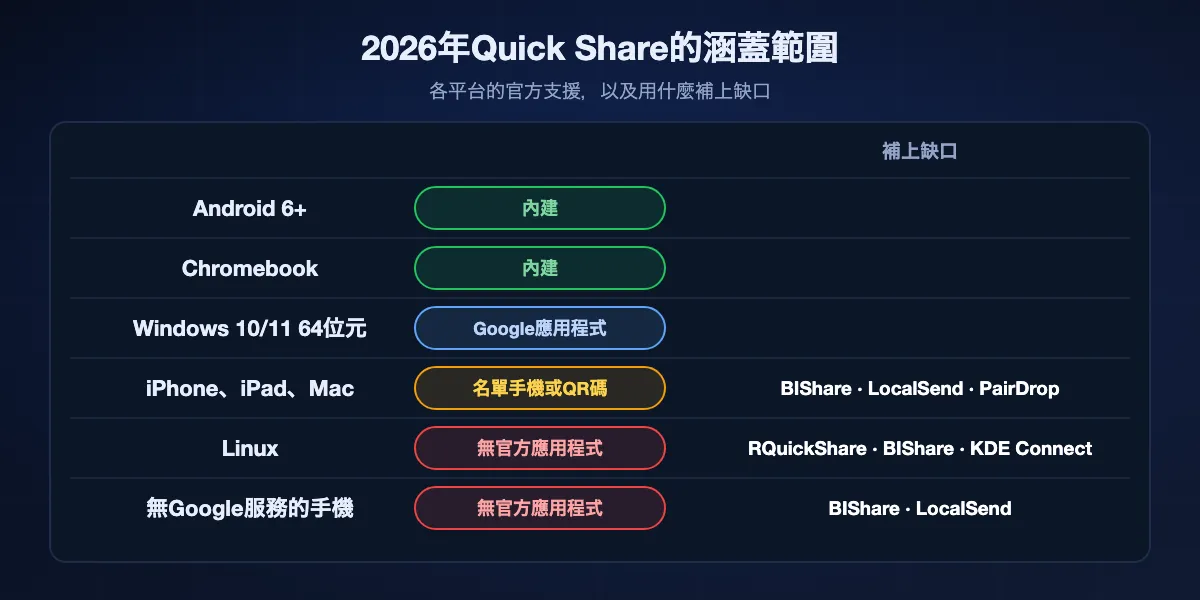
Quick Share covers far more than the first Nearby Share did, yet success still hinges on what sits on the receiving side. Google's own help pages set the limits below.

Where Quick Share reaches in 2026: built into Android 6 and later and Chromebooks; a Google app for 64-bit Windows 10 and 11; iPhone, iPad and Mac only from listed phones or by QR code; no official app for Linux; not on phones without Google services. Alternatives fill the last three gaps.
Where Quick Share reaches in 2026: built into Android 6 and later and Chromebooks; a Google app for 64-bit Windows 10 and 11; iPhone, iPad and Mac only from listed phones or by QR code; no official app for Linux; not on phones without Google services. Alternatives fill the last three gaps.Tap to enlarge

Android phones and tablets

Any device on Android 6.0 or newer with Google Play services can send and receive, as long as Bluetooth is on, and on Android 12 or earlier Location must be on as well. A transfer between devices signed in to the same Google Account is accepted automatically; anyone else gets an Accept or Decline prompt.

Windows PCs

Google's Quick Share app installs on 64-bit Windows 10 and later, and on Arm-based PCs only with Windows 11. The computer needs Bluetooth, the phone and PC should share one Wi-Fi or Ethernet network, and they have to be within about 5 metres. Incoming files land in a Quick Share folder inside Downloads. Google does not offer the app in Cuba, Iran, North Korea or Syria.

iPhone, iPad and Mac

Two routes exist, and both are narrower than headlines suggest. Phones on Google's AirDrop list can send to Apple devices whose AirDrop accepts everyone. Google has also added a QR code that an iPhone scans, which Google limits to 10 GB a day and a thousand files a session, and which needs Wi-Fi. Google makes no Quick Share app for iOS or macOS.

Linux

Google has never released Quick Share for Linux, and no major distribution includes it. The only Linux software that talks to an Android phone's built-in Quick Share is unofficial and reverse-engineered, covered further down.

Phones without Google services

Since Quick Share is delivered through Google Play services, phones sold without them, such as recent Huawei models, and custom Android builds that leave Google out do not have it. Those phones need a transfer app that installs on its own, from an APK or an alternative store.

Anyone who is not nearby

The name gives it away: Quick Share is made for devices within Bluetooth range of each other. It cannot help when the other person is at home and you are at the office, and it produces nothing you could paste into a chat for later.

Seven Nearby Share alternatives, ranked

The list mixes full replacements, which need an app on both ends, with unofficial clients that let a Mac or a Linux PC answer the phone's built-in Quick Share. Every entry says where it falls short.

01

BIShare

Best replacement across all five platforms, nearby or far away

Android, iPhone, Windows, macOS and Linux · MIT-licensed · direct over Wi-Fi or a phone hotspot, no size cap · encrypted 100 GB links that expire after a day · APK and Linux packages on GitHub · no account

BIShare fills in where Quick Share stops at the edge of Google's platforms. Open it on a Pixel and a MacBook, or a Galaxy phone and an Ubuntu laptop, and each device appears on the other once both use the same Wi-Fi or one joins the other's hotspot. It needs neither Bluetooth nor a Google account, so it also runs on a Windows PC that Google's app refuses and on an Android phone without Play services, installed from the APK on GitHub. When the other person is far away, the same app makes a link that opens in a browser.

Falls short: Nearby transfers need BIShare installed on the other device too, while Quick Share is already built into most Android phones.

02

LocalSend

Best open-source option on a shared network

Android, iOS, Windows, macOS, Linux, Fire OS · Apache 2.0 · one LAN · encrypted HTTPS, own certificate on each device · Winget, Homebrew, Flathub, F-Droid

LocalSend is the app threads about Nearby Share on a Mac or Linux recommend most often. Install it on each device, keep them on one router, and they list each other by name and icon, much like Quick Share's device picker. There are no accounts, no servers and no size limits, and desktop users can get it from the package manager they already use.

Falls short: Both devices must stay on the same local network, and there is no link option for someone elsewhere.

03

KDE Connect

Best for keeping a phone and computer linked all the time

Android, Linux, Windows, macOS, iOS · GPL · same network · files, clipboard and notifications · Google Play, F-Droid, Microsoft Store, Homebrew

KDE Connect does much more than send files. Once a phone and a computer are paired, it shows phone notifications on the desktop, shares the clipboard, lets you answer texts from the keyboard and turns the phone into a remote or a touchpad. File sending comes as part of that bundle, which suits anyone who wants Android and a Linux desktop to behave like one system.

Falls short: Pairing takes longer than a one-off send, and the iOS version is a separate port with known limitations, so it shines between Android and a computer.

04

PairDrop

Best for a one-off send with nothing to install

Any modern browser · GPL-3.0 · devices on one network find each other · pairing code or QR across networks · TURN relay fallback · self-hostable

PairDrop comes closest to Nearby Share's zero-setup feel on devices that lack it. Open pairdrop.net on a phone and a computer on the same network and they see each other; on different networks, pair them with a code. It covers borrowed laptops, work PCs that block installs, and iPhones, all from a browser tab.

Falls short: Devices need internet to be introduced, the tab has to stay open, and very large files lean on browser memory.

05

NearDrop

Best way for a Mac to receive from Quick Share

macOS menu bar app · Unlicense · unofficial · same Wi-Fi only · saves to Downloads · GitHub or Homebrew tap, not notarized

NearDrop reimplements enough of Google's protocol that an Android phone's own Quick Share sheet lists the Mac as a target, so nothing new goes on the phone. Received files go to the Mac's Downloads folder, and you can send the other way from the Share menu in Finder.

Falls short: The Mac cannot discover the phone by itself because macOS will not let apps send the Bluetooth broadcast Android listens for, so sending to a phone means scanning a QR code. The Mac is visible to everyone on the network while NearDrop runs, and it only opens after you approve an app from an unidentified developer.

06

RQuickShare

Best Quick Share client for Linux

Linux (.deb, .rpm, AppImage, AUR, Nix) and macOS · GPL-3.0 · unofficial · same Wi-Fi with mDNS allowed · can use the laptop's Bluetooth to wake the phone

RQuickShare, written in Rust, brings the same trick to Linux desktops: the phone keeps its built-in Quick Share, and the PC shows up in its device list. On a laptop with Bluetooth it sends an advertisement that prompts Android to announce itself, which makes the phone easier to find. GNOME users can also look at Packet, a GPL-3.0 client on Flathub with a Nautilus plugin for sending from the file manager.

Falls short: Like every unofficial client it covers only the Wi-Fi LAN part of the protocol, so both devices must be on a network that permits mDNS, which many public networks block.

07

Warpinator

Best between Linux PCs, with ports for Android and Windows

Ships with Linux Mint, Flathub for other distributions · GPL-3.0 · same network · unofficial Android and Windows ports

Warpinator is Linux Mint's own take on nearby sharing: open it on two computers on one network and drop files across. Community ports bring it to Android and Windows, so a Mint desktop, a Windows laptop and an Android phone can swap files with no Google account anywhere.

Falls short: The Android and Windows versions come from volunteers rather than the Mint team, and there is no app for iPhone or Mac.

At a glance

FeatureQuick ShareBIShareLocalSendKDE ConnectPairDropNearDropRQuickShare
Works with Android phones
Works with iPhone
Runs on Windows
Runs on a Mac
Runs on Linux
Nothing to install on the Android phone
Reaches someone far away
Open source

Checked September 2026. Quick Share gets to iPhones only through AirDrop from phones on Google's list or through its QR code, and Google's PC app requires a 64-bit Windows 10 or newer machine with Bluetooth on the phone's network. PairDrop runs in a browser and needs internet to connect devices. NearDrop and RQuickShare are unofficial and answer the phone's built-in Quick Share over a shared Wi-Fi only. KDE Connect's iOS app has fewer features than its Android app. A BIShare link holds up to 100 GB for 24 hours.

Using a phone's Quick Share with a Mac or Linux PC

If you like Quick Share on your phone and only miss a computer to send to, an unofficial client may be all you need. NearDrop, RQuickShare and Packet share the same strengths and the same limits, because each one reimplements the same slice of Google's protocol.

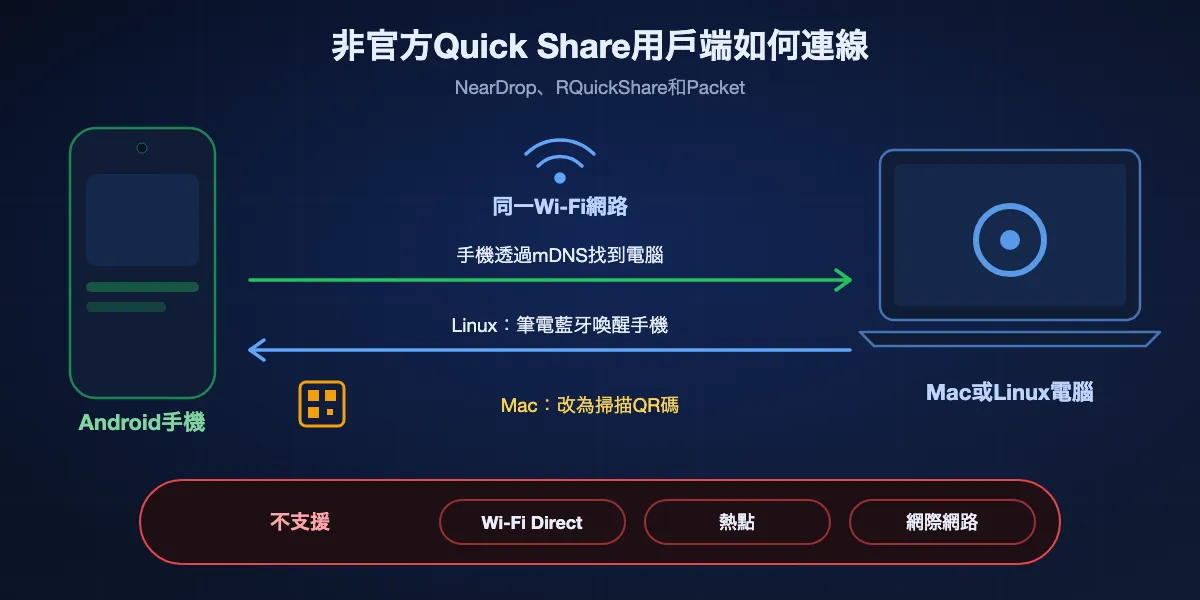
How unofficial clients join Quick Share: the Android phone and the Mac or Linux PC must be on the same Wi-Fi; the phone finds the computer through mDNS; a Linux laptop can wake the phone with a Bluetooth broadcast, while a Mac shows a QR code instead; Wi-Fi Direct, hotspot, Bluetooth transfer and internet paths are not supported.
How unofficial clients join Quick Share: the Android phone and the Mac or Linux PC must be on the same Wi-Fi; the phone finds the computer through mDNS; a Linux laptop can wake the phone with a Bluetooth broadcast, while a Mac shows a QR code instead; Wi-Fi Direct, hotspot, Bluetooth transfer and internet paths are not supported.Tap to enlarge

Only the local network path works

Google's own Quick Share can move a file over Wi-Fi Direct, a hotspot, Bluetooth or the internet. These clients implement just the Wi-Fi LAN path, so the phone and computer must be on one network. A café or hotel Wi-Fi that keeps guests from seeing one another will stop them even when both show full bars.

Phone to computer is easy, the reverse is not

The phone spots the computer through mDNS on the network, so sending from Android works as soon as the client is running. The other direction is harder, because Android only announces itself after hearing a specific Bluetooth Low Energy broadcast. RQuickShare can send that broadcast through a laptop's Bluetooth. macOS does not allow apps to, so NearDrop shows a QR code for the phone to scan instead.

Visibility is all or nothing

Contacts-only visibility depends on Google's servers, which these clients do not use. NearDrop's README warns that the Mac is visible to everyone on the network for as long as the app runs, so quit it on networks you share with strangers.

Installing them

NearDrop comes from GitHub or a Homebrew tap and is not notarized, so macOS asks you to allow it under Privacy & Security the first time. RQuickShare publishes .deb, .rpm and AppImage builds for Linux and a .dmg for macOS. Packet installs from Flathub. None of them come from Google, so keeping up with protocol changes depends on volunteers.

Which alternative for which gap

Start from the device Quick Share could not reach, then pick the lightest tool that gets you there.

Android phone to a Mac

Keep Quick Share on the phone and add NearDrop to the Mac if you mostly send one way. For both directions or for large folders, put BIShare or LocalSend on both devices.

Android phone to a Linux PC

RQuickShare or Packet if you want the phone's share sheet to list the PC. KDE Connect if phone notifications and a shared clipboard on the desktop appeal too.

Any Android phone to an iPhone

BIShare, LocalSend or PairDrop, since the AirDrop bridge covers listed phones only. If your phone is on Google's list, try Quick Share first because there is nothing to install.

A Windows PC that Google's app turns away

A 32-bit edition, a desktop with no Bluetooth or an Arm laptop still on Windows 10: install BIShare or LocalSend, which rely on the network alone.

A phone without Google Play services

BIShare from its GitHub APK, LocalSend or KDE Connect from F-Droid, or PairDrop in the phone's browser.

Someone far away

Make a BIShare link: 100 GB fits in one, it expires a day later, and the recipient only needs a browser. PairDrop can also pair two devices on different networks while both tabs are open.

Fix Quick Share before you replace it

When Quick Share worked before and suddenly will not, the cause is usually a setting rather than the service. Work through these in order.

Visibility switched back

Everyone for 10 minutes reverts on its own after ten minutes. A receiver on Contacts is visible only while its screen is on and unlocked, and only to people in its contacts; Your devices is limited to the same Google Account. Open Quick Share settings on the receiving phone and choose Everyone for 10 minutes again right before sending.

Bluetooth or Location is off

Bluetooth has to be on for nearby sharing even when the data itself will move over Wi-Fi. On Android 12 or earlier, Location must also be on, because those versions tie Bluetooth scanning to location access.

The PC misses Google's requirements

Confirm Windows is a 64-bit edition of version 10 or later, that Bluetooth works, and that phone and PC share a network and sit within about 5 metres. On a Samsung laptop, use Samsung's Quick Share app rather than Google's.

A Galaxy phone shows different menus

Google says settings and features can differ on Galaxy devices with One UI 2.1 or later. On a Galaxy phone, open Quick Share from the quick settings panel to change who can find it, and on supported models look for the option to share with Apple devices.

The file arrived but you cannot find it

On Windows, Google's app saves into a Quick Share folder inside Downloads rather than onto the desktop. On a phone, tap the notification shown when the transfer ends to open what arrived.

Your country is not covered

Google does not offer the Windows app in Cuba, Iran, North Korea or Syria, so there a cross-platform app is the only wireless route from phone to PC.

Staying safe with Quick Share and its alternatives

Any feature that makes your device visible to people nearby deserves a minute of thought.

Keep visibility narrow

Everyone for 10 minutes exists so that a phone does not stay open to every stranger around it all day, and Google removed the permanent Everyone mode on Android in 2026. Leave the phone on Contacts or Your devices and widen it only while you are receiving.

Check before you accept

When a device shows a verification PIN, compare it with the number on the other screen before accepting, and decline any transfer you were not expecting. An unexpected file from an unknown name is the classic way malware arrives.

Treat unofficial clients as unofficial

NearDrop, RQuickShare and Packet are open source, so anyone can read their code, but they are volunteer projects outside Google's security reviews. Install them from their GitHub pages, Flathub or a package manager rather than mirror sites, and quit them on networks you do not control.

Nearby Share alternatives: FAQ

Does Nearby Share still exist?

Yes, under a new name. Google merged Nearby Share into Samsung's Quick Share in January 2024, and on Android phones, Chromebooks and Windows the feature is now called Quick Share.

What is the best alternative to Nearby Share?

For every platform including iPhone, Mac and Linux, BIShare. LocalSend when open source on a single network matters most, PairDrop when nobody can install anything. To keep using the phone's Quick Share with a Mac or Linux PC, NearDrop or RQuickShare.

Is there Nearby Share for Mac?

Not from Google. The unofficial NearDrop lets a Mac receive from an Android phone's Quick Share on the same Wi-Fi, and phones on Google's AirDrop list can send straight to a Mac through AirDrop.

Is there Nearby Share for Linux?

There is no official version. RQuickShare and Packet are unofficial Quick Share clients for Linux, while KDE Connect, LocalSend, Warpinator and BIShare offer their own ways to send between Android and Linux.

Can Quick Share send files to an iPhone?

In some cases. Phones on Google's list can send to iPhones whose AirDrop is temporarily open to everyone, and a QR code lets an iPhone collect as much as 10 GB a day. Other phones need an app such as BIShare or LocalSend.

Is Nearby Share the same as Nearby sharing in Windows?

No. Nearby sharing is a Microsoft feature for sending between Windows PCs. Google's Nearby Share, now Quick Share, is what connects an Android phone and a PC, through Google's Quick Share app for Windows.

Why won't Quick Share for Windows work on my PC?

The app only installs on 64-bit Windows 10 or newer (Arm machines need Windows 11), and it wants Bluetooth plus the same network as the phone. It is also not offered in Cuba, Iran, North Korea or Syria.

Does Quick Share work without internet?

Yes. Between nearby devices it uses Bluetooth and peer-to-peer Wi-Fi. Google notes that sharing without Wi-Fi may use mobile data, which you can control in Quick Share settings.

Is Samsung Quick Share the same as Google Quick Share?

They are one feature now. Samsung launched Quick Share in 2020, and in 2024 Google merged Nearby Share into it, so Galaxy phones and other Android phones share with each other. Galaxy menus still look different from Google's.

Is BIShare free?

Yes. BIShare costs nothing, publishes its code under MIT, runs without an account or Google services, and sets no size cap when two devices send directly.

Share with every device, not only Android

Free, open source and account-free. Reach Android, iPhone, Windows, Mac and Linux across the room, or post an encrypted link for someone across town.

Use it right now

Related guides