
Android phone and Mac
Android File Transfer for Mac in 2026: what replaced it
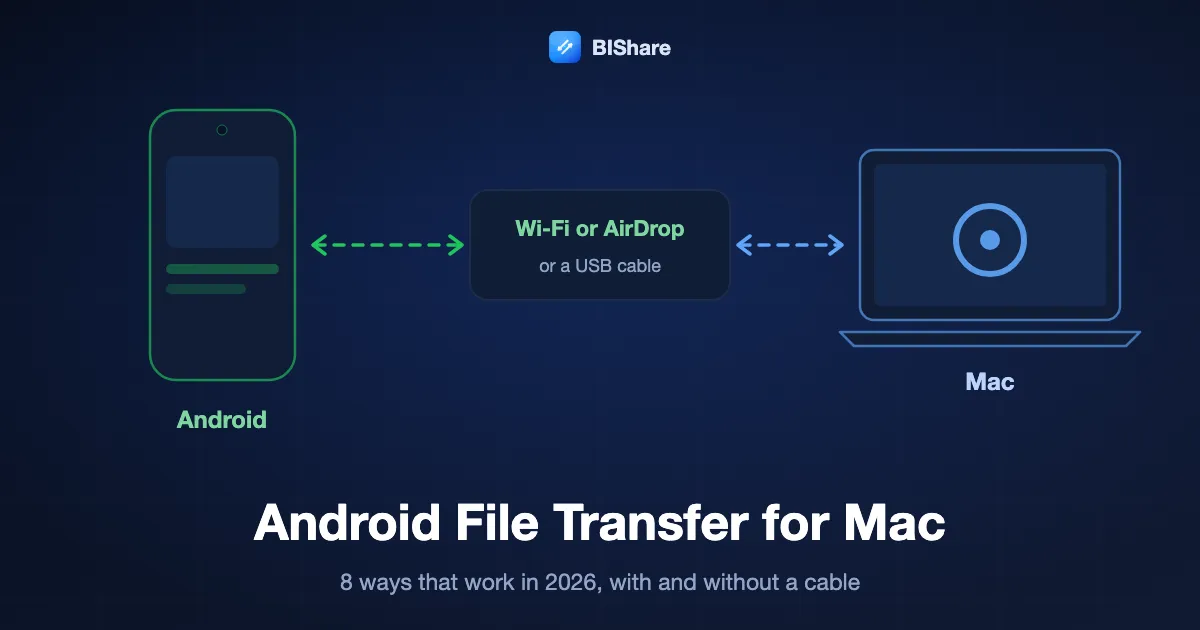
For a decade, moving files from an Android phone to a Mac meant one small Google app: Android File Transfer. Google emptied its download page in May 2024 and later pointed the address at Quick Share for Windows, which has no Mac version. Mirror sites still hand out version 1.0.12 from 2018. It was built for Intel Macs, runs on Apple silicon only through Rosetta, and stops at 4 GB per file. What works now depends on your phone and on whether you want a cable. Recent Pixel and Galaxy phones can send to a Mac through AirDrop, free tools such as OpenMTP read the phone over USB, and Wi-Fi apps move any file in both directions without one. Below are eight routes, each checked on its maker's own site in October 2026. After them come the cable and wireless methods step by step, the way back from Mac to Android, and a fix for each common failure.
BIShare is ours, and it is one of the eight routes below. When your phone can AirDrop to the Mac, or you only need photos once, a built-in route needs nothing installed, and this guide says so where it applies.
How do I transfer files from Android to Mac? The quick answer
- Without a cable, any phone: install a Wi-Fi app on both sides, such as BIShare or LocalSend, and send. Files cross the local network directly, in either direction, with no size cap.
- Newer Pixel or Galaxy: Quick Share can send to a Mac through AirDrop on a Pixel 8a or later and on some Samsung, Motorola, OnePlus and Xiaomi models. Set the Mac's AirDrop to Everyone for 10 minutes first.
- With a USB cable: switch the phone's USB mode to File transfer and open it in OpenMTP, which is free and open source. MacDroid does the same with a paid tier for copying back to the phone.
- Quick Share on the Mac: NearDrop, a free unofficial app, lets a Mac receive from any Android phone with Quick Share while both are on the same Wi-Fi.
- Through the cloud: Google Drive works on every phone and in any Mac browser, but new Google accounts now start with 5 GB of storage.
- Skip the old app: Google stopped offering Android File Transfer in 2024, and the copy on download sites is an Intel build from 2018 that cannot move a file over 4 GB.
What happened to Android File Transfer?
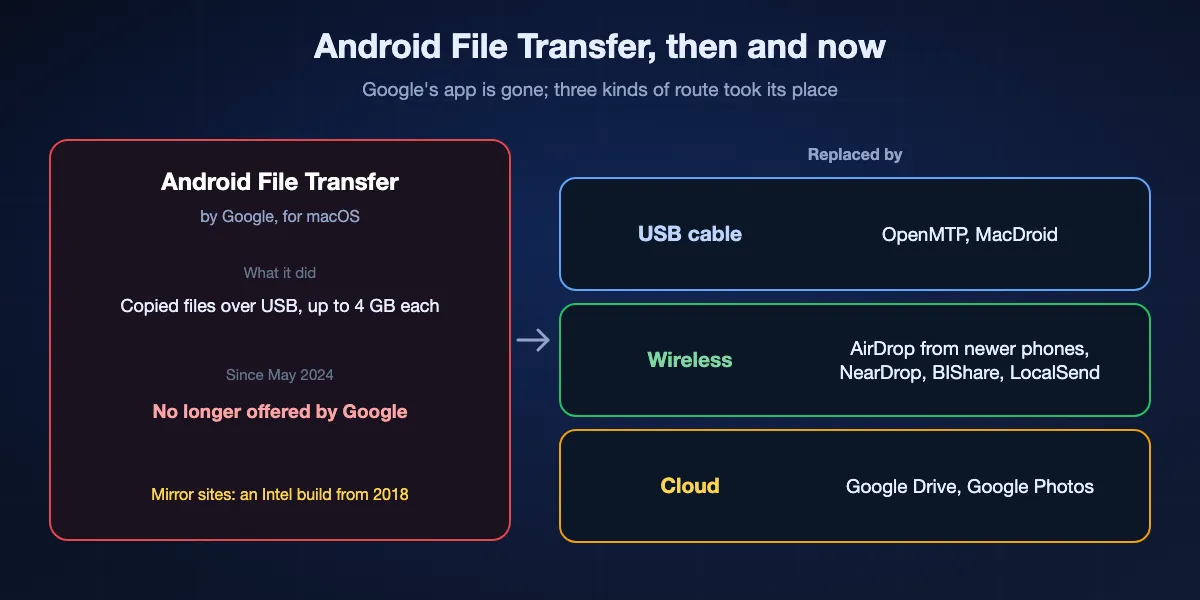
Android File Transfer was Google's MTP client for the Mac: plug in the phone, and a window listed its storage. Nothing replaced it on Google's side. The address android.com/filetransfer now forwards to the Quick Share page for Windows, and the help article on moving files over USB covers Windows and Chromebooks only.
When it went
Captures in the Internet Archive show the download page intact on 16 May 2024 and empty five days later. The Mac section of Google's help article, which had said a Mac needed OS X 10.5 or later, was gone by early June, and by July the old address redirected to Quick Share. Google published no notice. Its own Android compatibility document still names Android File Transfer as the reference MTP host, which tells you how little the protocol has changed.
Why the old copy is a poor answer
The installer still sitting on Google's download server, and copied by many mirror sites, is version 1.0.12, last modified in October 2018. We opened it: it is an Intel-only app for macOS 10.7 and later. On an Apple silicon Mac it needs Rosetta, which Apple says remains available as a general tool through macOS 27. Google's own page also capped copies at 4 GB per file, which a few minutes of 4K video exceeds.
What took its place
Three kinds of tool, depending on what you have. A cable still works with a newer MTP app on the Mac. Wireless now has two built-in paths, AirDrop from supported Android phones and Quick Share received by an app on the Mac, plus cross-platform apps that work on any phone. The cloud is the fallback when the two devices are not in the same place.
Eight ways to move files between Android and a Mac, ranked
BIShare
Best overall: any file, both directions, any Android phone
Android 7.0 or later from Google Play · Mac app from the Mac App Store, macOS 12 or later · same Wi-Fi for direct transfers · no size ceiling on one network · links up to 100 GB that open in any browser · end-to-end encrypted · source under Apache 2.0
Install BIShare on the phone and on the Mac. With both on the same network, each shows the other in its list of nearby devices; pick files on the phone, tap the Mac, and they arrive at full size. The Mac sends back by dragging files onto the app. When the Mac is somewhere else, the phone makes a link instead, and the Mac opens it in Safari or any other browser with nothing installed. The app also keeps each file's original Date modified, so photos sort by when they were taken rather than when they arrived.
Watch out for: The direct route needs the app on both devices, which is more than a one-off transfer on a phone that already supports AirDrop. A link goes through our relay, so it needs internet on both ends.
Quick Share to AirDrop
Best when your phone supports it: nothing to install
Pixel 8a or later; certain Samsung, Oppo, OnePlus, Vivo, Xiaomi, Honor, Transsion and Motorola phones · Mac AirDrop set to Everyone for 10 minutes · peer to peer · rolled out from 20 November 2025
Google added AirDrop to Quick Share in November 2025, starting with the Pixel 10. Open the share sheet on the phone, choose Quick Share, then pick the Mac from the list. Google's help page says the receiving Apple device has to be visible to everyone for 10 minutes. Phones without AirDrop support get a QR code instead: the files go through Google's servers, end-to-end encrypted, and stay downloadable for 24 hours, with a limit of 10 GB in 24 hours.
Watch out for: It covers a short list of phones. Samsung's own page listed only the Galaxy S26, S26+ and S26 Ultra as of March 2026. Receiving from a Mac needs a Pixel 9 or later, not the 9a, or one of the same brands. On older phones it is not there at all.
OpenMTP
Best free cable route
Free, MIT licence · macOS 10.14 or later · separate builds for Apple silicon and Intel · version 3.3.0 of 22 August 2026 fixed a crash on macOS 27 · phone set to File transfer over USB
OpenMTP is the closest thing to the old Google app, but maintained. Connect the phone with a cable that carries data, set its USB mode to File transfer, and OpenMTP shows the Mac on one side and the phone's storage on the other. Drag files in either direction, including whole folders. It needs no account and no network, which makes it the route for a phone with broken Wi-Fi or a Mac on a network that blocks devices from seeing each other.
Watch out for: Its own README says the MTP engine is updated for the latest three macOS versions only. You need a cable that carries data, and the phone has to stay unlocked and in File transfer mode for the whole copy.
MacDroid
Best paid all-in-one: cable, ADB or Wi-Fi
Mac App Store · macOS 11.5 or later · free version copies from Android to Mac only · PRO 19.99 USD a year or 34.99 USD once (US store, October 2026) · MTP, ADB and Wi-Fi modes
MacDroid mounts the phone as a disk you open in Finder, and its site lists editing Android files from the Mac without copying them first. The developer names three ways to connect: MTP over a cable, ADB for phones with developer options turned on, and Wi-Fi. For copying photos and documents from the phone onto the Mac, the free version is enough.
Watch out for: The free version copies from Android to the Mac only; sending files back to the phone needs PRO. Prices on the vendor's site differ from the App Store's and change by region.
NearDrop
Best for receiving Quick Share on a Mac
Free, The Unlicense · unofficial · version 2.2.2 of 19 September 2026 · same Wi-Fi network only · sending from the Mac through Finder's Share menu
NearDrop lives in the Mac's menu bar and makes the Mac show up as a Quick Share target on any Android phone. You send from the usual share sheet, with nothing extra installed on the phone. Received files go to Downloads. Going the other way, right-click a file in Finder, choose Share, then NearDrop, and the phone scans a QR code to receive it.
Watch out for: It is unofficial and not notarized, so the first launch needs right-click and Open. Its README says it works on one Wi-Fi network only and that the Mac is visible to everyone on that network all the time.
LocalSend
Best open-source app on both sides
Free, Apache 2.0 · Android 7.0 and macOS 11 or later · version 1.18.2 of 21 August 2026 · same local network · no account
LocalSend is a cross-platform app for the same job as the direct BIShare route: install it on the phone and the Mac, keep both on one network, and send in either direction. Its site promises no account, no login and no servers, and it works fully offline. Our LocalSend comparison sets the two side by side.
Watch out for: It has no link for a Mac that is not on the same network, so a transfer to someone else's computer elsewhere needs another route.
Google Drive and Google Photos
Best when the Mac is somewhere else
Every Android phone · any Mac browser at drive.google.com or photos.google.com · new accounts since 9 March 2026 start with 5 GB, 15 GB after phone verification · Drive files up to 5 TB · Photos: images up to 200 MB, videos up to 10 GB
Upload from the Drive or Photos app on the phone, then download on the Mac. It needs no setup on the Mac and works across any distance, which makes it the usual answer for sending a file to another person's computer. Photos that already back up to Google are one sign-in away from any Mac.
Watch out for: Storage is shared with Gmail, and Google now starts new accounts at 5 GB. Every file goes up and comes down again, so a large video takes as long as your upload speed allows, and a copy stays in your account until you delete it.
Bluetooth File Exchange
Built in, for the odd small file
Applications › Utilities on every Mac · turn on Bluetooth Sharing in System Settings › General › Sharing · received files go to Downloads · classic Bluetooth tops out at 3 Mb/s
Pair the phone and the Mac, switch on Bluetooth Sharing on the Mac, then share a file from the phone over Bluetooth. Apple's guide describes the feature for phones in general and does not name Android, so treat it as a route that may need a second try.
Watch out for: The Bluetooth specification's fastest classic rate works out to about 270 KB per second before overhead, so a 100 MB video takes more than six minutes. Fine for a contact card or a PDF, nothing larger.
At a glance
| Feature | BIShare | Quick Share to AirDrop | OpenMTP | MacDroid | NearDrop | Google Drive |
|---|---|---|---|---|---|---|
| No cable needed | ||||||
| Sends from Mac to Android too | ||||||
| Works with any Android phone | ||||||
| Works without an internet connection | ||||||
| Free in both directions | ||||||
| Open source |
As of October 2026. Between two devices on the same network BIShare sets no size limit, and a BIShare link holds up to 100 GB that any browser can download without an app. Quick Share to AirDrop needs a supported phone, the Mac set to Everyone for 10 minutes, and for Mac to Android a Pixel 9 or later (not 9a) or a listed brand. Other phones fall back to a QR code through Google's servers. OpenMTP needs a data cable and the phone in File transfer mode. MacDroid's free version copies from Android to Mac only. NearDrop is unofficial and works on one Wi-Fi network. Google Drive needs a Google account and counts against its storage.
Which way should you use?
Three questions settle it: is the Mac on the same network as the phone, can you install something on the Mac, and do you want a cable involved at all.
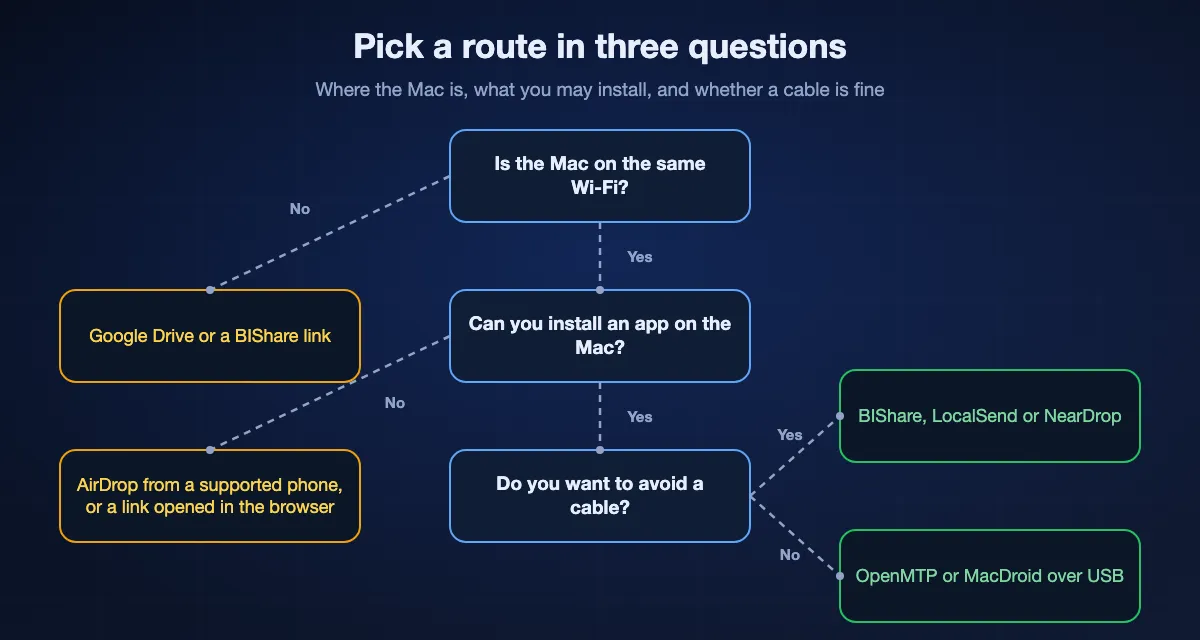
A few photos from a Pixel or Galaxy that supports AirDrop
Use Quick Share to AirDrop. Nothing to install, and the files keep their full quality. If your phone does not list the Mac, it is not on Google's list of supported models, and any of the other routes will do.
A whole camera roll or several gigabytes of video
Avoid the cloud and Bluetooth. Over Wi-Fi, BIShare or LocalSend run at local network speed with no cap; over a cable, OpenMTP copies folders without any network. The guide to sending large videos from Android to a Mac covers long 4K clips in more detail.
Files going back and forth every day
Pick something that works in both directions without plugging in: BIShare, LocalSend or NearDrop. With BIShare you can also sync the clipboard between the phone and the Mac, so copied text moves too. A shared network folder is another option, and our WebDAV guide for Android and Mac shows how.
Sending to someone else's Mac
Make a link. A link from BIShare opens in any browser for 6, 12 or 24 hours, and a link from the browser version needs no app on your side either. Google Drive works too if both of you are happy to sign in.
How to transfer files from Android to Mac with a USB cable
macOS has no built-in way to browse an Android phone's storage, so the cable route needs an app on the Mac. These steps use OpenMTP because it is free; MacDroid works the same way.
Use a cable that carries data
Some cables carry power only. If the phone charges but never asks what the USB connection is for, try another cable before anything else, and plug into the Mac directly rather than through a hub.
Set the phone to File transfer
Unlock the phone, pull down the notifications and tap the USB notification. Choose File transfer, which Android describes as transferring files via MTP. PTP, the other choice, is meant for photos only, and the default setting charges without sharing any data.
Open OpenMTP on the Mac
Download the build for your Mac, Apple silicon or Intel, from the project's GitHub page. Quit any other app that may be talking to the phone first, such as the old Android File Transfer or Samsung Smart Switch. The phone's storage appears in the right-hand pane.
Copy in either direction
Camera photos are in the DCIM folder and downloads in Download. Drag files or folders between the panes. Keep the phone unlocked during a long copy, since some phones close the connection when the screen locks.
Disconnect cleanly
Wait for the progress bar to finish before you unplug. A file cut off halfway is incomplete on the Mac, so delete it and copy it again rather than opening it.
How to transfer files from Android to Mac wirelessly with BIShare
Both devices on the same Wi-Fi is all it takes. No cable, no account, and no mobile data is used while the files move.
Install on both devices
Get BIShare from Google Play on the phone and from the Mac App Store on the Mac. On macOS 15 and later, allow it when the Mac asks for access to devices on your local network; without that the two cannot see each other.
Choose the files on the phone
Open BIShare and pick photos, videos or any file, or use the Android share sheet from another app and choose BIShare there. On a shared network neither the number of files nor their size is capped.
Tap the Mac
Your Mac appears in the list of nearby devices. Tap it and accept on the Mac. Files arrive in BIShare's own folder until you choose another under Settings, Save location, for example your Downloads or Pictures folder.
How to transfer files from Mac to Android
Most routes above run both ways, but not all of them, and the place the file lands on the phone differs.
With BIShare or LocalSend
Drag files onto the Mac app and choose the phone. BIShare saves them to Download, in a BIShare folder, where the Files app and the gallery both find them.
With OpenMTP
Drag from the Mac pane to any folder on the phone. Put photos in DCIM or Pictures if you want them in the gallery straight away; other folders work but may need the gallery to rescan.
With AirDrop or NearDrop
AirDrop from a Mac reaches only phones that can receive it: a Pixel 9 or later except the 9a, or one of the listed brands. NearDrop sends from the Finder Share menu to any phone with Quick Share, which scans a QR code to accept.
Not with the free MacDroid or Bluetooth
MacDroid's free version reads the phone only. Bluetooth File Exchange can send to a paired phone, but at Bluetooth speed it is only practical for small files.
Photos and videos without losing quality
Getting photos off a phone is the most common reason to connect it to a Mac, and the route decides what arrives.
Copy the file, not a version of it
A direct route, cable or Wi-Fi, copies the original file byte for byte. Google Photos keeps images up to 200 MB and videos up to 10 GB, so a very long 4K or 8K clip may not fit. Anything sent through a chat app is usually compressed on the way.
Keep the dates
Photo apps sort by the date stored in the file, but Finder and many other tools use Date modified. BIShare keeps the original Date modified on everything it receives, so a folder of last year's photos does not show up as today's.
Image Capture is worth one try
Android's PTP setting presents the phone the way a camera presents itself, and Image Capture is the Mac's app for importing from cameras. Apple's guide names cameras, iPhone, iPad and scanners but not Android phones, so the phone may or may not appear. If it does not, use one of the routes above.
How long does it take?
The connection sets the speed more than the app does. Cloud routes upload first and download second; a cable, Wi-Fi or AirDrop needs neither.
Over a USB cable
Check the phone's specification sheet for its USB version. USB 2.0 tops out at 480 Mb/s in theory, and in practice a thousand small photos copy more slowly than one video of the same total size, because each file is handled on its own.
Over Wi-Fi
Phone and Mac talk to each other through the router, so the router sets the pace. We measured 40 to 50 megabytes a second over Wi-Fi 5 and 70 to 110 over Wi-Fi 6: a 4 GB clip from the phone lands on the Mac in roughly a minute or two. The Wi-Fi transfer guide breaks the numbers down by router and device.
Through the cloud or Bluetooth
With 40 Mbps of upload, the phone spends around 13 minutes sending a 4 GB video to Google Drive before the Mac can fetch it. Bluetooth is slower still: at its classic peak of roughly 270 KB/s the same video would take over four hours.
When the Mac does not see the phone
Nothing happens when you plug in
That is normal: macOS shows no window for an Android phone. Open OpenMTP or MacDroid, then check that the phone is unlocked and set to File transfer in its USB notification.
The phone charges but no USB menu appears
The cable or the port carries power only. Swap the cable, use a port on the Mac itself, and avoid hubs while you test.
OpenMTP cannot open the phone
Another app may be holding the connection. Quit the old Android File Transfer, Samsung Smart Switch and any other phone manager, unplug, unlock the phone and connect again.
The Mac does not appear in Quick Share
Set AirDrop on the Mac to Everyone for 10 minutes, as Google's guide requires, and keep both screens on. Check that your phone is on the supported list; if it is not, use NearDrop or a Wi-Fi app instead.
The phone and the Mac cannot find each other over Wi-Fi
Put both on the same network, not a guest network that keeps devices apart. Since macOS 15 the Mac asks before an app may reach devices on the local network: open System Settings, Privacy and Security, Local Network, and turn the app on.
Old Android File Transfer will not open
It is an Intel app from 2018 that Google no longer supports. Remove it from Applications rather than trying to fix it, and use OpenMTP for the same job.
Who can see your files on the way?
Speed aside, the real difference between these routes is whether a copy of the file is left on someone else's computer.
Cable, AirDrop and local Wi-Fi apps
The file goes from the phone to the Mac and nowhere else. Google describes Quick Share to AirDrop as peer to peer; only its QR code fallback stores the files on Google's servers, encrypted, for 24 hours.
Google Drive and Photos
A copy stays in your Google account, protected in transit and at rest, until you delete it, and it counts against your storage.
BIShare
With the phone and the Mac on one network, BIShare moves the file between them end-to-end encrypted, and no server ever sees it. For a link, the phone encrypts the file before uploading and the key stays inside the link, so our relay holds only ciphertext until the link expires.
Frequently asked questions
How do I transfer files from Android to Mac?
Without a cable, install a Wi-Fi app such as BIShare or LocalSend on both devices and send over the same network, or use Quick Share to AirDrop if your phone supports it. With a cable, set the phone's USB mode to File transfer and open it in OpenMTP or MacDroid on the Mac.
Is Android File Transfer still available for Mac?
Not from Google. Its download page was emptied in May 2024 and the address now leads to Quick Share for Windows. Copies on download sites are version 1.0.12 from 2018, an Intel-only app limited to 4 GB per file. OpenMTP is the free, maintained replacement.
Can I AirDrop from Android to a Mac?
On some phones. Since November 2025 Quick Share can send to AirDrop on a Pixel 8a or later and on certain Samsung, Oppo, OnePlus, Vivo, Xiaomi, Honor, Transsion and Motorola models. The Mac has to set AirDrop to Everyone for 10 minutes. Other phones need another route.
How do I transfer photos from Android to Mac without a cable?
Send them over Wi-Fi with BIShare, LocalSend or NearDrop, use Quick Share to AirDrop on a supported phone, or let Google Photos back them up and download them on the Mac. Direct routes keep the original files; Google Photos accepts images up to 200 MB and videos up to 10 GB.
Why doesn't my Mac recognize my Android phone?
macOS does not open Android phones on its own, so nothing appears until you start an MTP app such as OpenMTP. If the app finds nothing, unlock the phone, choose File transfer in its USB notification, try a cable that carries data, and quit any other app using the connection.
How do I connect my Android phone to my Mac?
With a data cable and an MTP app such as OpenMTP or MacDroid, or wirelessly by installing the same transfer app on both and joining one Wi-Fi network. Quick Share connects to a Mac only through AirDrop on supported phones or through the NearDrop app.
Is there Quick Share for Mac?
Google makes Quick Share for Android, Chromebooks and Windows, not for macOS. NearDrop is a free, unofficial app that lets a Mac receive Quick Share on the same Wi-Fi and send back through the Finder Share menu.
How do I transfer files from Mac to Android?
Drag files onto BIShare or LocalSend on the Mac and choose the phone, drag them into the phone's folders in OpenMTP, or share them through NearDrop. AirDrop from a Mac reaches only a Pixel 9 or later, except the 9a, and some listed brands.
Is there a file size limit when moving files from Android to Mac?
It depends on the route. The old Android File Transfer stopped at 4 GB per file. Direct Wi-Fi apps and cable apps such as OpenMTP have no fixed limit. Google Drive takes files up to 5 TB if your storage allows, and Quick Share's QR code fallback caps at 10 GB in 24 hours.
How do I transfer files from a Samsung phone to a Mac?
The same ways as any Android phone. Samsung's Quick Share reaches a Mac through AirDrop only on the Galaxy S26 series, according to Samsung's page as of March 2026. Samsung Smart Switch for Mac backs up and restores a Galaxy; it is not a file browser.
Can I transfer files from Android to Mac with Bluetooth?
Yes, for small files. Turn on Bluetooth Sharing in System Settings, General, Sharing, pair the phone and send; files land in Downloads. At about 270 KB per second at best, anything larger than a few megabytes is faster over Wi-Fi or a cable.
Where do files from Android go on my Mac?
It depends on the route. AirDrop, NearDrop and Bluetooth save to Downloads, OpenMTP and MacDroid to the folder you drag them into, and BIShare to its own folder until you pick another under Settings, Save location.
Any file from Android to your Mac, no cable
Free and open source. Send photos, long videos and entire folders from the phone to the Mac and back at original quality, with no account and no size limit on your own network.