
Encrypted file transfer
Encrypted file transfer, explained properly
Almost every file transfer service now calls itself encrypted, and almost all of them are telling the truth about something. The question is what. A link can be protected by HTTPS on the way to the server, sit encrypted on a disk the provider can unlock, or be locked on your device with a key the provider never sees. Only the last one keeps the company itself, anyone who breaches it, and anyone who can compel it out of your file. This guide separates the three kinds of encryption, gives you a test to tell them apart on any service in a minute, ranks seven ways to send a file that the carrier cannot read, and is honest about what encryption does not hide, including on our own product. Our own BIShare is among the seven: free and licensed under Apache 2.0, it encrypts links in your browser with AES-256-GCM and sends device to device with keys agreed between the two devices. No account needed.
BIShare is our product, so factor that into the ranking. Its encryption code is public, and this page lists what it does not protect as plainly as it does for the others.
Quick answer
- Look for end-to-end, not just "encrypted": HTTPS and encryption at rest still let the provider open your file. End-to-end means only the sender and recipient hold the key.
- A one-minute test: if the service can show a preview of your file in its web app, or reset access when you lose the link, it is not end-to-end.
- Easiest from a browser: BIShare or Wormhole encrypt before upload and put the key in the link, so the recipient only needs to click.
- Files that must stay online for weeks: Proton Drive keeps end-to-end encrypted files in your account and shares them with a link and optional password.
- You also need to hide who is sending: OnionShare serves the file from your own computer over Tor.
- Any channel at all, even plain email: put the file in a 7-Zip archive with AES-256 and a strong password, and send the password another way.
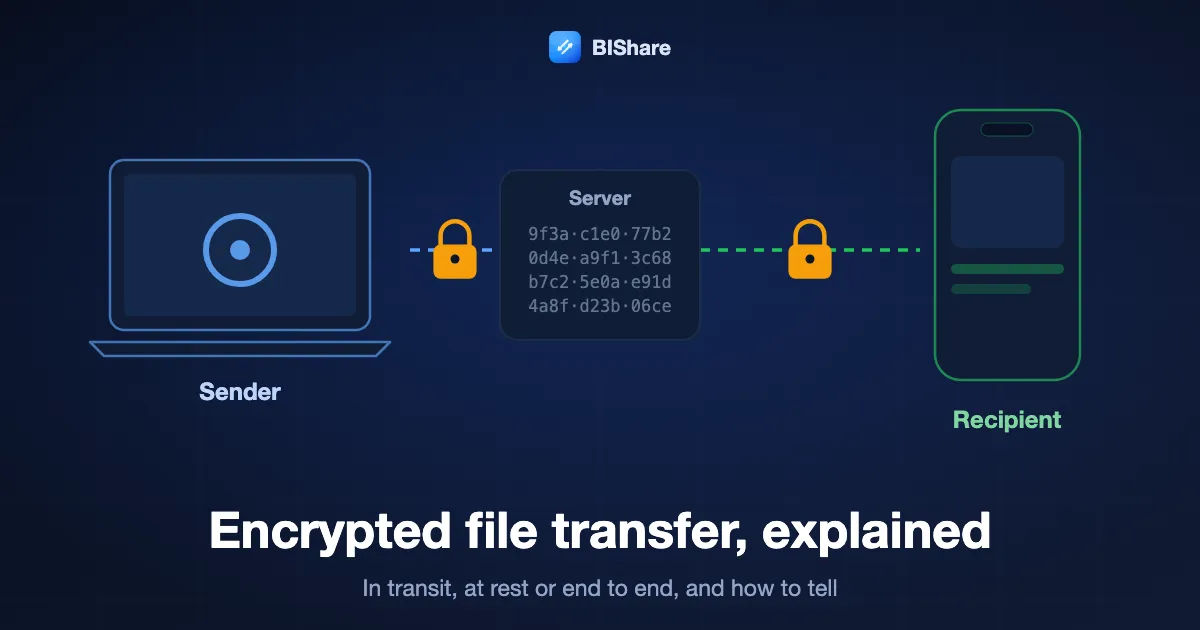
Three kinds of encryption hide behind one word
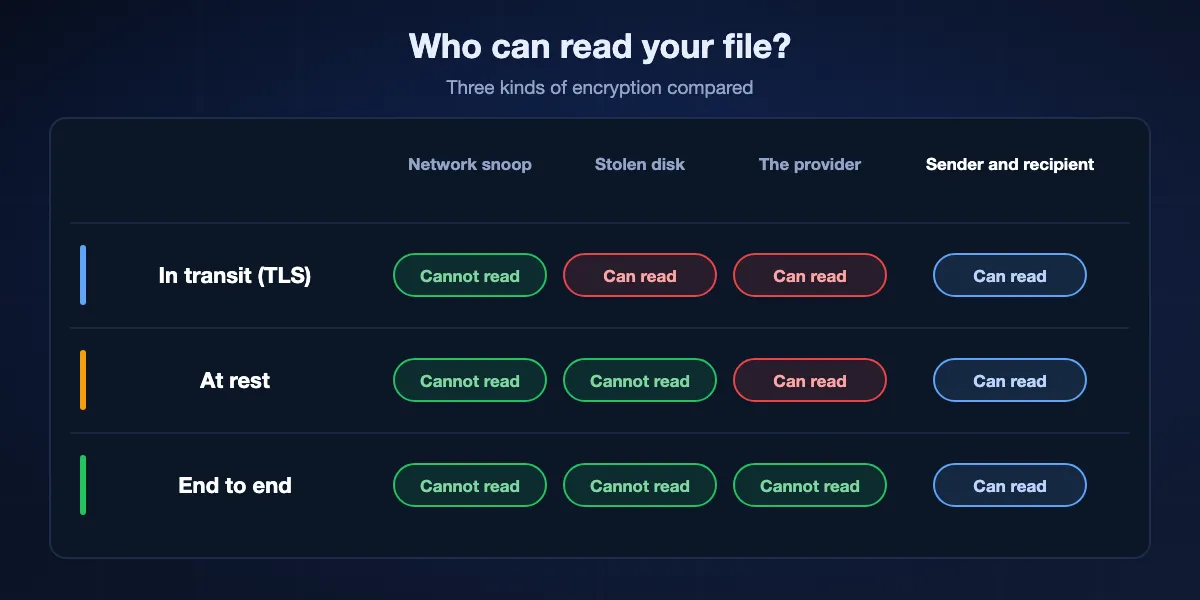
When a service says your files are encrypted, it usually means one of three different things. They protect against different people.
Encryption in transit
The connection between your browser or app and the server is wrapped in TLS, the padlock in the address bar. It stops someone on the café Wi-Fi or at your internet provider from reading the upload. It does nothing once the file arrives, because the server decrypts the connection to receive it. Every reputable service does this, so it is a baseline, not a feature.
Encryption at rest
The provider encrypts the file on its disks, so a stolen drive or a careless backup does not leak it. But the provider holds the keys and decrypts the file whenever its systems need to, for previews, virus scans, search or a legal request. Staff with enough access, an attacker inside the network, or a court order can all reach the readable file.
End-to-end encryption
The file is encrypted on the sender's device before it leaves, and only the recipient's device can decrypt it. The service stores or relays scrambled bytes and never has the key. If the company is breached or ordered to hand files over, it has nothing readable to give. This is the only kind that protects you from the carrier itself.
Why marketing blurs them
Phrases such as bank-grade, military-grade or 256-bit describe the strength of a cipher, not who holds the key. A service can use AES-256 at rest and still read every file. The honest question is always where the key lives.
How to tell whether a service is really end-to-end
You do not need to read source code to get a good answer. These checks take a minute on any file transfer site.
Can it show you a preview?
If the provider's web app renders a thumbnail of your photo or the first page of your PDF, its servers can read the file. End-to-end services either decrypt previews in your browser or show none.
Can it recover access for you?
If you lose the link or forget the password and support can restore the file, the provider holds a key. With true end-to-end encryption a lost key means a lost file, and good services say so plainly.
Where is the key in the link?
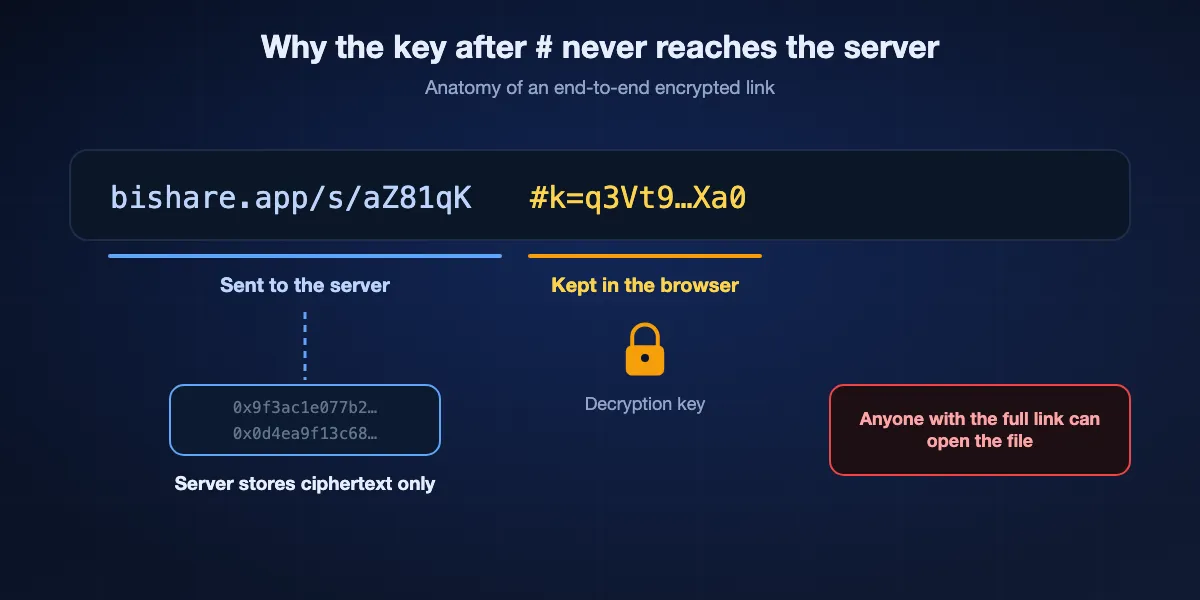
Many end-to-end link services put the key after a # in the URL. Browsers never send that part to the server, so the service stores the file without the means to open it. A link with no fragment and no separate password usually means the server can decrypt.
Does the security page name the design?
A credible service names its algorithms, explains where keys are created and publishes code or an audit. Vague claims with no mention of keys are a warning sign.
What does it say about metadata?
Even strong end-to-end services usually see file names, sizes, IP addresses and timing. A provider that is candid about this is more trustworthy than one that promises it sees nothing at all.
Seven ways to send a file end-to-end encrypted, ranked
Every option below keeps the file unreadable to the service in the middle. They differ in who needs to install what, how long the file stays available and what else they protect.
BIShare
Best all-round: encrypted links in a browser and direct transfers between devices
Browser at bishare.app, apps for Android, iPhone, Windows, macOS, Linux · Apache 2.0 · links: AES-256-GCM in the browser, key after #k= in the URL, up to 100 GB for 6, 12 or 24 hours · direct: X25519 key agreement, HKDF-SHA256, AES-256-GCM · no account
BIShare covers both ways people send files. For a link, the browser or app generates a random 256-bit key, encrypts the file in 1 MiB records with AES-GCM, uploads only ciphertext and places the key in the link fragment, which never reaches the server. For devices near each other, the apps agree on a key with X25519, derive it with HKDF-SHA256 and encrypt each chunk with AES-256-GCM, and each device shows a short fingerprint you can compare. The cryptography lives in a public Rust crate.
Keep in mind: File names and sizes of link uploads are visible to the server, the protocol code has not had a formal external audit, and links expire after 6, 12 or 24 hours.
Wormhole
Best quick encrypted link from any browser
Browser · free · up to 10 GB · AES-GCM with 128-bit keys based on RFC 8188, encrypted before upload · files up to 5 GB stored 24 hours, larger ones peer to peer · encryption library open source
Wormhole encrypts in the browser before anything leaves, so its servers hold ciphertext for at most a day. It is fast to use on a borrowed computer and needs nothing installed on either side. Its FAQ is specific about the scheme and publishes the streaming encryption library, though not the full service.
Keep in mind: The full client and server code is not published, the ceiling is 10 GB, and transfers over 5 GB need your tab open.
Proton Drive
Best for files that need to remain downloadable for weeks
Web, Windows, macOS, Android, iOS · end-to-end encrypted storage · free plan with 5 GB · share links with optional password and expiry · recipients need no account · apps open source and audited
Proton Drive is cloud storage built on end-to-end encryption, from the company behind Proton Mail. Upload once, create a link, and add a password or an expiry date; the recipient opens it in a browser without signing up. Because the files live in your account, you can keep them up for as long as you like instead of racing a 24-hour clock.
Keep in mind: You need a Proton account, the free plan's 5 GB is shared with everything else you store, and it is built for storage rather than quick one-off sends.
OnionShare
Best when you also need anonymity
Windows, macOS, Linux · open source · runs a web server on your computer as a Tor onion service · address plus private key · no third-party server holds the file
OnionShare turns your own computer into a temporary, private website reachable only through Tor. You send the onion address and its private key; the recipient pastes them into Tor Browser and pulls the file off your machine. No company stores the file, and Tor conceals where each side is connecting from.
Keep in mind: Your computer must stay on and online until the download finishes, the recipient needs Tor Browser, and Tor is slower than a direct connection.
magic-wormhole
Best for technical users moving files between computers
Command line on macOS, Linux, Windows · MIT · short single-use codes · end-to-end encrypted with a password-authenticated key exchange · mailbox server plus transit relay · any size, files and folders
Type wormhole send and a file name, read out the short code it prints, and the other person types wormhole receive and the code. The two machines use that code to agree on a key, so the relay in the middle only ever carries encrypted data. It handles files and directories of any size and is a favourite for moving data between servers.
Keep in mind: Both sides need the tool installed and a terminal, and it is not designed for sending to non-technical people.
LocalSend
Best for devices on the same network, no internet at all
Android, iOS, Windows, macOS, Linux · Apache 2.0 · HTTPS between devices with a certificate per device · local network only · no server
When sender and recipient share a Wi-Fi network, LocalSend moves files directly between the devices over encrypted HTTPS without any server in between. Nothing is uploaded anywhere, so the question of what a provider can read never arises.
Keep in mind: It only reaches devices on the same local network, and every device needs the app.
7-Zip archive with AES-256
Best when you must use email or a channel you do not trust
Free 7-Zip for Windows, with compatible tools on macOS and Linux · 7z format with AES-256 and a password · works with any carrier, from email to USB sticks
Encrypting the file itself makes the transport irrelevant. Create a 7z archive in 7-Zip, choose AES-256 and a long passphrase, then send the archive through email, a cloud drive or anything else. Send the passphrase separately, by phone or an encrypted messenger. It is the oldest method on the list and still one of the most dependable.
Keep in mind: Security rests entirely on the passphrase, the recipient needs software that opens 7z archives, and you must share that passphrase safely yourself.
At a glance
| Feature | BIShare | Wormhole | Proton Drive | OnionShare | magic-wormhole | 7-Zip archive |
|---|---|---|---|---|---|---|
| The service cannot read the file | ||||||
| Recipient installs nothing | ||||||
| Sender can go offline after sending | ||||||
| Handles files over 10 GB | ||||||
| Hides who is sending | ||||||
| Open-source client |
As of September 2026. BIShare's link recipients need only a browser; sending device to device needs the app at both ends. Wormhole stores files up to 5 GB for 24 hours and streams larger ones browser to browser up to 10 GB, and publishes its encryption library rather than the full client. Proton Drive's free plan has 5 GB of storage. OnionShare recipients need Tor Browser. magic-wormhole needs its command-line tool on both machines. A 7-Zip archive is only as strong as its passphrase, and the recipient needs a tool that opens 7z files.
What encryption does not hide
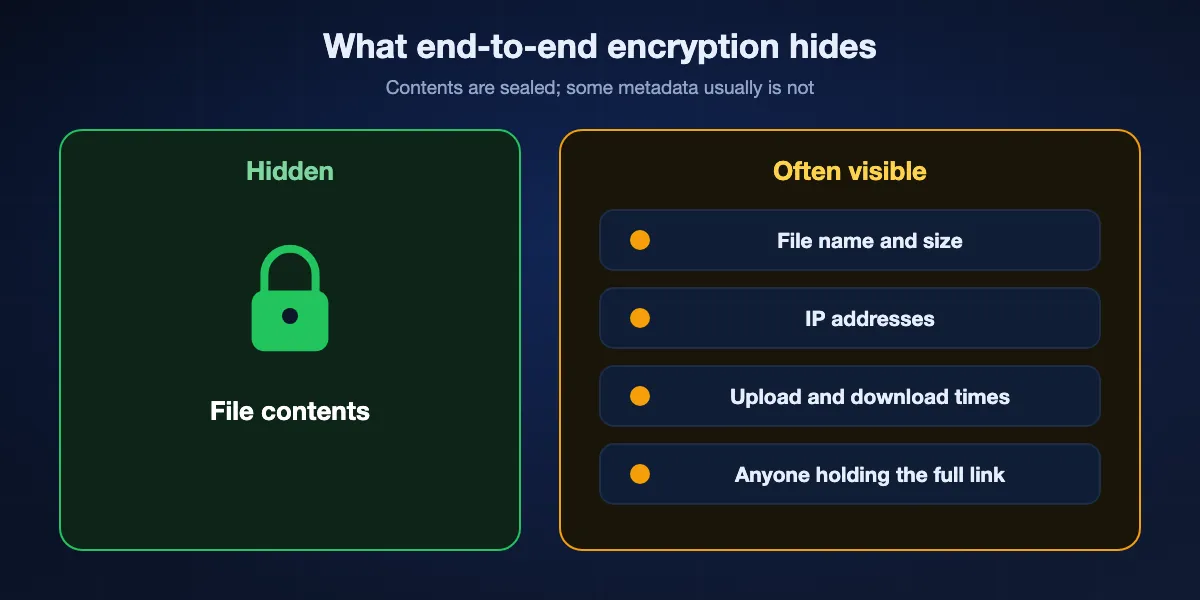
End-to-end encryption protects the contents of a file. Several other things usually stay visible, and it helps to know which.
File names and sizes
Many services need a name and size to show a download page. BIShare's link uploads, for example, send the file name, size and type to the server in the clear while the contents stay encrypted. If the name itself is sensitive, rename the file or put it inside an encrypted archive first.
Who connected, and when
The server sees the IP addresses of the sender and recipients and when they uploaded and downloaded. Only a network like Tor, as used by OnionShare, hides that from the service.
The link is the key
When the key rides in the link, anyone who gets the full link can open the file. A forwarded email, a chat backup or a shared screen is enough. Expiry dates, one-time downloads and a separate password all shrink that window.
What happens after download
Once decrypted, the file is ordinary data on the recipient's device. If their photos sync to a cloud service or their laptop is unencrypted, the protection you chose ends there.
How BIShare encrypts, in detail
Because we ask you to trust our code, here is exactly what it does, with the limits stated. The cryptography is in the public bishare-protocol and bishare-web repositories.
Links from a browser or the app
A fresh random 256-bit key is generated on your device for every file. The file is cut into 1 MiB records and each is sealed with AES-GCM using a nonce built from a per-file salt and the record number, with the record number also bound as authenticated data. Reordered, removed or truncated records fail to decrypt. The key is encoded after #k= in the link, a part of the URL that browsers keep to themselves.
Direct transfers between devices
The two apps run an X25519 key agreement, feed the shared secret through HKDF-SHA256 to get a 32-byte key, and encrypt the file in chunks with AES-256-GCM, each with its own derived nonce. Every device has a fingerprint, the first eight bytes of the SHA-256 of its public key, shown as hex so you can check you are talking to the right device.
What the server stores and sees
For links, the server stores ciphertext plus the name, size and type you uploaded, and removes it once the link's 6, 12 or 24 hours have passed, or as soon as it is fetched when you picked one-time. For direct transfers on the same network, nothing passes through our servers at all.
What has not been done yet
The protocol is covered by unit tests, including cross-platform test vectors, but it has not had a formal external security audit. Vulnerability reports go to cakrabudiman@icloud.com.
Sharing the key, link or password safely
Strong encryption fails if the secret travels next to the file. A few habits close that gap.
Use a second channel
Send the file by email and the password by text message, or share the link in a chat and read the code over a call. Someone who compromises one channel then still lacks the other half.
Shorten the window
Choose the shortest expiry that works, and one-time download when only one person needs the file. A link that stopped working yesterday cannot leak tomorrow.
Avoid group chats and tickets
Links with keys pasted into group chats, support tickets or shared documents are copied into places you do not control, often indefinitely. Send them one to one.
In person, use a QR code
When the recipient is in the room, scanning a QR code moves the link without it ever being typed, pasted or logged in a messaging service.
Which method for which situation
Pick by what the file is, who receives it and how long it must be available.
A contract, ID scan or medical letter for one person
A BIShare or Wormhole link with one-time download or a short expiry, and the link sent through a private chat.
Documents a client will need for weeks
Proton Drive, with a password on the link and an expiry you can extend.
Material from a source who must stay anonymous
OnionShare, with the address and private key exchanged over an encrypted messenger.
Large folders between your own devices
A direct BIShare transfer or LocalSend on the same network, so nothing is uploaded anywhere.
Data between servers or terminals
magic-wormhole, which handles directories of any size with a short code.
Only email is allowed
A 7-Zip AES-256 archive attached to the email, with the passphrase sent by another route.
Common mistakes that undo encryption
Most leaks of encrypted files do not break the cipher. They go around it.
Password in the same message
An archive and its passphrase in one email are as readable as the file on its own. Always split them.
Weak or reused passphrases
Password-based encryption is only as strong as the password. Use a long, random passphrase from a password manager, and never one you use elsewhere.
Trusting encrypted at rest for sensitive files
A service that encrypts only on its own disks can still read, scan and hand over your file. For anything sensitive, insist on end-to-end.
Forgetting the copies
Decrypted downloads, email drafts, screenshots and automatic photo backups all create readable copies. Delete what you no longer need on both ends.
Encrypted file transfer: FAQ
What is encrypted file transfer?
Encrypted file transfer, also called file transfer encryption or encrypted data transfer, means moving a file so that nobody who intercepts it can read it. The strongest version is end-to-end: the file is locked before leaving the sender, and only the recipient can unlock it.
What is the difference between encryption in transit and end-to-end?
Encryption in transit protects the connection to the server, but the server decrypts and can read the file. End-to-end encryption keeps the file encrypted until it reaches the recipient, so the server never can.
Is WeTransfer end-to-end encrypted?
WeTransfer describes encryption in transit and at rest, which means its systems can decrypt stored files. For end-to-end encryption from a browser, use a service such as BIShare, Wormhole or Proton Drive.
How can I send an encrypted file by email?
Put the file in a 7-Zip archive with AES-256 and a strong passphrase, attach the archive, and send the passphrase through a different channel such as a phone call or an encrypted messenger.
What is the most secure way to send a large file?
A direct end-to-end encrypted transfer between the two devices, such as BIShare on the same network, avoids storing the file anywhere. For someone far away, an end-to-end encrypted link that expires after one download is the next best option.
Does end-to-end encryption hide the file name?
Not always. Many services, including BIShare links, can see file names and sizes even though the contents are encrypted. Rename the file or place it inside an encrypted archive if the name is sensitive.
Is AES-128 weaker than AES-256 for file transfer?
Both are considered secure against practical attacks today. What matters more is that the key is created and kept on the sender's and recipient's devices rather than by the service.
Can the provider read my files if they are encrypted?
With encryption in transit or at rest, yes, because the provider holds the keys. With end-to-end encryption, no, because the key never leaves the sender's and recipient's devices.
Is BIShare end-to-end encrypted?
Yes. Links are encrypted in the browser or app with AES-256-GCM and the key stays in the link fragment, and direct transfers use keys agreed between the two devices. The server can see file names and sizes of link uploads, and the protocol has not yet had an external audit.
Is BIShare free?
Yes. It costs nothing, its source is published under Apache 2.0, and it runs without sign-up or advertising.
Send files only the recipient can open
Free and open source. Encrypt a link in your browser, or send directly between your devices with keys that never leave them.