
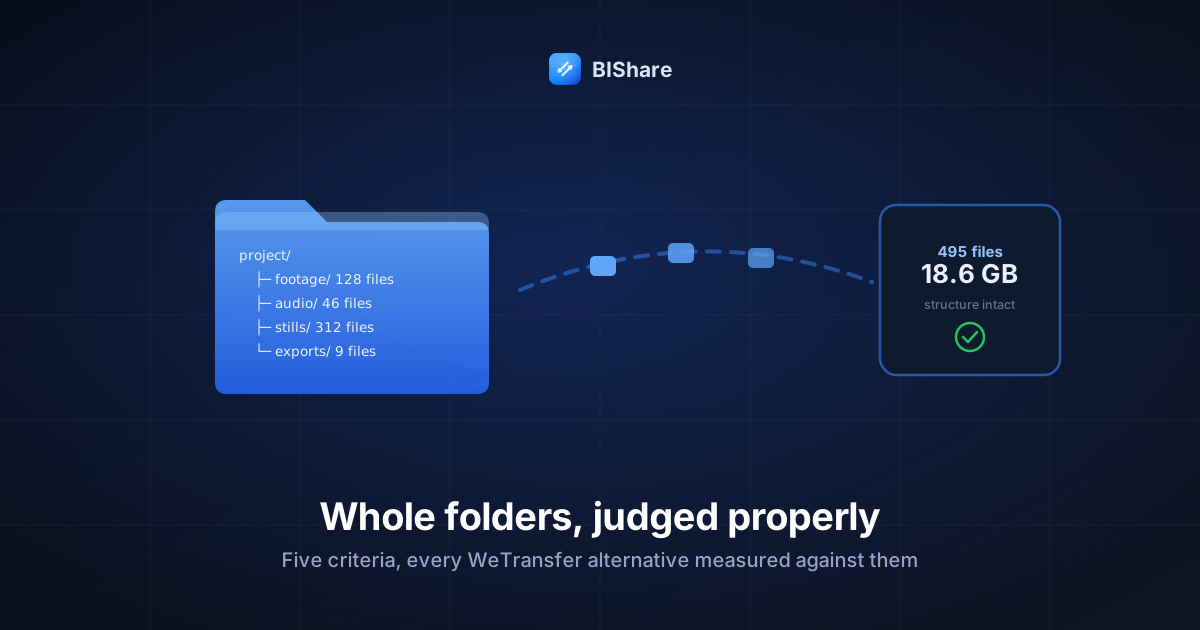
Files are easy. A file is one object with one size; move the bytes, compare the count, shake hands. Folders are where transfer tools go to be embarrassed — a real project folder is a tree: footage in one branch, audio stems in another, three hundred stills, nine exports, and a structure that means something to the person who built it. WeTransfer built its brand on making the single-file send painless, and its free tier's couple-of-gigabyte ceiling plus its folder handling are exactly where working people start shopping for alternatives. If that shopping trip brought you here: welcome — this is the guide we wish the search results had offered us when our own project trees outgrew the polite tools.
So this guide does something slightly unusual for the genre: before naming a single alternative, it fixes the judging criteria. Five of them, drawn from what actually goes wrong when folders travel. Then every contender faces the same five questions — including our own tool, because a rubric you'd exempt yourself from isn't a rubric. By the end you won't just have a pick; you'll have the test that outlives every future contender list.
Why folders break tools that files never do
Three pathologies, all invisible until the day they cost you an afternoon:
The many-small-files tax. A 5 GB video is one object; a 5 GB photo archive is four thousand objects, and every per-file action — listing, hashing, request setup — multiplies by four thousand. Tools engineered around single files hit folder trees and spend their time on ceremony instead of bytes. This is the same structural tax we measured building folder sharing ourselves and the reason serious folder handling always converges on one answer: bundle first, then move one stream.
The name minefield. Folder trees carry filenames across operating systems, and operating systems disagree. A Mac happily names a file mix: final.wav; Windows forbids the colon and the extraction fails or silently renames. Deep trees can exceed Windows' legacy path-length ceiling during unzip, failing halfway with the tree partially born. Two files differing only in case (Logo.png / logo.png) coexist on Linux and collide on the other two platforms. None of this is the transfer tool's fault — and all of it lands on the recipient as "your folder is broken."
The phantom files. macOS salts every folder it touches with .DS_Store and ._* companions; Windows leaves Thumbs.db. They inflate file counts, confuse count-based verification, and occasionally alarm recipients ("what are these files you sent me?"). Harmless, ubiquitous, and worth knowing by name so nobody debugs a ghost.
Hold those three in mind — the rubric below exists because of them, and every criterion traces back to one of these scars.
The five questions that expose a folder tool
1. Folder fidelity. Does the tree survive? A folder send can arrive three ways: as one archive that unpacks into the exact structure (good); as a browsable tree the recipient navigates online (good, different); or as a loose pile of files with the hierarchy flattened away (a quiet disaster — final_v2.wav means nothing outside its audio/stems/ home). Fidelity is the folder-specific criterion, and tools that ace single files fail it casually.
2. The honest ceiling. Not the number on the pricing page — the working ceiling: per-transfer cap, per-file cap inside the bundle, and what the free tier actually tolerates before the upgrade banner takes over the screen. As we unpacked in the 10 GB gauntlet, caps are pricing decisions, not physics; the question is where each service placed the wall.
3. Speed mechanics. Raw bandwidth is your uplink's business, but the tool decides three things: whether uploads resume after a blip (at folder scale, non-negotiable — a 495-file upload that restarts from zero is a hostage situation), whether the free tier is throttled or queued, and whether many small files are shipped efficiently or one polite request at a time — the chatty-protocol tax wears many costumes.
4. The privacy model. Three tiers, in plain words: end-to-end encrypted (the operator stores ciphertext it cannot read), TLS-only (encrypted in flight, readable at rest by the operator), and "see terms." A client's unreleased campaign or a family's photo archive deserves the first tier, and it costs nothing to have.
5. The receiver's minute. The person on the other end didn't choose your tool. Do they need an account? An app? Do they get one clean download with a sane name and an expiry that matches human schedules — or a gauntlet of interstitials designed to convert them while they're just trying to fetch your work?
Rubric set. Note what is deliberately absent from it: brand recognition, interface beauty, and the size of the number on the homepage — the three things marketing pages lead with. Contenders forward.
First, the incumbent: WeTransfer against the rubric
Fairness demands the baseline face the same five questions. What WeTransfer genuinely earned: the smoothest single-send ritual in the business, a brand recipients trust on sight (criterion 5 is where it shines — nobody hesitates to click a WeTransfer link), and folder uploads that arrive as a clean zip. The polish is real and a decade deep.
Where the rubric bites: the free ceiling sits at a couple of gigabytes — documents-and-a-clip territory, an order of magnitude under a working tree (criterion 2). Free-tier transfers aren't resumable in the chunk-level sense, which at folder scale converts every network blip into a restart (criterion 3). And the privacy model is TLS-tier, operator-readable, with an ad-and-upsell layer that has grown around the free experience (criteria 4 and 5). None of this makes it a bad product; it makes it a product whose free tier is a demo for the paid one. The alternatives below exist for the people the demo stopped fitting.
BIShare, judged by its own rubric
Fair's fair — we go first, and we'll be as blunt about the trade as we are about the strengths. (Skeptics are encouraged to keep score; the rubric works precisely because it doesn't care whose logo is on the tool.)
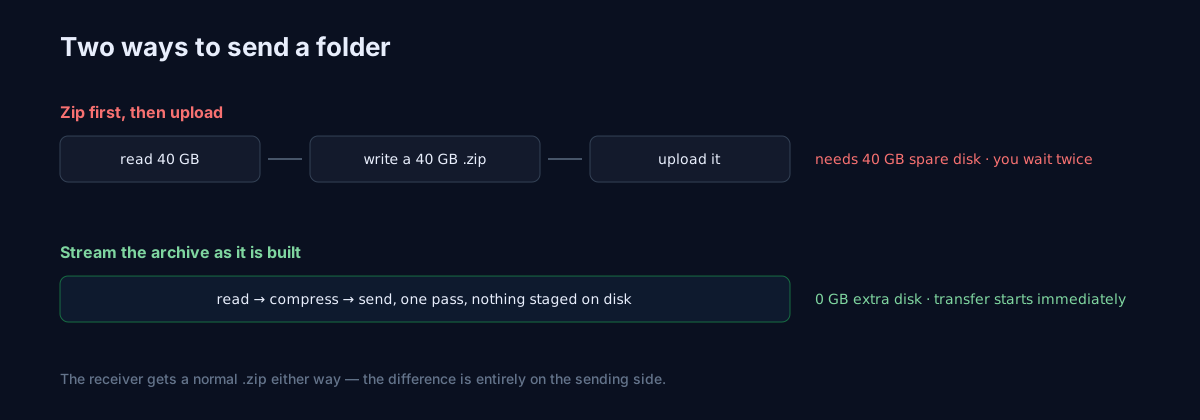
Fidelity: a folder shared from the app travels as one zip, streamed as it's built — no temp copy staged on disk, subfolders intact on unpacking. We chose streaming-zip when we built folder sharing for a reason that echoes criterion 3: in our early testing, trees with thousands of small files spent more time on per-file ceremony than on actual bytes, and bundling amortizes all of it into one continuous stream. On the web tool, you send batches of files; the folder-as-one-object experience is the app's.
Ceiling: 100 GB per transfer, free — no account, links self-expire, optional one-time download. Bigger trees split into logical batches (by subfolder, usually) — the craft section below makes that painless.
Speed: uploads are chunked and resumable — a blip resumes at the failed part, a page reload continues where it left off. No free-tier throttle, no queue; the same app also does the local route, which for a same-network handoff makes the whole internet question moot: a 20 GB tree crosses a router in minutes.
Privacy: end-to-end — files encrypt in the browser before upload; the relay holds ciphertext, the key rides only in the link.
The receiver's minute: open link → download → unpack. No account, no app, no interstitial. The honest trade to name: our per-transfer ceiling is not the biggest number on this page — the next contender's is bigger — and if raw size-per-send is your single criterion, keep reading.
SwissTransfer: the generous ceiling
SwissTransfer (from Swiss host Infomaniak) is the contender we respect enough to recommend when the shoe fits. Ceiling: its headline — up to 50 GB per transfer, free, no account, which for single monster trees is genuinely unmatched in the no-cost tier. Fidelity: folders arrive zipped; structure survives the trip. Receiver's minute: clean, account-free, humane expiry options — a genuinely courteous landing page by the genre's standards.
The honest asterisks live in criteria 3 and 4: uploads aren't resumable in the way chunk-level resume means it — a long upload that dies is a long upload again — and the privacy model is server-side rather than end-to-end, so you're trusting the operator (a reputable one, with Swiss framing, but trust-the-operator all the same). Verdict: the pick when one transfer must exceed 100 GB and the material isn't sensitive; pair it with a stable connection and our checklist habits.
Smash: unlimited, with a meter running
Smash plays the other extreme: no size cap at all, free. The catch is criterion 3 — free transfers above a modest size ride a slower queue (priority is the paid pitch), so "unlimited" and "fast" are different products. Fidelity is fine (zip on arrival), receiver experience is decent, privacy is TLS-tier. Verdict: the pick when the tree is huge, the deadline is soft, and you can start the upload before lunch — and our full Smash teardown covers the fine print.
Cloud drives: secretly the best at fidelity, openly the worst at handoffs
Here's the twist the rubric surfaces: on criterion 1 alone, Google Drive and Dropbox win — a shared folder link presents the living tree, browsable, no unpacking, even updatable after sharing. For an ongoing collaboration, that's not a transfer, that's a workspace, and it's genuinely the right shape.
As a delivery mechanism the old walls return: the folder consumes your storage quota (criterion 2), download-all still zips it anyway, recipients hit account prompts on some setups (criterion 5), and sync's deletion-mirroring means "cleaning up your side" can vaporize theirs — the courier-with-keys problem from the gauntlet. Verdict: workspaces, yes; handoffs, no — and knowing which one you're doing is the previous section's whole point.
The local route: the alternative that isn't a website
One contender answers all five questions by refusing the premise. If sender and receiver share a network — same office, same house, same event — a direct device-to-device transfer moves the folder with no upload leg at all: fidelity via the same zip-stream bundling, ceiling bounded by disk rather than plan, speed at router pace (tens of MB/s — a 20 GB tree in minutes), privacy end-to-end with the bytes never leaving the room, and a receiver experience of tapping "accept." The rubric's quiet lesson: the best WeTransfer alternative for a folder is often not a better website — it's skipping the internet. Websites are for distance.
Two folder shapes the rubric treats differently
Before the craft section, a distinction that changes which verdict applies to you:
The delivery tree — finished work leaving the building: client exports, a wedding's final gallery, a quarter's assets. It travels once, in one direction, and its virtues are integrity and a clean receiver minute. Everything in this guide's transfer verdicts is tuned for the delivery tree, and the manifest-plus-verification ritual below is its ceremony.
The living tree — a folder still being worked in: the active project, the shared family archive that grows weekly. Couriering a living tree is a category error that generates its own suffering — version confusion ("is this Tuesday's zip or Thursday's?"), divergent edits, the same 18 GB crossing the internet weekly with 200 MB of actual change. Living trees want replication, not transfer: a synced folder, Syncthing for the self-hosted, and the honest admission that you stopped needing a courier the second week in a row you called one. Misdiagnosing which tree you hold is the most expensive mistake on this page — more than any wrong tool pick.
The craft: sending folders well on any tool
Whatever contender you pick, folder handoffs go from fragile to boring with four habits:
Bundle deliberately. Let the tool zip the tree — or zip it yourself when you want control over the archive's name and contents. From the 10 GB guide: zipping doesn't shrink media, but for folders that was never the point — one object with one checksum beats five hundred maybes, and it's the difference between "download" and "download ×495." Self-zipping has one bonus power: you choose what stays out. A quick pass to exclude the cache/ subfolder, the editor's scratch files, and last year's rejects routinely shrinks a "20 GB folder" into a 12 GB delivery — the cheapest speedup in this article is not sending what nobody needs.
Split by meaning, not by megabytes. When a tree exceeds the ceiling, cut at the branches humans already understand — footage/ day one, stills/ day two — never at arbitrary byte boundaries. Each batch stays independently verifiable and independently useful; the recipient starts editing batch one while batch two uploads.
Send the manifest. One message alongside the link — and for folders it earns its keep double, because the recipient can't sense a tree's completeness the way they can a file's. File count, total size, top-level structure, expiry. 495 files · 18.6 GB · footage/audio/stills/exports · link dies Friday — twenty words that preempt every follow-up email. (The sender-etiquette section has the full ritual.)
Verify the tree, not just the bytes. For files you compare sizes; for folders, compare counts and sizes: right-click the original (495 files, 18.6 GB), have the recipient do the same after unpacking. Two numbers matching means the tree crossed intact — structure, stragglers, and all. Ten seconds, zero doubt.
Folder-upload arithmetic: where the minutes go
File-transfer timing has one number (bytes ÷ uplink — the 10 GB guide's table does that math); folder timing has three, and only one of them is bandwidth:
Bundling time. Zipping a 495-file, 18.6 GB tree is real work — minutes on a laptop, dominated by disk reads, before a single byte travels. Streaming-zip approaches overlap this with the upload (bundle and send simultaneously); zip-then-upload approaches serialize it. For one-off sends the difference is a coffee; for daily folder deliveries it's why the architecture question matters.
The straggler effect. A folder upload isn't done until its last file is done, and trees hide stragglers — the one 6 GB master file among four hundred small ones sets the clock, whatever the average says. Eyeball the biggest file in the tree before promising an ETA; it is the ETA.
Retry amplification. Non-resumable tools multiply misfortune at folder scale: a 1% blip probability per minute across a 90-minute upload is not 1% — it compounds toward "you will be restarting this." Chunk-level resume flattens that curve back to boring, which is why criterion 3 calls it non-negotiable above a few gigabytes.
The receiver's side: unpacking without tears
Half of "the folder arrived broken" happens after the download, so send these three notes alongside big trees (or just link this section):
Unzipping is built in everywhere — but behaves differently. Windows: right-click → Extract All — and extract to a short path (C:\Projects\ beats a nested Desktop folder) to dodge the path-length failure from the minefield above. macOS: double-click, done — though Safari's "Open safe files" setting sometimes auto-unzips on download, which is why your recipient occasionally reports a folder where you promised a zip. Both are fine outcomes; forewarned recipients don't file bug reports about them.
The double-folder illusion. Extracting project.zip often yields project/project/… — an artifact of how the archive was built, not data loss. Everything's there, one level deeper than expected. Thirty seconds of drag fixes what looks like disaster.
Count with the phantoms in mind. When verifying "495 files," remember the phantom-file caveat: a tree that crossed from a Mac may unpack with a handful of .DS_Store stragglers, nudging counts by single digits. Sizes matching within a rounding error plus counts matching within the phantom margin = a clean delivery. Exact-number anxiety is for accountants, not folders.
A special word on photo and RAW folders
The heaviest folder traffic we see is photography — shoots, archives, deliveries — and photo trees add one more wrinkle: sidecars. RAW workflows pair every IMG_2041.CR3 with an IMG_2041.xmp carrying its edits; separate the pair and the recipient gets the photo without the work. Folder-level bundling keeps pairs together automatically — one more argument for one-archive delivery over loose files — and catalog-based editors (Lightroom and kin) add their own database files that belong in the tree. Photo folders deserve their own full guide, and one is queued in this series; until then, the rule of thumb: for photo trees, always send the folder, never a selection of files — the folder knows things the file list doesn't.
The verdict table you came for
Compressed to a sentence each, rubric order:
- Need encryption, resume, and a clean receiver minute, ≤100 GB per send: BIShare's transfer — free, end-to-end, chunk-resumable, batch by subfolder above the line. This is the default we'd hand a working creative, and the criteria say why rather than us saying trust us.
- One transfer that must exceed 100 GB, material not sensitive: SwissTransfer, on a stable connection.
- Enormous tree, soft deadline: Smash's unlimited lane, queue accepted.
- Ongoing collaboration on a living tree: a cloud-drive folder share — a workspace, not a courier — with the deletion-mirroring caveat taped to the lid.
- Same network, any size: the local route; the internet was never required, and the 20 GB tree lands before the upload progress bar would have drawn itself.
- Every week, same recipient, same tree: stop couriering — Syncthing or a shared drive turns the ritual into plumbing, as the pillar guide maps.
And the rubric itself, folded to wallet size for the next shiny launch: Does the tree survive intact? Where's the real ceiling? Does it resume? Who can read my files? What does the recipient's minute look like? Five questions, thirty seconds, and no marketing page survives them unexamined. Tools rotate; the questions don't. That's the actual alternative to WeTransfer — not a different brand, but knowing exactly what a folder needs to survive the trip. Your next 495-file tree should arrive the boring way: one link, one download, two matching numbers, no walls.