
Send-Anywhere-Alternative
Die besten Alternativen zu Send Anywhere
Send Anywhere gewann seine Fans mit einem Trick: Datei wählen, sechs Ziffern vorlesen, und das andere Handy oder der Computer holt sie in Sekunden ab. Dieser Schlüssel funktioniert 2026 noch, doch der Rest des Dienstes hat sich verändert. Das koreanische Unternehmen dahinter trägt inzwischen den Namen Rakuten Symphony, kostenlose Freigabelinks zehren von einem monatlichen Downloadkontingent von 10 GB, das dem Konto des Absenders gehört, Links laufen nach 48 Stunden ab, und die Website zeigt Werbung neben dem Sendefeld. Dieser Ratgeber zeigt die drei Wege, auf denen Send Anywhere tatsächlich Dateien bewegt, und die Grenze jedes Weges, datiert die Richtlinienänderungen, bewertet sieben Alternativen für die Aufgaben, für die Menschen den Dienst nutzten, und ordnet jeder Send-Anywhere-Gewohnheit einen Ersatz zu. BIShare steht auf der Liste: kostenlos und Open Source, mit sechsstelligem Code, 100-GB-Links für höchstens einen Tag und direkten Übertragungen zwischen Handys und Computern. Keine Werbung, kein Monatskontingent.
Wir entwickeln BIShare, gewichten Sie unser Ranking entsprechend. Jede Send-Anywhere-Grenze unten stammt von der eigenen Preisseite oder aus dem Hilfecenter, und wo Send Anywhere noch das bessere Werkzeug ist, sagen wir es.
Kurze Antwort
- Sie nutzten vor allem den 6-stelligen Schlüssel: Er ist weiter kostenlos, bis 50 GB pro Übertragung und ohne Monatslimit. Stören Werbung oder Zuverlässigkeit, ersetzt der Code von BIShare oder der Kopplungscode von PairDrop ihn.
- Ihre Empfänger sehen Fehler wegen Downloadlimit: Kostenlose Links teilen sich ein Kontingent von 10 GB im Monat auf dem Konto des Absenders. Ein BIShare-Link fasst bis zu 100 GB und rechnet Downloads nie gegen Sie an.
- Sie brauchen einen Link, der länger als 48 Stunden hält: Smash bewahrt kostenlose Übertragungen 7 Tage auf, oder Sie zahlen für den Lite-Tarif von Send Anywhere und legen das Ablaufdatum selbst fest.
- Zwei Geräte im selben Raum: Lassen Sie das Internet weg. BIShare oder LocalSend übertragen von Gerät zu Gerät über Ihren Router oder einen Hotspot, und Quick Share erledigt Android zu Windows.
- Datenschutz zuerst, aus dem Browser: Wormhole verschlüsselt im Browser vor dem Hochladen, bis 10 GB für 24 Stunden.
- Sie bleiben bei Send Anywhere: Nutzen Sie für große Dateien den Schlüssel, denn der umgeht Server und Monatskontingent vollständig.
Was sich bei Send Anywhere geändert hat
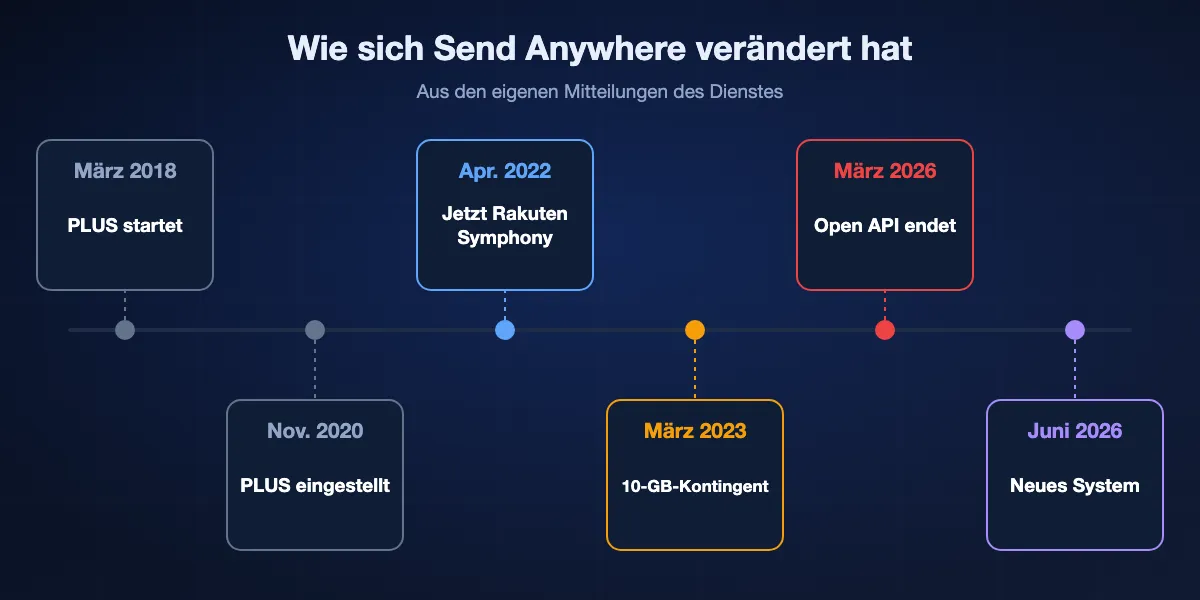
Die meisten Tests von Send Anywhere entstanden, bevor der Gratistarif 2023 umgebaut wurde, und beschreiben daher Grenzen, die nicht mehr gelten. Hier die datierten Änderungen aus den eigenen Mitteilungen.
März 2018 bis November 2020: die PLUS-Jahre
Send Anywhere PLUS startete im März 2018 mit eigenem Server, 50-GB-Übertragungen und Links ohne Ablaufdatum. Eine Mitteilung vom 30. November 2020 kündigte das Ende an; automatische Zahlungen endeten nach dem 31. Dezember 2020, und Links ohne Ablaufdatum erhielten eines, 90 Tage nach dem jeweiligen Abo-Ende.
April 2022: Estmob wird Rakuten Symphony Korea
Der Entwickler Estmob Inc. benannte sich zum 8. April 2022 in Rakuten Symphony Korea um, Nutzungsbedingungen und Datenschutzerklärung wurden angepasst. Im Fußbereich der Website steht heute Rakuten Symphony Inc.
März 2023: bezahltes Email Add-on und ein monatliches Downloadkontingent
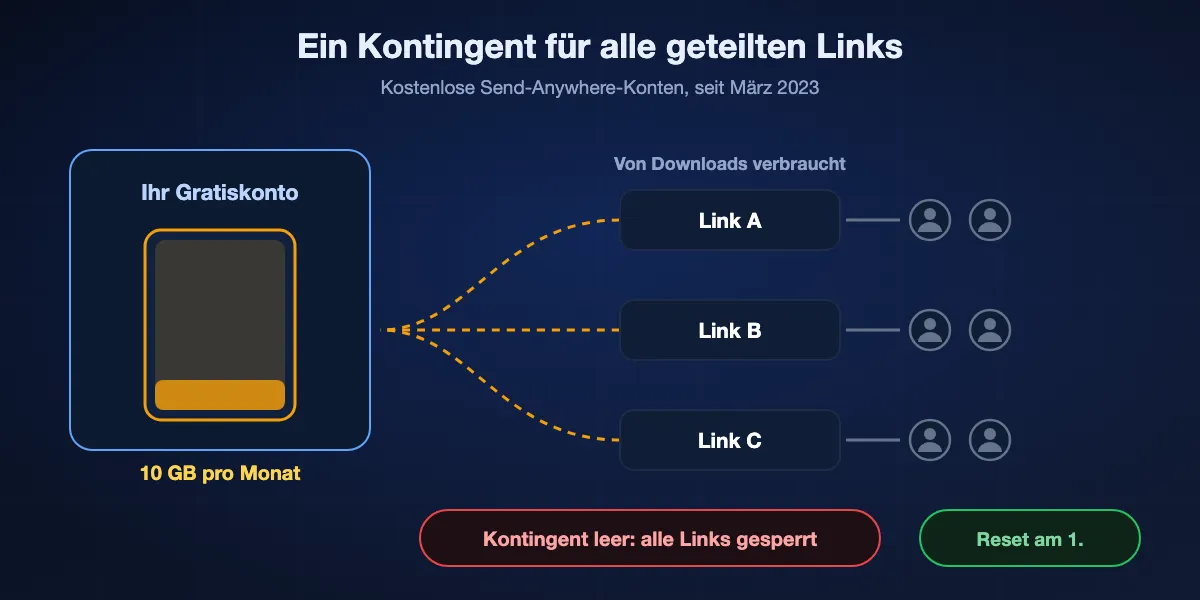
Am 7. März 2023 führte Send Anywhere die Email-Add-on-Tarife ein und änderte die Gratisregeln. Früher galt ein Downloadlimit von 10 GB pro Link; jetzt gilt ein Downloadlimit von 10 GB pro kostenlosem Konto im Monat, das sich am 1. zurücksetzt. Die Mitteilung betont, dass die Grenze für die teilende Person gilt, nicht für die Empfänger.
März 2026: Die Open API endet
Send Anywhere schaltete seine Open API am 31. März 2026 ab. Bestehende API-Schlüssel funktionieren nicht mehr, und Dateiübertragungen in darauf aufbauenden Apps von Drittanbietern endeten. Normale Nutzer der Apps und der Website waren nicht betroffen.
Juni 2026: ein neues System wird ausgerollt
Eine 2026 veröffentlichte Mitteilung kündigt an, dass die Infrastruktur von Send Anywhere auf ein neues System umzieht, schrittweise ab dem 8. Juni 2026, und bittet darum, die App aktuell zu halten. Wenn eine alte Installation plötzlich hakt, ist ein Update der erste Schritt.
Die drei Wege, auf denen Send Anywhere Dateien bewegt
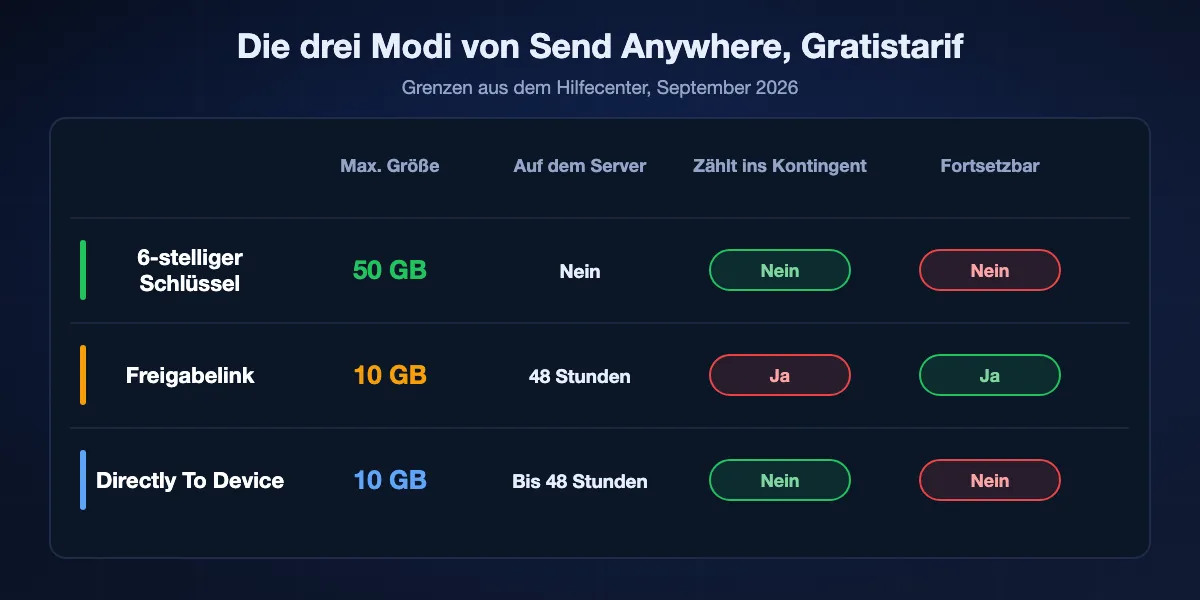
Hinter dem einen Senden-Button stecken eigentlich drei Produkte, jedes mit eigener Größengrenze, Speicherregel und typischem Fehler. Wer weiß, welchen Weg er nutzt, versteht die meisten Beschwerden.
Übertragung per 6-stelligem Schlüssel
Der Absender erhält einen sechsstelligen Schlüssel, der nur einmal und nur innerhalb von 10 Minuten gilt. Der Empfänger tippt ihn ein, und die Datei geht direkt zwischen den beiden Geräten, ohne auf dem Server zu liegen, bis 50 GB pro Übertragung und ohne Monatslimit. Am Computer lässt sich der Schlüssel auf der Website eingeben; am Handy braucht der Empfänger die App. Reißt die Verbindung ab, kann die Übertragung nicht fortgesetzt werden und beginnt bei null.
Freigabelink
Dateien werden hochgeladen und im Gratistarif 48 Stunden aufbewahrt, bis 10 GB und 1.000 Dateien pro Link, und jeder kann ohne Konto im Browser herunterladen. Downloads zählen gegen das 10-GB-Monatskontingent des Absenders, und kostenlose Konten dürfen in My Link 10 GB an noch gültigen Links halten. Unterbrochene Link-Übertragungen lassen sich in der App fortsetzen.
Directly To Device
Angemeldete Nutzer können Dateien ohne Schlüssel an eines ihrer registrierten Geräte schicken. Die Dateien liegen auf dem Server, bis das Gerät sie abholt oder 48 Stunden vergangen sind, mit einer Obergrenze von 10 GB. Wie beim Schlüssel ist es eine einmalige Eins-zu-eins-Zustellung ohne Fortsetzen.
Die Grenzen, die Menschen nach Alternativen suchen lassen
Für eine schnelle Übertragung per Schlüssel funktioniert Send Anywhere weiter gut. Ärger beginnt, wenn man sich auf Links, große Dateien oder die kostenlose Website verlässt.
Ein gefragter Link kann alle anderen blockieren
Weil das 10-GB-Kontingent dem Konto des Absenders gehört, verbraucht ein einziges 4-GB-Video, das drei Kollegen herunterladen, den Monat. Das Hilfecenter formuliert es deutlich: Ist die Grenze erreicht, werden alle Downloads der unter diesem Konto erstellten Links bis zum 1. eingeschränkt. Empfänger sehen nur einen fehlgeschlagenen Download.
Links verschwinden nach zwei Tagen
Kostenlose Links laufen nach 48 Stunden ab, und die Dateien werden endgültig gelöscht. Ein selbst gewähltes Ablaufdatum bis 30 Tage oder Links ohne Ablauf erfordern Lite für 5,99 $ oder Standard für 9,99 $ im Monat, und selbst diese unbegrenzten Links sind auf 2 GB beziehungsweise 5 GB beschränkt.
Werbung auf der kostenlosen Website und in den Apps
Beim Laden von send-anywhere.com im September 2026 erschienen Anzeigen mit dem Hinweis auf BuySellAds und Carbon neben den Feldern zum Senden und Empfangen, und Google Play kennzeichnet die Android-App mit „Enthält Werbung“. Werbefreiheit gehört zu den Funktionen der Bezahltarife.
Schlüssel-Übertragungen sind alles oder nichts
Der schnellste Modus ist zugleich der empfindlichste. Eine 30-GB-Übertragung per Schlüssel, die bei 90 Prozent abbricht, weil ein Handy sperrt oder das WLAN hakt, muss neu beginnen, denn Schlüssel und Directly To Device lassen sich nicht fortsetzen.
Handys brauchen die App, um einen Schlüssel zu empfangen
Wer die App nicht hat, kann Ihre sechs Ziffern am Handy nicht nutzen; entweder installiert die Person Send Anywhere, oder Sie wechseln zu einem Link, womit 48-Stunden-Ablauf und Monatskontingent zurück sind.
Sieben Alternativen zu Send Anywhere im Ranking
Bewertet für die Aufgaben, für die Menschen Send Anywhere nutzten: schnelles Senden zwischen Geräten, Links für Leute in der Ferne und große Dateien. Jede Empfehlung nennt ihren Haken.
BIShare
Bester Gesamtersatz für Schlüssel, Links und Übertragungen in der Nähe
Android, iPhone, Windows, macOS, Linux und jeder Browser · Apache 2.0 · 100-GB-Links für 6, 12 oder 24 Stunden mit 6-stelligem Code und QR · kein monatliches Downloadkontingent · Senden in der Nähe über Router oder Hotspot, ohne Limit · keine Werbung, kein Konto
BIShare deckt dieselben drei Aufgaben ab wie die drei Modi von Send Anywhere. Für jemanden in der Ferne laden Sie in der App oder auf bishare.app hoch und teilen einen Link, einen sechsstelligen Code oder einen QR-Code; die Datei wird vor dem Hochladen verschlüsselt, fasst bis 100 GB und bleibt 6, 12 oder 24 Stunden, auf Wunsch als Einmal-Download. Für Geräte in der Nähe finden sich die Apps über einen gemeinsamen Router oder Hotspot und übertragen ohne Internet und ohne Obergrenze. Es gibt kein Downloadkontingent pro Konto, das aufgebraucht werden könnte.
Haken: Links halten 6, 12 oder 24 statt 48 Stunden, Uploads aus dem Browser lehnen Programmdateien wie .exe oder .msi ab, und der Weg ohne Internet funktioniert erst, wenn beide Geräte die App haben.
PairDrop
Beste Kopplung wie mit Schlüssel, ohne Installation
Web-App unter GPL-3.0, als PWA installierbar · ein 6-stelliger Code oder QR merkt sich ein Gerät dauerhaft · Geräte im selben Netz erscheinen automatisch · temporäre öffentliche Räume · TURN-Relay hinter NAT
PairDrop ist dem Schlüssel von Send Anywhere im Browser am nächsten. Statt eines Codes, der nach zehn Minuten verfällt, koppelt ein sechsstelliger Code zwei Geräte einmalig, und danach erkennen sie sich in jedem Netz. Im selben WLAN erscheinen Geräte ganz ohne Code, und Dateien laufen nie über einen Server.
Haken: Beide Geräte müssen während der Übertragung mit geöffneter Seite online sein, und für jemanden, der offline ist, gibt es keinen gespeicherten Link.
Wormhole
Bester privater Link aus dem Browser
Nur Browser · kostenlos · Obergrenze 10 GB · clientseitig verschlüsselt · Links für 24 Stunden · Peer-to-Peer ab 5 GB
Wormhole ist die Wahl, wenn der Inhalt wichtiger ist als die Größe. Die Verschlüsselung passiert auf Ihrem Rechner, und der Schlüssel reist im Link mit, sodass der Dienst nur Chiffretext hält. Bis 5 GB werden einen Tag gespeichert; größere Dateien streamen vom Browser direkt zum Empfänger.
Haken: Die 10-GB-Grenze entspricht dem kostenlosen Link von Send Anywhere, Links halten nur 24 Stunden, und große Übertragungen brauchen Ihren offenen Tab.
Transfer.zip
Bester Open-Source-Dienst für Echtzeit- und gespeicherte Übertragungen
Browser · AGPL-3.0, selbst hostbar · kostenlose Quick Transfers: Ende-zu-Ende-verschlüsselt, nichts gespeichert, per Link oder QR geteilt · gespeicherte Übertragungen in Bezahltarifen mit 7-Tage-Test
Die kostenlosen Quick Transfers von Transfer.zip streamen eine Datei mit AES-GCM-Verschlüsselung und ohne Größengrenze zwischen zwei Browsern, übergeben per Link oder QR-Code. Das README erwähnt, dass Dateien über 10 MB aus Tempogründen über das eigene Relay laufen, weiterhin Ende-zu-Ende-verschlüsselt. Bezahltarife fügen gespeicherte Übertragungen bis 200 GB oder 1 TB hinzu, und der ganze Dienst lässt sich selbst hosten.
Haken: Kostenlose Übertragungen funktionieren nur, solange beide online sind, und gespeicherte Links erfordern nach dem Test ein Abo.
LocalSend
Beste Open-Source-App für Geräte im selben Netz
Apache 2.0 · Apps für Handys, Desktops und Fire-Tablets · ein LAN, funktioniert offline · HTTPS von Gerät zu Gerät · keine Anmeldung, kein Limit
Wenn Sie Send Anywhere meist zu Hause vom Handy zum Laptop nutzten, erledigt LocalSend das ohne Schlüssel, Server oder Werbung. Geräte am selben Router listen sich mit Namen auf, und Übertragungen verlassen das Haus nie, es gibt also keinerlei Kontingent.
Haken: Niemand außerhalb Ihres Routers ist erreichbar, und jedes Gerät muss es installieren.
Quick Share
Beste eingebaute Option zwischen Android und Windows
Vorinstalliert auf von Google zertifiziertem Android und ChromeOS · Googles PC-App verlangt 64-Bit-Windows 10+ · Bluetooth und WLAN · iPhone nur von gelisteten Modellen oder per QR
Android-Nutzer haben im Teilen-Menü schon eine Abkürzung im Stil von Send Anywhere. Quick Share findet Android-Handys, Chromebooks und Windows-PCs mit Googles App in der Nähe und sendet ohne Internet und ohne Werbung.
Haken: Es funktioniert nur in der Nähe, bietet keinen Link für später und braucht Google-Dienste auf Android und Bluetooth am PC.
Smash
Bester kostenloser Link für Dateien über 10 GB
Web und mobile Apps · kostenlos ohne Größenlimit · alles über 2 GB wartet in einer Schlange · Links für eine Woche · Passwort gratis
Smash ist die Antwort, wenn die Datei zu groß für den Gratislink von Send Anywhere ist und der Empfänger nicht gleichzeitig online sein kann. Im Gratistarif gibt es keine Größengrenze und kein Monatskontingent, und Links halten eine Woche statt zwei Tage.
Haken: Große Gratisübertragungen warten in einer Schlange, die Zustellzeit schwankt also, und der Dienst speichert Ihre Dateien, statt sie von Gerät zu Gerät zu senden.
Auf einen Blick
| Merkmal | BIShare | PairDrop | Wormhole | Transfer.zip | LocalSend | Smash |
|---|---|---|---|---|---|---|
| Kostenloser gespeicherter Link für Offline-Empfänger | ||||||
| Kostenlose Links über 10 GB | ||||||
| Direkte Übertragung von Gerät zu Gerät | ||||||
| Funktioniert ohne Internet | ||||||
| Empfänger braucht keine App | ||||||
| Open Source |
Stand September 2026. Ein BIShare-Link fasst 100 GB für höchstens einen Tag; der Nahbereichsmodus braucht die App auf beiden Seiten. PairDrop und die Quick Transfers von Transfer.zip brauchen beide Beteiligten online. Wormhole speichert bis 5 GB und streamt größere Dateien Peer-to-Peer, mit 10 GB als Obergrenze. LocalSend funktioniert nur in einem lokalen Netz. Smash hat kostenlos kein Größenlimit, stellt aber Übertragungen über 2 GB in eine Schlange. Zum Vergleich Send Anywhere: Schlüssel bis 50 GB, kostenlose Links bis 10 GB für 48 Stunden innerhalb eines Downloadkontingents von 10 GB im Monat.
Ersatz für jede Send-Anywhere-Gewohnheit
Ordnen Sie das, was Sie in Send Anywhere wirklich getan haben, dem Werkzeug zu, das genau das am besten kann.
Einem Freund in der Nähe sechs Ziffern vorlesen
BIShare auf beiden Handys findet das andere Gerät ohne Code, oder Sie teilen einen BIShare-Code für einen Link. Der Kopplungscode von PairDrop passt, wenn Sie nichts installieren möchten.
Einem Kunden einen Link mailen
Ein BIShare-Link für Dateien bis 100 GB innerhalb eines Tages, Smash, wenn er eine Woche bestehen muss, Wormhole bei sensiblen Inhalten.
Vom Handy auf den eigenen Laptop
LocalSend oder BIShare über den Heimrouter, Quick Share, wenn der Laptop Windows hat und das Handy Android.
Dateien über 10 GB
Ein BIShare-Link bis 100 GB, eine direkte Übertragung mit BIShare oder LocalSend ohne Limit, oder Smash, wenn der Empfänger eine Woche zum Abholen braucht.
Eine Datei, viele Empfänger
Links skalieren am besten: Ein BIShare-Link hat kein Downloadkontingent pro Konto, also können zehn Leute dieselbe Datei laden, ohne ein Monatskontingent zu verbrauchen.
Von Send Anywhere zu BIShare wechseln
Sichern, was noch in My Link liegt
Kostenlose Send-Anywhere-Links löschen ihre Dateien beim Ablauf, und danach lässt sich nichts wiederherstellen. Laden Sie also zuerst alles aus My Link herunter, was Sie noch brauchen.
BIShare dort installieren, wo Sie am meisten senden
Holen Sie BIShare für Android, iPhone, Windows, macOS oder Linux. Wer nur Links empfängt, braucht nichts; die Person öffnet den Link oder tippt den Code auf bishare.app ein.
Für jede Sendung Nähe oder Link wählen
Sind beide Geräte am selben Router oder im Hotspot eines Handys, tippen Sie auf das andere Gerät, und es sendet direkt. Für alle anderen erstellen Sie einen Link und teilen ihn, seinen sechsstelligen Code oder seinen QR-Code.
Sicherheit: was jeder Ansatz preisgibt
Die Modi von Send Anywhere behandeln Ihre Dateien unterschiedlich, und die Alternativen ebenso. Passen Sie die Methode an, wie vertraulich die Datei ist.
Schlüssel sind absichtlich kurzlebig
Ein sechsstelliger Schlüssel hat eine Million Kombinationen, weshalb Send Anywhere ihn auf eine Nutzung innerhalb von 10 Minuten begrenzt. Behandeln Sie jeden kurzen Code so: Nur der empfangenden Person geben, nicht in einen Gruppenchat stellen.
Gespeicherte Links liegen auf fremden Servern
Send Anywhere gibt an, dass Dateien für Links und Directly To Device verschlüsselt gespeichert und bei Ablauf gelöscht werden. Wormhole und BIShare gehen weiter und verschlüsseln vor dem Hochladen im Browser oder in der App, sodass der Dienst die gespeicherte Kopie nicht lesen kann.
Prüfen, was die App sammelt
Der Datensicherheitsbereich von Send Anywhere auf Google Play gibt eine verschlüsselte Übertragung an und nennt Standort, persönliche Angaben und Gerätekennungen in der Liste gesammelter Daten, teils für Werbung. Bei Open-Source-Werkzeugen wie LocalSend, PairDrop und BIShare können Sie den Code lesen, statt einem Label zu vertrauen.
Alternativen zu Send Anywhere: FAQ
Ist Send Anywhere noch kostenlos?
Ja. Übertragungen per Schlüssel bis 50 GB sind kostenlos und ohne Monatslimit. Kostenlose Freigabelinks sind auf 10 GB pro Link begrenzt, laufen nach 48 Stunden ab und zehren von einem Downloadkontingent von 10 GB im Monat auf dem Konto des Absenders.
Warum können andere meinen Send-Anywhere-Link nicht herunterladen?
Meist hat das kostenlose Konto des Absenders sein monatliches Downloadkontingent von 10 GB verbraucht, was Downloads aller Links dieses Kontos bis zum Monatsersten sperrt. Der Link kann auch seine 48 Stunden überschritten haben.
Was ist die beste Alternative zu Send Anywhere?
BIShare als ein Werkzeug für Codes, 100-GB-Links und direkte Übertragungen ohne Werbung. PairDrop für einen Kopplungscode im Browser, Wormhole für verschlüsselte Browser-Links, LocalSend für Geräte in einem Netz und Smash für kostenlose Links über 10 GB.
Wie lange gilt ein 6-stelliger Schlüssel von Send Anywhere?
Zehn Minuten, und er lässt sich nur einmal verwenden. Die Datei geht direkt zwischen den Geräten und wird nicht auf dem Server gespeichert.
Wie große Dateien sendet Send Anywhere kostenlos?
Bis 50 GB mit einem 6-stelligen Schlüssel, 10 GB mit einem Freigabelink und 10 GB mit Directly To Device. Die Bezahltarife Lite und Standard erhöhen Links auf 20 GB und 30 GB.
Was kostet Send Anywhere?
Die bezahlten Email-Add-on-Tarife kosten 5,99 $ im Monat für Lite mit 200 GB monatlichem Downloadvolumen und 9,99 $ im Monat für Standard mit 500 GB, laut der im September 2026 geprüften Preisseite.
Wem gehört Send Anywhere?
Der Entwickler Estmob benannte sich im April 2022 in Rakuten Symphony Korea um, und der Fußbereich der Website nennt Rakuten Symphony Inc.
Hat Send Anywhere Werbung?
Ja. Die kostenlose Website zeigt Anzeigen, und Google Play kennzeichnet die Android-App mit „Enthält Werbung“. Die Bezahltarife entfernen sie.
Kann Send Anywhere eine abgebrochene Übertragung fortsetzen?
Nur bei Freigabelinks in der App, weil diese Dateien auf dem Server bleiben. Übertragungen per Schlüssel und Directly To Device beginnen nach einer Unterbrechung von vorn.
Ist BIShare kostenlos?
Ja. BIShare ist kostenlos und Apache-2.0-lizenziert, zeigt keine Werbung, braucht kein Konto und hat kein monatliches Downloadkontingent; Links fassen bis zu 100 GB für 6, 12 oder 24 Stunden.
Schnell senden, ohne monatlichen Zähler
Kostenlos und Open Source. Senden Sie direkt an Geräte in der Nähe, oder teilen Sie einen 100-GB-Link mit kurzem Code, den jeder im Browser öffnet.