
Large file transfer
Send large files, free
Email stops at about 25 MB, WeTransfer's free plan at 3 GB, most upload sites at 5 GB. BIShare sends big files without the ceiling: up to 100 GB through a link the other person opens in any browser with no app and no sign-up — or any size at all when you are nearby, straight over your own Wi-Fi. Free, open source, encrypted before upload, and the link expires by itself within 24 hours.
Quick answer
- To send a large file free: open bishare.app/transfer, drop the file in, and share the link, QR code or 6-character code. Up to 100 GB per transfer, no account on either side, nothing to install.
- Bigger than 100 GB, or a whole folder of raw video? Put both devices on the same Wi-Fi (or a phone hotspot) and send device to device — no size limit, no upload at all.
- What is different from WeTransfer and the rest: the file is encrypted in your browser before it uploads and the key never reaches our server; there are no ads, no paid tier, and the link deletes itself after 6, 12 or 24 hours — or after the first download, if you choose.
- Speed: by link, whatever your internet upload speed allows (1 GB ≈ 3 minutes at 50 Mbps); nearby, 40–110 MB/s on modern Wi-Fi, so a gigabyte in well under a minute.
Why sending big files is still a pain in 2026
Email chokes past 20–25 MB. The popular transfer sites cap the free tier — 3 GB at WeTransfer, 2 GB before Smash puts you in a queue, 5 GB at Filemail, SendBig and TransferNow — then throttle the speed, wrap the download page in ads, or ask for an account. Cloud drives work, but every byte goes up, sits in your quota, and comes back down. BIShare takes a different route: on the same Wi-Fi the file goes straight from one device to the other with no size cap and nothing parked on a server; anywhere else, a 100 GB link that is free, account-free and encrypted end to end.
The headline number is almost never the limit
Every transfer site prints one number on its home page. That number is measured in a different way by each of them, and the measurement is what decides whether your file actually goes through. These are the four meanings, with what each provider published on 18 September 2026:
- Per transfer. The honest version. Filemail says up to 5 GB free with no registration; SwissTransfer says 50 GB. Send one file that size and it goes.
- Per transfer, but split. pCloud Transfer offers 5 GB free, then adds a second line above the drop zone: up to 200 MB per single file. A 1 GB video never fits, however much of the 5 GB is unused.
- Per month, not per send. WeTransfer's free tier is a pool: 10 transfers or 3 GB in a rolling 30 days. Your fourth 900 MB send this month fails for a reason the home page never mentions.
- Per transfer, then a queue. Smash advertises no size cap and keeps that promise, but its own pricing page says transfers above 2 GB are not prioritised and wait behind paying customers. The file arrives; you wait.
- Per day. TransferXL gives 5 GB per transfer on the free account and caps you at 10 transfers per day, with advertising on the download page.
None of this is hidden — it is all printed on their pricing pages. It is just never in the headline, which is why a transfer that should work refuses to start.
Start from the size of your file
Check the file first. On Windows, right-click it and open Properties; on macOS, select it and press Command-I; on a phone, open the file's details in the gallery or file manager. Then read the row you land in.
| Your file | What still works | What to avoid |
|---|---|---|
| Under 25 MB | Plain email. Gmail's published limit for personal accounts is 25 MB, and most business mail servers sit near the same mark. | Nothing — this is the one case where email is the shortest path. |
| 25 MB to 2 GB | Any transfer service, including the free tiers with the smallest caps. A link from <goTransfer>bishare.app/transfer</goTransfer> costs nothing and asks for no account. | Attaching it to mail anyway. The message bounces after the upload finishes, which wastes the whole upload. |
| 2 GB to 5 GB | Filemail, SendBig, TransferNow and SwissTransfer at their free tiers; BIShare with no tier to pick. | pCloud Transfer, whose 200 MB per-file ceiling bites here, and Smash, which starts queueing above 2 GB. |
| 5 GB to 50 GB | SwissTransfer at 50 GB, or a 100 GB BIShare link. Both send one file without a subscription. | Cloud drives. A 30 GB upload has to fit inside a 15 GB Google or 5 GB OneDrive allowance before anyone can download it. |
| 50 GB to 100 GB | A BIShare link, which carries up to 100 GB per transfer and expires after 6, 12 or 24 hours. | Free tiers generally. Above 50 GB nearly every one of them becomes a paid plan. |
| Over 100 GB | Same Wi-Fi, device to device: no ceiling at all, because nothing is uploaded. A hard drive by post is still faster for several terabytes. | Any upload-based route. At 40 Mbps upstream, 200 GB takes about 11 hours of uninterrupted connection. |
Folders count as the sum of what is inside them, and a folder picked for a link transfer is zipped into one archive first.
How to send a large file by link, step by step
Nothing to install on either side. Works from a phone, a laptop or a desktop, in any browser.
- 01
Open bishare.app/transfer and drop the file in
Drag it into the box or tap to browse. Several files or a whole folder are fine — they are bundled into one transfer. The size limit is 100 GB per transfer, and the counter shows how much room is left.
- 02
Wait for the upload — a shaky connection is fine
The file is encrypted in your browser first, then uploaded in 50 MB parts, and a part that fails is retried on its own. Keep the tab open until the page says it is done: because the key exists only in that page, closing it cancels the upload and frees the space straight away — nothing half-finished is left on a server.
- 03
Share the link, the QR code or the 6-character code
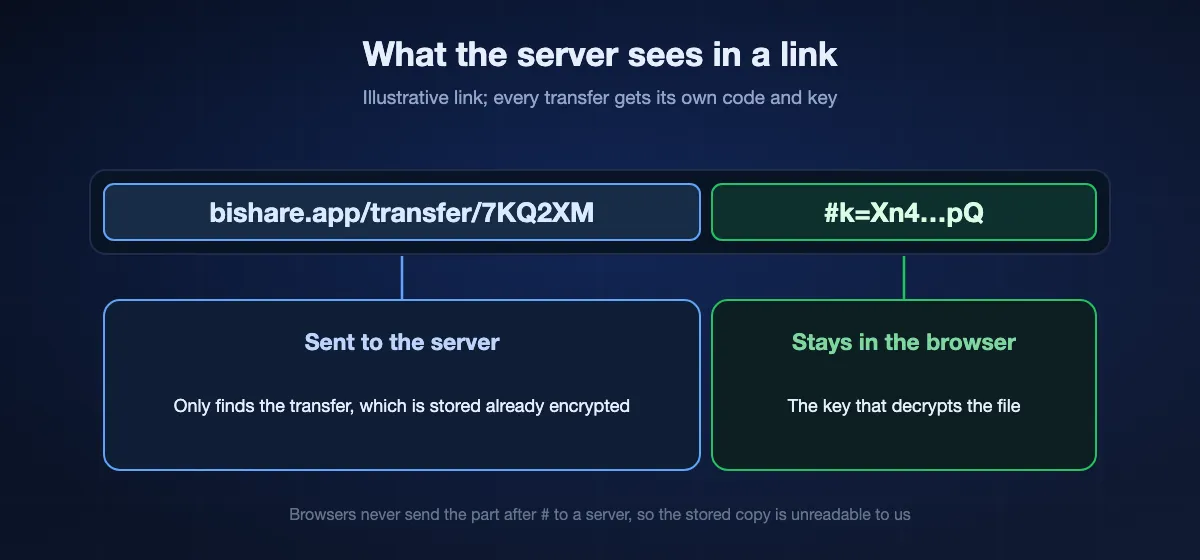
The link carries the decryption key after the # sign, which browsers never send to any server. Paste it in a chat, let the other person scan the QR, or read the six characters out loud — they type it at bishare.app/transfer and download.
- 04
They download in any browser — no app, no account
Chrome, Safari, Edge, Firefox, on any device. Large videos start playing before the download finishes. The link expires 6, 12 or 24 hours after you created it; tick the one-time option and it dies after the first download instead.

How big is big? What common files weigh
To pick the right route, it helps to know what you are actually sending:
| What it is | Typical size | Fits by email? | Fits a 100 GB link? |
|---|---|---|---|
| A full-resolution phone photo (JPEG / HEIC) | 2–8 MB | Yes, a few at a time | Yes, thousands |
| A RAW photo from a camera | 25–80 MB | No | Yes |
| One minute of 4K video from a phone | 350–450 MB | No | Yes |
| A one-hour 1080p recording | 4–10 GB | No | Yes |
| A one-hour 4K project export | 20–60 GB | No | Yes |
| A raw footage folder from a shoot | 100 GB–1 TB | No | Device to device, no limit |
Sending a large file by email, without the bounce
Mail was never built to move gigabytes, and the limit is enforced twice: once by the sender's provider and once by whoever receives it. Gmail publishes 25 MB for personal accounts. Because mail encodes attachments as text, a file close to the ceiling grows on the way and can be refused at around 20 MB of real content. The receiving server has its own cap, which you cannot see, so a 24 MB attachment that leaves your outbox can still be rejected by a company mail system an hour later.
- Gmail. Attach a file over the limit and Gmail replaces it with a Google Drive link by itself. That works, but the file now counts against the 15 GB shared with Gmail and Photos, and the recipient may need to request access if the sharing setting does not match.
- Outlook. The same substitution happens through OneDrive, which starts at 5 GB free for the whole account rather than per file.
- Any mail client. Paste a transfer link into the message instead. The mail stays a few kilobytes, passes every filter, and the file itself never touches a mail server.
A link also survives forwarding. An attachment re-uploads itself every time the message is passed on, which is how one 20 MB slide deck turns into several hundred megabytes inside a company's mail storage.
From a phone, where the file usually lives
Most large files start on a phone now — a long 4K clip, a screen recording, a folder of RAW shots. Two things go wrong there and neither is about size.
- The gallery re-encodes. Share sheets on both platforms are allowed to hand over a converted copy rather than the original. BIShare's iOS picker requests the current, unmodified version, so what you send is the file that is on the phone.
- The screen locks. A browser upload that is still running when the phone sleeps can stall. Keep the tab in front until the progress bar finishes, or send device to device over Wi-Fi, where there is nothing to upload in the first place.
Sending from a phone to a computer in the same room is covered step by step in transferring files from a phone to a PC; the other direction is in PC to phone.
Free file-transfer limits compared
Free tiers as published on each provider's own pricing or home page, read on 18 September 2026. The last column is the part the headline leaves out.
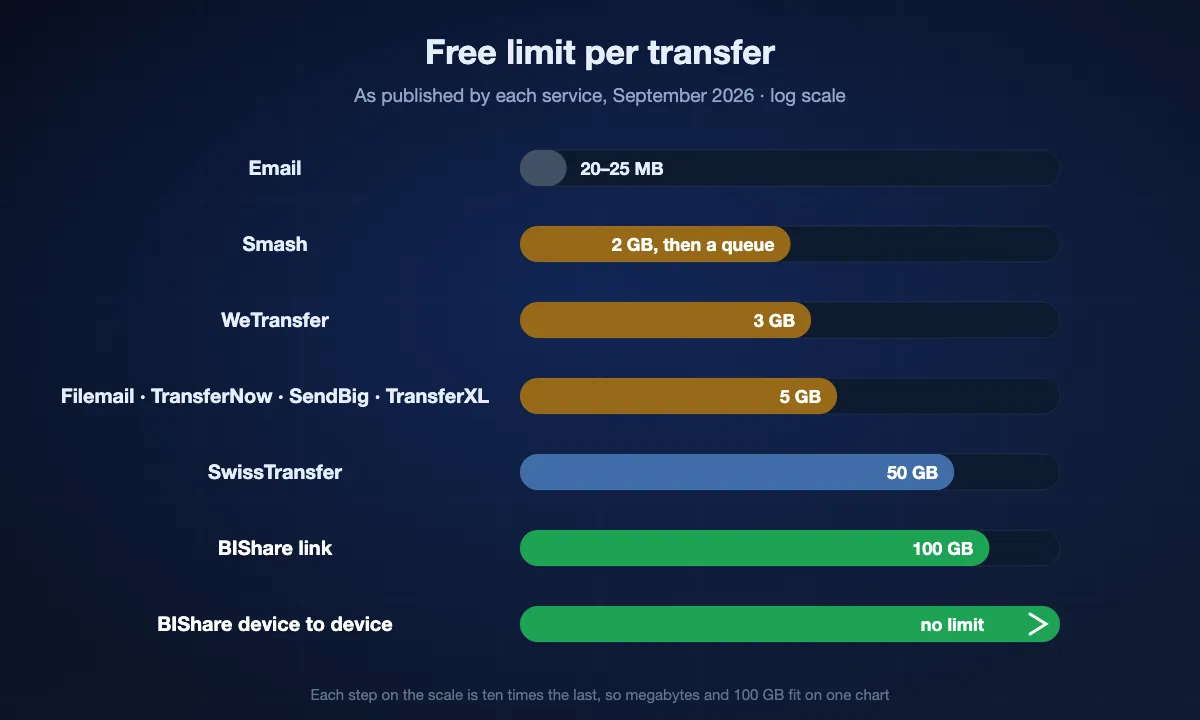
| Service | Free limit | Link expires | Account | The catch |
|---|---|---|---|---|
| Email (Gmail) | 25 MB per message | — | Yes | Encoding inflates the attachment; the recipient's server has its own cap |
| WeTransfer | 3 GB, or 10 transfers, per 30 days | 3 days | No | A monthly pool, not a per-send limit |
| Smash | No size cap | 7 days | No | Above 2 GB the transfer waits behind paying customers |
| pCloud Transfer | 5 GB per transfer | 7 days | No | 200 MB per single file inside that 5 GB |
| Filemail | 5 GB, 2 transfers a day | 7 days | No | End-to-end encryption only on Business plans; 30 days needs a paid plan |
| TransferNow | 5 GB per transfer | 7 days | No | Paid plans go to 250 GB; the free page is ad-supported |
| SendBig | 5 GB, or 30 GB signed in | 7 days, up to 30 | Optional | The longer expiry upsells a different product |
| TransferXL | 5 GB per transfer | 7 days | Yes | 10 transfers per day, and adverts for the recipient |
| SwissTransfer | 50 GB per transfer | 1 to 30 days (30 means 15 unless extended) | No | Files stay in Switzerland; not available in every country |
| Google Drive / OneDrive | Up to 15 GB / 5 GB of account storage | while it stays in your drive | Yes | Shared with mail and photos; 5 TB per file on Drive |
| BIShare | 100 GB per transfer | 6, 12 or 24 hours, or first download | No | Nothing is stored for later; 24 hours is the longest a link lives |
"The catch" is not an accusation — every line of it is printed on the provider's own pages. It is simply never the number in the heading. Where our own row loses: a BIShare link is gone within a day, so it is the wrong tool for a file a client may come back for next week.
Where your file is stored, and who can read it: transfer services compared on privacy
Size and price decide most choices. For contracts, medical scans or unreleased work, two other questions matter: where the file sits while it waits, and whether the service itself can open it.
| Service | Company | Where files are stored | End-to-end encryption | Password on the free plan |
|---|---|---|---|---|
| WeTransfer | WeTransfer B.V., Netherlands | In the EU when uploaded from the EU, otherwise in the US; no choice | Only on Enterprise | Yes, according to its pricing page |
| Smash | SMASH & CO, France | AWS in France, Ireland, the UK and Germany for European users; the US and Canada for others | No: TLS in transit, AES-256 at rest | Yes |
| TransferNow | Highsense SAS, France | The region nearest you; a fixed region only on Premium and up | No: server-side encryption, with your own password as the key on Premium | Yes |
| SwissTransfer | Infomaniak Network SA, Switzerland | Only in Switzerland | No: TLS in transit, AES-256 at rest | Yes |
| Filemail | Filemail AS, Norway | EU, Norway and the US; a choice only on Business and Enterprise | Only on Business and Enterprise | No, from the Pro plan up |
| Dropbox Transfer | Dropbox, Inc., USA | US data centres; other regions only for teams with 10 or more licences | No, not for transfers | No, paid plans only |
| BIShare | Cakra Budiman, Indonesia (open source) | Cloudflare R2 in the region nearest the sender: Western or Eastern Europe for uploads from Europe | Yes, on by default; the key stays in the link | No password; the link itself carries the key |
As stated on each provider's own privacy, security and help pages on 17 October 2026. End to end here means only the sender and the recipient hold the key; encryption in transit and at rest with the provider's own keys is not end to end.
Encrypted at rest is not the same as end to end
Every service here encrypts the connection and the stored file, but with keys the provider holds, so the provider can open the file when it has to: for a court order, a malware scan or after a breach. Only end-to-end encryption leaves the provider with ciphertext it cannot read. Of the seven, only BIShare does that on the free plan; WeTransfer and Filemail keep it for business tiers, and Dropbox does not offer it for transfers.
Where the server is, if GDPR matters to you
SwissTransfer keeps files in Switzerland, Smash and WeTransfer keep European uploads in the EU, and Dropbox stores in the US unless a team of ten or more pays for another region. A BIShare link made in Europe is stored in Cloudflare's Western or Eastern Europe region; Cloudflare is a US company, and because the file is encrypted end to end it holds only ciphertext.
A password and a key in the link do different jobs
A transfer password guards the download page while the provider still holds the readable file. A BIShare link carries the decryption key after the # sign, which browsers never send to a server, so the link is the key: send it through a channel you trust, and turn on one-time download if it might be forwarded.
How long will it take?
By link, the upload runs at your internet's upload speed — usually far below the download speed your plan advertises. What a 1 GB file takes:
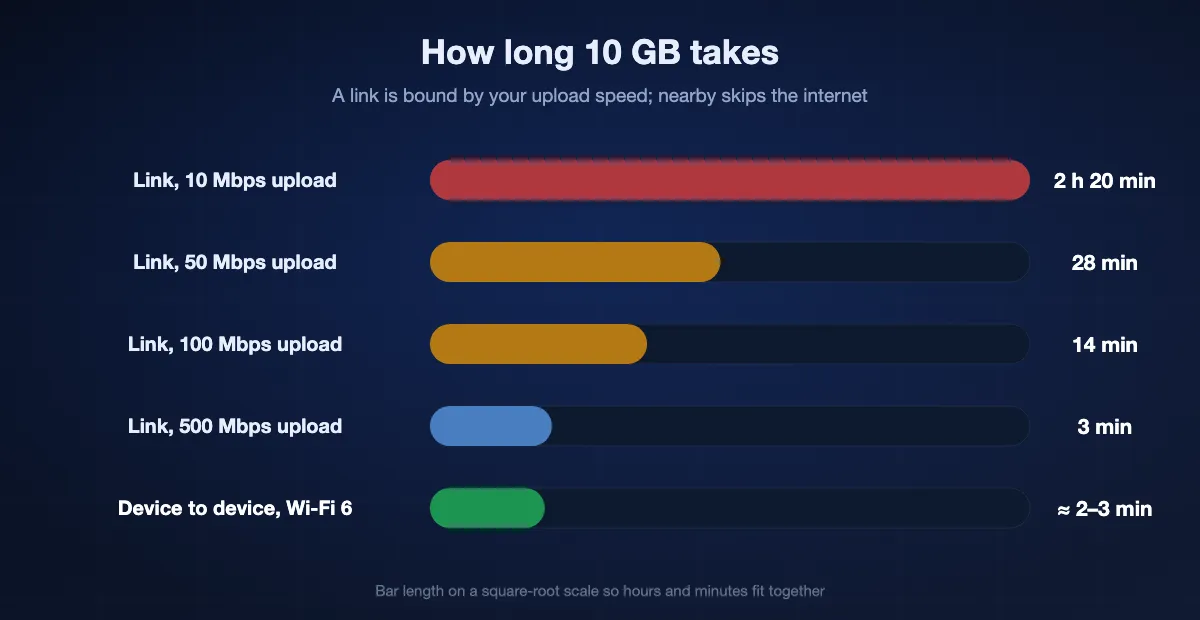
| Your upload speed | 1 GB by link takes about | 10 GB takes about |
|---|---|---|
| 10 Mbps (typical cable or 4G) | 14 minutes | 2 h 20 min |
| 50 Mbps (fibre, good 5G) | 3 minutes | 28 minutes |
| 100 Mbps | 1.5 minutes | 14 minutes |
| 500 Mbps | 17 seconds | 3 minutes |
Nearby, the same file skips the internet: 40–50 MB/s on Wi-Fi 5, 70–110 MB/s on Wi-Fi 6, so 1 GB lands in 10–30 seconds and 10 GB in a few minutes. That is why anything over 20 GB is worth walking across the room for.
Every way to send a large file, and when each fits
A BIShare link (up to 100 GB)
The default for anyone who is not next to you. Encrypted before upload, no account, no ads, expires in 6, 12 or 24 hours. Resumes an interrupted upload. Best for: a video for a client, a folder of photos for family, a backup to your own other computer.
BIShare device to device (any size)
Same Wi-Fi or a phone hotspot; the file never touches the internet. No size limit, local-network speed, works with mobile data off. Best for: a shoot's raw footage, a 200 GB project, anything you would otherwise put on a USB stick.
A cloud drive (Google Drive, OneDrive, iCloud, Dropbox)
Fine when the file should live somewhere permanently and the other person has the same service. Costs quota, needs accounts, and the upload plus download doubles the time. Not encrypted end to end. For a team that keeps working files there, compare the file-sharing collaboration apps on security and price.
Compressing or splitting the file
ZIP saves little on photos and video, which are already compressed. Splitting into email-sized parts works but is fiddly on the receiving side. Useful only when the recipient can accept nothing but email attachments.
FTP, SFTP or a NAS
Reliable for people who already run a server. Needs setup on both ends and a public address or VPN. Overkill for a one-off.
A USB drive or an external SSD
Still the fastest for a terabyte, and it works with no network at all. Slow to organise, easy to lose, and you have to meet — which is exactly the case BIShare's nearby route replaces.
Large files between specific devices
- iPhone to a Windows PC
- Android to an iPhone
- iPhone to Android
- Mac to a Windows PC
- Phone to PC, any pair
- Without any internet at all
Each guide covers the pairing, the permissions that trip people up, and what to expect for speed.
When a big transfer fails halfway
The larger the file, the longer the window in which something can interrupt it. The fix depends on which half broke.
- The upload stopped. Pick the same file again on bishare.app/transfer. The parts already stored are recognised and the upload continues from the last one instead of starting over.
- The link expired. Links last 6, 12 or 24 hours and one-time links disappear after the first completed download. Both are deliberate; send a fresh link.
- The download died near the end. Browsers restart a download rather than resume it. On a shaky connection, sending device to device over the same Wi-Fi removes both the upload and the download.
- The file type was refused. Executable formats — .exe, .bat, .cmd, .sh, .msi, .scr, .pif, .com — are rejected for link transfers. Put them in a zip, or send them device to device.
- Wi-Fi dropped mid-transfer. A device-to-device transfer that loses the network keeps what arrived and resumes from that point when the connection returns.
What happens to your file
- By link: the file is encrypted in your browser with a key generated on your device. The key travels in the link after the # sign, which browsers never send to a server, so our storage holds only ciphertext it cannot open — and the storage is in the region nearest you.
- Links expire 6, 12 or 24 hours after creation and the file is deleted with them. Turn on one-time and the file is deleted the moment the first download completes.
- Nearby: the file goes directly from one device to the other, encrypted for that transfer, and is stored nowhere but on the receiving device.
- No account or email address to send, no ad SDK, no paid tier for transfers. The apps and the web client are open source; the encryption format is published and the same on every platform.
Tips for very large transfers
Use the nearby route above 20 GB when you can
Uploading 50 GB at 50 Mbps takes over two hours; on the same Wi-Fi it takes minutes. If the other person is reachable, walk over.
Keep the tab open; a dropped connection is not a restart
Each 50 MB part is retried by itself, so a Wi-Fi hiccup costs seconds, not the whole upload. Closing the page does cancel it — the encryption key lives only there — so for a 50 GB upload, leave the laptop plugged in and awake.
Send a folder as one transfer
Drop the whole folder in. It is sent as a single bundle, so the recipient gets one download and one link instead of a hundred.
Use a hotspot when the network is the problem
Café, hotel and office Wi-Fi often isolate devices from each other. A phone hotspot puts both devices on a network you control, and the nearby route works with mobile data switched off.
Prefer 5 GHz Wi-Fi or a cable on the receiving side
2.4 GHz Wi-Fi tops out around 3–8 MB/s. Move both devices to the 5 GHz network, or plug the PC into the router, and the same transfer runs five to ten times faster.
Email vs WeTransfer vs BIShare for big files
| WeTransfer (free) | BIShare | ||
|---|---|---|---|
| No size limit nearby | |||
| End-to-end encrypted | |||
| Works with no internet | |||
| No ads, no download-page wall | |||
| Free to send | |||
| Sends up to 100 GB by link | |||
| No account needed |
Sending large files free: FAQ
How do I send large files for free?
Open bishare.app/transfer in any browser, drop the file in and share the link it gives you — up to 100 GB per transfer, no account on either side, encrypted before upload. If the other device is on the same Wi-Fi, install BIShare on both and send directly, with no size limit at all.
How do I upload a file to share it with someone?
Open bishare.app/transfer, drop the file or folder in and wait for the upload; you get a link, a QR code and a 6-character code to send. The recipient opens the link in any browser and downloads, with no account. The file is encrypted in your browser before it leaves, and the link expires after 6, 12 or 24 hours.
What is the maximum file size I can send?
100 GB per transfer through a link, free. Device to device over your own Wi-Fi there is no cap: the limit is the free space on the receiving device, so a 500 GB folder is an ordinary transfer. You can send as many transfers as you like.
How can I send a 10 GB file for free?
With a BIShare link: drop the 10 GB file at bishare.app/transfer and share the link. At 50 Mbps upload it takes about half an hour; at 100 Mbps, about 15 minutes. Nearby over Wi-Fi 5 it takes 3–4 minutes with nothing uploaded. WeTransfer's free plan stops at 3 GB, Filemail and TransferNow at 5 GB.
How do I send a file larger than 25 MB by email?
You do not attach it — Gmail and Outlook refuse anything much above 20–25 MB. Upload it to bishare.app/transfer and paste the link into the email instead. The recipient clicks it and downloads in their browser; the link works for 6, 12 or 24 hours.
Does the person receiving need an app or an account?
No. They open the link in Chrome, Safari, Edge or Firefox on any device and download. Nothing to install and nothing to sign up for on their side. Installing BIShare only matters if you two want the faster device-to-device route.
How long does the download link stay active?
6, 12 or 24 hours from the moment you created it, whichever you picked when sending (a link made in the app lasts 24); then the file is deleted. If you switch on the one-time option, the file is deleted as soon as the first download completes, so a link forwarded later leads nowhere.
Is it safe to send large files this way?
Yes. The file is encrypted in your browser before it uploads, with a key that lives only in the link after the # sign — browsers never send that part to a server, so what we store cannot be opened by us or by anyone who reaches our storage. Nearby transfers never touch the internet at all. We ask for no name, email or account.
Can I send a whole folder?
Yes. Drop the folder onto bishare.app/transfer or pick it in the app; it is sent as one bundle with the folder structure kept, and the recipient gets a single download. Nearby, folders of any size go across as they are.
Will my video or photos lose quality?
No. BIShare moves the exact bytes — no recompression, no resizing, no re-encoding. A 4K ProRes export or a HEIC photo arrives identical to the original, which is not true of email, most chat apps or social media.
What happens if the upload is interrupted?
A dropped connection is retried part by part — the file goes up in 50 MB pieces, and only the piece that failed is sent again. If you close the page or cancel, the encrypted upload stops and its unfinished parts are removed from our storage immediately; start it again when you are back online.
Can I send files bigger than 100 GB?
By link, 100 GB is the ceiling per transfer, so split a bigger job into two links. Device to device there is no ceiling: put both devices on the same Wi-Fi or a hotspot and send the whole thing at local speed.
Is BIShare really free — no trial, no paid tier?
Yes. Sending has no paid plan and nothing behind a paywall; the link limit of 100 GB and the unlimited nearby route are the whole product. The source code is public, so you can check what it does.
How do I send an 8 GB file for free?
By link: open bishare.app/transfer, drop the file in and share the link — 8 GB is well inside the 100 GB per transfer, and no account is asked for. Most other free tiers stop at 5 GB, so an 8 GB file is exactly the size that gets refused by them. If both devices are on the same Wi-Fi, sending device to device avoids the upload entirely and finishes in a couple of minutes.
Can I really send 100 GB free?
Yes, that is the per-transfer limit on a free BIShare link, and there is no paid tier that raises it. The practical question is time rather than permission: 100 GB at a 40 Mbps upload speed is about six hours, and the connection has to hold. Over the same Wi-Fi there is no upload and no ceiling.
Why does a transfer site reject my file when I am under its limit?
Usually one of three reasons. The limit is a monthly pool and you have used it, as with WeTransfer's 10 transfers or 3 GB per 30 days. Or there is a second, smaller limit per file inside the headline figure, as with pCloud Transfer's 200 MB. Or the file type is blocked — executables are refused by most services, ours included.
What is the fastest way to send huge files?
Not uploading it. On one Wi-Fi network, a device-to-device transfer runs at 40 to 110 MB/s on current hardware, so 10 GB lands in two or three minutes. Any upload-based service is limited by your upstream bandwidth, which on most home connections is a small fraction of the download speed.
Which file transfer services store files in Europe?
SwissTransfer stores files only in Switzerland, Smash keeps European users' files in France, Ireland, the UK and Germany, and WeTransfer stores files in the EU when they are uploaded from the EU. Filemail and TransferNow let paying customers choose a region. A BIShare link made in Europe is stored in Cloudflare's European region, encrypted end to end.
Send your first big file in seconds
Free, open source, no account. Send up to 100 GB by link right now in your browser — or any size at all when you are on the same Wi-Fi.