
بديل WeTransfer
أفضل بدائل WeTransfer المجانية
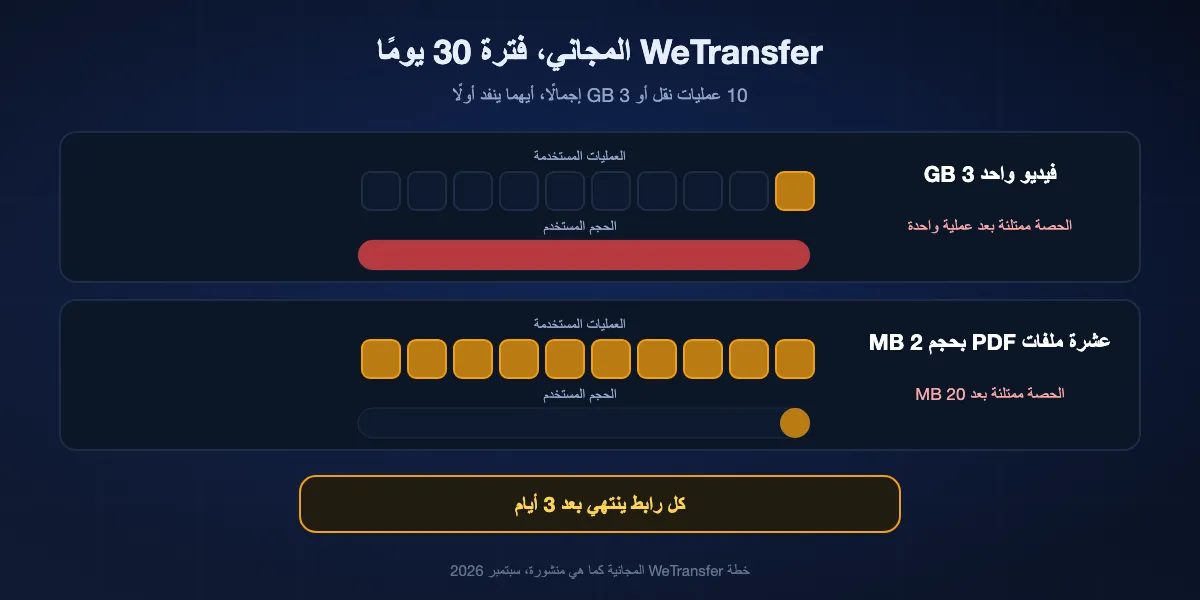
كانت خطة WeTransfer المجانية الخيار السهل الذي يلجأ إليه الجميع. في 2026 أصبحت حصة شهرية: عشر عمليات نقل أو 3 GB إجمالًا، أيهما ينفد أولًا، وكل رابط يختفي بعد ثلاثة أيام. كثيرون لا ينتبهون لذلك إلا حين يستهلك فيديو واحد بحجم 3 GB الشهر كله. الخبر الجيد أن البدائل سارت في الاتجاه المعاكس، بخطط مجانية ترسل 50 GB أو تحتفظ بالملفات لأسابيع أو تشفّرها قبل أن تغادر المتصفح. يشرح هذا الدليل بالضبط ما تحسبه خطة WeTransfer المجانية، ويرتّب ثمانية بدائل حسب ما يتقنه كل منها، ويساعدك على الاختيار حسب المهمة: تسليم عمل لعميل، أو مستند خاص، أو فيديو ضخم، أو ملف لشخص في الغرفة نفسها. BIShare ضمن القائمة؛ فهو يرسل حتى 100 GB عبر رابط، مشفّرة على جهازك، أو مباشرة إلى جهاز قريب دون أي رفع. مجاني، مفتوح المصدر، بلا حساب.
BIShare منتجنا. وليس الخيار المناسب لكل مهمة أدناه، خصوصًا حين يجب أن يبقى الملف متاحًا لأسابيع، والترتيب يوضح ذلك.
إجابة سريعة
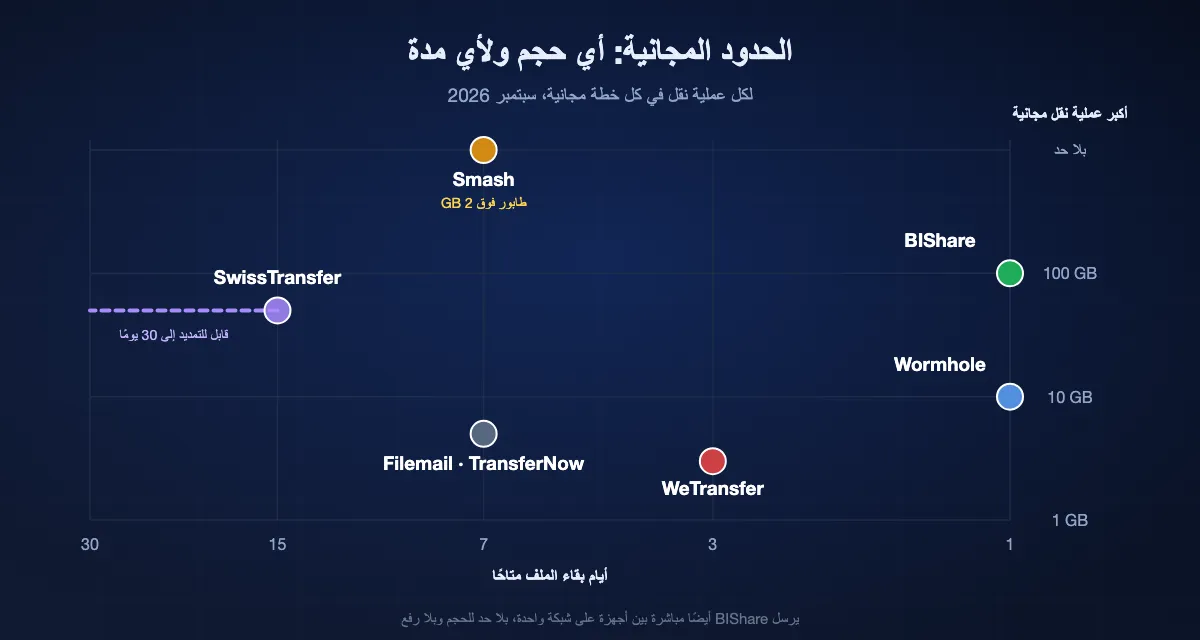
- أسخى حد مجاني مع تخزين طويل: SwissTransfer يرسل حتى 50 GB ويحتفظ بالملفات 15 يومًا، قابلة للتمديد إلى 30.
- بلا حد للحجم إطلاقًا: Smash يقبل أي حجم في خطته المجانية، لكن عمليات النقل الأكبر من 2 GB تنتظر في طابور خلف المشتركين المدفوعين؛ وتبقى الملفات 7 أيام.
- خصوصية منذ التصميم، من المتصفح: Wormhole يشفّر الملفات قبل الرفع، حتى 10 GB، ويحذفها بعد 24 ساعة.
- ملفات كبيرة، مشفّرة على جهازك، بلا حساب: روابط BIShare تحمل حتى 100 GB لمدة 6 أو 12 أو 24 ساعة، والأجهزة على الشبكة نفسها ترسل مباشرة دون حد للحجم.
- ملفات مكانها مجلد لا رابط: Proton Drive يشارك روابط مشفّرة من طرف إلى طرف بكلمة مرور وتاريخ انتهاء من مساحة مجانية قدرها 5 GB.
- تحب WeTransfer وتحتاج فقط إلى المزيد: خطة Ultimate ترسل حتى 1 TB في العملية الواحدة، مع مدة صلاحية مخصّصة.
ما تسمح به خطة WeTransfer المجانية فعلًا في 2026
تصف WeTransfer خطتها المجانية بأنها حتى 10 عمليات نقل أو 3 GB إجمالًا خلال أي فترة متجددة مدتها 30 يومًا. العبارة قصيرة، وعواقبها سهلة التجاهل.
حصة شهرية وليست حدًا لكل ملف
يمكن أن تصل عملية النقل الواحدة إلى 3 GB، لكن هذه الـ3 GB هي أيضًا الحصة الكاملة لثلاثين يومًا. أرسل فيديو كبيرًا في أول الشهر وستُحظر العملية التالية حتى تتقدم الفترة؛ وأرسل عشرة ملفات PDF صغيرة وستعلق بالقدر نفسه، حتى لو كان مجموعها 20 MB.
الروابط تبقى ثلاثة أيام
تنتهي عمليات النقل المجانية بعد ثلاثة أيام، ولا يمكن تمديدها دون خطة مدفوعة. المستلم المسافر أو الغائب في عطلة طويلة قد يعود ليجد الرابط منتهيًا، فيضطر المرسل إلى إعادة الإرسال واستهلاك خانة أخرى من الحصة.
الميزات الإضافية في الخطط المدفوعة
تواريخ الانتهاء المخصّصة جزء من خطة Ultimate، أما كلمة المرور فيمكن وضعها في أي خطة، ومستلمو عمليات النقل المجانية يرون إعلانات WeTransfer في صفحة التنزيل. ترفع خطة Starter الحصة إلى 300 GB كل 30 يومًا، وتلغي Ultimate العدّ الشهري وتسمح بحتى 1 TB في العملية الواحدة.
لماذا بدأ الناس يبحثون عن بديل لـWeTransfer
الحدود جزء من القصة فقط. ثلاثة تغييرات خلال العامين الأخيرين دفعت المستخدمين العاديين إلى مقارنة خدمات أخرى.
مالك جديد وخطة مجانية جديدة
اشترت Bending Spoons، الشركة الإيطالية التي تقف وراء تطبيقات مثل Evernote، خدمة WeTransfer في 2024. وبعد الاستحواذ أُعيد تصميم الخطة المجانية لتصبح الحصة الحالية، أي 10 عمليات نقل أو 3 GB كل 30 يومًا، بدلًا من الحد الأبسط لكل عملية الذي اعتاده كثيرون.
بند شروط يوليو 2025
في يوليو 2025 نشرت WeTransfer شروطًا جديدة تضمنت ترخيصًا واسعًا على المحتوى المرفوع وإشارة إلى تحسين نماذج تعلّم الآلة. وبعد موجة انتقادات من المصورين والمصممين، أعادت الشركة صياغة البند في 15 يوليو 2025، فقصرت الترخيص على تشغيل الخدمة وتحسينها وحذفت عبارة تعلّم الآلة. تركت الحادثة كثيرًا من المبدعين يراجعون ما وافقوا عليه غير ذلك.
إعلانات أمام عملائك
في الخطة المجانية، يرى من ينزّل ملفك إعلانات WeTransfer بملء الصفحة. وحين يكون الملف ملف أعمال أو عقدًا أو تسليمًا لعميل، فهذا أول انطباع يأخذه عن عملك.
ثمانية بدائل لـWeTransfer مرتّبة
BIShare
الأفضل إجمالًا: روابط كبيرة مشفّرة، مع نقل مباشر حين تكونان قريبين
المتصفح وiPhone وAndroid وWindows وMac وLinux · مفتوح المصدر (Apache 2.0) · روابط حتى 100 GB لمدة 6 أو 12 أو 24 ساعة · مباشر على شبكة واحدة بلا حد للحجم · تشفير على جهازك · بلا حساب ولا إعلانات
يعمل BIShare مثل WeTransfer حين يكون المستلم بعيدًا: افتح bishare.app/transfer أو التطبيق، وأضف الملفات، وشارك الرابط أو رمز QR أو الرمز المكوّن من 6 أحرف. الفرق فيما يحدث قبل الرفع. يُشفَّر الملف على جهازك، وينتقل المفتاح في جزء الرابط الذي يلي علامة #، وهو جزء لا ترسله المتصفحات إلى أي خادم، لذا فما يخزّنه BIShare غير مقروء بالنسبة إليه. ينزّل المستلم الملف من أي متصفح دون تسجيل دخول أو إعلانات. وحين يكون الشخص الآخر في المكتب نفسه أو على شبكة Wi-Fi نفسها، يتجاوز التطبيق الإنترنت كليًا ويرسل من جهاز إلى جهاز بسرعة الشبكة المحلية دون حد للحجم.
انتبه إلى: تتوقف الروابط بعد 6 أو 12 أو 24 ساعة، وهي مدة أقصر من أيام WeTransfer الثلاثة، فهو أداة تسليم لا مكان لترك الملفات. ولا توجد صفحة تنزيل تحمل علامتك التجارية لأعمال العملاء.
SwissTransfer
أفضل حد مجاني مع تخزين طويل
المتصفح وتطبيقات iOS وAndroid · مجاني · حتى 50 GB لكل عملية · حفظ 15 يومًا قابل للتمديد إلى 30 · بلا حساب · تديره Infomaniak، شركة استضافة سويسرية
SwissTransfer أقرب ما يكون إلى WeTransfer القديم السخي: اسحب الملفات، واحصل على رابط أو أرسله بالبريد، وينزّل المستلم دون حساب. خمسون غيغابايت لكل عملية تكفي تقريبًا لأي مشروع فيديو، وتبقى الملفات متاحة 15 يومًا، مع عرض بالتمديد إلى 30 يصل إلى بريد المرسل قبل انتهائها. ولمن يريد أن يتولى مزوّد أوروبي بياناته، فالمشغّل السويسري جزء من الجاذبية.
انتبه إلى: لا توثّق Infomaniak تشفيرًا داخل المتصفح قبل الرفع، لذا يستطيع المزوّد تقنيًا الوصول إلى الملفات المخزّنة. ورفع 50 GB يستغرق ما يحتاجه اتصالك مهما كانت الخدمة.
Smash
الأفضل حين يتجاوز الملف كل الحدود المجانية
المتصفح وiOS وAndroid · خطة مجانية بلا حد للحجم · عمليات النقل فوق 2 GB تنتظر خلف الخطط المدفوعة · حفظ 7 أيام · كلمة مرور متاحة مجانًا · بلا حساب للإرسال
Smash الخدمة المعروفة الوحيدة التي لا تضع خطتها المجانية سقفًا لحجم النقل. تُرسل العمليات الصغيرة فورًا؛ وكل ما يزيد على 2 GB ينضم إلى طابور خلف عملاء Pro وTeam، ما قد يضيف انتظارًا ملحوظًا في أوقات الذروة. تبقى الملفات سبعة أيام، ويمكن إضافة كلمة مرور في الخطة المجانية، ولا يوجد عدّ شهري لعمليات النقل.
انتبه إلى: الطابور يجعل مواعيد وصول الملفات الكبيرة غير متوقعة. يصف Smash تشفيره بأنه أثناء النقل وأثناء التخزين؛ ولا يوثّق تشفيرًا في متصفحك قبل الرفع.
Wormhole
أفضل رابط خاص من المتصفح، حتى 10 GB
أي متصفح · مجاني · حتى 10 GB · تشفير من طرف إلى طرف داخل المتصفح · ينتهي الرابط بعد 24 ساعة · الملفات فوق 5 GB تنتقل من نظير إلى نظير
يشفّر Wormhole الملفات في متصفحك قبل رفع أي شيء، والمفتاح موجود في الرابط، لذا لا تستطيع الخدمة قراءة ما تخزّنه. تبقى الملفات حتى 5 GB على خوادمه 24 ساعة؛ أما الأكبر فتُبث مباشرة من متصفحك إلى متصفح المستلم، ما يعني أن تبقى علامة التبويب مفتوحة حتى ينتهي التنزيل. لعقد موقّع أو صورة بطاقة هوية تُرسل من حاسوب مستعار، يصعب التفوق عليه.
انتبه إلى: السقف 10 GB، والروابط تبقى يومًا واحدًا، وعمليات النقل فوق 5 GB تتطلب بقاء المتصفحين متصلين في الوقت نفسه.
Proton Drive
الأفضل حين يجب أن يبقى الملف في مجلد مشفّر
الويب وWindows وMac وiOS وAndroid · مساحة مجانية 5 GB · تشفير من طرف إلى طرف · روابط مشاركة بكلمة مرور وتاريخ انتهاء اختياريين · يتطلب حساب Proton
Proton Drive تخزين سحابي لا خدمة نقل، وهذا يناسب ملفات تريد الاحتفاظ بها ومشاركتها مرارًا: ملف أعمال، أو مجموعة عقود، أو مجلد يعود إليه العميل. كل شيء يُشفَّر على جهازك، ويمكن حماية الروابط العامة بكلمة مرور وجعلها تنتهي في تاريخ تختاره. ولا يحتاج المستلم إلى حساب Proton للتنزيل.
انتبه إلى: يحتاج المرسل إلى حساب، ومساحة 5 GB المجانية تمتلئ بسرعة بالفيديو. وهو أبطأ من خدمة نقل مخصّصة للملفات الكبيرة لمرة واحدة.
Filemail
الأفضل لبضع عمليات نقل بحجم 5 GB مع تنزيلات غير محدودة
المتصفح وتطبيقات سطح المكتب والجوال · مجانًا: 5 GB لكل عملية · عمليتان كل 24 ساعة · حفظ 7 أيام · تنزيلات غير محدودة · بلا تسجيل
خدمة Filemail المجانية بسيطة: حتى 5 GB لكل عملية، بلا تسجيل، وتبقى الملفات أسبوعًا دون حد لعدد مرات التنزيل أو عدد من ينزّلها. وهذا يجعلها عملية لإرسال ملف واحد إلى قائمة بريدية كاملة. وترفع الخطط المدفوعة حدود الحجم والتخزين للاستخدام التجاري.
انتبه إلى: عمليتان مجانيتان فقط كل 24 ساعة، و5 GB لكل عملية، ولا يوجد تشفير موثّق داخل المتصفح قبل الرفع.
TransferNow
خطة مجانية متينة بحجم 5 GB بلا عدّ شهري
المتصفح · مجانًا: 5 GB لكل عملية · حفظ 7 أيام · لا يوجد حد شهري منشور لعمليات النقل · الحساب اختياري
يغطي TransferNow ما تغطيه خطة WeTransfer المجانية بحد أكبر لكل عملية وعمر أطول لكل رابط: 5 GB متاحة سبعة أيام. يرسل عبر رابط أو بريد إلكتروني، وصفحة التنزيل واضحة. ولعمليات النقل المتوسطة المتكررة، يجنّبك حصة الثلاثين يومًا في WeTransfer.
انتبه إلى: 5 GB ما زالت صغيرة للفيديو الخام، والأحجام الأكبر وكلمات المرور والتخزين الأطول تحتاج إلى خطة مدفوعة.
WeTransfer بخطة مدفوعة
الأفضل إن كان عملاؤك يتوقعون رابط WeTransfer
المتصفح والتطبيقات · Starter: 10 عمليات أو 300 GB كل 30 يومًا · Ultimate: عمليات غير محدودة حتى 1 TB لكل منها، كلمات مرور، صلاحية مخصّصة · بلا إعلانات
تبقى وكالات واستوديوهات كثيرة مع WeTransfer لأن العملاء يعرفون رسالته وصفحة تنزيله. وإن كانت هذه الألفة مهمة، فالخطط المدفوعة تعالج معظم مشكلات الخطة المجانية: ترفع Starter الحجم الشهري إلى 300 GB، وتلغي Ultimate عدّ العمليات وترفع حجم العملية الواحدة إلى 1 TB وتضيف تواريخ الانتهاء المخصّصة.
انتبه إلى: تدفع كل شهر مقابل ما تقدمه بدائل عدة مجانًا، وما زالت Starter تعدّ العمليات. ولا تُشفَّر الملفات داخل المتصفح قبل الرفع.
نظرة سريعة
| الميزة | BIShare | WeTransfer (مجاني) | SwissTransfer | Smash | Wormhole | Filemail |
|---|---|---|---|---|---|---|
| 50 GB أو أكثر في عملية مجانية واحدة | ||||||
| حفظ الملفات أسبوعًا أو أكثر | ||||||
| تشفير داخل المتصفح قبل الرفع | ||||||
| خيار نقل مباشر بين الأجهزة | ||||||
| مفتوح المصدر |
الخطط المجانية كما هي موثّقة في سبتمبر 2026. BIShare: روابط 100 GB لمدة 6 أو 12 أو 24 ساعة، ونقل مباشر بلا حد للحجم حين تتشارك الأجهزة شبكة واحدة. WeTransfer المجاني: 10 عمليات أو 3 GB إجمالًا كل 30 يومًا، وروابط لمدة 3 أيام. SwissTransfer: 50 GB، و15 يومًا قابلة للتمديد إلى 30. Smash: بلا حد للحجم، والعمليات فوق 2 GB في طابور، و7 أيام. Wormhole: 10 GB، و24 ساعة؛ والملفات فوق 5 GB تنتقل من نظير إلى نظير ما دام المتصفحان مفتوحين. Filemail: 5 GB، وعمليتان كل 24 ساعة، و7 أيام. يشير صف التشفير إلى الخدمات التي توثّق تشفيرًا داخل المتصفح قبل الرفع؛ أما البقية فتصف التشفير أثناء النقل وعلى خوادمها.
أي بديل لأي مهمة
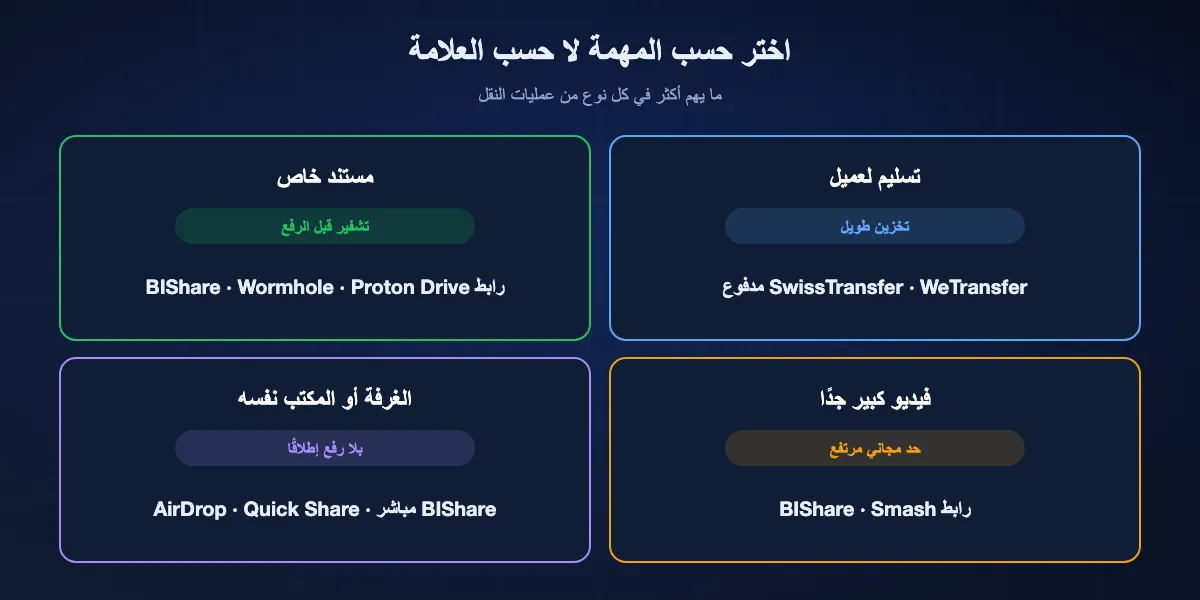
معظم الناس يحتاجون إلى اثنين من هذه لا إلى واحد: خدمة روابط للبعيدين، ووسيلة أسرع للزملاء في المبنى نفسه.
تسليم مشروع منجز لعميل
اختر خدمة تحتفظ بالملف مدة كافية لعميل يفتح بريده متأخرًا: SwissTransfer لحتى 50 GB ومن أسبوعين إلى أربعة، أو خطة WeTransfer المدفوعة إن كان العميل يتوقع هذا الاسم. رابط BIShare يصلح أيضًا، لكن اضبط تذكيرًا لأنه يبقى 6 أو 12 أو 24 ساعة.
إرسال عقد أو هوية أو ملف طبي
استخدم خدمة تشفّر داخل المتصفح حتى لا يملك المزوّد نسخة مقروءة أبدًا: Wormhole لحتى 10 GB، أو رابط BIShare لما هو أكبر، أو Proton Drive إن كان يجب أن يبقى المستند في مجلد محمي.
نقل فيديو كبير جدًا
فوق 50 GB تضيق الخيارات المجانية إلى BIShare، بروابط حتى 100 GB ونقل مباشر غير محدود على الشبكة نفسها، وSmash الذي لا سقف لحجمه لكنه يضع عمليات النقل المجانية الكبيرة في طابور. وإن كان الشخصان على شبكة واحدة، فتجاوز الرفع كليًا.
المشاركة مع شخص في الغرفة أو المكتب نفسه
رفع ملف إلى خادم كي ينزّله زميل يجلس على بُعد مكتبين يهدر الوقت وسعة الإنترنت. النقل المباشر عبر BIShare، أو AirDrop بين أجهزة Apple، أو Quick Share بين Android وWindows ينقله عبر الشبكة المحلية في ثوانٍ.
إرسال ملف كبير عبر BIShare
افتح صفحة النقل أو التطبيق
ادخل إلى bishare.app/transfer من أي متصفح، أو افتح BIShare على هاتفك أو حاسوبك. لا حاجة إلى حساب ولا إلى بريد إلكتروني.
أضف الملفات وأنشئ الرابط
اسحب ملفات أو مجلدات حتى 100 GB. تُشفَّر على جهازك أثناء رفعها، وتحصل على رابط ورمز QR ورمز من 6 أحرف.
أرسل الرابط، أو أرسل مباشرة
الصق الرابط في بريد أو محادثة؛ وينزّل المستلم من أي متصفح خلال 24 ساعة. وإن كان على شبكة Wi-Fi نفسها ولديه التطبيق، فاختر جهازه بدلًا من ذلك لتنتقل الملفات مباشرة دون أي رفع.
لماذا تبدو عمليات النقل الكبيرة بطيئة وكيف تسرّعها
كل خدمة تعتمد على الروابط، ومنها WeTransfer، تتقيد أولًا بسرعة رفع المرسل ثم بسرعة تنزيل المستلم. ونادرًا ما تهم الخدمة بقدر ما يهم الاتصال.
الرفع هو عنق الزجاجة
اتصالات المنازل كثيرًا ما ترفع أبطأ بكثير مما تنزّل. بسرعة رفع 20 Mbit/s يستغرق رفع مجلد بحجم 10 GB أكثر من ساعة؛ وبسرعة 100 Mbit/s نحو 15 دقيقة. وضغط آلاف الملفات الصغيرة في أرشيف واحد قبل الإرسال يوفّر الوقت أيضًا.
الطوابير وخفض السرعة
بعض الخطط المجانية تبطئ عمليات النقل الكبيرة عمدًا: Smash يضع العمليات المجانية فوق 2 GB في طابور خلف العملاء الدافعين. وإن كان هناك موعد نهائي، فالخدمة بلا طابور أو النقل المباشر أكثر قابلية للتوقع.
تجاوز الرفع حين تستطيع
على شبكة Wi-Fi نفسها يعمل النقل المباشر بسرعة الشبكة المحلية، وهي عادة عشرات الميغابايتات في الثانية على الأجهزة الحالية، فيعبر ملف بحجم 10 GB في دقائق قليلة بدل انتظار رفع ثم تنزيل.
حين لا يعمل رابط النقل
الرابط يقول إنه انتهى
كل خدمة تحذف الملفات وفق جدول: من 6 إلى 24 ساعة في BIShare و24 ساعة في Wormhole، و3 أيام في WeTransfer المجاني، و7 أيام في Smash وFilemail وTransferNow، ومن 15 إلى 30 يومًا في SwissTransfer. اطلب رابطًا جديدًا، واختر للمستلمين البطيئين خدمة بتخزين أطول.
WeTransfer لا يسمح لك بالإرسال
فترة الثلاثين يومًا في الخطة المجانية ممتلئة، إما بعشر عمليات أو بـ3 GB إجمالًا. انتظر حتى تخرج العمليات القديمة من الفترة، أو أرسل هذا الملف بخدمة أخرى.
شركة المستلم تحظر التنزيل
جدران الحماية في الشركات تحظر أحيانًا نطاقات خدمات نقل الملفات. اطلب من المستلم المحاولة من هاتفه أو من اتصال منزله، أو استخدم خدمة يسمح بها قسم تقنية المعلومات لديه أصلًا.
تنزيل ضخم يفشل مرارًا
استخدم اتصالًا مستقرًا، وامنع الجهاز من السكون، ونزّل الملفات التي تتجاوز بضعة غيغابايتات من متصفح حاسوب لا من الهاتف. وتقسيم المشروع إلى عدة عمليات نقل يقلل ما يجب إعادته أيضًا.
رسالة الرابط لم تصل أبدًا
إشعارات خدمات النقل تقع كثيرًا في مجلد البريد العشوائي أو العروض. انسخ الرابط بنفسك وأرسله عبر تطبيق محادثة أو من بريدك الخاص.
ما مدى خصوصية هذه الخدمات؟
كلها تستخدم اتصالات مشفّرة. الفرق الحقيقي هو هل تستطيع الشركة التي تخزّن ملفك أن تفتحه.
تشفير قبل الرفع
روابط BIShare وWormhole وProton Drive تشفّر الملفات على جهازك، ولا يصل المفتاح إلى خوادمها أبدًا. أي اختراق أو طلب قانوني يستهدف المزوّد لن يكشف إلا بيانات غير مقروءة.
تشفير على خوادم المزوّد
WeTransfer وSwissTransfer وSmash وFilemail وTransferNow تحمي الملفات أثناء النقل والتخزين، لكنها تدير المفاتيح بنفسها. هذا مقبول لمعظم الملفات اليومية؛ لكن فكّر مرتين مع وثائق الهوية والسجلات الصحية والأعمال غير المنشورة.
بلا رفع على الإطلاق
النقل المباشر بين أجهزة على الشبكة نفسها، عبر BIShare أو AirDrop أو Quick Share، لا يضع الملف أبدًا على خادم طرف ثالث، فيُسقط مسألة التخزين من الحساب تمامًا.
أين تُخزَّن الملفات، إن كانت اللائحة الأوروبية GDPR تهمّك
تحتفظ SwissTransfer بالملفات في سويسرا فقط، وتُبقي Smash وWeTransfer ما يُرفع من أوروبا داخل أوروبا، ولا تسمح Filemail وTransferNow بتثبيت منطقة إلا في الخطط المدفوعة. أما رابط BIShare المنشأ في أوروبا فيُخزَّن في منطقة غرب أوروبا أو شرقها لدى Cloudflare بعد تشفيره على جهازك أولًا. وتذكر مقارنتنا لأماكن التخزين الشركة ومكان البيانات لكل خدمة.
بدائل WeTransfer: أسئلة شائعة
ما أفضل بديل مجاني لـWeTransfer؟
للتخزين الطويل والحد المجاني الكبير: SwissTransfer بـ50 GB وحفظ حتى 30 يومًا. وللخصوصية: Wormhole أو رابط BIShare، إذ يشفّران الملفات قبل الرفع. وللملفات بأي حجم: Smash مع طابور فوق 2 GB. ويضيف BIShare روابط 100 GB ونقلًا مباشرًا على الشبكة نفسها.
ما حدود خطة WeTransfer المجانية في 2026؟
حتى 10 عمليات نقل أو 3 GB إجمالًا خلال أي فترة متجددة مدتها 30 يومًا، مع حد 3 GB لكل عملية وروابط تنتهي بعد 3 أيام.
هل يوجد بديل لـWeTransfer بلا حد لحجم الملف؟
Smash بلا حد للحجم في خطته المجانية، لكن العمليات فوق 2 GB تنتظر في طابور. وBIShare بلا حد للحجم في النقل المباشر بين أجهزة على الشبكة نفسها، وروابطه تحمل حتى 100 GB.
أي بديل لـWeTransfer يحتفظ بالملفات أطول مدة مجانًا؟
SwissTransfer يحتفظ بالملفات 15 يومًا، ويمكن للمرسل تمديدها إلى 30 يومًا. أما Proton Drive فيحتفظ بالملفات المشاركة حتى تحذفها، ضمن مساحة 5 GB المجانية.
هل يوجد بديل لـWeTransfer مشفّر من طرف إلى طرف؟
نعم. Wormhole وروابط BIShare وProton Drive تشفّر الملفات في المتصفح أو التطبيق قبل الرفع، فلا يستطيع المزوّد قراءتها.
هل يوجد بديل لـWeTransfer يحفظ الملفات في أوروبا؟
يوجد أكثر من بديل. تخزّن SwissTransfer كل شيء في سويسرا، وتضع Smash ملفات مستخدميها الأوروبيين على خوادم في فرنسا وأيرلندا وبريطانيا وألمانيا. وتُبقي WeTransfer نفسها ما يُرفع من الاتحاد الأوروبي داخله. ومع BIShare يبقى الرابط المنشأ في أوروبا في منطقة Cloudflare الأوروبية، ولأنه يُشفَّر قبل الرفع فلا يملك المزوّد شيئًا يستطيع قراءته.
هل يمكن إرسال الملفات دون إنشاء حساب؟
نعم. BIShare وSwissTransfer وSmash وWormhole وFilemail تتيح الإرسال دون تسجيل. أما Proton Drive فيتطلب حسابًا للمرسل.
هل تستخدم WeTransfer ملفاتي لتدريب الذكاء الاصطناعي؟
راجعت WeTransfer شروطها في 15 يوليو 2025 بعد الانتقادات، فحذفت الإشارات إلى تعلّم الآلة وقصرت ترخيصها على تشغيل الخدمة وتحسينها. راجع الشروط الحالية إن كان الأمر مهمًا لعملك.
ما أسرع طريقة لإرسال ملف بحجم 50 GB؟
إن كان المستلم على الشبكة نفسها، فأرسله مباشرة عبر BIShare دون رفع أي شيء. وإلا فاستخدم خدمة بحد مجاني مرتفع، مثل رابط BIShare أو SwissTransfer، من أسرع اتصال رفع لديك.
لماذا يقول WeTransfer إنني بلغت الحد وأنا لم أرسل إلا ملفات صغيرة؟
الخطة المجانية تعدّ عمليات النقل إلى جانب الحجم. عشر عمليات في 30 يومًا تستنفد الحصة حتى لو كانت صغيرة جدًا.
هل BIShare مجاني حقًا؟
نعم. BIShare مفتوح المصدر بترخيص Apache 2.0، بلا إعلانات ولا حساب ولا فئة مدفوعة للروابط حتى 100 GB أو للنقل المباشر.
أرسل الملفات الكبيرة دون حصة شهرية
مفتوح المصدر ومجاني. شارك رابطًا حتى 100 GB يُشفَّر قبل أن يغادر جهازك، أو أرسل مباشرة إلى جهاز قريب دون أي رفع.