
Computer to computer
How to transfer files between two computers
Moving files from one computer to another sounds like a single task, but a folder for a colleague across the office, a new laptop that needs everything from the old one, and a Mac swapping projects with a Windows PC are three different jobs with three different best routes. Windows now has a built-in PC-to-PC transfer during setup, Macs have had Migration Assistant for years, and both can share folders over the network if you know which switches to flip. This guide starts from the pair of computers in front of you, ranks eight ways to move the files, explains what a full migration carries and what it leaves behind, and covers the drive formats, speeds and settings that cause most failed copies. One of the eight is BIShare, which sends files and folders directly between Windows, Mac and Linux on the same network, with no size limit and nothing uploaded. Free and open source, with no sign-up.
BIShare is ours. For moving a whole account onto a new computer, Windows Backup or Migration Assistant does more than any file transfer app, and the rankings say so.
Quick answer
- Setting up a new Windows 11 PC: during setup, choose to restore from another PC and pair it with Windows Backup on the old one; files and settings come across the network.
- Setting up a new Mac: Migration Assistant copies apps, accounts, settings and files from the old Mac or from a Windows PC.
- A few files between two Windows PCs nearby: Nearby sharing in the Share menu, set to Everyone nearby, drops them in Downloads.
- A big folder between Windows, Mac or Linux: BIShare on both computers sends it directly over the same network with no size limit.
- The same folder, used from both machines every day: share it over the network from Windows or macOS File Sharing and open it from the other computer.
- No network at all: an external drive formatted as exFAT reads and writes on both Windows and Mac.
Start with the pair: which two computers?
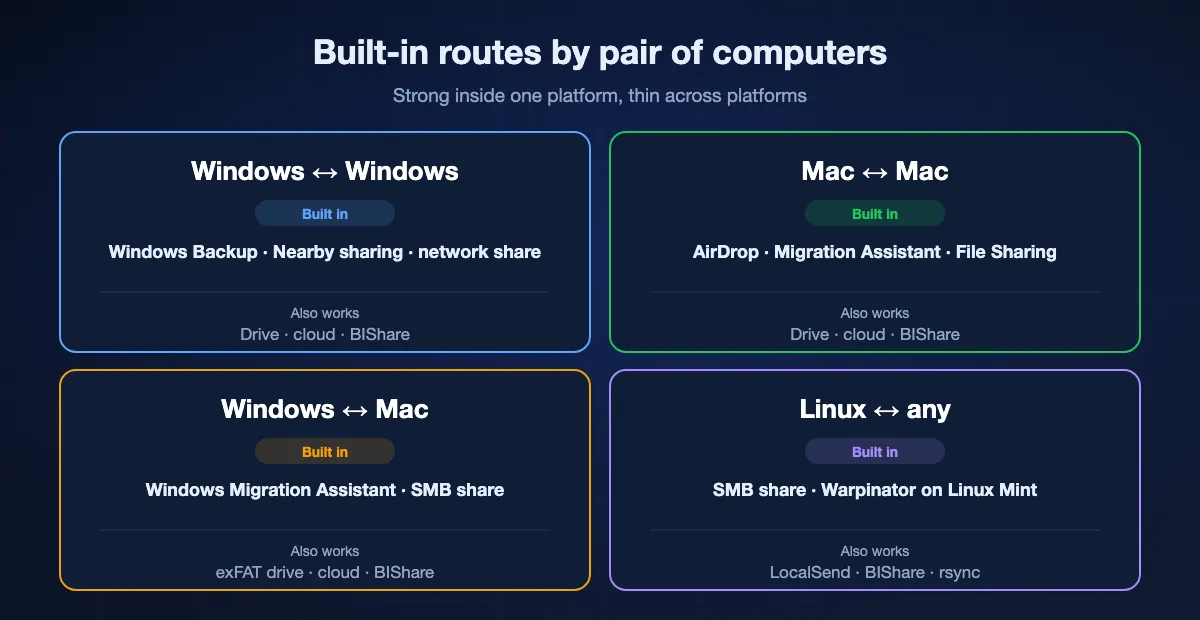
The best route depends less on the files than on the two operating systems. Built-in tools are excellent inside one platform and thin across platforms.
Windows to Windows
Windows has the richest built-in options: Windows Backup's transfer for a new PC, Nearby sharing for quick sends between PCs close together, and network file sharing for folders you open from both machines. Nearby sharing falls back to Bluetooth when the PCs are not on the same private network, which is fine for a document and slow for a video.
Mac to Mac
AirDrop covers quick sends, Migration Assistant moves an entire user account to a new Mac over Wi-Fi, Ethernet or a Thunderbolt cable, and File Sharing in System Settings lets one Mac open folders on the other. Between two Macs you rarely need anything else.
Windows and Mac
Apple's Windows Migration Assistant moves files and settings from a PC to a new Mac, but nothing built in goes the other way. For everyday transfers, a Windows share opened from the Mac's Finder, an exFAT drive, a cloud folder or a cross-platform app such as BIShare fills the gap.
Linux in the mix
Linux desktops speak SMB, so they can open Windows and Mac shares, and Linux Mint ships Warpinator for LAN transfers. Cross-platform apps such as LocalSend and BIShare avoid mounting shares at all, and rsync over SSH suits people comfortable in a terminal.
Eight ways to move files between two computers, ranked
BIShare
Best overall for everyday transfers across Windows, Mac and Linux
Windows (Microsoft Store), Mac App Store, Linux · MIT-licensed open source · direct on a shared network with no size cap · a link holds up to 100 GB and stays valid a day · end-to-end encrypted · no sign-up
Install BIShare on both computers, drag files or a folder onto the app window, and pick the other computer from the nearby list; the receiving side confirms, and the files are written to BIShare's save folder. Nothing is uploaded, so a 40 GB project moves at the speed of the local network, and the same steps work between any mix of Windows, macOS and Linux. With no router around, a phone's hotspot serves as the network. When the other computer is in another building, make a link instead, which that computer can open in any browser for the next 24 hours.
Watch out for: It moves files, not installed apps or settings, so it does not replace a migration tool for a new computer. A folder is packed into a single zip archive for the trip, and both computers need the app for a direct transfer.
Windows Backup: transfer to a new PC
Best for moving into a new Windows 11 PC
Old PC: Windows 10 or 11 · new PC: Windows 11 24H2 or later, during setup · Microsoft account · same Wi-Fi or wired network · one-time pairing code · files and settings
While the new PC is still in its first-time setup, sign in with a Microsoft account and choose to restore from another PC. Open Windows Backup on the old PC, select the option to transfer to a new PC, and confirm the pairing code the new PC shows. Documents, photos, videos and other files come across the network along with wallpaper, themes and other personal settings, and Windows resumes on its own if the connection drops.
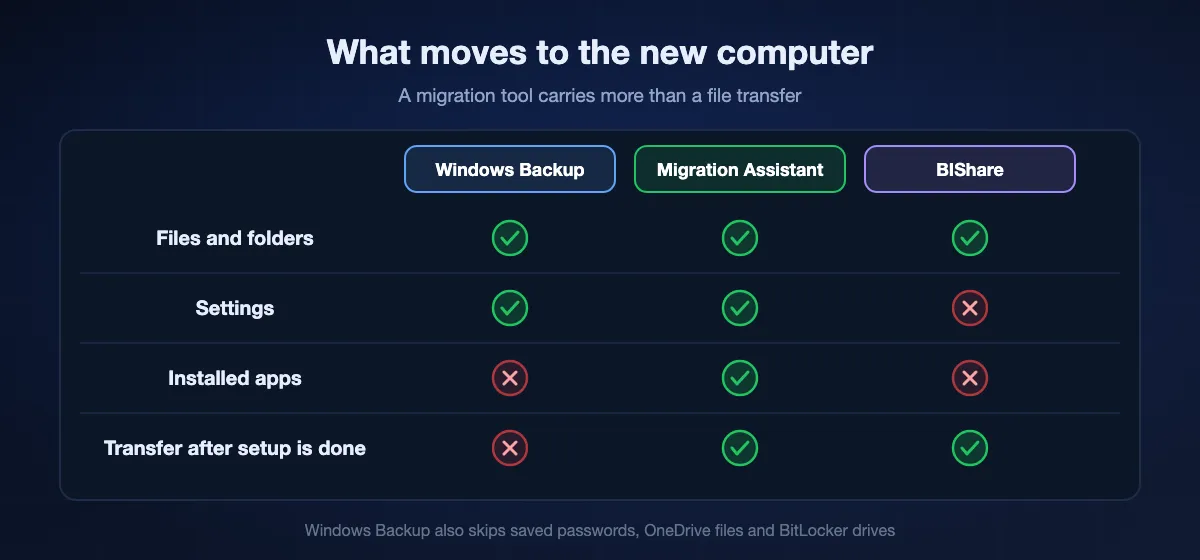
Watch out for: It only appears during setup, so an already configured PC cannot use it. Installed apps, saved passwords, OneDrive files and BitLocker-encrypted drives do not transfer, and both PCs should stay plugged in until it finishes.
Nearby sharing in Windows
Best for a few files between two Windows PCs in the same room
Windows 11, or Windows 10 version 1803 and later · Bluetooth LE · Wi-Fi when both PCs are on the same private network · My devices only or Everyone nearby · saves to Downloads
Turn on Nearby sharing in Settings on both PCs, choose Everyone nearby if they use different Microsoft accounts, then right-click a file in File Explorer, choose Share and pick the other PC. The recipient accepts a notification and the file lands in Downloads, or in another folder chosen in Settings. Nothing to install, and it works even when the PCs are not on the same network, using Bluetooth.
Watch out for: It is Windows only. Without a shared private network it runs over Bluetooth, which is painfully slow for large files, and Everyone nearby makes the PC's name and Bluetooth address visible to people around you.
Network file sharing (SMB)
Best for a folder both computers keep using
Built into Windows, macOS and most Linux desktops · same local network · private network profile on Windows · share permissions per folder · no size limit
On Windows, turn on network discovery and file and printer sharing for private networks, then share a folder from its properties; other computers open it from Network in File Explorer, from Finder's Connect to Server on a Mac, or from a Linux file manager. On a Mac, File Sharing under General, Sharing in System Settings does the same. Once set up, the folder behaves like part of the other computer's disk, which suits shared project folders and media libraries.
Watch out for: Setup takes more steps than any other route, and permissions, accounts and firewall prompts trip up many first attempts. Leaving shares open on a laptop that joins public Wi-Fi is a risk, so turn sharing off when it is not needed.
Migration Assistant (Mac)
Best for moving an entire account onto a new Mac
Built into macOS · Mac to Mac over Wi-Fi, Ethernet or Thunderbolt cable, or from a Time Machine backup · Windows Migration Assistant 3 for PC to Mac, Windows 10 or later, macOS Sonoma 14.4 or later
Open Migration Assistant from the Utilities folder, or during the new Mac's setup, and choose the old Mac, a Time Machine backup or a Windows PC as the source. From a Mac it copies apps, user accounts, settings and documents, leaving the old Mac untouched, and a Thunderbolt or Ethernet cable is usually faster than Wi-Fi. From a PC, install Apple's Windows Migration Assistant on Windows first and keep Wi-Fi and Bluetooth on for both computers.
Watch out for: It only moves data onto a Mac; nothing from Apple migrates a Mac to a Windows PC. Antivirus, firewall and VPN software can block it until turned off, and a large account over Wi-Fi can take hours.
External drive or USB stick
Best when the computers share no network at all
Any USB drive or SSD · exFAT reads and writes on Windows and Mac · NTFS is read-only on a Mac · FAT32 caps each file at 4 GB · no account, no internet
Copy the files onto the drive, move it to the other computer and copy them off. For a drive shared between Windows and Mac, format it as exFAT in Disk Utility or File Explorer so both can write to it. A fast USB 3 SSD often beats Wi-Fi for tens of gigabytes, and a drive is still the simplest answer for an offline computer or a site with locked-down networking.
Watch out for: Formatting erases the drive, so check what is on it first. Walking a stick back and forth gets old quickly for repeated transfers, and a lost unencrypted drive exposes everything on it.
Cloud folder: OneDrive, iCloud Drive or Google Drive
Best when the two computers are rarely in the same place
OneDrive: 5 GB at no cost, single files up to 250 GB · iCloud Drive: 5 GB at no cost · Google Drive: 15 GB at no cost, pooled with Gmail and Google Photos · the same account on both computers
Put the files in a synced folder on one computer and they appear on the other once it syncs, whether it is across the street or across the country. For people who already work out of OneDrive or iCloud Drive, nothing needs to be transferred at all, because the files follow the account. It also leaves a backup copy in the cloud.
Watch out for: Everything is uploaded first and downloaded second, so home upload speed sets the pace, and free storage fills quickly. Two computers in the same room still send the data out to a data centre and back.
LocalSend or Warpinator
Open source LAN alternatives for occasional transfers
LocalSend: Windows, macOS, Linux, Android, iPhone, Apache 2.0 · Warpinator: Linux Mint default, on Flathub, unofficial Windows ports · same local network · no account
LocalSend spots computers sharing a network with it and passes the chosen files straight across, on every major platform. Warpinator, built by the Linux Mint team, does the same between Linux machines and, through community ports, Windows PCs. Both are free, ad-free and simple, which makes them good choices for anyone who prefers community-run tools.
Watch out for: Neither works beyond the local network, and finding the other computer often fails on hotel, guest or corporate networks that keep devices apart. The Windows versions of Warpinator are unofficial.
At a glance
| Feature | BIShare | Windows Backup | Nearby sharing | Network sharing | External drive | Cloud folder |
|---|---|---|---|---|---|---|
| Works between Windows and Mac | ||||||
| Carries settings as well as files | ||||||
| Nothing uploaded to the internet | ||||||
| Usable any time, not only during setup | ||||||
| No extra hardware or storage plan |
As of September 2026. BIShare needs the app on both computers for a direct transfer and has no size limit on one network; a BIShare link tops out at 100 GB and expires after a day. Windows Backup's transfer runs during the new PC's setup and needs Windows 11 24H2 or later on the new PC. Nearby sharing is Windows only and falls back to Bluetooth without a shared private network. Network sharing works between Windows, Mac and Linux once set up. An external drive shared with a Mac should be exFAT. Cloud folders need an account and storage for the files.
Moving everything to a new computer
A new computer is a migration, not a transfer. The goal is the old desktop, documents and settings on the new machine with nothing lost, and the tools differ in how much of that they carry.
Windows to Windows: what comes and what does not
Windows Backup's PC-to-PC transfer brings files and personal settings, and apps from the Microsoft Store are ready to reinstall. Desktop apps installed from the web, browser passwords saved outside a synced account, and licences tied to the old hardware have to be handled one by one. Laplink PCmover, a paid tool, is the usual choice when installed apps must come along.
Mac to Mac: the whole account
Migration Assistant copies user accounts, apps and settings as well as files, so the new Mac often looks like the old one on first login. Choosing a cable and letting it run overnight is the least stressful way to move a large account.
Before you wipe the old computer
Open a handful of files from different folders on the new machine, check that email, browser bookmarks and password managers are signed in, and deauthorise software licences that limit activations. Keep the old computer, or a full backup of it, for a few weeks; the missing file usually turns up only when someone needs it.
Windows 10 is out of support
Microsoft ended Windows 10 support on 14 October 2025, which has pushed many people onto new PCs this year. The old PC can still send its files with Windows Backup, Nearby sharing, a share, a drive or BIShare, even though it no longer gets security updates.
Drives, formats and file names that break cross-platform copies
When a copy between Windows and Mac fails halfway, the cause is often the destination rather than the route.
exFAT, NTFS and APFS
Windows formats drives as NTFS by default, which a Mac can read but not write. Macs use APFS, which Windows cannot read without extra software. exFAT is the common ground: both systems read and write it, and it has no practical file size limit.
The 4 GB wall on FAT32
Older USB sticks often come as FAT32, which refuses any single file larger than 4 GB. Copying a long film or an ISO image stops with an unhelpful error even though the stick has room to spare. Reformatting as exFAT fixes it.
Names Windows will not accept
macOS and Linux allow characters in file names that Windows rejects, including colons, question marks, asterisks, quotation marks and vertical bars, and Windows also refuses names that end in a space or a period. Rename those files, or send the folder as an archive, before copying to a Windows PC.
Hidden files that tag along
Copying from a Mac to a non-Mac drive can leave small files starting with ._ next to each document, plus .DS_Store files in folders. They are harmless metadata and safe to delete on Windows.
Transferring files between computers with BIShare
Install on both computers
Get BIShare from the Microsoft Store on Windows, the Mac App Store on a Mac, or the Linux download. Connect both to one Wi-Fi or wired network, or have both join a phone's hotspot.
Drag in files or a folder
Drop files or a whole folder onto the app window, or use Files to browse for them. There is no size limit when both computers share a network.
Pick the other computer
Choose it from the nearby devices and accept on the receiving side. Files are stored in the folder set in BIShare, which starts out as Downloads. When the two machines are on separate networks, generate a link and open it in the other computer's browser within a day.
How fast each route can be
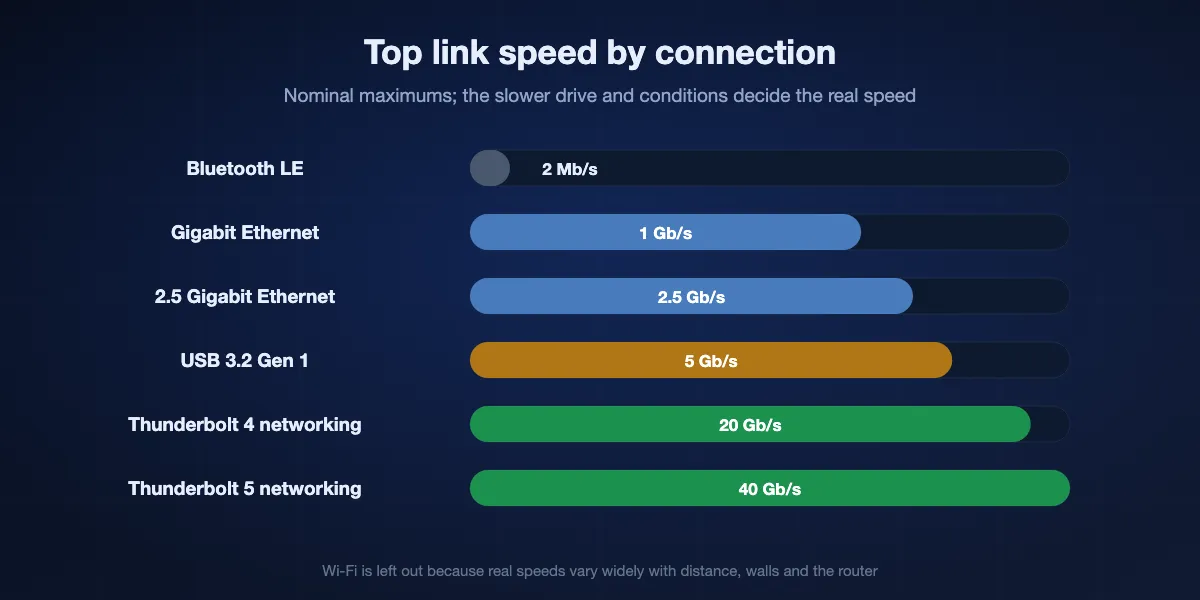
The connection sets the ceiling and the slower of the two drives sets the real speed. Nominal link rates below are maximums; real copies land lower.
Wi-Fi versus a cable
Wi-Fi speed swings with distance, walls and the router, so a gigabit Ethernet cable is often faster and always steadier for large folders. Plugging one of the two computers into the router already helps a wireless transfer.
USB and Thunderbolt drives
A USB 3 external SSD copies tens of gigabytes quickly, and the limit is often the computer's port or the drive itself. Two PCs with Thunderbolt 4 or 5 ports can also link directly with Intel's Thunderbolt Share at up to 20 or 40 Gb/s, but one of them, or the accessory, must carry a licence from its manufacturer.
Bluetooth and the cloud
Bluetooth, which Nearby sharing uses without a shared network, is fine for documents and impractical for video. Cloud folders are bound by the sender's upload speed, which on home connections is usually a fraction of the download speed.
When a transfer between computers fails
The other PC does not appear in Network
Set the network profile to Private on both PCs, enable Network discovery plus File and printer sharing under Advanced sharing settings, and check that both are on the same router rather than a guest network. Typing the other PC's address, such as \\PCNAME, into File Explorer often works when browsing does not.
Nearby sharing cannot find the PC
Turn on Bluetooth on both PCs, set Nearby sharing to Everyone nearby, and keep them within a few metres. If one PC runs Windows 10, check that it is version 1803 or later.
The transfer option is missing on the new PC
Windows Backup's PC-to-PC transfer is only offered during first-time setup on Windows 11 24H2 or later. On a PC that is already set up, use a share, a drive, a cloud folder or an app instead.
The Mac cannot copy to the drive
Drives formatted with NTFS open on a Mac for reading only. Move the files somewhere safe, then erase the drive as exFAT if it will keep travelling between Windows and Mac.
A large file refuses to copy to a USB stick
A stick formatted as FAT32 rejects files over 4 GB. Reformat it as exFAT, or send the file over the network instead.
Long transfers stop partway
Stop both computers from sleeping, keep laptops plugged in, and pause VPN or firewall software that drops local connections. Moving a huge project in a few batches means an interruption costs minutes rather than hours.
Keeping transfers between computers private
Local transfers are private by default, but a few habits keep them that way.
Share folders only on private networks
Network sharing and Nearby sharing set to Everyone nearby make a computer discoverable. Keep sharing to the Private network profile, turn it off on laptops that travel, and use password-protected shares where the network has other people on it.
Encrypt drives that leave the house
A USB stick or external SSD with personal files should be encrypted, with BitLocker To Go on Windows or an encrypted APFS volume on a Mac, because a lost drive is otherwise readable by anyone.
Know where copies end up
Cloud folders keep a copy with the provider. A direct transfer with BIShare, LocalSend, Nearby sharing or a network share moves files only between the two computers, and a BIShare link is encrypted before upload and deleted after 24 hours.
Transferring files between computers: FAQ
What is the simplest way to move files from one computer to another?
For a new Windows 11 PC, use Windows Backup's transfer during setup; for a new Mac, Migration Assistant. For everyday files between any two computers on the same network, a direct app such as BIShare or LocalSend needs the least setup.
What is the best way to send files PC to PC over Wi-Fi?
Use Nearby sharing for a few files, network file sharing for folders you open from both PCs, or a direct transfer app for large folders. All of them keep the data on your local network.
Can I transfer files between computers with a USB cable?
A regular USB cable does not connect two PCs for file transfer. Use a USB drive, an Ethernet cable between the computers, special PC-to-PC transfer cables that come with their own software, or Thunderbolt Share on PCs that support it.
How do I move everything from my old PC to a new PC?
On a new Windows 11 PC, choose to restore from another PC during setup and pair it with Windows Backup on the old PC. Files and settings transfer; installed apps and saved passwords need to be set up again.
Can I move files from a Windows PC to a Mac without extra software?
Yes, for a new Mac: Apple's Windows Migration Assistant copies files and settings from the PC. For everyday files, open a Windows share from the Mac's Finder, or use an exFAT drive or a cloud folder; a cross-platform app such as BIShare also works.
How do I transfer files from Mac to Windows?
Turn on File Sharing on the Mac and open it from the PC, copy to an exFAT drive, use a cloud folder, or send with a cross-platform app. Apple has no migration tool for Mac to Windows.
My Mac shows the external drive but will not copy to it. Why?
The drive is formatted as NTFS, which macOS can read but not write. Reformat it as exFAT to use it with both Windows and Mac, after copying its files somewhere safe.
Do both computers need to be on the same network?
For network sharing, LocalSend and a direct BIShare transfer, yes, though a phone hotspot counts. Nearby sharing can fall back to Bluetooth, and a cloud folder or a BIShare link works from anywhere.
What is the fastest way to transfer a large folder between computers?
A cable: an Ethernet connection for network transfers, a fast USB SSD, or Thunderbolt Share on supported PCs. Over Wi-Fi, a direct transfer on one network beats uploading to the cloud.
Is BIShare free for transfers between computers?
Yes. BIShare costs nothing: the code is MIT-licensed, there are no ads or sign-ups, and direct transfers between computers on one network are not capped in size.
Move files between any two computers directly
Open source and free. Send files and folders between Windows, Mac and Linux over your own network, with no size limit and nothing uploaded.