
Alternatif Smash
Alternatif Smash terbaik
Reputasi Smash dibangun di atas satu janji, dan halaman depannya masih menyampaikannya tanpa catatan kaki: kirim berkas tanpa memikirkan batas ukuran, gratis, tanpa mendaftar. Janji itu nyata, dan di antara layanan transfer gratis hal itu masih jarang. Yang tidak disebut halaman depan, tetapi ada di halaman harga, adalah antreannya. Apa pun di atas 2 GB pada paket gratis menunggu di belakang pelanggan berbayar sebelum penerima bisa mengambilnya. Untuk folder yang tidak Anda kejar waktunya, itu tidak merugikan. Untuk kiriman dengan tenggat, satu angka yang perlu Anda perkirakan justru berubah menjadi angka yang tidak bisa Anda perkirakan. Halaman ini menjelaskan persis bagaimana pertukaran itu bekerja, lalu memeringkat delapan alternatif menurut ukuran gratis, umur tautan, dan seberapa terduga waktu kirimnya, dengan setiap batas dibaca dari halaman resmi tiap layanan pada September 2026.
BIShare adalah produk kami. Ia bukan jawaban yang tepat untuk semua hal di bawah ini: Smash menyimpan berkas lebih lama daripada kami dan sama sekali tidak memasang batas ukuran, dan di bagian yang memang begitu, teksnya mengatakannya terus terang.
Jawaban singkat
- Anda pergi karena antrean: tautan BIShare membawa hingga 100 GB dan mulai diunduh begitu unggahan selesai, tanpa menunggu siapa pun. Tautannya hangus setelah 6, 12, atau 24 jam.
- Anda pergi karena 7 hari kurang panjang: SwissTransfer menyimpan 50 GB selama 15 hari dan menawarkan perpanjangan sampai 30 hari, gratis, tanpa akun.
- Berkas harus tetap rahasia, bukan sekadar sampai: Wormhole atau tautan BIShare. Keduanya mengacak berkas di dalam peramban dan menjauhkan kuncinya dari server, sehingga tak satu pun layanan bisa membuka apa yang disimpannya.
- Anda memang butuh tanpa batas ukuran: tetap di Smash, atau lewati unggahan sama sekali. Dua perangkat pada satu jaringan saling mengirim langsung tanpa batas dan tanpa antrean, karena tidak ada yang diunggah.
- Yang diam-diam dilakukan Smash lebih baik dari kebanyakan: perlindungan kata sandi pada transfer gratis, yang ditandingi SwissTransfer dan umumnya dijual berbayar oleh Dropbox, OneDrive, dan pesaing Smash lainnya.
- Ringkasan jujurnya: paket gratis lebih berbeda dalam kepastian daripada dalam ukuran. Pilih berdasarkan ada atau tidaknya tenggat di sisi penerima.
Apa sebenarnya antrean itu, dan kapan ia merugikan
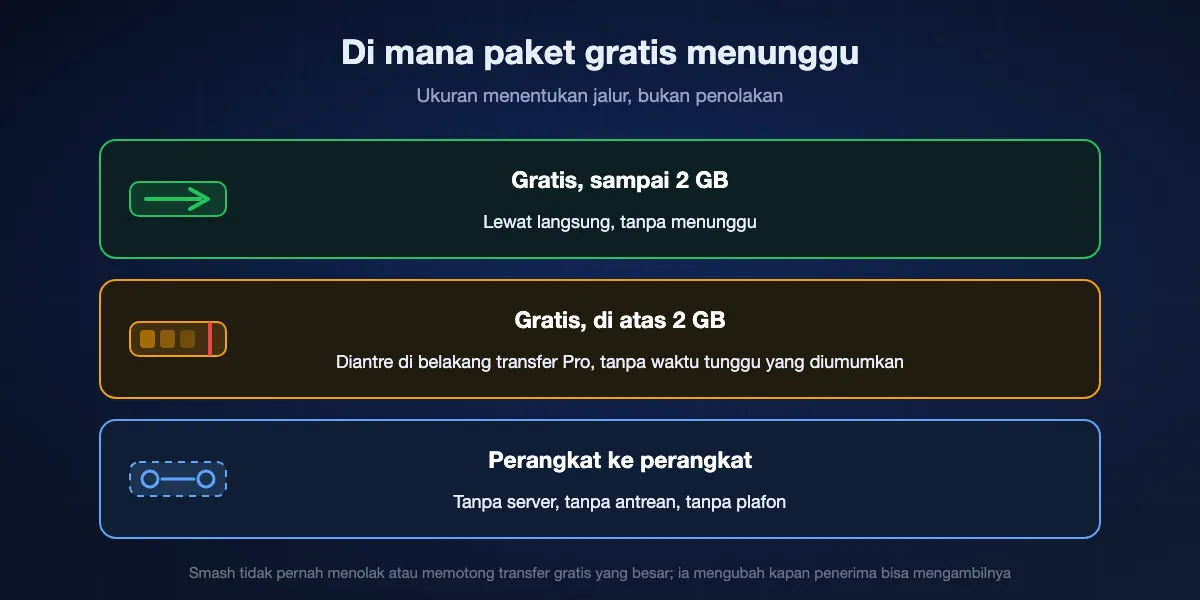
Bagian ini layak dipahami sebelum pindah, karena ia menentukan apakah Smash alat yang salah atau justru yang tepat. Smash tidak menolak transfer gratis berukuran besar dan tidak memotongnya. Unggahan Anda selesai seperti biasa. Yang berubah adalah apa yang terjadi sesudahnya: halaman harga menyebut transfer di atas 2 GB masuk antrean di belakang transfer Pro, jadi berkas menunggu giliran sebelum penerima bisa menariknya. Batas ukuran yang dipasang layanan lain di pintu masuk, oleh Smash dipasang pada jam.
Kenapa antrean itu ada
Ada yang membayar penyimpanan dan bandwidth untuk transfer gratis 30 GB, dan di Smash yang membayar adalah pelanggan berbayar yang transfernya jalan lebih dulu. Ini tawar-menawar yang lebih jujur daripada batas keras yang dibungkus sebagai kemurahan hati, dan itulah sebabnya Smash bisa mengiklankan tanpa batas ukuran sementara paket gratis WeTransfer kini hanya memberi 3 GB per bulan secara total. Biayanya sekadar dipindahkan dari apa yang boleh Anda kirim menjadi kapan berkas itu tiba.
Kapan ia tidak merugikan sama sekali
Arsip, cadangan, satu folder rekaman mentah yang baru dibuka rekan kerja minggu depan, apa pun yang memang tidak akan dilihat penerima hari ini. Penantiannya tidak terasa karena tak ada yang menunggui berkas itu. Dalam bentuk seperti itu Smash boleh dibilang paket gratis paling murah hati di seluruh perbandingan ini, dan menukarnya dengan layanan berplafon 5 GB justru sebuah penurunan.
Kapan ia membuat Anda kehilangan pekerjaan
Klien yang menunggu di telepon. Tenggat sore ini. Apa pun yang membuat orang bertanya berapa lama lagi, sementara satu-satunya jawaban jujur adalah tergantung seberapa sibuk orang asing di luar sana. Ketidakpastian itulah, bukan ukurannya, yang membuat orang mencari alternatif, dan itu satu hal yang tidak terganti oleh berapa pun gigabita gratis.
Bagian yang dilewatkan halaman depan
Halaman depan Smash menjanjikan transfer tanpa batas ukuran apa pun dan tidak memasang tanda bintang di sana. Antreannya muncul di halaman harga, di kolom gratis. Kedua pernyataan itu benar bersamaan, tetapi hanya satu yang ada di halaman yang pertama kali dibuka orang, dan karena itu banyak pengguna berkenalan dengan antrean saat sedang menunggu sebuah kiriman sampai.
Delapan alternatif Smash, diperingkat
BIShare
Terbaik saat waktu kirim harus bisa diperkirakan, dan gratis pada kecepatan berapa pun
Tanpa antrean dan tanpa tingkat prioritas untuk ditunggui · 100 GB per tautan, hidup paling lama sehari · tanpa batas begitu dua perangkat berbagi jaringan · diacak sebelum meninggalkan Anda · sumber berlisensi Apache 2.0 · ponsel, komputer, peramban apa pun · tak ada yang perlu didaftarkan
BIShare menjawab antrean dengan cara tidak memilikinya. Tidak ada tingkat berbayar untuk ditunggui, karena mengirim tidak punya tingkat berbayar sama sekali: sumbernya terbuka di bawah lisensi Apache 2.0, tak ada iklan, dan tak ada layar pengiriman yang meminta Anda mendaftar. Letakkan hingga 100 GB di bishare.app/transfer dan pengambilan bisa dimulai begitu unggahan Anda berakhir. Berkasnya diacak di dalam peramban Anda sendiri lebih dulu, dan kuncinya diparkir setelah penanda # pada tautan, bagian yang disimpan peramban untuk dirinya sendiri, sehingga penyimpanan kami memegang bita yang tidak punya cara kami buka. Kalau orang seberang berada di Wi-Fi yang sama, aplikasinya membuang langkah unggah dan mendorong berkasnya menyeberangi ruangan, tempat tidak ada plafon apa pun.
Perhatikan: Dua puluh empat jam adalah jendela terpendek di halaman ini. Kalau penerima Anda membuka surel seminggu sekali, ini alat yang salah dan SwissTransfer yang benar. Berkas program seperti .exe dan .msi ditolak pada tautan.
SwissTransfer
Terbaik saat penerima lambat dan berkasnya besar
50 GB per transfer · dua pekan di rak, bisa direntangkan jadi sebulan · kata sandi tanpa bayar · tak ada yang mendaftar di kedua ujung · peramban plus iOS dan Android · dihosting di Swiss oleh Infomaniak
Kalau antrean keluhan Anda tetapi jendela tujuh hari justru bagian yang Anda sukai, SwissTransfer memperbaiki keduanya. Lima puluh gigabita per transfer, dikirim lewat tautan atau surel, disimpan lima belas hari, dengan tawaran perpanjangan sampai tiga puluh hari yang datang sebelum masa berlakunya habis. Tanpa akun di kedua ujung, tanpa iklan di halaman unduh, dan perlindungan kata sandi disertakan sebagaimana Smash menyertakannya. Infomaniak, penyedia Swiss di belakangnya, menyimpan semuanya di Swiss, yang bagi sebagian penerima di Eropa sudah menjadi faktor penentu.
Perhatikan: Lima puluh gigabita tetaplah sebuah plafon, sedangkan Smash menolak menyebut satu angka pun. Enkripsinya menutupi perjalanan dan masa simpan, tetapi Infomaniak memegang kuncinya, jadi perintah pengadilan bisa menjangkau berkas yang terbaca.
Transfer langsung antarperangkat Anda
Terbaik saat kedua mesin berada beberapa meter saja satu sama lain
Tidak ada yang diunggah, jadi tidak ada yang diantre dan tidak ada yang dibatasi · BIShare atau LocalSend · satu Wi-Fi atau hotspot ponsel di antaranya · jalan terus meski saluran mati · diacak ujung ke ujung · gratis, sumber diterbitkan
Cara tercepat mengalahkan antrean adalah mengeluarkan server dari urusan. Saat kedua mesin berbagi jaringan, BIShare dan LocalSend memindahkan berkas langsung dari satu ke yang lain: tidak ada yang diunggah, tidak ada yang disimpan, tidak ada transfer Pro siapa pun yang jalan duluan, dan tidak ada plafon karena tidak ada ember. Pada Wi-Fi 6 di jarak dekat kami mengukur 70 sampai 110 MB/s, jadi folder 10 GB mendarat dalam beberapa menit alih-alih selama apa pun gabungan saluran unggah Anda dan antrean orang lain. Ia bahkan bekerja saat internet mati, sesuatu yang tak bisa diklaim layanan berbasis tautan mana pun.
Perhatikan: Hanya berguna saat perangkat lain berada di dekat Anda. Untuk penerima di kota lain ini sama sekali bukan pilihan, dan Anda kembali ke tautan.
Wormhole
Terbaik untuk sesuatu yang rahasia di bawah 10 GB yang harus sampai hari ini
Plafon 10 GB · satu tab peramban, tanpa pemasangan · tautan mati setelah sehari · di atas 5 GB ia berjalan peramban ke peramban · AES-GCM 128-bit diterapkan sebelum unggah · tanpa pendaftaran
Wormhole menukar ukuran dengan kepastian dan kerahasiaan. Pengacakan terjadi sebelum satu bita pun meninggalkan tab, kuncinya bersembunyi di bagian bilah alamat yang menolak dikirim peramban, dan sehari kemudian tautannya mati. Apa pun di bawah 5 GB beristirahat di server mereka selama sehari itu; berkas yang lebih berat, sampai 10 GB, berjalan langsung antara kedua tab selama keduanya tetap terbuka. Tidak ada pelanggan berbayar yang jalan duluan. Untuk kontrak, satu set master, atau paspor yang dipindai dan dikirim ke satu orang sore ini, tidak ada yang lebih sederhana atau lebih tertutup tanpa pemasangan.
Perhatikan: Sepuluh gigabita jauh di bawah apa yang ditelan Smash, mode peramban ke peramban memaku tab Anda tetap terbuka sampai mereka selesai, dan jam sehari itu tidak bisa diubah.
Filemail
Terbaik saat satu berkas dikirim ke satu daftar penerima
5 GB per transfer · bertahan sepekan di rak · tanpa pendaftaran untuk mengirim · diunduh sesering yang daftar itu butuhkan · hanya peramban · plafon lebih besar dijual di tingkat berbayar
Filemail mempertahankan bagian Smash yang dianggap orang sudah semestinya, yaitu Anda bisa mengirim tanpa akun, dan menambahkan sesuatu yang tidak ditonjolkan tingkat gratis Smash: tanpa batas unduhan. Kirim satu tautan 5 GB ke milis berisi dua ratus orang dan perilakunya sama pada unduhan terakhir seperti pada yang pertama. Jendela tujuh hari persis sama dengan Smash, jadi berpindah tidak merugikan Anda dalam masa simpan, hanya dalam plafon.
Perhatikan: Lima gigabita mencoret sebagian besar pekerjaan video, yang justru menjadi alasan orang memilih Smash. Tidak ada yang dienkripsi sebelum unggah, jadi layanan itu memegang salinan yang terbaca.
WeTransfer
Terbaik hanya saat penerima mengharapkan nama itu
Jatah, bukan batas per kiriman: sepuluh kiriman atau tiga gigabita dalam sebulan berjalan · tiga hari sebelum tautan mati · mengirim tidak perlu pendaftaran · peramban dan aplikasi · kiriman lebih besar dijual lewat langganan
WeTransfer ada di daftar ini karena namanya dikenali klien, bukan karena paket gratisnya bersaing. Kolam bulanan itulah jebakannya: sepuluh transfer atau tiga gigabita secara total dalam tiga puluh hari berjalan, jadi satu video besar bisa menghabiskan jatah sebulan dalam sekali kirim, dan tautannya bertahan tiga hari. Kalau klien hanya mau mengeklik tautan wetransfer.com, itu alasan bisnis yang nyata untuk memakainya. Dari sisi batas saja, hampir semua yang lain di sini lebih murah hati.
Perhatikan: Jatah bulanan alih-alih batas per transfer, dan masa simpan terpendek di antara layanan tautan di sini setelah BIShare dan Wormhole.
Dropbox Transfer
Terbaik saat Anda memang sudah berlangganan Dropbox
Hanya pengirim yang masuk akun · Basic memberi 2 GB dan sepekan · langganan naik ke 50, 100, dan 250 GB, menambah kata sandi dan masa berlaku pilihan Anda · tak ada yang menunggu giliran
Dropbox Transfer mengirim salinan alih-alih membagikan folder, jadi penerima mengunduh tanpa menyentuh berkas Anda atau membuat akun. Tingkat Basic yang gratis nyaris persis menyamai ambang prioritas Smash di 2 GB dan tujuh hari, tanpa antrean di atasnya karena memang tidak ada apa-apa di atasnya. Nilainya terletak pada paket berbayar, yang naik ke 50, 100, atau 250 GB dengan kata sandi dan masa berlaku pilihan Anda, serta pengiriman yang tidak pernah menunggu pelanggan lain.
Perhatikan: Anda butuh akun untuk mengirim, yang tidak disyaratkan Smash, dan ukuran yang bisa bersaing dengan Smash semuanya berada di balik langganan.
Proton Drive
Terbaik saat berkas harus tetap tersedia dan tetap tertutup
Penyimpanan, bukan kurir · 5 GB gratis itu total, bukan per kiriman · diacak di mesin Anda sendiri · tautan publik menerima kata sandi dan tanggal penutupan · membukanya tidak perlu akun Proton · mengirimnya perlu
Proton Drive adalah penyimpanan, bukan layanan transfer, dan itu membuatnya berbentuk tepat untuk kasus yang paling buruk ditangani Smash: berkas yang mestinya masih ada bulan depan. Semuanya dienkripsi di perangkat Anda, tautan publik menerima kata sandi dan tanggal kedaluwarsa yang Anda tetapkan, dan penerima membukanya di peramban tanpa akun Proton. Untuk portofolio, satu set kontrak, atau folder yang klien datangi berulang kali, keawetan mengalahkan jendela tujuh hari.
Perhatikan: Lima gigabita penyimpanan gratis adalah total, bukan angka per transfer, dan video cepat memenuhinya. Pengirim butuh akun, jadi ia bukan jawaban sama sekali untuk daya tarik tanpa pendaftaran milik Smash.
Sekilas
| Paket gratis, September 2026 | BIShare | Smash | SwissTransfer | Wormhole | Filemail | WeTransfer |
|---|---|---|---|---|---|---|
| Sumber terbuka | ||||||
| Pengiriman tidak pernah diantre | ||||||
| Lebih dari 10 GB dalam satu transfer | ||||||
| Kata sandi atau tautan sekali pakai | ||||||
| Dienkripsi sebelum unggah | ||||||
| Disimpan lebih dari 24 jam |
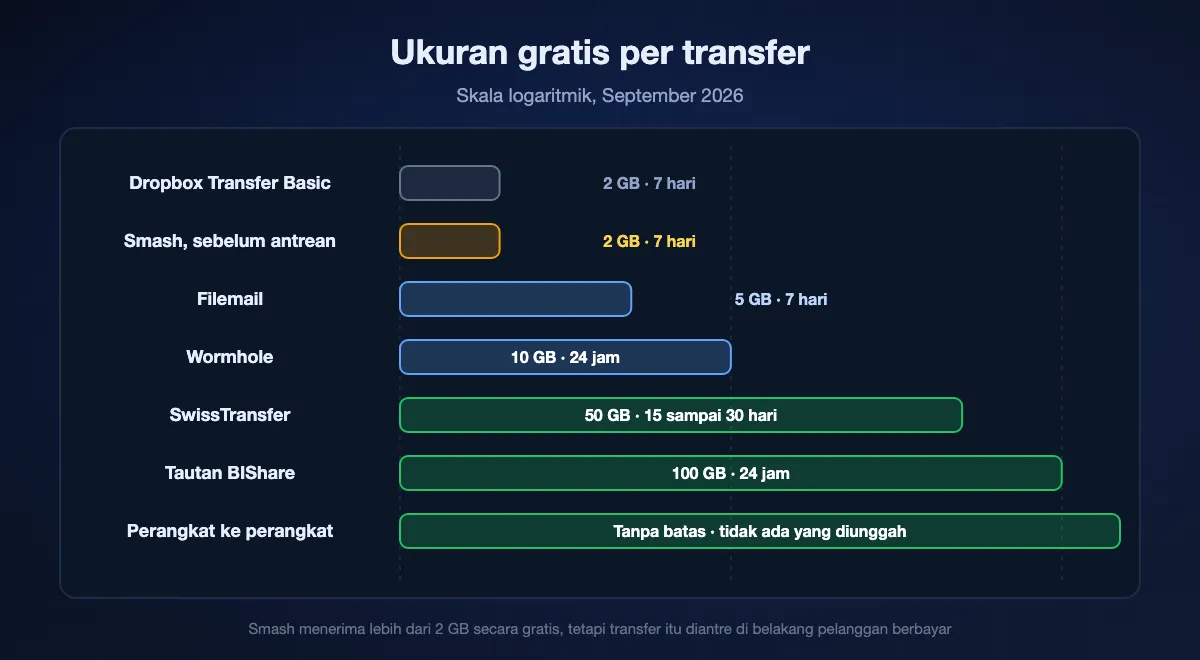
Diambil dari halaman resmi tiap layanan sepanjang September 2026. Smash pada paket gratis: tidak ada plafon yang disebut, apa pun di atas 2 GB menunggu di belakang Pro, sepekan di rak, kata sandi disertakan. BIShare: tautan 100 GB hidup paling lama sehari, diacak di peramban, ada opsi hangus setelah dibaca, dan tidak ada plafon sama sekali antara dua perangkat yang berbagi jaringan. SwissTransfer: 50 GB disimpan dua pekan, bisa direntangkan jadi sebulan. Wormhole: 10 GB sehari, diacak di peramban. Filemail: 5 GB sepekan. WeTransfer pada paket gratis: jatah sepuluh kiriman atau tiga gigabita sebulan, tautan bertahan tiga hari.
Berapa lama tiap rute sebenarnya makan waktu
Batas ukuran tercetak di halaman harga. Waktu kirim tidak, dan itulah angka yang menentukan sebuah transfer berhasil atau gagal. Tiga hal menetapkannya, dan hanya satu yang menyangkut berkasnya.
Unggahan Anda, yang bisa Anda perkirakan
Setiap layanan tautan mulai dari langkah yang sama, dan ia berjalan pada kecepatan unggah Anda, bukan kecepatan unduh. Transfer 10 GB memakan sekitar 28 menit pada unggahan 50 Mbps dan sekitar 14 menit pada 100 Mbps, logo apa pun yang ada di halamannya. Bagian ini identik di Smash, SwissTransfer, WeTransfer, dan tautan BIShare, jadi ia tidak pernah menjadi alasan untuk pindah.
Antrean, yang tidak bisa Anda perkirakan
Inilah variabel tingkat gratis Smash dan ia tidak punya angka yang diumumkan, karena bergantung pada berapa banyak transfer berbayar yang ada di depan Anda saat itu. Halaman harga mereka sendiri menyebut jalur gratis sebagai nonprioritas. Pada malam yang sepi mungkin tidak terasa; pada jam kerja dengan berkas besar mungkin sangat terasa. Tidak ada yang bisa menyebutkan angkanya, termasuk kami.
Unduhan penerima, yang mereka kendalikan
Kaki terakhir berjalan pada kecepatan saluran mereka. Layak diingat sebelum menyalahkan sebuah layanan: unggahan cepat ke server cepat tetap tiba pelan pada orang dengan koneksi lemah. Kalau Anda berdua di gedung yang sama, seluruh rantai itu mengerut menjadi satu transfer lokal pada 70 sampai 110 MB/s di Wi-Fi 6, satu-satunya rute di halaman ini yang tidak punya server di tengah.
Pindah dari Smash ke BIShare
Kirim dengan cara yang sama, minus pertanyaan akun
Buka bishare.app/transfer di peramban, atau lewat aplikasi. Tidak ada layar yang menanyakan siapa Anda, persis seperti di Smash. Masukkan hingga 100 GB dan serahkan mana yang cocok: tautannya, satu kotak QR untuk ponsel di sebelah Anda, atau enam karakter yang cukup pendek untuk didiktekan lewat telepon.
Putuskan apa yang Anda mau sebagai ganti antrean
Pengacakan ujung ke ujung sudah menyala, dan satu sakelar memusnahkan tautan begitu seseorang menarik berkasnya. Tidak ada pengaturan prioritas, karena tidak ada yang bisa diprioritaskan di atasnya. Pengambilan bisa dimulai sedetik setelah unggahan Anda berakhir.
Untuk apa pun di atas 100 GB, atau apa pun yang dekat
Pasang aplikasinya di kedua perangkat. Pada Wi-Fi bersama atau hotspot ponsel keduanya saling menemukan dan mengirim langsung, tanpa plafon dan tanpa unggahan, yang sekaligus menutupi kasus yang paling baik ditangani Smash.
Simpan Smash untuk ekor panjangnya
Tidak ada alasan memilih satu layanan selamanya. Arsip 60 GB yang tidak ditunggu siapa pun tetap cocok untuk paket gratis Smash, dan tujuh hari mengalahkan dua puluh empat jam kami. Memakai yang tepat per pekerjaan lebih murah daripada membayar salah satunya.
Alternatif mana untuk pekerjaan mana
Urutkan berdasarkan tenggat lalu ukuran, dalam urutan itu. Sisanya detail.
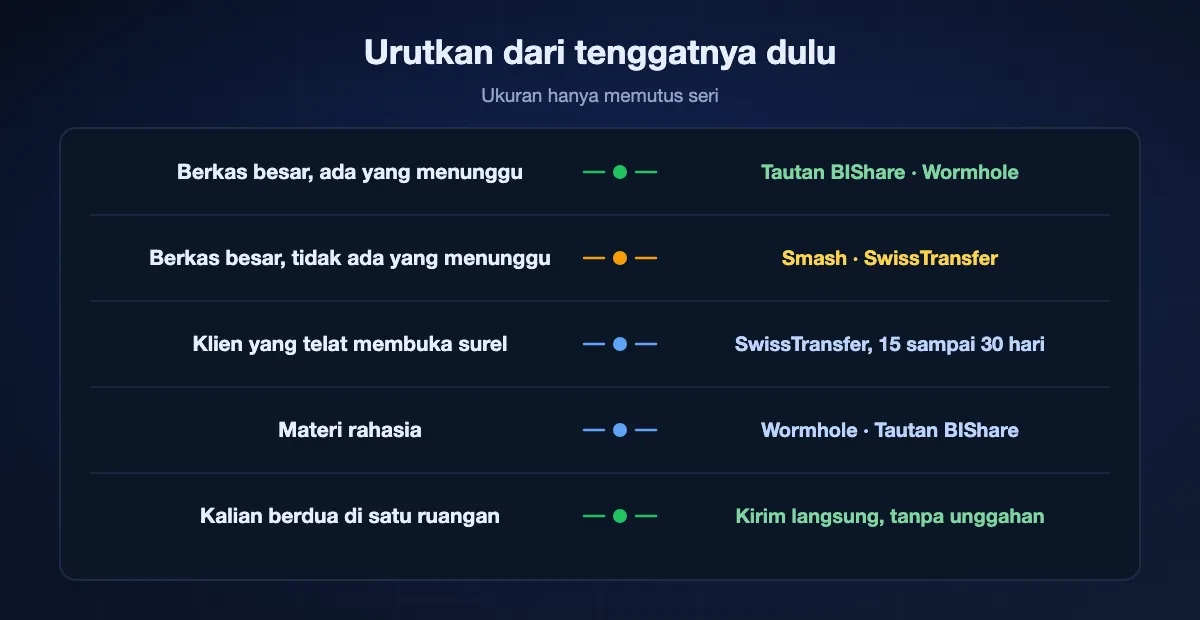
Berkas besar, ada yang menunggu hari ini
Tautan BIShare hingga 100 GB, atau Wormhole hingga 10 GB. Keduanya tidak mengantre, dan keduanya mulai begitu unggahan selesai.
Berkas besar, tidak ada yang menunggu
Tetap di Smash, atau pakai SwissTransfer untuk 50 GB dan dua pekan. Inilah kasus saat meninggalkan Smash tidak memberi Anda apa-apa.
Klien yang telat membuka surel
SwissTransfer, untuk 15 hari yang bisa diperpanjang jadi 30. Dua puluh empat jam tidak akan bertahan melewati akhir pekan.
Materi rahasia
Layanan yang mengenkripsi sebelum unggah: Wormhole atau tautan BIShare, tempat kuncinya duduk di dalam tautan dan tidak pernah sampai ke server.
Kalian berdua di ruangan yang sama
Kirim langsung dan lewati setiap batas di halaman ini. Tanpa unggahan, tanpa antrean, tanpa plafon, dan tetap jalan saat internet mati.
Apa yang bisa dibaca tiap layanan
Setiap layanan di sini mengenkripsi dalam perjalanan, jadi perbandingan itu tidak menentukan apa pun. Pertanyaan yang memisahkan mereka adalah siapa yang memegang kunci selagi berkasnya duduk di cakram.
Dienkripsi sebelum meninggalkan perangkat Anda
Tautan BIShare dan Wormhole sama-sama mengacak berkas di dalam peramban dan menyelipkan kuncinya di balik penanda # pada bilah alamat, yang tidak dikirimkan peramban mana pun. Bobol salah satu layanan itu, atau datangi dengan surat perintah, dan yang keluar hanya bita yang tidak terbaca. Proton Drive juga melakukan pengacakannya di perangkat Anda.
Dienkripsi, tetapi kuncinya dipegang layanan
Smash menyebut SSL/TLS dalam perjalanan dan AES 256-bit saat tersimpan, dan SwissTransfer, Filemail, serta WeTransfer berada di kategori yang sama. Itu memadai untuk pekerjaan sehari-hari dan layak dipikir dua kali untuk dokumen identitas, rekam medis, atau materi yang belum dirilis.
Tidak ada yang disimpan di mana pun
Transfer langsung antara dua perangkat pada satu jaringan tidak menulis ke server mana pun, jadi tidak ada yang bisa dibobol, tidak ada yang bisa dipanggil pengadilan, dan tidak ada yang kedaluwarsa. Itu posisi terkuat yang tersedia, dan ia hanya tersedia saat perangkat lain berada di dekat Anda.
Alternatif Smash: tanya jawab
Apa alternatif Smash gratis terbaik?
Untuk waktu kirim yang terduga, BIShare: 100 GB per tautan tanpa antrean dan tanpa tingkat berbayar untuk ditunggui. Untuk jendela lebih panjang, SwissTransfer dengan 50 GB selama 15 sampai 30 hari. Kalau Anda benar-benar butuh tanpa plafon ukuran dan tidak ada yang menunggu, paket gratis Smash sendiri masih sulit dikalahkan.
Kenapa transfer Smash saya lambat?
Kemungkinan besar antreannya, bukan koneksi Anda. Halaman harga Smash menyatakan transfer gratis di atas 2 GB masuk antrean di belakang transfer Pro, jadi penerima menunggu pelanggan berbayar selesai. Di bawah 2 GB jalur gratis tidak diantre.
Apa Smash benar-benar tanpa batas ukuran berkas?
Halaman depannya menyebut transfer tanpa batas ukuran apa pun, tanpa catatan kaki, dan halaman harganya menambahkan bahwa di atas 2 GB transfer gratis diantre dan ditandai nonprioritas. Keduanya benar: tidak ada plafon pada apa yang boleh Anda kirim, hanya pada kapan ia berangkat.
Apa Smash gratis selamanya?
Paket gratisnya tidak perlu pembayaran dan tidak perlu pendaftaran, menyimpan transfer selama 7 hari, dan menyertakan perlindungan kata sandi. Tingkat berbayar menambah ukuran tanpa batas dengan prioritas, masa simpan 30 hari, pengelola transfer, pelacakan unduhan, merek kustom, dan penerimaan berkas.
Alternatif Smash mana yang tanpa batas ukuran?
Untuk transfer lewat tautan, tidak satu pun alternatif gratis yang tanpa plafon; 100 GB milik BIShare yang terbesar di sini. Antara dua perangkat pada jaringan yang sama, BIShare dan LocalSend sama sekali tanpa batas, karena berkasnya tidak pernah diunggah.
Bisakah saya mengirim berkas besar tanpa akun, seperti di Smash?
Bisa. BIShare, SwissTransfer, Wormhole, Filemail, dan WeTransfer semuanya mengirim dari tab peramban anonim pada tingkat gratisnya. Dropbox Transfer dan Proton Drive adalah dua yang di sini mengharuskan pengirim masuk akun.
Apa ada alternatif gratis yang menawarkan perlindungan kata sandi?
SwissTransfer punya, pada transfer gratis, sama seperti Smash. BIShare dan Wormhole menempuh jalan berbeda: kunci dekripsinya ada di dalam tautan, jadi perlindungannya datang dari mengirim tautan itu secara pribadi, dan BIShare menambahkan unduhan sekali pakai yang mematikan tautan setelah pengambilan pertama.
Berapa lama alternatifnya menyimpan berkas saya?
Dua puluh empat jam di BIShare dan Wormhole, tiga hari di WeTransfer gratis, tujuh hari di Smash, Filemail, dan Dropbox Transfer Basic, serta lima belas sampai tiga puluh hari di SwissTransfer. Proton Drive menyimpannya sampai Anda menghapusnya, dalam batas penyimpanan gratisnya.
Apa BIShare benar-benar gratis, atau ada tingkat di atasnya?
Tidak ada tingkat di atasnya. Sumbernya diterbitkan di bawah lisensi Apache 2.0, tidak ada iklan, dan mengirim tidak butuh akun maupun paket berbayar, yang juga menjadi sebab tidak ada transfer yang bisa diantre di belakang transfer yang lebih baik.
Apa yang membuat berkas sangat besar sampai paling cepat?
Kalau perangkat lain berada di dekat Anda, kirim langsung lewat jaringan Anda sendiri: tanpa unggahan, tanpa batas ukuran, dan 70 sampai 110 MB/s di Wi-Fi 6 menurut pengukuran kami. Kalau tidak, kecepatan unggah Anda menetapkan lantai yang sama untuk semua layanan, jadi pilihlah berdasarkan antrean dan masa simpan, bukan kecepatan yang diiklankan.
Kirim sekarang, tanpa mengantre
Hingga 100 GB per tautan, dienkripsi sebelum unggah, tanpa akun dan tanpa tingkat berbayar untuk ditunggui. Gratis dan sumber terbuka.