
AirDrop for Android
AirDrop for Android
Search for AirDrop on an Android phone and you get two very different answers. Google's Quick Share has long been Android's own AirDrop, moving files between Android phones, Chromebooks and Windows PCs. Since November 2025 it has also learned to speak AirDrop itself: on a growing list of Pixel, Galaxy and other recent phones, an iPhone, iPad or Mac now appears right inside the Quick Share sheet. This guide checks whether your phone is on that list, walks through the settings on both devices, explains what the bridge still cannot do, and ranks six ways to get the same result on every other Android phone. BIShare is one of the six: it runs on any Android phone and any iPhone, sends in both directions without internet when you share a network, and makes a link when you do not. Free, open source, no account.
BIShare is our app. When your phone is on Google's list and the Apple device is in the same room, the Quick Share bridge built into the phone is the easier choice, so this guide starts there.
Can you AirDrop to Android? The quick answer
- Pixel 8a or newer, a recent Galaxy S or Z phone, or another model Google lists: Quick Share already works with AirDrop, as long as the Apple device picks Everyone for 10 Minutes.
- A Galaxy on One UI 8.5: switch on Share with Apple devices under Settings, Connected devices, Quick Share before looking for the iPhone.
- Any other Android sending to an Apple device: the Quick Share QR code uploads through Google to an iPhone, iPad or Mac that scans it, with internet on both ends.
- Any Android, both directions, with or without internet: BIShare goes straight across a shared Wi-Fi or hotspot and turns into an encrypted link for people far away.
- Android to Android, Chromebook or Windows PC: plain Quick Share, set to Contacts or Your devices for everyday use.
- Skip apps called AirDrop on Google Play: Apple does not make them, and they never show up in an iPhone's AirDrop menu.
What AirDrop for Android means in 2026
The phrase now covers three different things. Which one you need depends on the device at the other end.
Quick Share, Android's own AirDrop
Google's Nearby Share and Samsung's Quick Share became a single Quick Share in 2024. It moves photos, videos and files between Android phones and tablets, Chromebooks and Windows PCs over Bluetooth and Wi-Fi, and it ships on Android phones with Google services, so for most people it is the AirDrop they already have.
Quick Share that talks to AirDrop
In November 2025 Google taught Quick Share on the Pixel 10 to use Apple's AirDrop protocol, and it has been adding phones ever since. On a supported model, nearby iPhones, iPads and Macs appear as Quick Share targets, and the Android phone appears in their own AirDrop menu. Google built this on its own and has said it would welcome working with Apple.
Apps that act like AirDrop everywhere
For phones Google has not added, for Windows and Linux computers, and for people who are not in the same room, a cross-platform app does the job. The useful ones run on the Android phone and the iPhone alike, or need nothing more than a browser at the other end.
Does your Android phone work with AirDrop?
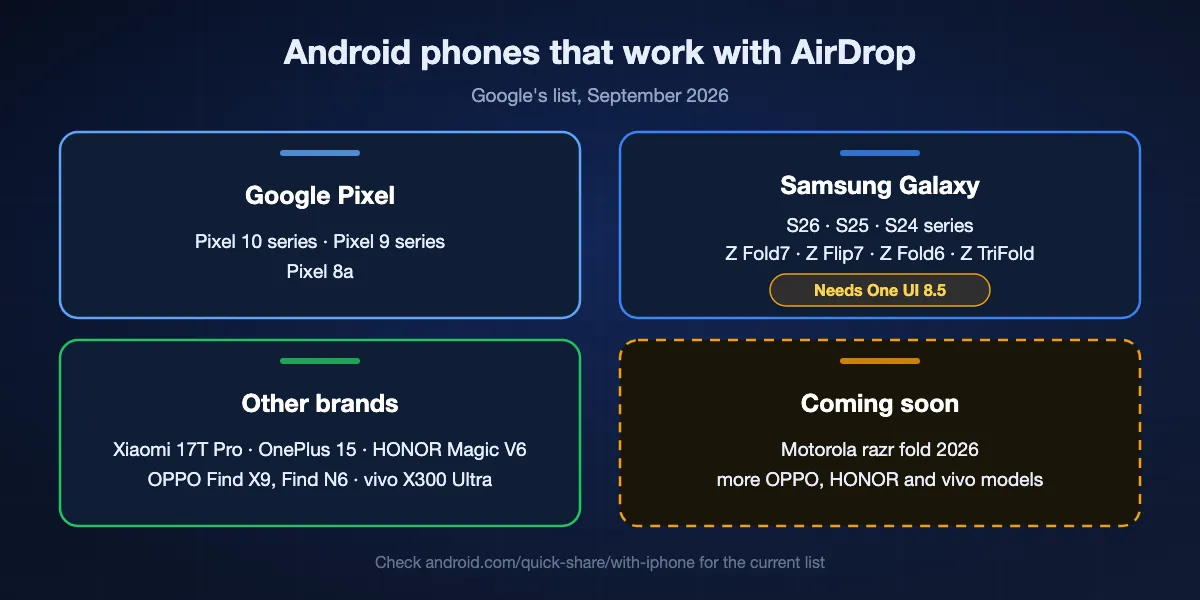
Google keeps the official list on its Quick Share with iPhone page. The list has grown every few months since launch, so if your model is missing below, check that page before giving up.
Google Pixel
The Pixel 10 series came first, in November 2025. The Pixel 9 series followed in February 2026, and the Pixel 8a is listed as well. Pixels receive the feature through Quick Share and Google Play system updates, so installing the latest of both is usually all that is needed.
Samsung Galaxy
A Galaxy needs One UI 8.5. Google's page names the Galaxy S26, S25 and S24 series along with the Z Fold7, Z Flip7, Z Flip6, Z Fold6 and Z TriFold. The feature sits behind a switch called Share with Apple devices, and it relies on Samsung's Quick Share apps being current.
Xiaomi, OnePlus, OPPO, HONOR and vivo
The Xiaomi 17T Pro, OnePlus 15, OPPO Find X9 series and Find N6, HONOR Magic V6 and vivo X300 Ultra are on the list. Google names the Motorola razr fold 2026, plus further OPPO, HONOR and vivo models, as coming soon.
Why older phones are left out
AirDrop moves data over Apple's own Wi-Fi link, Apple Wireless Direct Link, and reporting on the rollout says support depends on whether a phone's Wi-Fi chip can be adapted to it. That is why a phone on the latest Android version can still miss out. Every listed model was released in 2024 or later.
Phones on Google's list, at a glance
| Brand | Works with AirDrop now | Listed as coming soon |
|---|---|---|
| Google Pixel | Pixel 10, 10 Pro, 10 Pro XL, 10 Pro Fold and 10a; Pixel 9, 9 Pro, 9 Pro XL, 9 Pro Fold and 9a; Pixel 8a | None listed |
| Samsung Galaxy (One UI 8.5) | S26, S26+ and S26 Ultra; S25, S25+, S25 Ultra and S25 Edge; S24, S24+ and S24 Ultra; Z Fold7, Z Flip7, Z Fold6 (Special Edition too), Z Flip6 and Z TriFold | None listed |
| Xiaomi | Xiaomi 17T Pro | None listed |
| OnePlus | OnePlus 15 | None listed |
| OPPO | Find X9, X9 Pro, X9 Ultra and X9s; Find N6 | Find X8 series |
| HONOR | Magic V6 | Magic8 Pro |
| vivo | X300 Ultra | X300 and X300 Pro |
| Motorola | None yet | razr fold 2026 |
From Google's Quick Share with iPhone page, checked on 17 October 2026. Google says availability varies by region, carrier and device, so install every system, Quick Share and Google Play system update before deciding that a listed phone does not work.
Setting it up on both devices
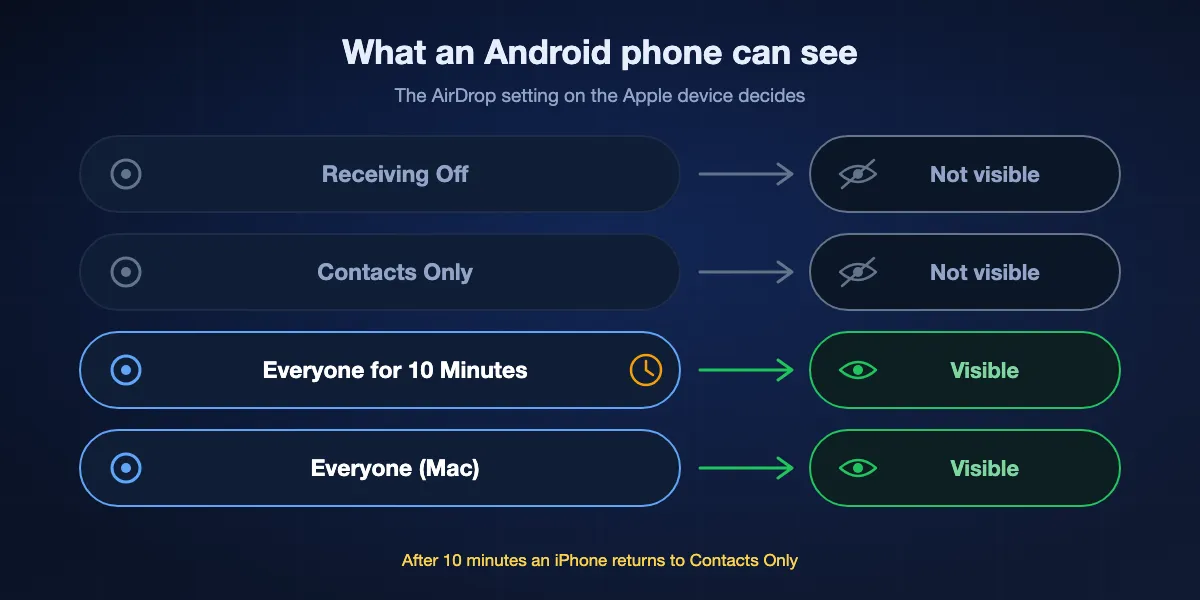
The Android phone and the Apple device each need one change. The Apple side is the one people forget: Google's bridge cannot match contacts across platforms, and an iPhone drops back to Contacts Only ten minutes after you choose Everyone.
Update Quick Share first
On the Android phone, install any waiting system update, then open Settings, Security and privacy, System and updates, Google Play system update. On a Galaxy, also update Quick Share, Quick Share Agent and Quick Share Connectivity from the Galaxy Store, and Quick Share extension from Google Play.
On a Galaxy, turn on the Apple switch
Open Settings, Connected devices, Quick Share and turn on Share with Apple devices. With the switch off, a Galaxy will not list an iPhone even when the two lie side by side on a table.
On the iPhone or iPad
Open Control Center, touch and hold the group of connection controls, tap AirDrop and choose Everyone for 10 Minutes; the same choice lives in Settings, General, AirDrop. Keep Wi-Fi and Bluetooth on, and turn Personal Hotspot off.
On a Mac
Click AirDrop in Control Center or in the Finder sidebar and allow discovery by Everyone. Set it back to Contacts Only once the files have arrived.
Send from Android
Select photos or files, tap Share, choose Quick Share and tap the iPhone, iPad or Mac among the devices that appear. The Apple device shows its familiar AirDrop prompt to accept or decline.
Receive on Android
Open Quick Share and tap Receive, or set who can share with you to Everyone for 10 minutes, and leave the screen unlocked. On the iPhone, pick AirDrop in the share sheet and tap the Android phone; Quick Share asks for your approval before saving anything.
Quick Share between Android, Chromebook and Windows
When nobody in the room owns an Apple device, Quick Share on its own is still the quickest way to move files, and its privacy options changed in 2026.
Who can share with you
Search Settings for Quick Share and open Who can share with you. Your devices covers phones, tablets and computers signed in to the same Google account and works with the screen off. Contacts makes you visible to people in your contacts while your screen is unlocked. Everyone for 10 minutes opens you to anyone nearby, then returns to your earlier choice.
The permanent Everyone option is gone
In February 2026 Google removed the always-on Everyone setting, leaving Your devices, Contacts, Everyone for 10 minutes and No one. Apple made the same move with iOS 16.2. If a phone that used to receive from strangers without any fuss no longer does, this is the reason.
Windows PCs and Chromebooks
Chromebooks have Quick Share built in, and Google's Quick Share app for Windows, for 64-bit Windows 10 and later and Arm-based Windows 11 PCs, sends and receives with Android phones. Neither one reaches AirDrop: Google lists the Apple bridge for phones only.
What the AirDrop bridge still cannot do
Quick Share's AirDrop support is a genuine direct connection, not a detour through the cloud. It is also narrower than AirDrop between two Apple devices, in four ways that matter.
Contacts Only does not work
Google supports AirDrop's Everyone for 10 Minutes mode and nothing else. Every exchange between an iPhone and an Android phone therefore means somebody briefly opens a device to everyone nearby. Google has said it wants Contacts Only too, which would need Apple's cooperation.
Both devices have to be close
Google asks for the devices to be within Bluetooth range with Wi-Fi switched on. There is no way to AirDrop to a friend in another city, and no link to fall back on when you are apart.
Listed phones only
Android tablets are not on Google's list, and neither are Windows PCs, Chromebooks or Linux machines. Phones released before 2024 are missing entirely, however current their software.
Clone apps do not fill the gap
Search Google Play for AirDrop and you will find apps using the name. Apple does not make them, and they connect only to devices running the same app, so they never appear in an iPhone's AirDrop menu. Check who publishes an app like that before letting it read your photos.
Six ways to AirDrop from any Android, ranked
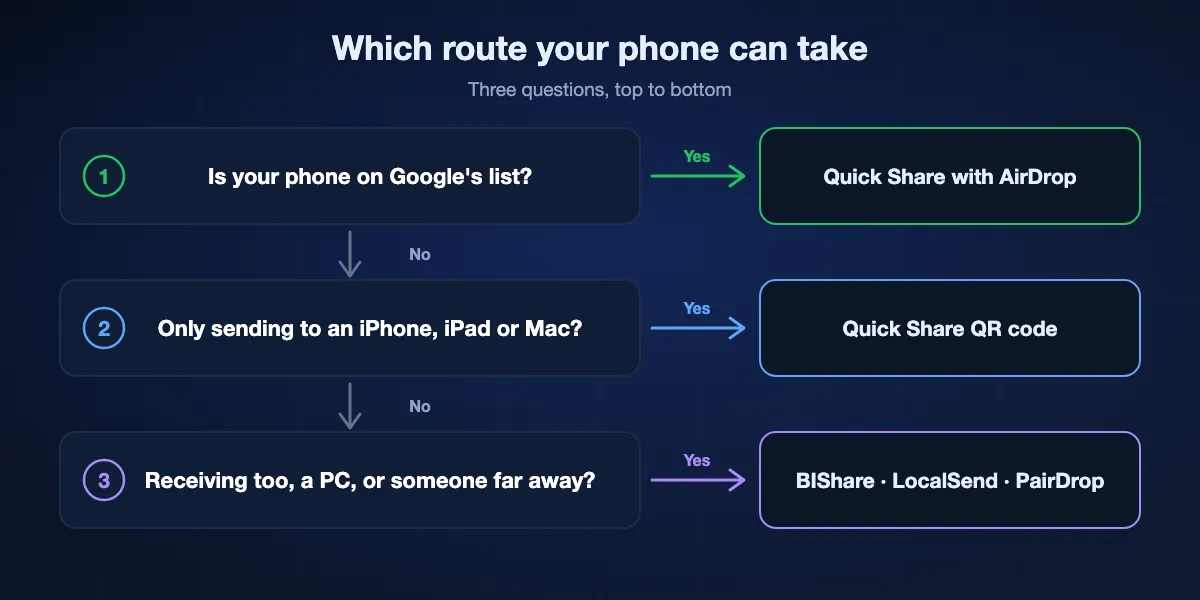
Use the built-in options when they cover your phone and the device at the other end, then pick an app for everything else.
Quick Share with AirDrop
Best when your phone is on Google's list and the Apple device is nearby
Part of Quick Share · listed Pixel, Galaxy (One UI 8.5), Xiaomi, OnePlus, OPPO, HONOR and vivo phones · iPhone, iPad and Mac · both directions · peer to peer, no server · Everyone for 10 Minutes only
Nothing to install and nothing to explain. The iPhone owner finds your phone in the AirDrop menu they already know, and you tap their iPhone in Quick Share. Files travel from one device straight to the other, and Google had the connection examined by the penetration testing firm NetSPI before release.
Keep in mind: It covers only the listed phones, the Apple device must switch to Everyone for 10 Minutes every time, and the range ends where Bluetooth does.
Quick Share QR code
Best for reaching an Apple device from a phone that is not on the list
Android 6.0 or later with Google Play services · Android to iPhone, iPad or Mac only · end-to-end encrypted, held by Google for 24 hours · 10 GB per 24 hours, 1,000 files a session · internet needed on both sides
In Quick Share, tap Use QR code instead of choosing a nearby device. The iPhone owner points the Camera app at the code, a web page opens, and the files download from Google's servers. Google began rolling it out through Play services in May 2026, so it reaches budget and older phones that will never get the AirDrop bridge.
Keep in mind: It runs one way only, from Android to Apple, so nothing comes back to the Android phone by this route, and it stops without a data connection.
BIShare
Best for any Android phone, both directions, with or without internet
Android, iPhone, Windows, macOS, Linux · Apache 2.0 licence · direct on a shared Wi-Fi or hotspot, no size limit · encrypted links up to 100 GB that open in any browser for 6, 12 or 24 hours · rooms with a short code · listed in the Android share sheet · no account
BIShare covers the ground the bridge leaves. Any Android phone and any iPhone running the app find each other on the same Wi-Fi or on a phone's hotspot, listed model or not, and files cross directly in either direction without using the internet. A Windows PC or a Linux laptop joins in the same way. When the other person is somewhere else, share a link: it is encrypted on your phone before upload and opens in any browser for up to a day.
Keep in mind: Nearby transfers need the app on both devices, and links need a connection at each end.
LocalSend
Best open-source choice for devices on one home network
Android, iPhone, Windows, macOS, Linux · Apache 2.0 · one local network · HTTPS with a certificate per device · no account
LocalSend behaves like a network-wide AirDrop. Every device running it on the same Wi-Fi shows up under a friendly name, and one tap sends. iPhone to Android is as easy as Android to a Linux desktop, and no server is ever involved.
Keep in mind: Both devices need the app, and it cannot reach anything on another network, a phone on mobile data included.
PairDrop
Best when the other person refuses to install anything
Runs in a current browser, can be added as a web app · GPL-3.0 · spots devices on one network, pairs them across networks · peer to peer with a TURN relay as backup · no account
Open pairdrop.net on the Android phone and in Safari on the iPhone, and on the same network the two appear to each other straight away. It suits a one-off exchange with someone you have just met, and pairing lets two devices find each other again later on different networks.
Keep in mind: Both browser tabs must stay open, it needs internet to introduce the devices, and long videos can push a phone browser's memory.
Send Anywhere
Best for sending with a short code read out loud
Android, iOS, Windows, macOS and a website · 6-digit key, single use, valid 10 minutes · share links last 48 hours · paid plans raise the limits
Choose files and Send Anywhere shows a six-digit key. The other person types it into the app or the website within ten minutes and the transfer begins, which makes it an old favourite for getting photos from an Android phone to a friend's iPhone.
Keep in mind: It is closed source, keys and links depend on its servers, and the free limits sit below those of the paid plans.
At a glance
| Feature | Quick Share + AirDrop | Quick Share QR | BIShare | LocalSend | PairDrop | Send Anywhere |
|---|---|---|---|---|---|---|
| Works on any Android phone with Google Play | ||||||
| Nothing to install on the iPhone | ||||||
| Reaches Windows and Linux computers | ||||||
| Works without an internet connection | ||||||
| Also sends from iPhone to Android | ||||||
| Built into the phone |
As of October 2026. Quick Share with AirDrop needs a phone on Google's list and connects the devices directly, so it does not depend on internet but only works nearby. The QR code needs internet and only sends from Android to Apple devices. BIShare needs nothing on the iPhone when you send a link, which needs internet; nearby transfers run offline with the app on both devices. LocalSend needs its app on both sides. PairDrop runs in the browser and Send Anywhere also has a website, but both rely on their servers to connect devices.
When the iPhone and the Android phone cannot see each other
The iPhone went back to Contacts Only
Everyone for 10 Minutes really does end after ten minutes. If the Android phone saw the iPhone earlier but not now, open Control Center on the iPhone and choose it again.
Personal Hotspot is on
Apple tells both people to switch off Personal Hotspot before using AirDrop. An iPhone sharing its mobile connection with a laptop can drop out of discovery for Android and Apple devices alike.
The Galaxy switch is missing
If Share with Apple devices does not appear under Connected devices, Quick Share, the phone is not on One UI 8.5 yet or its Quick Share apps are out of date. Update from Software update and the Galaxy Store, restart, and look again.
The Android phone is locked or not receiving
An Apple device can only find the Android phone while it is visible. Unlock the screen, open Quick Share and tap Receive before the iPhone owner opens AirDrop.
Bluetooth, Wi-Fi or distance
Both devices need Bluetooth and Wi-Fi switched on, even when there is no Wi-Fi network to join, and they should sit a few metres apart at most. Airplane mode on either one stops discovery completely.
Your model is simply not supported
No setting adds a phone that is missing from Google's list. Send to an iPhone with the Quick Share QR code, or install a cross-platform app on both devices for transfers in both directions.
Is AirDrop on Android safe?
Swapping files with an Apple device means making your phone visible to everyone nearby for a while, so it helps to know what protects you during that time.
A direct, audited connection
Google says the AirDrop connection is peer to peer, never routed through a server and never logged, that its core is written in the memory-safe Rust language, and that NetSPI's independent review rated it notably stronger than other implementations. Each incoming file still waits for your approval.
Keep the open window short
Everyone for 10 Minutes on the iPhone and Everyone for 10 minutes in Quick Share both close by themselves. Decline anything you did not expect, particularly in crowded places where strangers may send unwanted pictures.
Links and third-party apps
The Quick Share QR code keeps files on Google's servers for 24 hours with end-to-end encryption. A BIShare link is encrypted on your phone, and its key travels inside the link rather than sitting on the server. Apps that merely borrow the AirDrop name deserve extra care before they get access to your files.
AirDrop for Android: FAQ
Can you AirDrop to Android?
Yes, to the Android phones on Google's Quick Share list. Set AirDrop on the iPhone to Everyone for 10 Minutes, tap Receive in Quick Share on the Android phone, then pick that phone in the iPhone's AirDrop sheet. An Android phone that is not on the list never appears in AirDrop; for those, install an app such as BIShare on both phones or send a link.
How do you AirDrop on Android?
On a phone from Google's list, AirDrop lives inside Quick Share: select a photo or file, tap Share, choose Quick Share and tap the iPhone, iPad or Mac that appears. The Apple device has to be set to Everyone for 10 Minutes, and a Galaxy needs Share with Apple devices switched on first. A phone that is not on the list cannot use AirDrop; an app installed on both devices does the same job.
Does Android have AirDrop?
Yes, in two ways. Quick Share is the built-in equivalent for Android phones, Chromebooks and Windows PCs, and on a growing list of phones Quick Share also works with Apple's AirDrop to reach iPhones, iPads and Macs.
How do I AirDrop from Android to iPhone?
Ask the iPhone owner to choose Everyone for 10 Minutes under AirDrop in Control Center. On the Android phone, select the files, tap Share, then Quick Share, and tap the iPhone when it appears; the iPhone shows the usual AirDrop prompt. If your phone is not on Google's list, use the Quick Share QR code instead, which the iPhone scans with its camera.
How do I receive AirDrop on Android?
Unlock the phone, open Quick Share and tap Receive, or set who can share with you to Everyone for 10 minutes. The iPhone owner then picks your phone in the AirDrop share sheet, and Quick Share asks you to accept before anything is saved.
Which Android phones can AirDrop with an iPhone?
As of October 2026 Google lists the Pixel 10 and 9 series and Pixel 8a; the Galaxy S26, S25 and S24 series, Z Fold7, Z Flip7, Z Flip6, Z Fold6 and Z TriFold on One UI 8.5; the Xiaomi 17T Pro, OnePlus 15, OPPO Find X9 series and Find N6, HONOR Magic V6 and vivo X300 Ultra.
How do I AirDrop from an iPhone to an Android phone?
Set AirDrop on the iPhone to Everyone for 10 Minutes, open Quick Share on the Android phone and tap Receive, then choose AirDrop on the iPhone and tap the Android phone. On a Galaxy, turn on Share with Apple devices first.
Why doesn't my Samsung show up in AirDrop?
The Galaxy needs One UI 8.5, updated Quick Share apps and the Share with Apple devices switch turned on, and the model has to be on Google's list. The iPhone must also be set to Everyone for 10 Minutes.
Can an iPhone AirDrop to a Samsung Galaxy?
Yes, if the Galaxy is on Google's list: the S24, S25 and S26 series, the Z Fold6, Z Flip6, Z Fold7 and Z Flip7, or the Z TriFold, running One UI 8.5. Update the Quick Share apps, turn on Share with Apple devices under Settings, Connected devices, Quick Share, and set the iPhone to Everyone for 10 Minutes. Older Galaxy phones and Galaxy tablets are not on the list.
Can I AirDrop with an Android phone that is not on the list?
Not through AirDrop. You can send from that phone to an Apple device with the Quick Share QR code, or install an app such as BIShare or LocalSend on both devices.
Do I need internet to AirDrop between Android and iPhone?
No. Quick Share's AirDrop support links the two devices directly, without a server in between. The Quick Share QR code, on the other hand, needs internet on both phones.
Are the AirDrop apps on Google Play real?
None of them comes from Apple. Apps with AirDrop in their name only connect to devices running the same app and never appear in an iPhone's AirDrop menu.
Can a Windows PC use AirDrop through Quick Share?
No. Google lists AirDrop support for phones only. Quick Share for Windows exchanges files with Android phones, and a cross-platform app such as BIShare connects an iPhone with a PC.
Is there a size limit for Quick Share to AirDrop?
Google does not publish one for the direct AirDrop connection. The Quick Share QR code is capped at 10 GB per 24 hours.
Is BIShare free on Android?
Yes. BIShare is free and open source under the Apache 2.0 licence, asks for no account and sets no limit on direct transfers between nearby devices.
Does AirDrop on Android work in every country?
Not everywhere at the same time. Google says availability varies by region, carrier and device, so a listed phone sold by a carrier or in another market can get the update later. Install every system, Quick Share and Google Play system update; if the AirDrop option still does not appear, it has not reached that phone yet.
AirDrop-style sharing on every Android phone
Free and open source. Send directly between any Android phone and iPhone on the same network, or share an encrypted link with everyone else.