
ShareDrop alternative
The best ShareDrop alternatives
ShareDrop was one of the first web pages to copy AirDrop in a browser: open sharedrop.io on two devices, see each other's avatars, drop a file, and it travels straight across over WebRTC. It is still online in 2026, but it no longer belongs to its creator. LimeWire bought it in early 2025, and today the page loads LimeWire scripts for five ad slots and an Upload Files button that sends files to LimeWire's servers instead of to the device next to you. Plenty of people now want the old behaviour without the new owner, and a few always wanted more than a single tab could do. This guide explains what changed, how ShareDrop actually picked which devices you could see, where it falls short, ranks seven alternatives including self-hosted ShareDrop Classic, and shows how to send to someone on another network. Our own BIShare made the list: free and licensed under Apache 2.0, it runs in a browser at bishare.app and as apps for Android, iPhone, Windows, macOS and Linux. No account on either side.
We make BIShare, so treat our ranking with that in mind. Where a browser-only tool such as PairDrop is the simpler fit, this page says so.
Quick answer
- Closest thing to classic ShareDrop: PairDrop. Same idea, open source, devices on one network find each other, and pairing covers other networks.
- You want the sender to go offline after sending: a BIShare link stores up to 100 GB, encrypted, for 6, 12 or 24 hours and opens in any browser, so neither tab has to stay open.
- One file, one recipient, nothing stored anywhere: FilePizza or ToffeeShare, as long as you keep your tab open until the download finishes.
- Big folders between your own computers and phones: an app beats a tab. BIShare or LocalSend across one router, or Taildrop if you already run Tailscale.
- You liked ShareDrop exactly as it was: the original MIT-licensed code sits untouched on GitHub, ready to host, though it needs a Firebase database.
- Using sharedrop.io anyway: drop files on a person's avatar for a direct transfer. The Upload Files button sends them to LimeWire instead.
What happened to ShareDrop
ShareDrop never shut down, which is why so many guides still recommend it as if nothing changed. The page is the same shape; who runs it, and what else it loads, are not.
2014: an AirDrop clone in a browser
Polish developer Szymon Nowak created the ShareDrop repository in March 2014 and released it under the MIT licence. The README described it plainly as a web application inspired by Apple AirDrop that moves files directly between devices over WebRTC, with Firebase handling presence and signalling. It predates Snapdrop and most of the drop pages people know today.
February 2025: LimeWire takes over
The README now opens with "ShareDrop is now LimeWire" and a note to the community that the project was acquired. It promises sharing on the same network, anonymous uploads and downloads, end-to-end encryption and up to 40 GB of storage for free users. A Hacker News post linking the change appeared on 22 February 2025, and the repository moved to a ShareDropio organisation.
The classic code froze
The README says the repository will stay as it is and that the classic version can still be run on your own infrastructure. Its last change to anything beyond documentation is a small link fix from January 2024. Whatever runs on sharedrop.io today is not the code in that repository, so nobody outside LimeWire can audit it.
September 2026: ad slots and a LimeWire upload
Loading sharedrop.io on 14 September 2026 pulled in two scripts named lw_ads.js and lw_upload.js. The first fetches sponsored creatives from api.limewire.com for five slots (left, right, top, bottom and a mobile banner). The second powers an Upload Files and Upload Folder area that hands files to LimeWire's own upload service, with a sign-in page on limewire.com.
September 2026: LimeWire itself changes hands
On 14 September 2026 the memecoin project BabyDoge announced it had acquired LimeWire, terms undisclosed, with Abel Czupor at the helm and a stated direction of creator ownership, decentralized storage and AI tools paid for in the LMWR token. ShareDrop is not mentioned. Whatever sharedrop.io becomes next is now decided two owners removed from the developer who wrote it.
The peer-to-peer part is still there
The avatars, the + button for rooms and the text explaining that files move directly between sender and recipient all remain. So ShareDrop still works as a drop page, as long as you use the avatar rather than the upload box. The reason to move is trust and clarity, not a dead site.
How ShareDrop decided which devices you saw
Most people assume ShareDrop scanned the local Wi-Fi like AirDrop. It never did, and that detail explains both its magic and its odd failures.
Same public IP address, same room
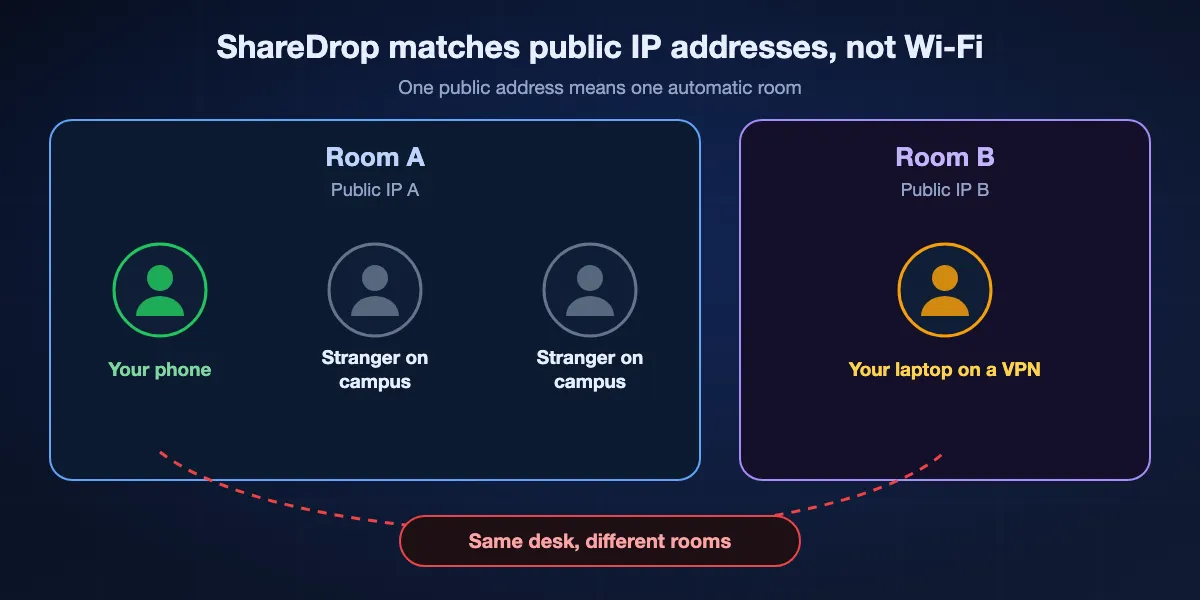
ShareDrop's README defines devices "in the same local network" as devices with the same public IP address. Every browser that reaches the server from one internet address lands in one automatic room and sees the others' avatars. The Wi-Fi itself plays no part in discovery; the server does the matching.
Why strangers sometimes appeared
Large networks often put hundreds of people behind one public address: a university, an office, a hotel, or a mobile carrier using carrier-grade NAT. On those, ShareDrop could show avatars of people you have never met, and they could see yours. The recipient still has to accept, but it is not the private circle many users imagined.
Why your own laptop sometimes vanished
The reverse happens too. A laptop on a VPN, a phone on mobile data, or a PC whose traffic leaves through a different gateway presents a different public address, so it lands in a different room even while sitting on the same desk. The live page now warns that ShareDrop does not work with VPNs.
Rooms for everything else
For devices on different networks, the + button creates a room with its own URL. Everyone who opens that URL joins the room and sees each other, and the transfer then runs peer to peer over WebRTC. Discovery and signalling always needed an internet connection, even when both devices sat on one router.
Where ShareDrop falls short
Even before the sale, a browser drop page had hard edges. These are the ones that send people looking for something else.
Both tabs must stay open
A WebRTC transfer lives inside two browser tabs. If the sender closes the page, a phone locks its screen and suspends the tab, or a laptop sleeps, the transfer stops and has to start again from the beginning.
Nothing to collect later
ShareDrop moves a file only while both people are online at the same moment. There is no link that waits for a colleague in another time zone, and no way to send first and let the recipient download tomorrow.
Discovery depends on a server and the internet
Two laptops on a router with no internet connection cannot find each other, because matching happens on ShareDrop's server. A captive portal, a VPN or a network that blocks WebRTC also breaks it.
Mobile browsers are fragile senders
Phones throttle background tabs to save battery. Sending a long video from a phone browser works when you keep the screen on and the page in front, and fails quietly when you switch to another app.
Two buttons that do very different things
On today's page, dropping a file on an avatar is peer to peer, while the Upload Files area stores it with LimeWire. Both sit on one screen, and a hurried user can pick the wrong one without noticing.
Seven ShareDrop alternatives, ranked
Ranked for people who liked ShareDrop's no-account, no-install feel. Each entry lists what it needs on each side and where it falls short.
BIShare
Best when the recipient should not have to be online at the same time
bishare.app in any browser, plus Android, iPhone, Windows, macOS and Linux apps · Apache 2.0 · links up to 100 GB, encrypted, expire after 6, 12 or 24 hours · Rooms with a cloud or local peer-to-peer mode · no account
BIShare covers both halves of what ShareDrop did and the part it never could. In a browser, upload to get a link and a six-character code, close your laptop, and the recipient downloads later in any browser. For a group, a Room joined with a short code can run in local mode, where files go straight between browsers on one Wi-Fi, or in cloud mode for people in different places. Install the app on your own devices and they discover one another over shared Wi-Fi or a phone's hotspot, with no cap on size.
Falls short: Browser links refuse executable types such as .exe, .msi and .sh, and the fastest direct transfers need the app on both devices.
PairDrop
Best like-for-like replacement in a browser
Any modern browser, installable as a PWA · GPL-3.0 · same-network discovery · permanent pairing with a 6-digit code or QR · temporary public rooms · TURN relay for NAT · Docker images for self-hosting
PairDrop grew out of Snapdrop and behaves the way people remember ShareDrop behaving, with extras. Devices on one network appear automatically; paired devices find each other wherever they are; and a temporary public room works like ShareDrop's + button. Its FAQ is clear about routing: on the same network files never reach a server, and paired devices behind NAT fall back to PairDrop's TURN server.
Falls short: Like ShareDrop, both devices must be online together with the tab open, and a TURN-relayed transfer is slower than a direct one.
FilePizza
Best for handing one person a file through a link
Any modern browser including Mobile Safari · BSD-3-Clause · link-based, peer to peer · password protection · multiple files arrive as a zip · Docker, optional Redis and TURN
FilePizza skips discovery altogether. Pick files, get a link, send it through any chat, and the recipient's browser pulls data straight from yours. Version 2 added password protection, progress the sender can watch and stop, multi-file transfers delivered as a zip, and streaming downloads so large files do not sit in memory.
Falls short: Your tab is the server: close it and the link dies, so it suits a live handover, not a file someone opens tomorrow.
ToffeeShare
Best no-frills peer-to-peer link from the Netherlands
Browser · free · WebRTC with DTLS 1.3 · no file size limit claimed · nothing stored online
ToffeeShare describes itself as an independent peer-to-peer service from the Netherlands. Drop a file, share the link, and data flows over an encrypted WebRTC connection, with the site claiming no size limit because nothing is stored on its side. Closing the tab ends the share, which some people prefer as a privacy feature.
Falls short: It is not open source, and like FilePizza it depends on the sender's tab staying open for the whole download.
LocalSend
Best app-based option on one network
Apache 2.0 · apps on Android, iOS, desktop and Fire OS · one local network, internet optional · HTTPS between devices · Winget, Homebrew, Flathub, F-Droid
If ShareDrop mostly moved files between your own phone and computer, an app removes the tab problems entirely. LocalSend devices on one router list each other without any server, so it keeps working on a router with no internet connection. In September 2026 it topped the list of open-source picks on AlternativeTo's ShareDrop page.
Falls short: Every device needs the app, and it cannot reach anyone outside your local network.
Taildrop
Best for your own devices if you already use Tailscale
Part of Tailscale on macOS, iOS, Windows, Android and Linux · public alpha · your own devices only · encrypted peer-to-peer connections · available on all Tailscale plans
Taildrop sends files between devices signed in to your Tailscale network, wherever they are, over the same encrypted connections Tailscale uses for everything else. A phone at a café can drop a file onto the desktop at home with no room URL and no open tab. Received files land in Downloads on Mac and Windows.
Falls short: Tailscale's documentation limits it to your own personal devices, so it cannot send to a friend, and it is still labelled alpha and must be enabled by the admin.
ShareDrop Classic, self-hosted
Best if you want the original, minus the new owner
MIT licence · Ember app · needs a Firebase Realtime Database for presence and signalling · README includes Heroku deployment steps · Chrome, Edge, Firefox, Opera, Safari 13+
The README still documents how to run the classic version: create a Firebase database, load the provided security rules, install Ember CLI and the dependencies, set a secret, and deploy. Hosted on your own domain, it behaves like the ShareDrop you remember, with no ad scripts and no upload box.
Falls short: The instructions are old (they point to firebase.com and Heroku), the code has not changed since 2024, and you take on keeping Firebase and the server secure.
At a glance
| Feature | BIShare | PairDrop | FilePizza | ToffeeShare | LocalSend | Taildrop |
|---|---|---|---|---|---|---|
| Works in a browser on both ends | ||||||
| Finds nearby devices by itself | ||||||
| Reaches another network | ||||||
| Recipient can download after the sender goes offline | ||||||
| Sends to other people | ||||||
| No account |
As of September 2026. BIShare works in a browser through links and Rooms, and finds nearby devices in its apps. PairDrop reaches other networks through pairing or public rooms, relayed by TURN behind NAT. FilePizza and ToffeeShare need the sender's tab open until the download ends. LocalSend needs its app on every device and one shared network. Taildrop needs a Tailscale login and only sends between your own devices.
Sending to someone on another network
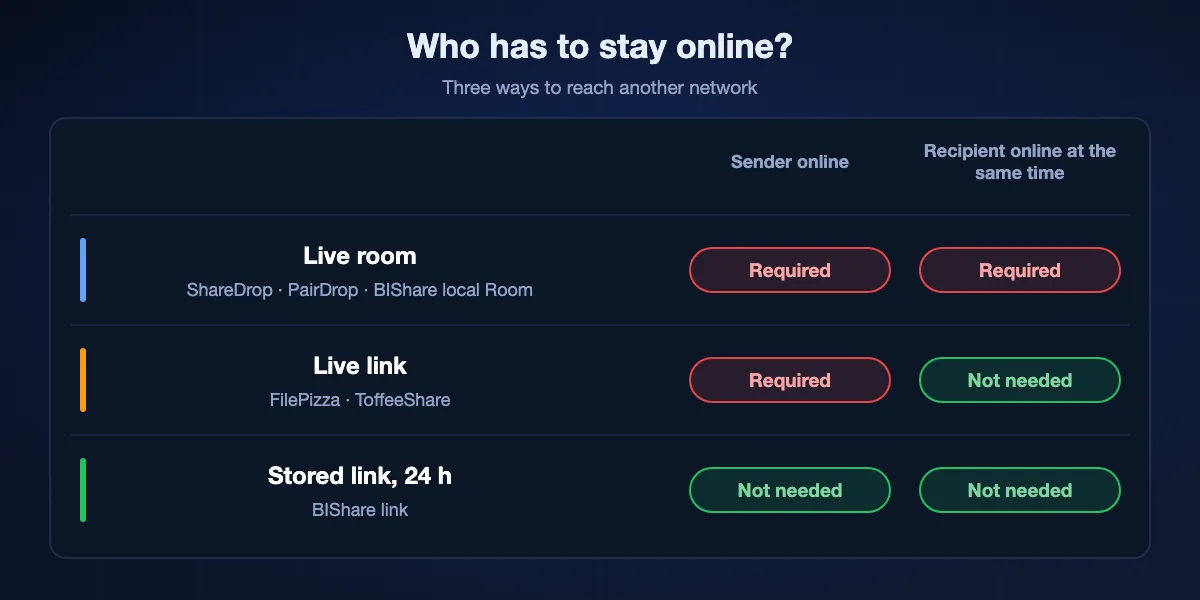
ShareDrop's + button was the least understood part of it. The alternatives split into three models, and the right one depends on who can stay online.
Live rooms: everyone online together
ShareDrop rooms, PairDrop public rooms and BIShare local Rooms all expect people to join at the same time. They are ideal on a call or in a classroom, where you can say "open this now", and useless for someone who will not see the message until later.
Live links: only the sender must wait
FilePizza and ToffeeShare turn the room into a single link. The recipient can open it whenever they like, but only while your tab stays open. Leave a laptop plugged in with the page visible and it works; close the lid and the link is gone.
Stored links: nobody has to wait
A BIShare link encrypts the file in your browser, uploads it, and keeps it for 6, 12 or 24 hours. You can go offline straight away, and the recipient downloads from any browser. This is the model that fits time zones and busy people, at the cost of a copy sitting encrypted on a server until the link expires.
Paired devices: your own gear anywhere
PairDrop pairing and Taildrop both remember devices, so your phone and laptop find each other on any network without a new room each time. Pairing suits two devices you use daily; Taildrop suits a whole fleet already on Tailscale.
Hosting ShareDrop Classic or a replacement yourself
Self-hosting was ShareDrop's quiet promise, and it is how you keep a drop page that nobody can sell. The effort varies more than you might expect.
ShareDrop Classic
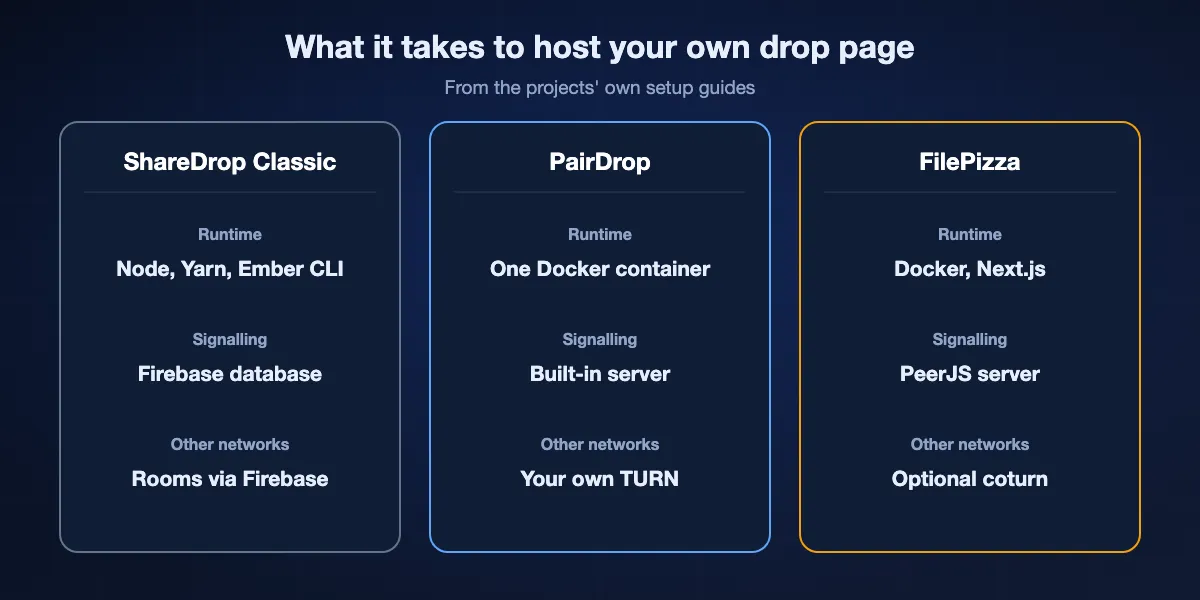
You need a Firebase Realtime Database with the repository's rules, Node with Yarn and Ember CLI, a SECRET used for cookies and room names, and somewhere to run it; the README walks through Heroku. Firebase is a Google service, so a self-hosted ShareDrop still depends on a third party for signalling.
PairDrop
PairDrop is the lightest: one Docker command using the LinuxServer.io or GitHub Container Registry image, or Node directly. Its hosting guide warns that transfers between different networks need your own TURN server, and ships a Docker Compose file that starts coturn alongside PairDrop.
FilePizza
FilePizza v2 is a Next.js app with Docker scripts. Redis is optional for channel state, a coturn TURN server can be switched on for peers behind NAT, and the PeerJS signalling host can point at your own server instead of the public one.
The part nobody mentions: TURN
Every WebRTC drop page works on one network without help, but a transfer between two home or mobile networks often needs a relay. A self-hosted page without TURN will look fine in testing at home and then fail for the friend on mobile data. Budget for bandwidth if you turn it on.
Which alternative for which moment
Pick by who is on the other end and whether they can be online at the same time as you.
Two of your devices on the same Wi-Fi
PairDrop if you want nothing installed, BIShare or LocalSend if the files are large or the phone keeps suspending the tab.
A friend on a call right now
A PairDrop public room, a BIShare Room, or a FilePizza link. All three are quick to explain out loud.
A client or colleague who will open it later
A BIShare link, which waits up to 24 hours without your tab, or a paid storage service if the file must stay up longer.
A classroom or meeting
A BIShare Room joined with a short code, in local mode when everyone shares the Wi-Fi and cloud mode when some join remotely.
Your own fleet of machines
Taildrop if you run Tailscale already, or a self-hosted PairDrop with TURN if you want a page you control.
Privacy: what a browser drop page can and cannot see
Peer to peer does not mean invisible. It helps to know which part of the trip each service can observe.
WebRTC encrypts the file in transit
ShareDrop, PairDrop, FilePizza and ToffeeShare all send data over WebRTC, which encrypts it with DTLS between the two browsers. Someone on the café Wi-Fi cannot read the file, and a TURN relay forwards encrypted packets it cannot open.
The signalling server still sees metadata
To introduce two browsers, a server learns their IP addresses and when they connected, and on ShareDrop your public address decides your room. PairDrop's own FAQ adds that you still have to trust its server, and that encrypting the signalling is planned. Self-hosting moves that trust to you.
Upload buttons are a different model
The Upload Files area on sharedrop.io stores files with LimeWire, and a BIShare link stores an encrypted copy for 6, 12 or 24 hours. Stored links are convenient, but read what each service keeps and for how long, and prefer one that encrypts on your device before upload. Beyond the browser, our guide to the best file-sharing apps shows which services encrypt on your device and which keep a readable copy.
ShareDrop alternatives: FAQ
Does ShareDrop still work?
Yes. sharedrop.io is online and dropping a file on another device's avatar still sends it peer to peer. Since LimeWire bought it in 2025, the page also loads ad slots and an Upload Files area that stores files with LimeWire.
Who owns ShareDrop now?
LimeWire. The project README announces the acquisition, and a Hacker News post about it appeared on 22 February 2025. Szymon Nowak's original code is still published on GitHub, MIT-licensed.
What is the best ShareDrop alternative?
PairDrop is the closest browser replacement. BIShare is best when the recipient needs a link that works after you go offline, FilePizza for a quick live link, and LocalSend for moving files between your own devices with an app.
Why can't ShareDrop see my other device?
ShareDrop groups devices by public IP address, not by Wi-Fi. A VPN, mobile data or a different gateway gives a device another address, so it lands in a different room. Turn off the VPN or create a room with the + button.
Why do strangers show up on ShareDrop?
Offices, campuses, hotels and mobile carriers often share one public IP address among many people, and ShareDrop puts everyone behind that address in the same room. Nobody can send you a file unless you accept it.
Is ShareDrop safe?
Direct transfers use encrypted WebRTC connections. The live site's code is no longer published, and it now loads LimeWire scripts, so if that matters to you, use an open-source alternative or host ShareDrop Classic yourself.
Is ShareDrop the same as Snapdrop?
No. They are separate open-source projects with the same idea, and LimeWire acquired both. ShareDrop started in 2014 with Firebase signalling; PairDrop is a fork of Snapdrop.
Can I send a file with ShareDrop to someone who is offline?
No. Both browsers must be open at the same time. For a file someone collects later, use a stored link such as BIShare's, kept for 6, 12 or 24 hours.
Can I host ShareDrop myself?
Yes. The classic code is MIT-licensed on GitHub, and the README explains setup with a Firebase database, Ember CLI and Heroku. PairDrop is simpler to host with a single Docker command.
Is BIShare free?
Yes. BIShare charges nothing, publishes its code under Apache 2.0, asks neither sender nor recipient to sign up, and each link carries as much as 100 GB for up to 24 hours.
Keep the drop, lose the wait
Free and open source. Share from a browser with a link that outlives the tab, or install the app and move files directly between your own devices.