
The cross-platform AirDrop
The AirDrop alternative for every device
AirDrop only speaks to Apple gear. The moment an Android phone, a Windows laptop or a Linux box joins the room, it goes quiet. This page covers the eight alternatives that actually work, what each one costs you, and which to pick for your exact pair of devices. BIShare leads because it does both halves of the job: instant transfers on the same Wi-Fi and a link anyone can open, across iPhone, Android, Windows, Mac and Linux. Free, open source, no account.
BIShare is ours, so weigh the ranking accordingly. Everything asserted below can be checked against the vendors' own documentation, and the places BIShare comes second are named rather than skipped.
Quick answer
- Best overall: BIShare. It behaves like AirDrop on a shared Wi-Fi, direct and encrypted with nothing uploaded, except the device on the other side can be an Android phone, a Windows laptop or a Linux desktop. When nobody is nearby it switches to a 100 GB link that opens in any browser. Free, open source, no sign-in.
- Best open source, same network only: LocalSend is excellent on a shared Wi-Fi. Both sides need the app, and there is no link route.
- Best built in: Quick Share, free and already on the phone. Since November 2025 it can send to an iPhone and receive from one over AirDrop itself, on a specific list of handsets. No Mac or Linux app, and it wants a Google account.
- If both phones are on Google's interoperability list (Pixel 9/10, recent Galaxy S and Z, some Xiaomi, OnePlus, Oppo, Vivo and Honor), Android to iPhone needs no third-party app at all. Set both sides to Everyone.
- Nothing installed anywhere: PairDrop runs in two browser tabs, and a 6-digit code joins devices that are not on the same network.
- One large file to somebody far away: a BIShare link carries 100 GB encrypted; Wormhole carries 10 GB the same way.
- Skip: SHAREit and the apps like it. Ads, broad permissions, and a history of security findings.
Why AirDrop stops, and where
AirDrop is not a general file-transfer protocol. It is a short-range link between Apple devices, built on Apple Wireless Direct Link, which means Apple silicon talking to Apple software. There is no Android client, no Windows client and no Linux client, and there never will be, because the protocol is not published for anyone else to implement. That single fact is what sends people looking for an alternative, and it shows up in four situations.
Someone in the group is on Android
The most common reason by far, and the situation shifted in 2026. Quick Share on some Android phones can now talk to AirDrop directly, but that covers a specific list of handsets rather than Android as a whole, as the next section sets out. A family with an older or mid-range Android among the iPhones still has no built-in way to pass a video around.
The other machine runs Windows or Linux
A Mac cannot AirDrop to a Windows laptop, and a Windows PC cannot AirDrop at all. Microsoft's Nearby Sharing works between two Windows PCs and nothing else. Linux has never had any of it.
The other person is not in the room
AirDrop needs both devices within Bluetooth range, awake and unlocked. It is useless for sending a file to someone in another building, on another network, or across a time zone. That is where a link route matters more than raw speed.
AirDrop is on, both are Apple, and it still fails
Discovery breaks often enough that "AirDrop not working" is its own search. Personal Hotspot on, Wi-Fi or Bluetooth off, Contacts Only with a number that is not saved, a locked screen, or a device more than about 9 metres away: any of these makes the other device vanish. An alternative that runs over ordinary Wi-Fi does not depend on that handshake.
2026 update: Quick Share can now talk to AirDrop
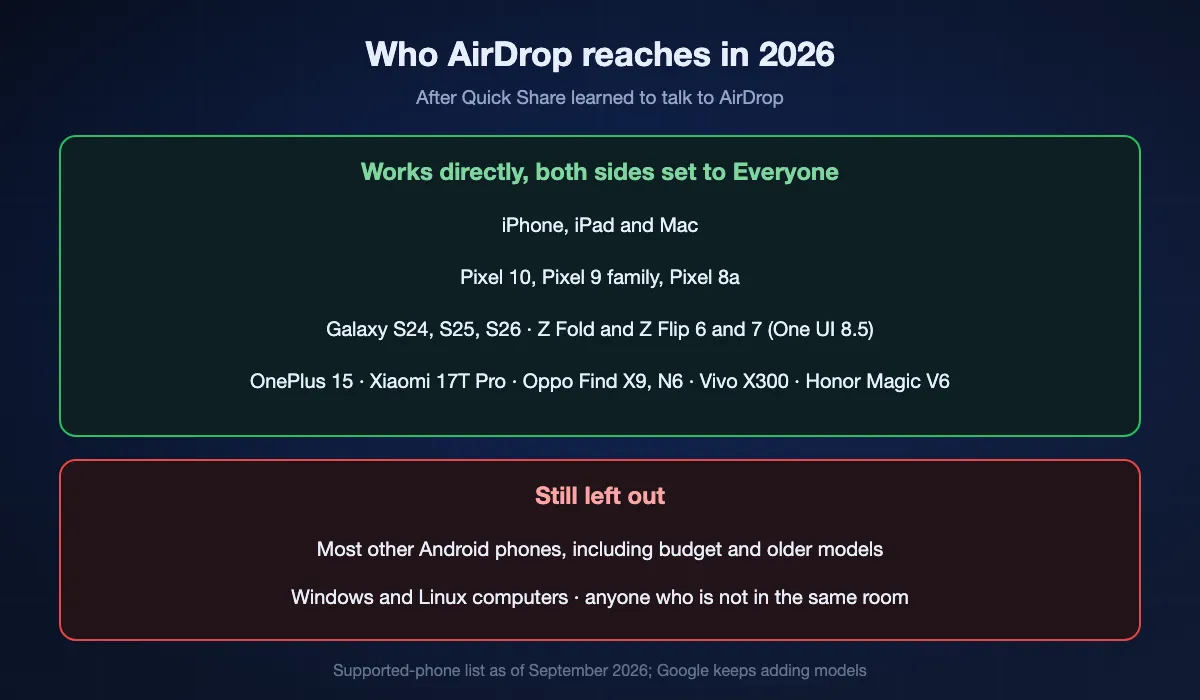
The biggest change to this question in years. In November 2025 Google shipped Quick Share interoperability with AirDrop on the Pixel 10 family, built by reverse-engineering Apple's protocol rather than by agreement, and it has widened steadily since. If both phones are on the list below, you no longer need a third-party app to move a file between an Android phone and an iPhone, iPad or Mac.
Which Android phones can do it
Pixel 10 and Pixel 9 families, the 9a and 8a included. Samsung Galaxy S24, S25 and S26 lines plus the Z Fold 6/7 and Z Flip 6/7 on One UI 8.5. Then a widening set of others: Xiaomi 17T Pro, OnePlus 15, Oppo Find X9 series and N6, Vivo X300 series, Honor Magic V6. Pixel 10 arrived in November 2025, Pixel 9 in February 2026, the Samsung models across March and April 2026, and more keep landing.
What you have to set
Both sides have to be visible to Everyone. AirDrop's Contacts Only mode cannot work across platforms, because there is no shared contact identity to match against. It runs in both directions, phone to Apple device and back, over the same short-range link AirDrop has always used.
What it still does not cover
Any Android phone that is not on the list, which is the overwhelming majority of phones in use. Windows and Linux, which Quick Share's AirDrop bridge does not touch at all. Mac to Windows. Sending to someone who is not in the room. And a receiver who cannot install or enable anything. Those are exactly the gaps a cross-platform tool still fills.
The eight alternatives, ranked
BIShare
Best overall: AirDrop's behaviour without the Apple requirement
Native on all five platforms plus any browser · Apache 2.0 licence, free · nearby transfers uncapped, links to 100 GB · encrypted end to end · no sign-in on either side
Put two devices on one Wi-Fi and BIShare behaves the way AirDrop does: the other machine shows up in a list, you pick it, the file crosses at whatever speed the network allows, and no server ever sees the contents. The difference is what counts as "the other machine". A Galaxy phone, a ThinkPad, a Fedora desktop and an iPad are all equally valid targets. When nobody is nearby, the same app hands you a link, a QR code and a 6-character code instead; the person on the other end opens it in whatever browser they have, downloads, and never installs or signs into anything. That link carries up to 100 GB, and the file is sealed in your browser before it uploads, with the key living in the part of the URL that browsers never transmit. Links die within a day, or after one download if you prefer. For a group, a room code lets several people drop files for each other under the same encryption.
Where it falls short: Files are not kept. Once a link expires the file is gone, so this is the wrong tool if you wanted a copy sitting somewhere next month. And two iPhones side by side really are quicker over AirDrop's own radio, because it builds a direct link that skips your router entirely.
LocalSend
Best open-source alternative for the same network
Five platforms, app on both ends · free, open source · same Wi-Fi only · encrypted in transit between devices · no sign-in
Ask an open-source forum what replaces AirDrop and LocalSend is the first answer you get. It earns that: pick a device from the list, send, done, with the file going straight across the network and nothing landing on anyone's server. It covers the pair AirDrop refuses most often, a Mac and a Windows laptop on one Wi-Fi, and it does that job as well as anything here.
Where it falls short: Software has to be installed at both ends, which rules out a locked-down work machine, and there is no link mode, so anyone outside your network stays out of reach.
Quick Share (Google)
The built-in option, and since 2026 it speaks AirDrop
Android and Windows · free · needs a Google sign-in · no Mac app, no Linux app · talks to AirDrop on a published device list
Android has had nearby sharing built in for years, and Google's Windows client brings a PC into the same circle when Bluetooth and Wi-Fi are both on. The interesting part is newer. Google reverse-engineered AirDrop and shipped it inside Quick Share in November 2025, so a supported phone now trades files with an iPhone, iPad or Mac without a third app in the middle. Apple was not involved and has said nothing about blocking it. For a household running Android next to Windows with one of those handsets, this is the free answer, and it is a good one.
Where it falls short: The AirDrop bridge is limited to the phones on Google's list, both sides must be visible to Everyone, there is still no Mac or Linux client, and nobody outside your network can be reached.
PairDrop (and Snapdrop)
Best with nothing installed at all
Browser tab on both ends · free, open source · same network, or paired across networks by code · WebRTC, encrypted · nothing stored
Snapdrop taught people that a file can cross between two laptops with nothing installed; PairDrop is the fork that kept the idea alive and added to it. Open the page on both devices, drag, and the file moves peer to peer. Devices sharing a network find each other by themselves, and a 6-digit code or a temporary public room joins two devices sitting on different networks entirely. On a borrowed laptop, or a work machine where installing anything means filing a ticket, this is usually the fastest route out.
Where it falls short: There is no app and no link that survives the moment, so both tabs stay open for the whole transfer. Hotel and office networks that isolate clients force you through the pairing code.
Phone Link (Microsoft)
Built into Windows, one phone to one PC
Windows 11 and 10 · free · Android files and photos over the same Wi-Fi; iPhone file transfer is Insider-only · Microsoft account and the Link to Windows app · no Mac, no Linux
Phone Link is Microsoft's bridge between a phone and a Windows PC. With an Android phone it has moved photos and files for years, and since Windows 11 build 22631.4112 you can share files straight from the Windows share sheet to a paired phone on the same Wi-Fi, provided the phone runs Link to Windows 2.1.6 or later. Since December 2024 it can also move files to and from an iPhone, which is the closest thing to built-in AirDrop that Windows has. That path asks for a lot: the Windows Insider Program, iOS 16 or later, a Bluetooth Low Energy pairing and a Microsoft account on both sides. Microsoft's own support pages still document file transfer for Android only.
Where it falls short: One phone paired to one PC. Nothing for Mac to PC, nothing for PC to Mac, nothing for Linux, and no way to send to another person's device.
Wormhole
Best encrypted link when the other person is far away
Browser only · free · 10 GB ceiling · encrypted in the browser before upload · deleted after 24 hours · no sign-in
Nothing about Wormhole competes with AirDrop in the room. It answers the other half of the question, the part AirDrop never had an opinion about: getting a file to somebody who is nowhere near you. Encryption happens in your browser first, the key rides along in the link text, and the service is left holding bytes it cannot open. Anything under 5 GB waits on their servers for a day; bigger files stream between the two browsers live.
Where it falls short: Ten gigabytes is the wall, there is no local mode at all, and a big transfer collapses if either browser closes.
Send Anywhere
Cross-platform, with ads and a paid tier behind it
All five platforms plus browser · free tier carries ads · 10 GB per link · encrypted in transit, not end to end · sign-in required for links
The 6-digit key that half this category copied started here. You read a number off one screen, type it into another, and the file lands, on practically any device you own. For a straight swap of AirDrop's platform matrix it does the job and has done for a decade.
Where it falls short: Advertising sits on the free tier, the subscription prompt is never far away, and files are readable by the service while they pass through it.
SHAREit, Xender and the apps like them
Fast on paper, expensive in every other way
iPhone, Android, Windows, Mac · free, ad-funded · nearby transfers · readable by the app's own servers · bundled feeds, wide permissions
These apps got there first. Long before LocalSend existed, SHAREit and Xender were how a phone handed a film to another phone, and app-store search still puts them at the top. Transfers work now as they did then. What surrounds them has grown: full-screen advertising, a content feed nobody asked for, permission requests far past anything a transfer needs, and a run of security and privacy findings over several years.
Where it falls short: Advertising, permissions, and that track record. Every tool listed above moves the same file without any of it, most of them free and quiet about it.
At a glance
| Feature | AirDrop | BIShare | LocalSend | Quick Share | PairDrop | Wormhole |
|---|---|---|---|---|---|---|
| Sends to an Android phone | ||||||
| Sends to a Windows PC or a Linux machine | ||||||
| Sends to a Mac | ||||||
| Direct over Wi-Fi, nothing uploaded | ||||||
| Reaches a person in another building | ||||||
| Receiver needs no app and no sign-in | ||||||
| Keeps working on a phone hotspot | ||||||
| No ads, no paid tier for sending, source published |
Checked in September 2026 against each tool's own documentation. AirDrop reaches an Android phone only in one specific case: Quick Share on a supported handset, which is why the first row is a cross rather than a tick. Quick Share itself has no Mac or Linux app and wants a signed-in Google account. PairDrop keeps working across networks once two devices are paired with a 6-digit code. Wormhole tops out at 10 GB and holds a file for 24 hours.
Which alternative for which pair of devices
iPhone to Android, or Android to iPhone
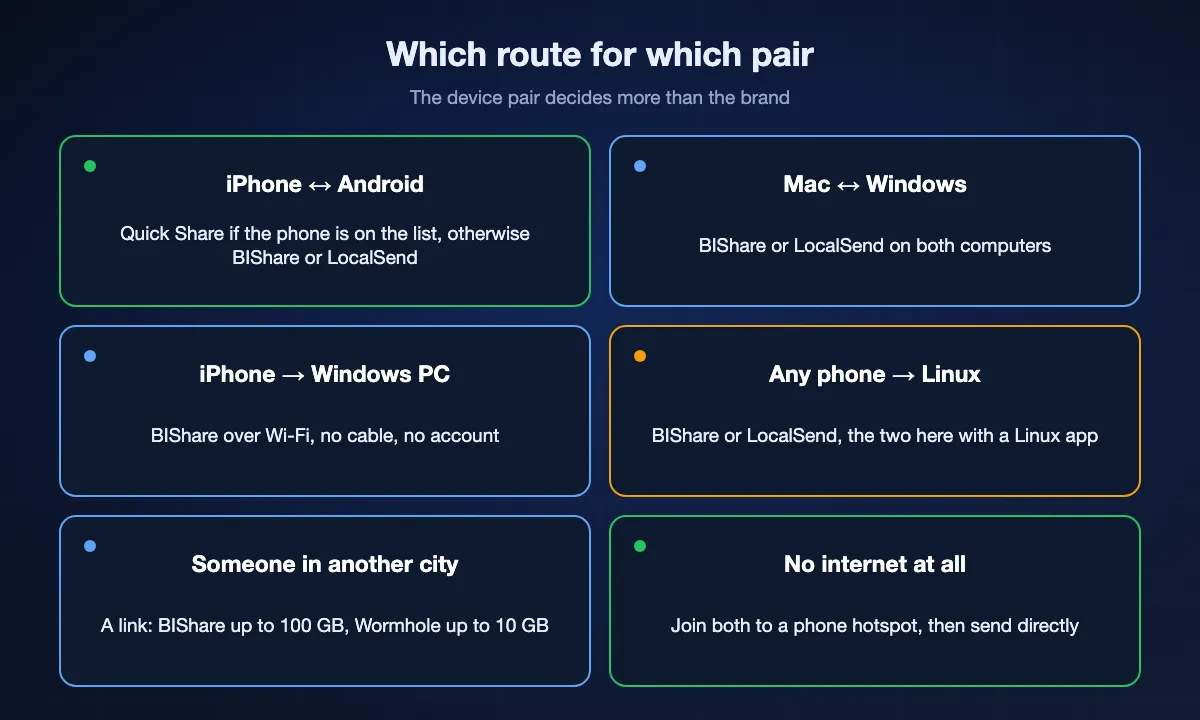
If the Android phone sits on Google's interoperability list, Quick Share now handles this natively in both directions. Set AirDrop and Quick Share to Everyone on both sides. For every other Android phone, and for anything older, AirDrop still cannot see it: BIShare and LocalSend both send directly over a shared Wi-Fi, and BIShare additionally gives you a link when the phones are apart. If neither person can install anything, open PairDrop in both browsers.
Mac to Windows, or Windows to Mac
The pair AirDrop users miss most. BIShare and LocalSend both run natively on macOS and Windows and move files at local-network speed. Phone Link does not help here, because it connects a phone to a PC rather than two computers.
iPhone to a Windows PC
BIShare sends directly over Wi-Fi with no cable and no account. Phone Link can do it too if you are on the Windows Insider channel with iOS 16 or later and a Bluetooth pairing. A cable and the Photos app still works for photos, one direction only.
Any phone to a Linux machine
BIShare and LocalSend are the only two here with a real Linux client. Quick Share, Phone Link and AirDrop have nothing for Linux at all, so a browser tool like PairDrop is the fallback.
To someone in another city
This is where nearby tools stop being relevant. A BIShare link carries up to 100 GB, encrypted, expiring in 6, 12 or 24 hours; a Wormhole link carries 10 GB the same way. Neither needs the recipient to install anything.
Between two devices with no internet at all
Turn on a phone's hotspot and join both devices to it. That hotspot is a network, even with mobile data switched off, and BIShare and LocalSend transfer over it at full speed. AirDrop refuses to work while Personal Hotspot is on, which is one of the most common reasons it fails.
Replacing AirDrop with BIShare, step by step
Both devices nearby: install and send
Install BIShare on both devices from the App Store, Google Play, the Microsoft Store or the site, and join them to the same Wi-Fi. Each device appears in the other's list within a second or two. Pick the file, pick the device, accept on the other end. The transfer runs direct and end-to-end encrypted, with nothing uploaded to a server. A phone hotspot works exactly the same way when there is no Wi-Fi.
The other person is elsewhere: send a link
Open bishare.app/transfer in any browser, or the share screen in the app, and drop the file in. Anything up to 100 GB is fine. Three ways to pass it on come back at once: a link, a QR code for a phone camera, and a short code somebody can type. Encryption happens locally before the upload starts, and the key stays in the fragment of the URL, which browsers keep to themselves, so the file is unreadable to us. Send the link however you normally talk to people. It stops working after 6, 12 or 24 hours, or after a single download if you set it that way.
A group swapping files: open a room
Rooms give a group a 6-character code. Everyone who joins can drop files for the others, from apps or from the browser, and everything is end-to-end encrypted with a key the room members share. It is the multi-person case AirDrop never covered.
How fast are the alternatives, really
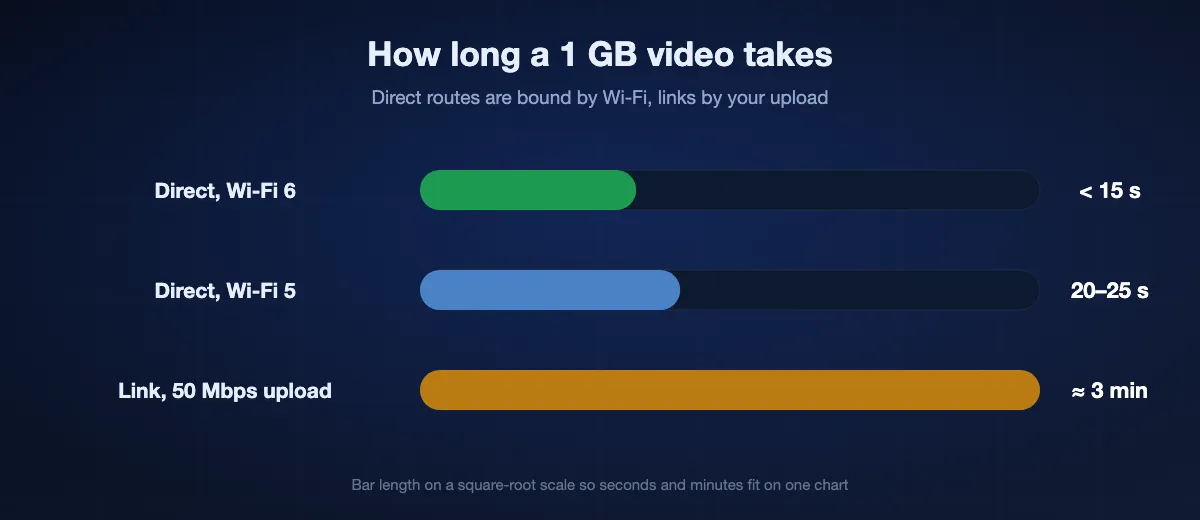
Anything that transfers directly over your own network is limited by the network, not by the app. On ordinary Wi-Fi 5, device-to-device transfers land around 40–50 MB/s; on Wi-Fi 6 with both devices close to the router, 70–110 MB/s. That puts a 1 GB video at roughly 20 to 25 seconds on Wi-Fi 5 and under 15 seconds on Wi-Fi 6, for BIShare, LocalSend, Quick Share and AirDrop alike, because they are all bounded by the same radio.
Link transfers are bounded by your upload speed
A link route uploads once and downloads once, so the ceiling is your connection rather than the tool. On a 50 Mbps upload, 1 GB takes about three minutes and 10 GB takes over half an hour. That holds for BIShare links, Wormhole, WeTransfer and every other service, which is exactly why the local route is worth preferring whenever both devices are in the same place.
AirDrop is faster only between two Apple devices side by side
AirDrop can negotiate a direct peer-to-peer Wi-Fi link between two Apple devices, bypassing the router entirely, and in that narrow case it is quicker than anything running over your normal Wi-Fi. The moment either device is not Apple, that advantage is not available to you at any price.
What actually slows a transfer down
Distance from the router, 2.4 GHz instead of 5 GHz, a phone throttling on battery saver, and thousands of tiny files instead of a few large ones. Fix those before blaming the app; the difference between the tools here is small next to the difference between a good and a bad Wi-Fi position.
Is an alternative as private as AirDrop?
AirDrop sets a high bar: transfers are encrypted, they never touch a server, and nothing is stored. Any replacement worth using should match that, and several here do. Not all of them, though, and the difference matters more than the feature lists suggest.
End-to-end encrypted, nothing stored
BIShare encrypts both routes end to end. On a link, the key sits in the URL fragment, the one part of a web address a browser never puts on the wire, which is why we cannot open what you send even in principle. AirDrop, LocalSend, PairDrop's browser transfers and Wormhole's links all hold to the same standard.
Encrypted in transit only
Send Anywhere, WeTransfer, Google Drive and SHAREit use HTTPS on the wire, which stops someone on your network reading the file. The service itself still holds a readable copy. For a holiday video that may be fine; for a contract or a passport scan it is not the same thing at all. Our comparison of the best file-sharing apps marks which services can read what you send, cloud drives included.
Check what the app asks for
A transfer app needs access to the files you pick and the local network. It does not need your contacts, your call log, your location or permission to install other apps. Broad permission requests and bundled ad feeds are the clearest signal that a free app is being paid for some other way.
AirDrop alternatives: FAQ
What is the best AirDrop alternative?
For most people it is BIShare, because it does what AirDrop does, namely instant, direct, encrypted transfers, but across iPhone, Android, Windows, Mac and Linux rather than Apple devices only, and it adds a browser link for someone who is not nearby. If you only ever transfer between devices on the same Wi-Fi and prefer open source with no cloud component at all, LocalSend is an excellent free choice.
Is there an AirDrop alternative that works between iPhone and Android?
Partly built in now, and fully with an app. Since November 2025 Quick Share on a supported Android phone (the Pixel 9 and 10 families, recent Samsung Galaxy S and Z models on One UI 8.5, and a handful of Xiaomi, OnePlus, Oppo, Vivo and Honor handsets) can send to and receive from an iPhone over AirDrop itself, with both sides set to Everyone. For any other Android phone, AirDrop cannot see it at all: BIShare handles iPhone to Android in both directions, directly over a shared Wi-Fi or by link when the phones are apart, and LocalSend covers the same-network case well too.
What is the AirDrop equivalent for Windows?
There is no single built-in equivalent. Nearby Sharing works between two Windows PCs only; Phone Link connects one phone to one PC, with iPhone file transfer limited to Insider builds. BIShare and LocalSend both give a Windows PC AirDrop-style transfers with iPhones, Android phones, Macs and Linux machines.
Is there an AirDrop alternative for Linux?
BIShare and LocalSend both ship real Linux clients and transfer at local-network speed. AirDrop, Quick Share and Phone Link have nothing for Linux. If you cannot install anything, PairDrop in a browser is the fallback.
Is there a free AirDrop alternative with no account?
BIShare is free, open source and needs no sign-up on either side. Nearby transfers have no size cap, and share links carry up to 100 GB and expire automatically. LocalSend and PairDrop are also free with no account; Quick Share needs a Google account, and Send Anywhere needs one for links.
Can I use an AirDrop alternative without installing anything?
To receive, yes. Open a BIShare link in any browser and download, with no app and no account. To send without installing, use bishare.app/transfer or PairDrop, both of which run entirely in the browser. Installing the app only makes nearby transfers faster and adds the device list.
Is an AirDrop alternative as secure as AirDrop?
The good ones are. BIShare's local transfers and links are both end-to-end encrypted, and the link's key never reaches our servers; LocalSend, PairDrop and Wormhole are end-to-end encrypted as well. Send Anywhere, WeTransfer, Google Drive and SHAREit are not, because they protect the file in transit while the service can still read it.
Why does AirDrop stop working between two Apple devices?
Usually one of five things: Personal Hotspot is switched on, Wi-Fi or Bluetooth is off, the receiver is set to Contacts Only and your number is not in their contacts, the screen is locked, or the devices are more than about 9 metres apart. Tools that run over ordinary Wi-Fi avoid that handshake entirely, which is why some people switch even between two Macs.
What is the best AirDrop alternative for large files?
Size only becomes a question once a server is involved. Sent nearby, BIShare and LocalSend have no ceiling at all, so a 200 GB folder is a matter of waiting for the Wi-Fi rather than hunting for a plan. Over a link the numbers do matter: BIShare stops at 100 GB on the free tier, Wormhole and Send Anywhere at 10 GB, WeTransfer at 3 GB. Cloud storage is bounded by whatever space is left in your account instead.
Can an Android phone AirDrop to an iPhone in 2026?
On a supported handset, yes, with no extra app. Quick Share speaks AirDrop's protocol on the Pixel 9 and 10 families, Samsung's recent Galaxy S and Z models on One UI 8.5, and a growing list from Xiaomi, OnePlus, Oppo, Vivo and Honor. Both devices must be set to Everyone rather than Contacts Only. On any phone outside that list, and for Windows, Linux or anyone who is not in the room, you still need a cross-platform tool such as BIShare or LocalSend.
Do AirDrop alternatives work without internet?
The local ones do. BIShare and LocalSend transfer over any shared network, including a phone hotspot with mobile data switched off, because nothing is uploaded. Link-based tools such as Wormhole, WeTransfer and cloud drives need a connection on both sides by definition.
One app that reaches every device you own
Free, open source, no account. Install BIShare on your phone, laptop or desktop and start sending. The other side does not even need the app.