
SHAREit alternative
The best SHAREit alternatives
SHAREit became one of the most installed apps in the world for a simple reason: it moved videos, music and apps between phones in seconds, with no mobile data and no cable. Over the years that simple tool picked up a video downloader, games, ads and a long list of data it collects, went through a security scare in 2021, and was blocked in India in 2020. Most people searching for an alternative still want the original job done: fast transfers between an Android phone, another phone and a computer, ideally without internet. This guide explains what changed, what SHAREit still gets right, what Google Play's own labels say about SHAREit and its best-known rivals, ranks seven alternatives, and covers the one thing few of them handle: sending an installed app. BIShare is one of the seven: free and open source, with direct transfers over Wi-Fi or a hotspot and App Share for Android apps. No account, no ads.
BIShare is our app, so weigh our ranking accordingly. Every label quoted below is what each developer declares on Google Play, and you can check it yourself on the listing.
Quick answer
- Closest replacement without ads, Android to any device: BIShare sends directly over Wi-Fi or a phone's hotspot, shares installed apps as APKs, and makes a link for people far away.
- Two Android phones or an Android and a Windows PC: Quick Share is already built in and needs no extra app.
- Open source on a home network: LocalSend runs on every major platform and its Play label declares no data collected.
- Nobody wants to install anything: PairDrop works in a browser on both ends.
- You like SHAREit but hate the ads: the same developer sells SHAREit Premium, which carries no ads label but still declares data isn't encrypted in transit.
- Sending an app from one phone to another: the Play Store dropped its Share apps button in 2025, so use BIShare App Share, LocalSend or Files by Google.
Why people are replacing SHAREit
SHAREit launched under Lenovo in 2013 and is now published by Smart Media4U Technology in Singapore. Its Play Store listing counts more than a billion downloads. The reasons users leave fall into five groups.
It stopped being just a transfer app
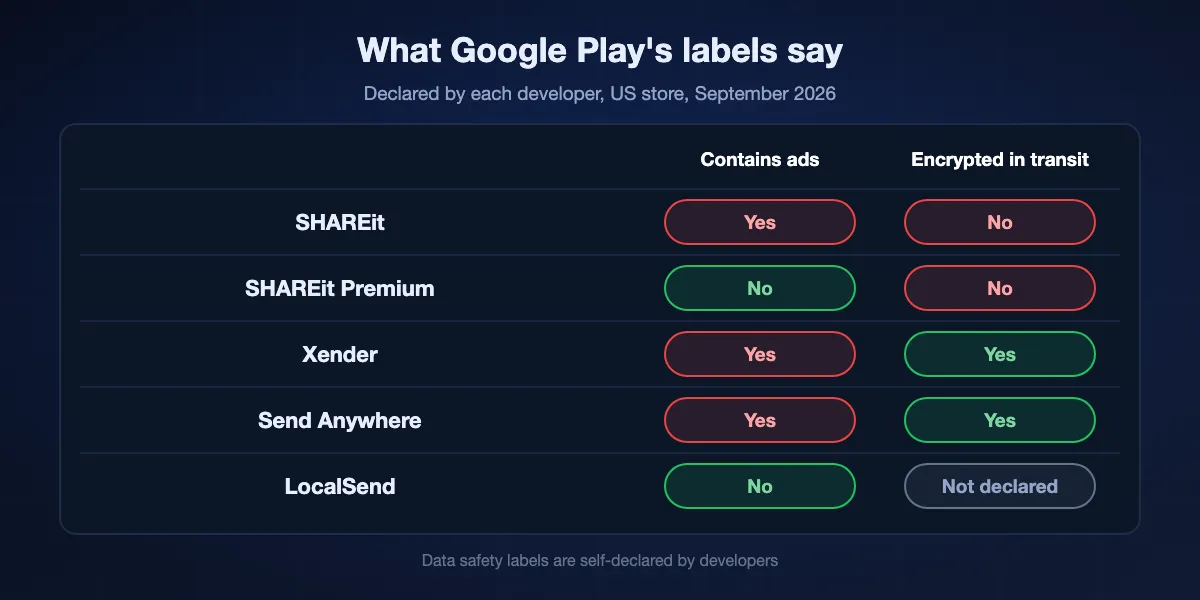
The current Play description opens with sending big files and games, a video downloader and a file manager. Google Play marks the app as containing ads and offering in-app purchases. For someone who only wants to move a folder, that is a lot of app between them and the Send button.
What its Play label declares
In the data safety section, the developer states that data isn't transferred over a secure connection and that there is no way to request deletion. It lists app interactions, installed apps, device IDs and crash data among what the app may collect, while declaring that nothing is shared with third parties.
The 2021 security findings
In February 2021 Trend Micro reported flaws in the Android app, including a misconfigured FileProvider that exposed app data to other apps and downloads fetched over plain HTTP that an attacker on the network could tamper with. SHAREit fixed them by 23 February, about three months after being notified.
Blocked in India
On 29 June 2020 India's IT ministry blocked 59 apps it described as Chinese, citing data security concerns, and SHAREit and Xender were both on the list. For many users in India that ban was the moment they needed a replacement.
Lite versions and mirror sites
Because the main app grew heavy, people hunt for old SHAREit Lite builds on APK download sites and forums. Installing an outdated file transfer app from an unofficial mirror undoes whatever security fixes came later, and there is no way to know whether the file was altered before it was uploaded.
What SHAREit got right, and any replacement should keep
Before comparing apps, it helps to name the features that made SHAREit popular, because not every alternative has them.
No mobile data needed
SHAREit connects phones directly, so a video moves between two handsets in a place with no Wi-Fi and no signal, such as a bus, a village with patchy coverage or a campus where data is expensive. A replacement should work over a phone's own hotspot or a direct Wi-Fi link, not only through the internet.
Phone to computer
Many people used SHAREit to move photos and downloaded videos onto a Windows PC, often an older laptop with no Bluetooth pairing set up. The replacement needs a desktop app, or a browser route, that works without a USB cable or a cloud account.
Large files without a cap
Nearby transfers of full-length videos were the everyday use. Cloud services with small free limits are not a real substitute for that.
Sending apps
Sharing an installed game or app with a friend who has no data was a signature SHAREit trick. The version Google built into the Play Store has since been retired, so check that a replacement can pick installed apps before you uninstall SHAREit.
Seven SHAREit alternatives, ranked
Each entry notes whether Google Play labels the app as containing ads and what its data safety section says about encryption in transit, as of September 2026.
BIShare
Best all-round replacement: offline speed, every platform, and App Share
Apps for Android, iPhone, Windows, macOS and Linux · Apache 2.0 licence · device to device over Wi-Fi or a phone hotspot, any size · App Share sends installed Android apps as APK files · encrypted links hold 100 GB for 6, 12 or 24 hours · no sign-up
BIShare does the jobs people used SHAREit for without the extras wrapped around them. Phones and computers that have it installed spot one another on a shared Wi-Fi or on one phone's hotspot, and files travel between them with no mobile data used. On Android, App Share lists the apps on your home screen and sends the one you pick as an APK. When your friend is in another city, a link does the job and opens in whatever browser they have. The only telemetry is an anonymous tally of transfers and bytes, never file names, and a switch in Settings turns it off.
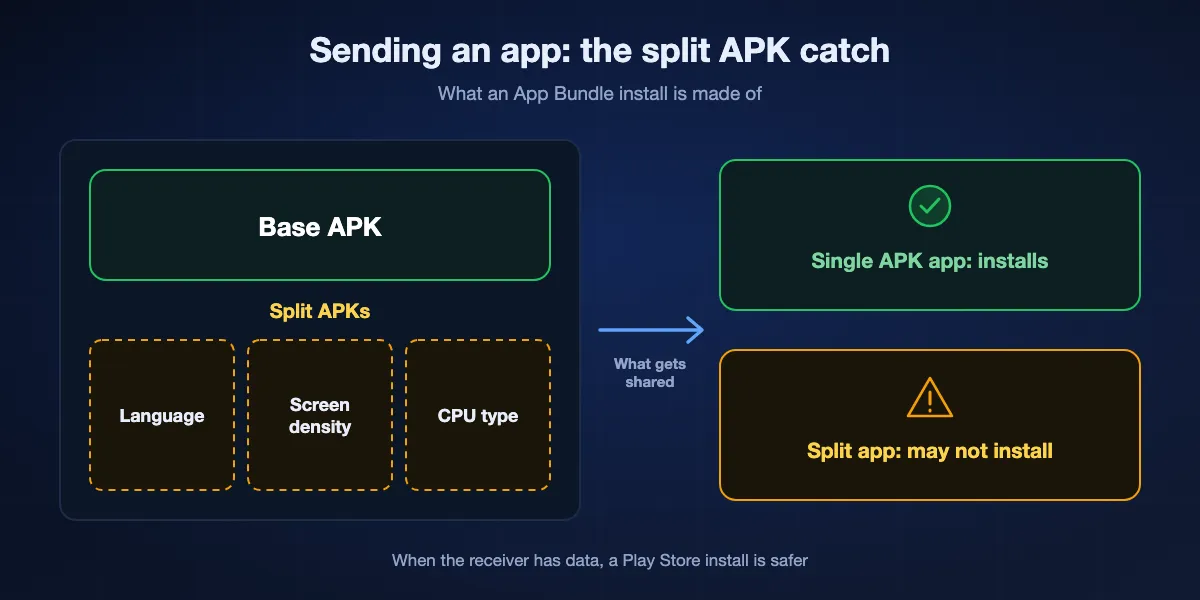
Keep in mind: App Share sends the base APK only, so apps installed as split App Bundles may not install on the other phone. Both devices need BIShare for nearby transfers.
Quick Share
Best when everyone uses Android or a Windows PC
Built into Android with Google services, Chromebooks, and a free Windows app for 64-bit Windows 10 and later · Bluetooth and Wi-Fi, no internet · works with iPhone on a growing list of phones · no ads
Google's Quick Share is already in the share sheet of most Android phones, so two friends can swap videos without installing anything. Its Windows app covers the phone-to-PC case, and recent Pixel, Galaxy and other listed phones can even reach iPhones through AirDrop.
Keep in mind: It is not available on older phones without Google services, iPhones only take part with listed Android models, and it does not send installed apps.
LocalSend
Best open-source choice for a home or office network
Apps for Android, iOS, Windows, macOS and Linux · Apache licence · one local network · HTTPS between devices · Play label: no ads, no data collected
LocalSend is the app most often recommended by people who left SHAREit for privacy reasons. Any phone or computer where it is open on the same router appears in the list on its own, and files move across with no account and no server in between. It installs from app stores and package managers on every major system.
Keep in mind: Both devices must share a network, and it cannot reach a phone that is on mobile data.
PairDrop
Best when the other person will not install anything
Any modern browser · GPL-3.0 · finds devices on your network, pairing reaches across networks · peer to peer, TURN relay as fallback · no account
Load pairdrop.net on the two devices and each lists the other, whether the far side is an Android phone, an iPhone or a laptop. It is useful at a friend's place or on a borrowed computer where installing SHAREit or anything else is not an option.
Keep in mind: It needs an internet connection to introduce the devices, browser tabs must stay open, and very large files depend on browser memory.
Xender
Closest like-for-like app, ads included
Android, iOS, plus Xender Web in a PC browser · 500M+ Play downloads · Play label: contains ads, data encrypted in transit · device IDs collected for advertising
Xender copies SHAREit's formula most closely: phone-to-phone transfers without mobile data, a browser page for PCs, and a familiar interface. Unlike SHAREit, its Play data safety section declares that data is encrypted in transit.
Keep in mind: It is ad-supported, it was blocked in India alongside SHAREit in 2020, and it declares collecting device IDs for advertising.
Send Anywhere
Best for sending with a 6-digit key or a link
Android, iOS, Windows, macOS, web · 6-digit key valid 10 minutes · links last 48 hours · Play label: contains ads, in-app purchases, data encrypted in transit
Send Anywhere pairs two devices with a six-digit key instead of scanning for nearby phones, and can also make a link for later. That makes it handy when the two phones are not on the same network.
Keep in mind: Its Play label lists location, personal info and device IDs among collected data, partly for advertising, and key transfers depend on its servers.
SHAREit Premium
Best if you want to stay with SHAREit but lose the ads
Smart Media4U's paid edition on Google Play · 5M+ downloads · no ads label, in-app purchases · Play label: no data collected, data isn't encrypted in transit
The same developer publishes SHAREit Premium, pitched as pure sharing without annoying notifications. If you are used to SHAREit's screens and the friends you send to still use it, this is the least disruptive switch.
Keep in mind: It is paid, it comes from the same company behind the 2021 findings, and its label still declares that data isn't transferred over a secure connection.
At a glance
| Feature | BIShare | Quick Share | LocalSend | PairDrop | Xender | Send Anywhere |
|---|---|---|---|---|---|---|
| No ads in the app | ||||||
| Works without internet | ||||||
| Reaches a Windows PC | ||||||
| Works with iPhone | ||||||
| Sends installed apps | ||||||
| Open source |
As of September 2026. Quick Share reaches iPhones only from Android phones on Google's list, and its Windows app needs 64-bit Windows 10 or later. PairDrop needs internet to connect devices. Xender reaches PCs through Xender Web in a browser. Send Anywhere key transfers rely on its servers. Apps are sent as APK files on Android; apps installed as split App Bundles may not install on the receiving phone.
Sending an installed app without SHAREit
Sharing a game or an app with a friend who has no data plan was one of SHAREit's most popular tricks. Google tried to cover it, then stepped back. BIShare, LocalSend, Xender and Send Anywhere can all pick an installed app and send it as an APK.
The Play Store button is gone
From 2021 the Play Store could send apps to nearby Android phones under Manage apps and device. Google announced its retirement in December 2024, and the Share apps option had disappeared by March 2025. 9to5Google reports that Files by Google can still share apps from its Apps category.
BIShare App Share
In BIShare on Android, App Share lists the apps on your launcher and adds the chosen one to the send tray as an APK, which travels over Wi-Fi or a hotspot like any other file. BIShare deliberately asks only to see launcher apps rather than every package on the phone, and it never installs anything itself: the receiver opens the APK from a file manager and allows installs from that source.
The split APK catch
Many modern apps are installed from Google Play as a base APK plus several split pieces. Sending the base file alone may produce an app that will not install or will crash. Games and large apps are the usual offenders, so a fresh download from the Play Store is safer when the receiver has data.
Which app for which destination
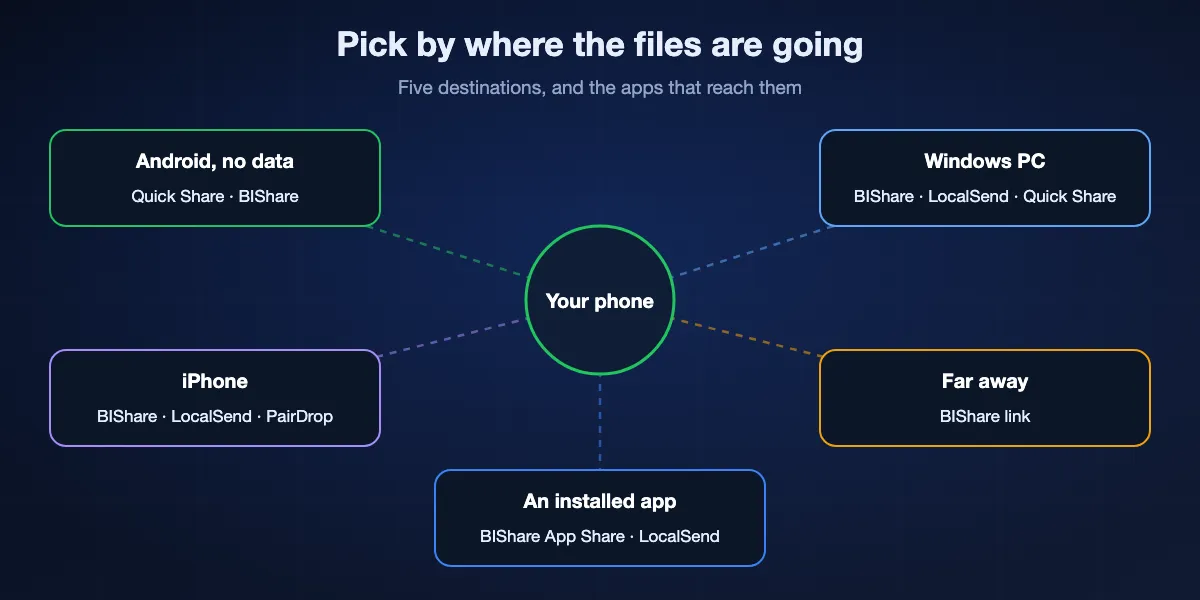
Choose by where the files need to end up rather than by which app lists the most features.
Android to Android, no mobile data
Quick Share if both phones have it, otherwise BIShare over a phone's hotspot. Both move large videos without touching the internet.
Phone to a Windows PC
BIShare or LocalSend on both, or Quick Share for Windows on the computer. Xender Web works in a browser if you already use Xender.
An iPhone is involved
BIShare, LocalSend or PairDrop all work between Android and iPhone. Quick Share only reaches iPhones from listed Android phones.
The other person is somewhere else
Make a BIShare link: it holds up to 100 GB, stays valid for 6, 12 or 24 hours and the receiver needs only a browser. Send Anywhere links last 48 hours.
Handing over an app
BIShare App Share, LocalSend or Files by Google, keeping in mind that split APK apps may need a normal Play Store install.
Switching from SHAREit to BIShare
Remove SHAREit and its leftovers
Uninstall SHAREit, then check Settings, Apps, Special app access for any install or overlay permissions you granted it. Delete old SHAREit folders in your file manager once you have kept the files you need.
Install BIShare on both devices
Get BIShare from Google Play, the App Store, the Microsoft Store or the Mac App Store, or the Linux build. Put both devices on one Wi-Fi, or turn on one phone's hotspot and connect the other to it.
Send files or an app
Pick photos, videos or files, or open App Share and choose an installed app, then tap the other device and accept on the receiving side. Transfers over a hotspot keep going without any mobile data. For someone far away, create a link instead and send it through any chat app.
Choosing a safer file transfer app
File transfer apps see everything you send, so a little checking before installing one pays off.
Read the data safety label
On any Play listing, open Data safety and look for whether data is encrypted in transit and what the app collects. The labels are declared by developers, so treat them as a floor rather than a guarantee, but a declaration of unencrypted transfers is worth taking at face value. For apps beyond Android, our file-sharing app comparison checks the same point: whether the service can read your files.
Install from official stores only
Avoid Lite versions and old builds from APK mirror sites. They miss security fixes, and a modified file transfer app is an easy way to plant malware, because it already has permission to read the files on your phone.
Be careful with APKs you receive
Only install apps from people you trust, turn the install unknown apps permission back off afterwards, and let Google Play Protect scan anything you side-load.
SHAREit alternatives: FAQ
What is the best alternative to SHAREit?
For offline transfers between Android, iPhone and computers without ads, BIShare. For Android and Windows only, the built-in Quick Share. For open source on one network, LocalSend. For browser-only use, PairDrop.
Is SHAREit safe to use in 2026?
The 2021 flaws Trend Micro reported were fixed, but SHAREit's own Google Play label declares that data isn't transferred over a secure connection and cannot be deleted on request. Many users prefer an app that declares encryption in transit.
Is SHAREit banned?
It was blocked in India on 29 June 2020 along with 58 other apps, including Xender. It remains listed on Google Play in other countries such as the United States.
Which SHAREit alternative has no ads?
BIShare, Quick Share, LocalSend and PairDrop show no ads. Xender and Send Anywhere are labelled on Google Play as containing ads.
Can I share apps like SHAREit without the Play Store feature?
Yes. BIShare's App Share and LocalSend both send an installed Android app as an APK, and Files by Google can share apps too. Apps installed as split APKs may not install from the base file alone.
What replaced SHAREit for Android to PC transfers?
Quick Share for Windows, BIShare and LocalSend all move files from an Android phone onto a Windows computer over Wi-Fi, no cable needed.
Does a SHAREit alternative work without internet?
BIShare, Quick Share, LocalSend and Xender all transfer directly between nearby devices without mobile data. PairDrop and Send Anywhere key transfers need internet.
Is Xender better than SHAREit?
It is similar in features and also shows ads, but its Google Play label declares data encrypted in transit, which SHAREit's does not. Both were blocked in India in 2020.
What is SHAREit Premium?
A paid edition from the same developer without the ads label. Its data safety section declares no data collected, but still says data isn't transferred over a secure connection.
Is BIShare free?
Yes. BIShare costs nothing, its source code is published under the Apache 2.0 licence, and it asks for no account, shows no ads and sets no cap on direct transfers.
Keep the speed, drop the clutter
Free and open source. Send files and apps directly between phones and computers, or share an encrypted link with anyone.