
Local + off-network transfer
A Snapdrop alternative for any network
Open a page on two devices, drag a file across, done. That habit is why people looked for Snapdrop in the first place, and why they are looking for a replacement now. This page covers what really changed after LimeWire bought the project, and seven alternatives that keep the good part. BIShare leads because it does the Snapdrop thing on a shared Wi-Fi and also reaches a person who is nowhere near you. Free, open source, no account.
BIShare is ours, so weigh the ranking accordingly. Everything below can be checked against the projects' own repositories and pages, and where another tool is the better answer, we name it.
Quick answer
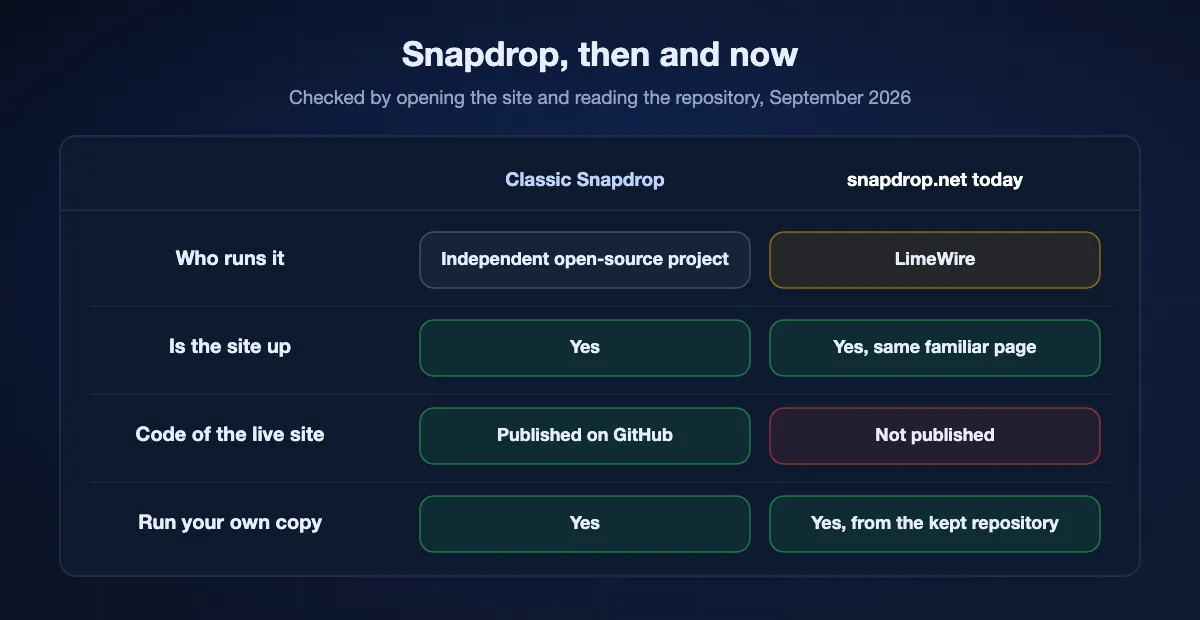
- Snapdrop is not dead. LimeWire acquired it and snapdrop.net still serves a Snapdrop-branded transfer page. What changed is that the code behind the live site is no longer published, so nobody outside can audit what today's version does with your files.
- Closest replacement, same habit: PairDrop. A community fork of Snapdrop, GPL-3.0, still just a browser tab, and it adds the thing Snapdrop never had: a 6-digit pairing code, so two devices on different networks can find each other.
- Best overall: BIShare. Native apps on five platforms for full-speed local transfers, plus a 100 GB browser link for anyone not in the room. Free, open source, no sign-in on either side.
- Best if you want an app and only ever transfer at home: LocalSend. Open source, same network only, nothing in the cloud.
- You can also run Snapdrop yourself. The classic code is still on GitHub under the original licence, and a Docker container puts it on your own machine, which is the only way to be certain nothing changed under you.
- For one file to someone far away: a BIShare link (100 GB, encrypted, expires after 6, 12 or 24 hours) or Wormhole (10 GB, encrypted).
What actually happened to Snapdrop
Search results on this topic are full of obituaries, and most of them overstate the case. Here is what we could verify by opening the sites and reading the repository in September 2026.
LimeWire bought it, and says so in the repo
The project's own GitHub README carries the announcement: "Snapdrop has been acquired by LimeWire, a leading file sharing platform with integrated AI tools." The same note adds that the repository stays as-is and that you can still download and run the classic Snapdrop on your own infrastructure. ShareDrop, the other well-known WebRTC drop page, ended up under the same owner.
September 2026: LimeWire itself was sold
On 14 September 2026 the memecoin project BabyDoge announced it had acquired LimeWire, terms undisclosed, with Abel Czupor taking over and a stated focus on creators, decentralized storage and AI tools paid for in its LMWR token. The release does not mention Snapdrop. So the owner of snapdrop.net now has an owner of its own, and a browser drop page is nowhere in its plans — one more reason to want the code you rely on out in the open.
The site is still up, and still looks like Snapdrop
Load snapdrop.net today and you get the familiar page: device names, Upload Files, Upload Folder, Send a Message. No sign-in wall, no storage plan in your face. The logo file is served as snapdrop_by_lw.svg, which is the clearest sign of the new owner. sharedrop.io is likewise still the classic peer-to-peer page. If you read somewhere that both are gone, that was not true this month.
The part that genuinely changed is transparency
What sits on GitHub is the classic version. The code running on the live site is not published, so there is no way for anyone outside LimeWire to confirm how a transfer is routed now, or what is logged. For a tool whose entire appeal was that files went straight between two browsers and touched nothing, that is a real loss, and it is the honest reason to move rather than any story about the site disappearing.
Why people wanted an alternative even before this
Both devices had to be on the same network, and on a hotel or office network that isolates clients, they could not see each other at all. There was no app, so a big transfer died with the tab. And nothing reached a person who was not in the building. The acquisition gave the search a push; those limits were always the substance of it.
What to keep from Snapdrop
A replacement is only a replacement if it keeps the four things that made people loyal to a plain web page in the first place.
Nothing to install
Open a URL on both devices and they see each other. On a borrowed laptop, or a work machine where installing software means a ticket, that is not a nice-to-have, it is the whole reason the tool exists.
No account, no email address
Snapdrop never asked who you were. Any replacement that opens with a sign-up form has already lost the comparison, whatever it does afterwards.
Files go straight across
WebRTC moves the data between the two browsers; the server only introduces them. Nothing is uploaded, so nothing sits on anyone's disk waiting to be deleted.
Any device talks to any device
An iPhone to a Windows laptop, an Android to a Mac, a Linux desktop to a tablet. Snapdrop treated them all the same, which is exactly what AirDrop and Quick Share refuse to do.
The seven alternatives, ranked
BIShare
Best overall — the Snapdrop habit plus a route to people who are far away
iPhone, Android, Windows, Mac, Linux, and any browser · Apache 2.0 licence, free · no size limit nearby, 100 GB by link · end-to-end encrypted · no sign-in on either side
Put two devices on one Wi-Fi and the experience is what you remember, except through a proper app: names in a list, tap one, watch the bar fill at whatever the network can do, with nothing landing on a server. Where it leaves Snapdrop behind is distance. Somebody in another city gets a web address instead, which they open in whatever browser is already on their screen, no install and no sign-up, carrying as much as 100 GB. The sealing happens before the upload starts and the key stays in your link, so the copy we hold is meaningless to us. Set it to die after 6, 12 or 24 hours, or after the first download. For a group, one room code lets several people leave files for each other under the same protection.
Where it falls short: The local route is at its best through the app; the browser side is for receiving and for one-off sends rather than a permanent replacement for a native client. And nothing is stored, so a link that expires is genuinely gone.
PairDrop
The community fork, and the closest thing to the original
Any browser · free, GPL-3.0, self-hostable with Docker or Node.js · same network, or paired across networks by code · WebRTC · no account
PairDrop is a fork of Snapdrop that kept the interface and fixed the biggest complaint. Devices on one network still find each other automatically, and two devices on different networks can be paired with a 6-digit code or a QR code, or meet in a temporary public room through a 5-letter code. Transfers stay peer to peer over WebRTC, the project is properly open source, and you can run your own instance in a container if you would rather not trust anyone's server at all. For somebody who only wants Snapdrop back, this is the answer.
Where it falls short: Still a browser tab, so both people have to be online at the same time with the page open, and there are no native apps. Networks that isolate clients force you through the pairing code.
LocalSend
Best installed app for transfers at home
iPhone, Android, Windows, Mac, Linux · free, open source · same network only · encrypted between devices · no account
LocalSend is what people recommend when the browser requirement is not sacred. It puts a small app on each device, finds the others on your network, and sends files directly, encrypted, with no cloud component anywhere. It is faster and steadier than a browser tab for a large folder, and it is the tool to reach for when the two machines in question are both yours.
Where it falls short: Both ends need the app installed, which rules out a borrowed or locked-down computer, and there is no way at all to reach someone on a different network.
ShareDrop
The other classic page, same new owner
Any browser · free · same network, or a room link · WebRTC · no account
ShareDrop predates Snapdrop's popularity and works the same way: open the page on two devices, drag, done. It adds a room link you can send to someone, which loosens the same-network requirement a little. It still works today. Worth knowing before you settle on it: LimeWire acquired this one as well, so switching from Snapdrop to ShareDrop for the ownership reason moves you nowhere.
Where it falls short: Same owner as Snapdrop, no apps, and the same tab-must-stay-open constraint.
Transfer.zip
Browser sending with an unusually honest free tier
Any browser · free tier with no size limit · open source · encrypted · account optional for sending · paid plans from $9/month
Transfer.zip covers the link half of the problem. Its free tier advertises no size limit at all, which works because a free transfer is live rather than stored: the file streams while your tab stays open, and the transfer ends when you close it. Paid plans add real storage, 200 GB per transfer for 14 days on the entry tier. If your need is sending one enormous file to one person right now, the free tier is genuinely useful.
Where it falls short: The free tier keeps nothing, so the recipient has to collect while you wait with the tab open. Anything asynchronous means paying, and there is no local-network mode.
Wormhole
Best encrypted link when the other person is elsewhere
Browser only · free · stops at 10 GB · sealed in the page before anything leaves · gone after a day · nobody signs in
Wormhole never tried to be a nearby-transfer tool, so comparing it to Snapdrop only makes sense for the case Snapdrop could not handle. Encryption happens in your browser first and the key rides in the link text, leaving the service with bytes it cannot open. Files under 5 GB wait a day on their servers; larger ones stream between the two browsers live.
Where it falls short: Ten gigabytes and no further, nothing for two devices in the same room, and a stalled tab kills a long transfer.
Self-hosted Snapdrop
For anyone who wants the original, unchanged, under their own control
Your own server or NAS · free, original licence · same network by default · WebRTC · you own the signalling server
The classic code is still on GitHub and the README explicitly invites you to run it yourself. A Docker container on a home server, a NAS, or a small VPS gives you the exact page you remember, with a signalling server you control and no question about who owns what. PairDrop can be self-hosted the same way and is the more actively maintained codebase, so most people choosing this route end up running that instead.
Where it falls short: Somebody has to maintain it, keep TLS valid and leave a machine switched on. Over the internet you will also need a TURN server for the connections WebRTC cannot make directly.
At a glance
| Feature | Snapdrop | BIShare | PairDrop | LocalSend | Transfer.zip | Wormhole |
|---|---|---|---|---|---|---|
| Works with nothing installed | ||||||
| Sends between devices on the same network | ||||||
| Sends when the devices are on different networks | ||||||
| Native apps as well as a browser | ||||||
| Receiver can collect later, without waiting | ||||||
| End-to-end encrypted | ||||||
| Source of the running service is published | ||||||
| Free, with no paid tier for sending |
Checked in September 2026 by opening each service. Snapdrop and ShareDrop are both owned by LimeWire; the classic Snapdrop code on GitHub is published, the code running snapdrop.net is not, which is why that row is a cross. PairDrop pairs across networks with a 6-digit code and offers temporary public rooms under a 5-letter code. Transfer.zip's free tier has no size limit because the transfer is live: it ends when your tab closes.
Which one to open, by situation
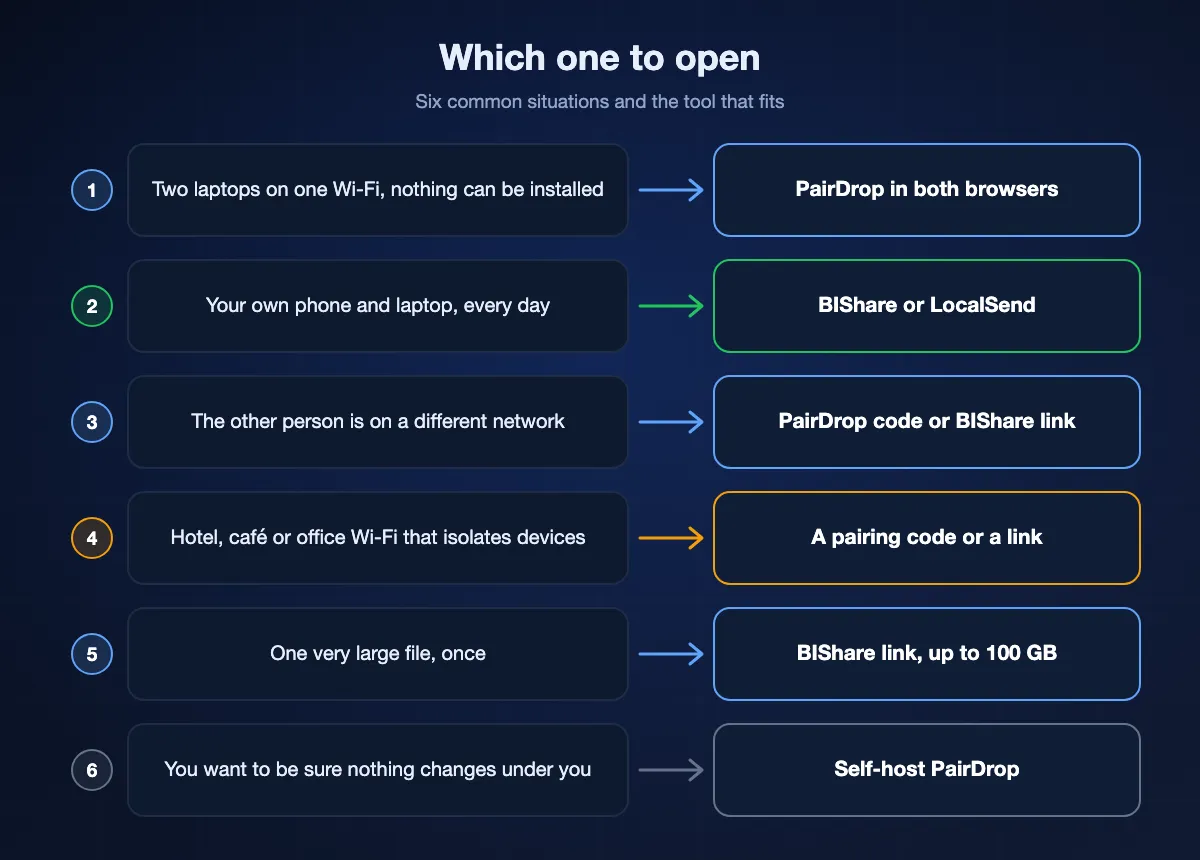
Two laptops on the same Wi-Fi, nothing installable
PairDrop in both browsers. It is the closest thing to the Snapdrop you remember, and on a shared network the devices find each other with no setup at all.
Your own phone and your own laptop, every day
Install something. BIShare or LocalSend will be faster and less fragile than a tab, and BIShare keeps the browser route for the days when you are sending to someone else.
The other person is on a different network
Snapdrop never did this. Pair through PairDrop's 6-digit code if you both stay online, or send a BIShare link if they should be able to collect it later at their own pace.
A hotel, café or office network
These usually isolate clients from each other, so local discovery fails no matter which tool you use. A paired code or a share link is the way through.
One very large file, once
A BIShare link carries 100 GB and holds it for 6, 12 or 24 hours. Transfer.zip's free tier has no ceiling at all as long as you keep the tab open while the other person downloads.
You want to be certain nothing changed under you
Self-host. PairDrop in Docker on a home server or a small VPS is a short evening's work and answers the ownership question permanently.
Replacing Snapdrop with BIShare, step by step
Both devices nearby
Grab the app on both machines, from whichever store fits, and make sure they sit on one Wi-Fi. Names appear in each other's list almost immediately. Choose a file, choose where it goes, tap accept at the far end, and the bytes move between the two devices with no server in the path and encryption applied the whole way. Away from any router, turn a phone into a hotspot and the same thing works offline.
The other person is elsewhere
Drag a file onto bishare.app/transfer, anything up to 100 GB. You get back three ways to hand it over: a web address, a QR square for a phone camera, and six characters short enough to read out loud. Sealing happens in your own browser first; the key travels in the fragment after the hash, which never leaves the address bar, so the copy on our side is meaningless without your link. It stops answering after 6, 12 or 24 hours, or sooner if you tick the single-download option.
Nothing installed on either side
Everything above also works with no app at all. bishare.app/transfer is a plain web page, so a locked-down machine can still send, and the person receiving only ever needs the address you send them. That is the Snapdrop shape with the same-network rule taken out.
Speed: browser tab versus native app
For a handful of photos the difference is invisible. For a folder of video it is not, and it is worth knowing where the time goes.
On your own network, the network is the ceiling
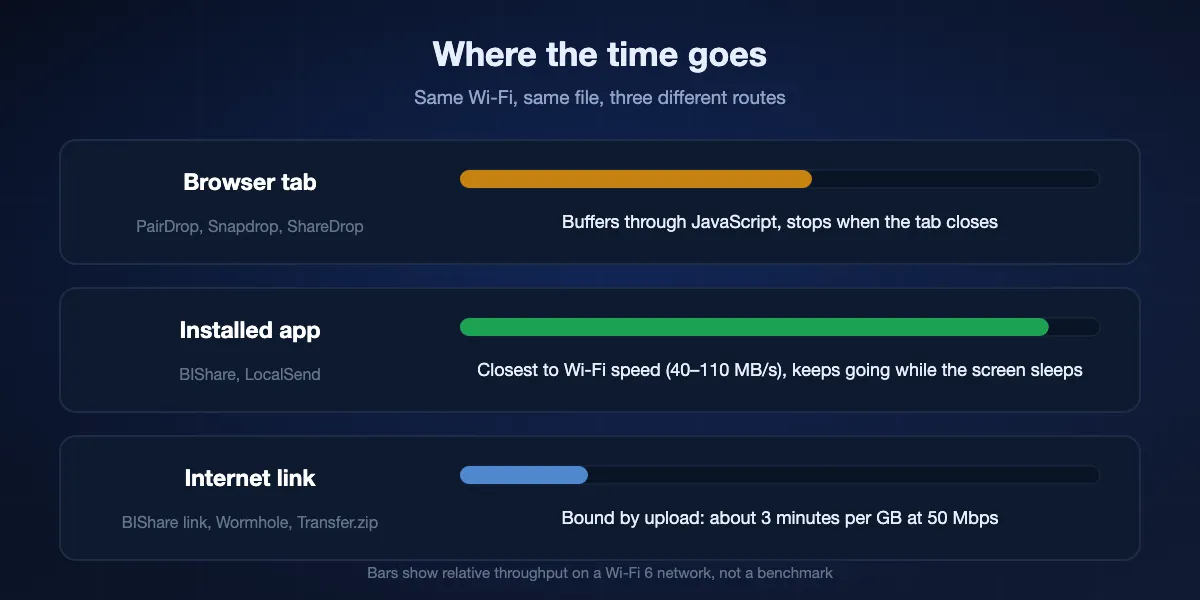
Measured on ordinary hardware, a direct transfer sits around 40–50 MB/s on Wi-Fi 5 and reaches 70–110 MB/s on Wi-Fi 6 when neither device is far from the router. An installed client gets nearer that ceiling than a page does, because the page has to buffer through JavaScript before anything is written to disk.
A browser transfer ends when the tab does
This is the practical limit of every Snapdrop-style tool, PairDrop included. Close the lid, lose the connection, and a 30 GB transfer starts again. An installed app can hold the transfer open while the screen sleeps.
Over the internet, your upload decides everything
Anything that goes out to the internet is governed by the slower half of your connection, the upload. Reckon on roughly three minutes per gigabyte at 50 Mbps, so a ten-gigabyte file is a lunch break. No service escapes this, which is the argument for using the local path whenever the two devices are within reach of the same router.
Is a Snapdrop alternative private?
The original's pitch was that files never reached a server. Some replacements hold that line and some do not, and the difference is easy to check once you know what to look at.
Peer to peer, nothing stored
PairDrop, ShareDrop and self-hosted Snapdrop move data between browsers over encrypted WebRTC; the server only introduces the two sides. BIShare's local transfers behave the same way, and its links are end-to-end encrypted with the key in the URL fragment, so we cannot read them either.
Published source is what makes the claim checkable
PairDrop, LocalSend, Transfer.zip and BIShare publish the code that runs. The current snapdrop.net does not, which does not prove anything bad about it, only that its privacy claim has to be taken on trust rather than read.
Watch where a free tier gets its money
A service that stores your files has costs, and something has to cover them: a paid tier, advertising, or your data. Tools that store nothing at all have the easiest answer to that question, which is part of why the Snapdrop model was so well liked. Our round-up of the best file-sharing apps shows which ones are free and which charge for more.
Snapdrop alternatives: FAQ
What is the best Snapdrop alternative?
If you want the same habit with nothing installed, PairDrop, because it is a fork of Snapdrop that kept the interface and added cross-network pairing. If you want one tool that also reaches people who are not on your network, BIShare, which sends device to device on a shared Wi-Fi and gives you a 100 GB browser link otherwise. Both are free and neither asks for an account.
Is Snapdrop still working in 2026?
Yes. LimeWire acquired the project and snapdrop.net still serves a working Snapdrop-branded transfer page, as does sharedrop.io under the same owner. The meaningful change is that the source of the live site is no longer published, so its behaviour cannot be audited from outside.
What happened to Snapdrop and LimeWire?
Snapdrop's GitHub README announces the acquisition directly: "Snapdrop has been acquired by LimeWire." The same notice says the repository stays as-is and that anyone can keep running the classic version on their own infrastructure. ShareDrop went to the same owner.
Is Snapdrop safe to use now?
Nothing we found says otherwise, and the page still behaves like the original. What you cannot do any more is verify it, because the code behind the live site is not published. If that matters for what you are sending, use a tool whose running code is open, or host Snapdrop or PairDrop yourself.
Is there a Snapdrop alternative that works across different networks?
Two approaches. PairDrop pairs two devices with a 6-digit code, or puts them in a temporary public room with a 5-letter code, and then transfers peer to peer even across networks. BIShare hands you a link the other person opens whenever they get to it, up to 100 GB, which does not require both of you to be online at the same moment.
Can I self-host Snapdrop?
Yes, and the project invites it. The classic code is still on GitHub and runs in Docker or Node.js. PairDrop can be self-hosted the same way and is the more actively maintained option. Over the internet you will also want a TURN server for the connections that WebRTC cannot establish directly.
What is the difference between Snapdrop, PairDrop and LocalSend?
Snapdrop and PairDrop are web pages: nothing to install, both devices open a URL. PairDrop adds pairing across networks and is actively maintained. LocalSend is an installed app on five platforms, faster and steadier for large folders, but it works only within one network and both ends need it.
Does a Snapdrop alternative work without internet?
Locally, yes. Any shared network works, and a phone acting as a hotspot with mobile data switched off counts as one, because nothing leaves for the internet. That covers BIShare's local mode, LocalSend, and a PairDrop instance you run yourself on that same network. A public PairDrop or ShareDrop page still needs to reach its signalling server, so that one does want a connection.
What is the best Snapdrop alternative for iPhone and Android?
PairDrop works in Safari and Chrome on both, with no install. BIShare has native apps on both and sends in either direction over Wi-Fi, or by link when the phones are apart. AirDrop remains no help here unless both handsets are on Google's Quick Share interoperability list.
Is there a free Snapdrop alternative with no size limit?
On your own network there is no cap worth worrying about: BIShare and LocalSend will push a 200 GB folder across and the only limit is how long the Wi-Fi takes. Going over the internet, Transfer.zip's free tier states no ceiling while your tab stays open, a BIShare link holds 100 GB for up to 24 hours, and Wormhole stops at 10 GB.
Keep the Snapdrop habit, lose the network limit
Free, open source, no account. Send across the room through the app, or across the country with a link the other person opens in any browser.