
Buyer's guide · Updated 2026
The best file sharing apps in 2026
There is no single best tool for everyone — it depends on whether you need instant transfers on the same Wi-Fi, a link anyone can open, storage that stays put, or all three. Here are the ten apps people actually reach for, what each does well, and where each one stops.
We make BIShare, so read our ranking with that in mind. Every claim below can be checked on each app's own pages, and where BIShare loses — Apple-only speed, permanent storage, team features — we say so.
Quick answer
- Best overall: BIShare — local-speed transfers between iPhone, Android, Windows, Mac and Linux, plus a 100 GB link for anyone who is not nearby. Free, open source, no account, end-to-end encrypted.
- Best local-only, open source: LocalSend — excellent on a shared Wi-Fi, no link route.
- Best if everyone is on Apple: AirDrop — built in and instant, but iPhone/iPad/Mac only.
- Best with nothing installed: PairDrop (the Snapdrop successor) — browser to browser, and it can pair across networks with a code.
- Best link for a big one-off send: BIShare (100 GB, encrypted) or Wormhole (10 GB, encrypted); WeTransfer's free plan stops at 3 GB.
- Best for a team that needs files to stay put: Google Drive or Dropbox — storage and collaboration, not transfer.
- Skip: SHAREit — ads, heavy permissions, and a security history.
How we judged
Does it cross platforms?
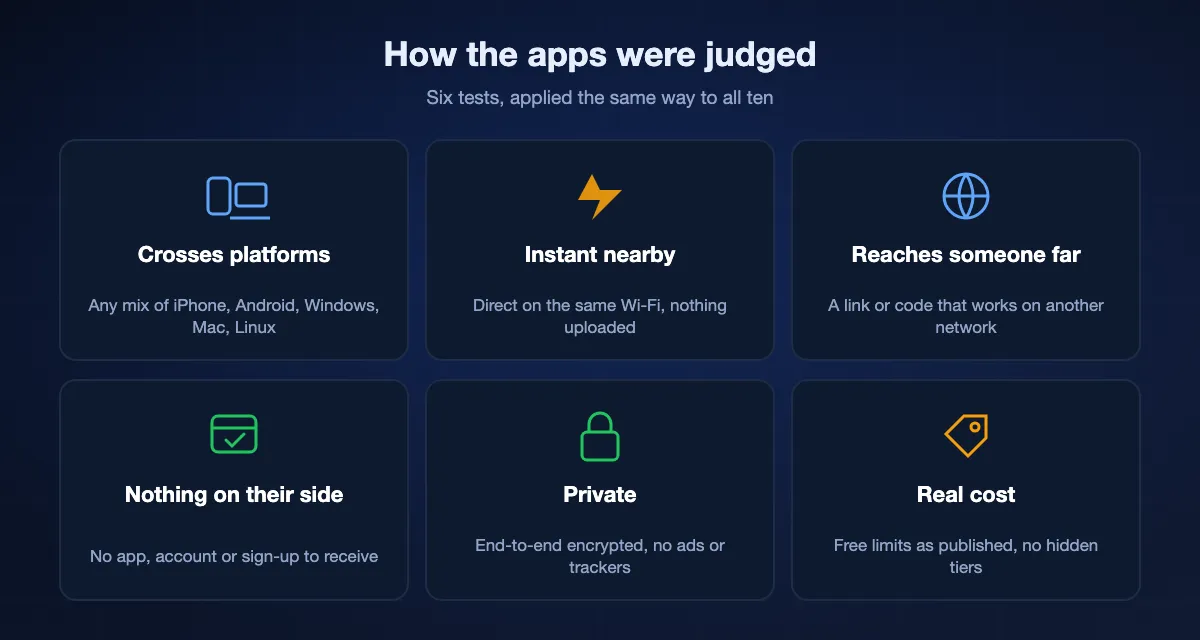
Whether it works between any mix of iPhone, Android, Windows, Mac and Linux — not just inside one company's ecosystem.
Is it instant on the same network?
Direct device-to-device transfer at Wi-Fi speed, with no upload to a server. Measured on ordinary Wi-Fi 5 (40–50 MB/s) and Wi-Fi 6 (70–110 MB/s).
Can it reach someone who is not nearby?
A link or code the other person opens on a different network, and the size that link allows for free.
Does the recipient need anything?
No app, no account and no sign-up on the receiving side is a real difference when you send to a client or a relative.
Is it private?
End-to-end encrypted means the service cannot read the file. HTTPS alone does not count. We also note ads, trackers and what permissions the app asks for.
What does it cost, really?
Free tiers with caps, queues or ads are priced tiers in disguise. We list the free limit of each app as published in September 2026.
At a glance
| Feature | BIShare | LocalSend | AirDrop | PairDrop | Quick Share | WeTransfer | Wormhole |
|---|---|---|---|---|---|---|---|
| Works across iPhone · Android · Windows · Mac · Linux | |||||||
| Instant device-to-device on the same Wi-Fi | |||||||
| A link or code for someone on another network | |||||||
| End-to-end encrypted | |||||||
| Nothing to install on the receiving side | |||||||
| No account needed | |||||||
| Works with no internet (hotspot) | |||||||
| Native apps on every platform | |||||||
| Free, no ads, open source |
Checked September 2026. Quick Share: Android and Windows (Google account); recent Pixel phones can hand files to an iPhone via AirDrop; no Mac. PairDrop: browser only, pairs across networks with a code. WeTransfer free: 3 GB, 3 days. Wormhole: 10 GB, 24 hours, browser only.
The ten, ranked
- 01
BIShare
Best overall — local speed plus a link for anyone
iPhone, Android, Windows, Mac, Linux, browser · free, open source (MIT) · 100 GB by link, no limit nearby · end-to-end encrypted · no account
BIShare is the only tool here that covers both cases at once. On the same Wi-Fi it sends device to device at local-network speed, end-to-end encrypted, the way AirDrop does — but between any mix of iPhone, Android, Windows, Mac and Linux. When the other person is far away, you send a link they open in any browser, no app or account on their end, up to 100 GB, encrypted before upload with the key in the link. Links expire in 24 hours, or after the first download if you choose. Rooms let a group drop files for each other by code, end-to-end encrypted as well. What it does not do: keep files permanently (it is a transfer tool, not a drive) or collaborate on documents.
Best for: anyone who shares between different platforms and wants one app that works everywhere, including with people who install nothing.
Where it falls short: Not a cloud drive; a browser transfer holds the file in memory, so the very biggest files are better sent nearby.
- 02
LocalSend
Best open-source local transfer
iPhone, Android, Windows, Mac, Linux · free, open source · same network only · encrypted device to device · no account
LocalSend is a well-loved open-source app that sends files directly between devices on the same network, encrypted, across every desktop and mobile platform. As a same-network AirDrop replacement it is excellent and fast. The trade-off is decisive for some people: there is no link route at all, so it cannot reach anyone on a different network or anyone who cannot install the app.
Best for: privacy-minded users who only need same-network transfers and want open source.
Where it falls short: Both sides need the app; no way to send to someone who is not on your Wi-Fi.
- 03
AirDrop
Best inside the Apple ecosystem
Apple devices only · built in, free · nearby only · encrypted · no account
If everyone you share with is on an iPhone, iPad or Mac, AirDrop is instant, private and already installed — hard to beat. Its one limitation is also decisive: it is Apple-only. It cannot send to an Android phone, a Windows PC or Linux, which is exactly why cross-platform tools exist.
Best for: people who only ever share between iPhones, iPads and Macs.
Where it falls short: No Android, no Windows, no Linux, and no link for someone far away.
- 04
PairDrop (and Snapdrop)
Best zero-install browser transfer
Any browser · free, open source · same network, or paired across networks with a 6-digit code · encrypted WebRTC · no account
PairDrop, the actively maintained successor to Snapdrop, runs entirely in the browser: open the same page on two devices and drag a file across. Devices on the same network see each other automatically, and unlike the original Snapdrop, PairDrop can pair two devices on different networks with a 6-digit code or a temporary public room. There are no native apps, nothing is stored, and transfers are peer to peer. On networks that isolate clients (hotels, offices) it needs the pairing route.
Best for: a quick transfer with nothing installed, on a borrowed or locked-down computer.
Where it falls short: No apps, no persistent link — both people have to be online at the same time.
- 05
Quick Share (Google)
Best built-in option for Android and Windows
Android, Windows (64-bit Windows 10+) · free · nearby only · Google account required · no Mac; iPhone only from recent Pixel phones
Quick Share is Android's built-in nearby sharing, and Google's Windows app extends it to a PC on the same network with Bluetooth and Wi-Fi on. For an Android-plus-Windows household it is free and already there. It does not run on a Mac or Linux, needs a Google account signed in, and reaches an iPhone only from recent Pixel phones through AirDrop's open mode — for everything else you need a cross-platform app.
Best for: Android owners who also have a Windows PC and a Google account.
Where it falls short: No Mac, no Linux, account required, no link route.
- 06
Wormhole
Best encrypted one-off link, no app
Any browser · free · 10 GB · end-to-end encrypted in the browser · links expire in 24 hours · no account
Wormhole encrypts the file in your browser before upload and puts the key in the link, so the service cannot read what you send. Files up to 5 GB are held for 24 hours; larger ones stream peer to peer, which means both browsers must stay open. It has no local route and no apps, and 10 GB is the ceiling. Within those limits it is a clean, honest tool.
Best for: sending one file up to 10 GB privately to someone far away, from a browser.
Where it falls short: 10 GB cap, no local transfer, no apps, both sides online for big files.
- 07
WeTransfer
The classic link service — now a tight free plan
Browser and apps · free plan: 3 GB per transfer, 3 days, 10 transfers a month · not end-to-end encrypted · no account to send
WeTransfer is the name people know for "upload, get a link". The free plan has shrunk: 3 GB per transfer, links that last 3 days, and a monthly cap of ten transfers or 3 GB in total. It is never instant, because everything goes through its servers, and files are not end-to-end encrypted. Fine for a document or a short video when the recipient insists on it; for anything large or private there are better free options.
Best for: emailing a file to a client who expects a WeTransfer link.
Where it falls short: 3 GB free cap and 3-day expiry, no local route, no end-to-end encryption.
- 08
Send Anywhere
Good cross-platform sender with a paid tier behind it
iPhone, Android, Windows, Mac, Linux, browser · free with ads · 10 GB by link, more by 6-digit key · not end-to-end encrypted · account for links
Send Anywhere popularised the 6-digit key: type it on the other device and the file comes across, on nearly every platform. The free tier carries ads and pushes toward a subscription, and transfers are not end-to-end encrypted. It still works well; it is simply no longer the cleanest way to do what it does.
Best for: people who like the 6-digit key flow and do not mind ads.
Where it falls short: Ads on the free tier, no end-to-end encryption, account needed for some features.
- 09
Google Drive (and Dropbox, OneDrive)
Best when the files should stay somewhere
Every platform · 15 GB free (Drive), 2 GB (Dropbox), 5 GB (OneDrive) · not end-to-end encrypted · account required
A cloud drive is the right answer when the file has to live somewhere: a shared folder for a team, a document several people edit, a backup. It is the wrong answer for a one-off transfer — every byte goes up and comes back down, it uses your quota, the other person usually needs an account, and the provider can read the file. Use it for storage; use a transfer tool for transfer.
Best for: teams and anyone who needs storage, versions and shared folders rather than a transfer.
Where it falls short: Slow for one-offs, quota-bound, account on both sides, provider can read files.
- 10
SHAREit
Legacy — proceed with caution
iPhone, Android, Windows, Mac · free with ads · nearby · not end-to-end encrypted · bundled content
SHAREit pioneered cross-platform local transfer on phones, but it is now weighed down by ads, bundled content, broad permissions, and a history of security and privacy findings. It still moves files. Any of the tools above does the same job more cleanly, and most of them for free without the ads.
Best for: almost nothing today — listed because people still search for it.
Where it falls short: Ads, permissions, security history.
Which app for which situation
Between two laptops (Windows, Mac, Linux)
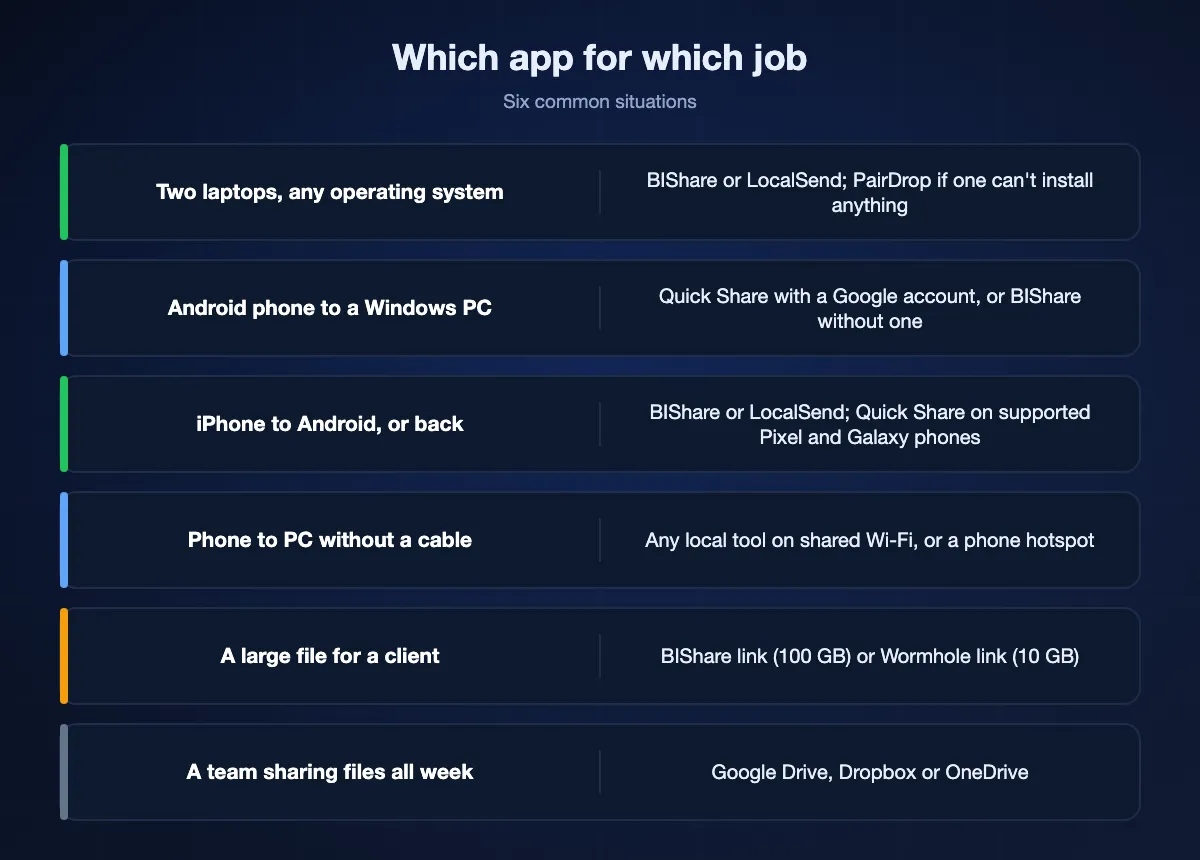
BIShare or LocalSend on the same Wi-Fi — both send at local speed with nothing uploaded. If one laptop is locked down and cannot install anything, PairDrop in a browser. For a laptop that is elsewhere, a BIShare link.
Android phone to a Windows PC
Quick Share is built in and works if both are on the same network with a Google account. BIShare does the same without an account, and also covers the Mac, Linux and the link route.
iPhone to Android (or back)
AirDrop reaches an Android phone only if it is on Google's Quick Share compatibility list, such as recent Pixel and Galaxy models, with both sides set to Everyone. For every other phone, BIShare and LocalSend send directly over Wi-Fi between the two; BIShare also gives you a link when they are not together.
Phone to PC without a cable
Any of the local tools works on a shared Wi-Fi. If there is no Wi-Fi, a phone hotspot is a network too: BIShare and LocalSend work on it with mobile data switched off.
A large file for a client
A BIShare link (100 GB, encrypted, 24 hours) or a Wormhole link (10 GB, encrypted). WeTransfer if the client insists on it and the file is under 3 GB.
A team sharing project files all week
Google Drive, Dropbox or OneDrive — that is storage and collaboration, which none of the transfer tools tries to be.
Why BIShare tops the list
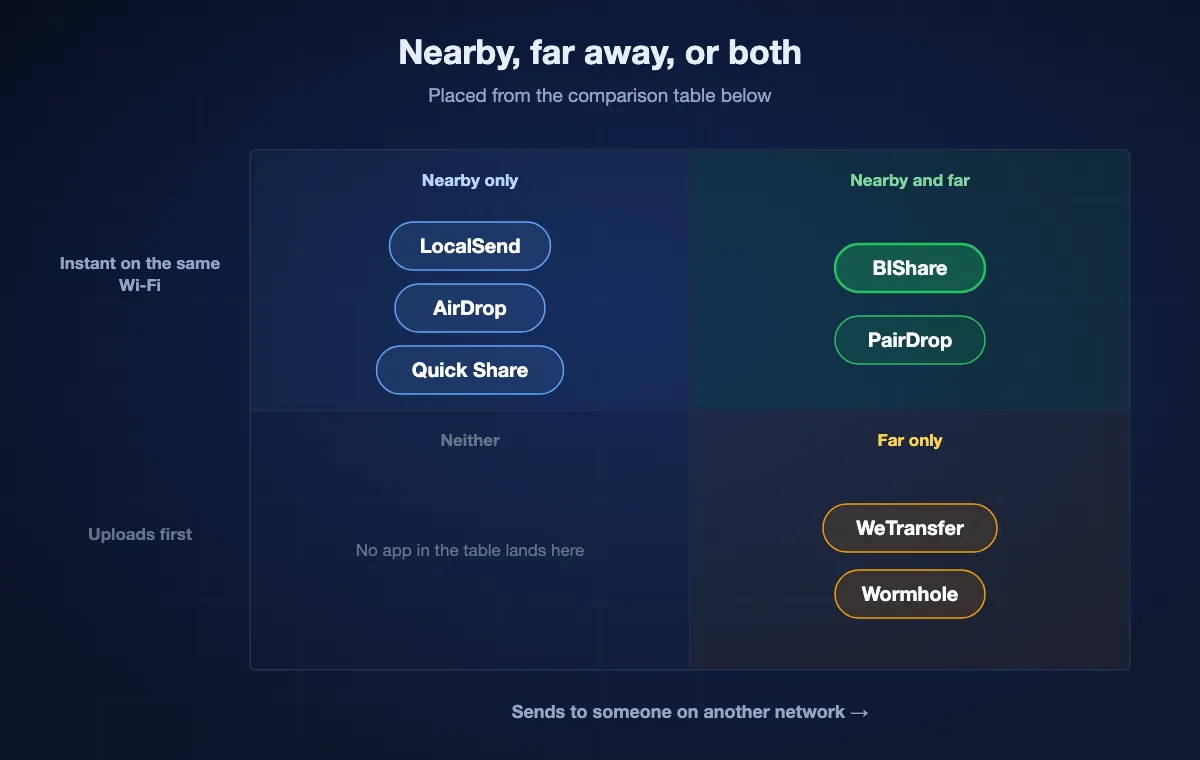
Most tools solve half the problem. AirDrop, LocalSend and Quick Share are fast nearby but cannot reach someone on another network; WeTransfer and Wormhole reach anyone but are never instant. BIShare does both from one app — instant and end-to-end encrypted on your own network, or a 100 GB browser link for anyone — on every platform, free, open source, with no account and no ads. That combination is the whole reason it exists.
Frequently asked questions
What is the best free file sharing app in 2026?
For most people, BIShare — free and open source, works across iPhone, Android, Windows, Mac and Linux, sends instantly on your local network, and gives you a 100 GB encrypted link for anyone who is not nearby. If you only need same-network transfers, LocalSend is an excellent free choice too.
What is the best file sharing app for Android?
Quick Share is built in and fine for Android-to-Android and Android-to-Windows. For an iPhone, a Mac, Linux, or anyone far away, use BIShare: it is free on Google Play, needs no account, and adds a link route. LocalSend is the open-source pick for same-network only.
What is the best file sharing app for laptops?
BIShare or LocalSend between laptops on the same Wi-Fi — both are free, cross-platform and send at local speed with nothing uploaded. PairDrop when one laptop cannot install anything. For a laptop in another place, a BIShare link up to 100 GB.
What is the best way to send files between iPhone and Android?
AirDrop cannot reach Android, so use a cross-platform app. BIShare sends directly between the two over Wi-Fi, or by link when they are apart. LocalSend also handles same-network iPhone-to-Android transfers well.
Which file sharing apps are end-to-end encrypted?
BIShare (local and link), LocalSend (device to device), AirDrop, PairDrop's browser transfers and Wormhole's links are encrypted end to end. WeTransfer, Send Anywhere, Google Drive and SHAREit are not — they use HTTPS in transit, but the service can read the file.
Do I need an account to receive a file?
With BIShare, Wormhole and PairDrop the recipient never needs an account: a link, a code or a browser page is enough. LocalSend and AirDrop need no account either, but both devices must be on the same network with the app. Quick Share needs a Google account; cloud drives usually need one on both sides.
What is the best app to transfer files from phone to PC?
On the same Wi-Fi, BIShare (any phone, any PC) or Quick Share (Android to Windows). Without Wi-Fi, turn on the phone's hotspot and use BIShare or LocalSend — the local route needs no internet. For a PC somewhere else, a BIShare link.
Which app is best for sharing large files?
Nearby, BIShare and LocalSend have no size limit — a 200 GB folder goes across at Wi-Fi speed. By link, BIShare allows 100 GB free, Wormhole 10 GB, Send Anywhere 10 GB, WeTransfer 3 GB. Cloud drives are limited by your storage quota.
What can I use instead of WeTransfer or SHAREit?
BIShare replaces both: WeTransfer-style links up to 100 GB plus instant local transfers, without ads, size caps or the privacy concerns around SHAREit. Wormhole is a good encrypted link-only alternative; LocalSend a good local-only one.
Is it safe to use free file sharing apps?
It depends on the app. Open-source tools with end-to-end encryption and no account — BIShare, LocalSend, PairDrop, Wormhole — leave nothing readable on a server. Be careful with apps that carry ads and ask for broad permissions, and with any download that promises "AirDrop for Windows" or similar: get apps from the official stores.
Get the best of both — local speed and a link for anyone
Install BIShare free on every device you use. No account to receive, end-to-end encrypted, links expire on their own.