
In the browser, nothing to install
AirDrop online, for every device
AirDrop never leaves Apple hardware, and Apple has no web version of it. Search for an online AirDrop, AirDrop web or an AirDrop website and what you find is a page you open on two devices so a file can jump from one to the other. That exists, it costs nothing, and it does not care whether the devices are an iPhone, an Android phone, a Windows PC, a Mac or a Linux laptop. BIShare does it at bishare.app/transfer and right here on this page, and below it is compared with four other tools we opened and tried this month. No account, no install, and no copy kept on a server.
BIShare is ours, so read the ranking with that in mind. Each claim about another tool comes from its own page or repository, and where one of them is the better fit we say so.
Quick answer
- There is no official AirDrop online. Apple's own support page describes AirDrop as something for nearby Apple devices with Wi-Fi and Bluetooth switched on. It has no web version and no Windows or Linux version.
- The browser stand-in works like this: open the same page on both devices, they appear to each other, you pick a file. The file travels straight between the two browsers.
- Fastest way to try it: open bishare.app/transfer on both devices and choose Nearby. On one Wi-Fi they see each other with no setup. On two different networks, type the same 6-character code on both.
- Closest to the classic open-source page: PairDrop. Same idea, GPL-3.0, with a 6-digit pairing code for devices on different networks.
- If the other person should collect later: no AirDrop-style page can do that, because both tabs must be open at once. A BIShare link holds up to 100 GB, encrypted, for 6, 12 or 24 hours.
Try it on this page
Open this page on the second device as well, then start Nearby on both. Each device shows the other by name.
Starting it makes this device visible to others on your network who have BIShare open, until you close the tab.
Is there a real AirDrop online?
No, and it helps to know why before choosing a substitute.
AirDrop is built into Apple devices, not into a website
Apple's support article "How to use AirDrop on iPhone and iPad", dated 14 September 2026, asks for two things: the other person nearby, and Wi-Fi and Bluetooth turned on for both of you. Bluetooth finds the other device and a direct Wi-Fi link carries the file. A web page cannot use either radio that way, so Apple could not put AirDrop in a browser even if it wanted to.
What the sites called AirDrop online really are
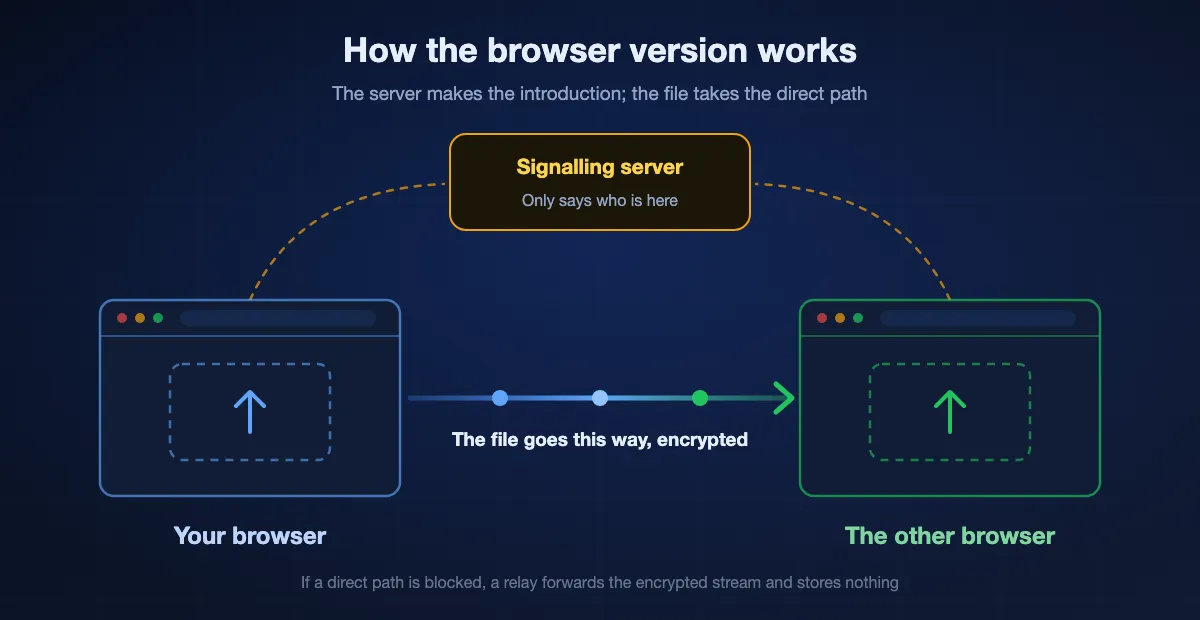
They are independent web apps that borrow the idea. Two browsers open one page, a small server tells each that the other exists, and then WebRTC, a standard built into Chrome, Safari, Firefox and Edge, connects them directly. None of them is made by Apple and none of them talks to the AirDrop on your iPhone.
The one bridge that does reach real AirDrop
In November 2025 Google added AirDrop compatibility to Quick Share on the Pixel 10 family, and the list of supported Android phones has grown since. That is phone to Apple device only. A Windows PC or a Linux machine still has no way in, which is the gap a browser page fills.
How a browser does AirDrop's job
A browser AirDrop file transfer happens in three steps, about a second in all, and only the first one involves a server.
The two pages find each other
Each page tells a signalling server it is there. Most tools then group visitors by network, so two devices behind one router land in the same list. ShareDrop and AirDrop Web say outright that they use the public IP address for this. BIShare does the same on IPv4 and compares the network prefix on IPv6.
They connect directly
WebRTC opens an encrypted channel from one browser to the other. When that direct path works, the bytes stay on your own network, the speed is whatever the Wi-Fi can carry, and the server that introduced the two pages sees none of the file.
When a direct path is blocked
Guest Wi-Fi, office networks and some mobile carriers stop devices from reaching each other. Tools with a relay pass the still-encrypted stream through it and keep no copy. PairDrop's README says devices behind a NAT are connected through its TURN server, and BIShare relays the same way. A tool with no relay simply fails here.
Five ways to AirDrop online, compared
BIShare
Best overall: same network, another network, or a link for later
bishare.app/transfer · any modern browser · free, MIT-licensed · same Wi-Fi or a 6-character code · link up to 100 GB · no account
The Nearby tab is the AirDrop part. Open the page on two devices that share a Wi-Fi and each shows the other by name; drop a file on the name and the other side taps Accept. For two different networks, switch to Private code and enter the same six characters on both. What the others do not have is the third route: the Link tab seals a file in your browser, uploads the sealed copy, and gives you a link that works for 6, 12 or 24 hours, so the other person does not have to be online when you send. A phone with the BIShare app installed also appears in the page's Nearby list, which makes computer to phone a two-tap job.
Where it falls short: Chrome and Edge write an incoming file straight to disk. Safari and Firefox hold it in memory until you save it, so a very large file can fail in those two. For tens of gigabytes between your own devices, the app is the better tool.
PairDrop
The maintained open-source fork, closest to the original idea
pairdrop.net · any browser · free, GPL-3.0, self-hostable · same network, 6-digit pairing code, or 5-letter public room · no account
PairDrop describes itself as local file sharing in the browser, inspired by AirDrop, and a fork of Snapdrop. Devices on one network list each other automatically. For anything else it offers two tools: pair two devices for good with a 6-digit code or a QR code, or meet once in a public room under a 5-letter code. If all you want is a page that does direct transfers and nothing else, this is the one to bookmark.
Where it falls short: A tab on both sides must stay open for the whole transfer, and there is no way to leave a file for someone to fetch later. No native apps.
Snapdrop
The page that made the idea popular, now owned by LimeWire
snapdrop.net · any browser · free · same network only · no account
Snapdrop still loads and still shows the devices on your network. Its GitHub README announces that LimeWire acquired it, and the logo on the live page is served as snapdrop_by_lw.svg. For two devices on one Wi-Fi it does what it always did. What changed after the sale is covered on its own page.
Where it falls short: The code running the live site is not published, so nobody outside can check what it does today. Same network only, with no code or room to cross to another one.
ShareDrop
Same idea with a room link, also under LimeWire
sharedrop.io · any browser · free · same public IP address, or a room link · no account for direct transfers
ShareDrop puts everyone with the same public IP address in one room, and its + button creates a room link you can send to a device elsewhere. Dropping a file on a person's avatar is a direct transfer. The page also has an Upload Files area, and that one is different: it stores the file with LimeWire. Our ShareDrop page lists what else the new owner added.
Where it falls short: The live page warns that it does not work with VPNs. It loads advertising, and one wrong button sends a file to a server instead of to the device beside you.
AirDrop Web
A small single-developer page that does one thing
airdrop.io.vn · any browser · free · same public IP address · no login
The simplest of the five. Its page says files move directly between devices over WebRTC, that no intermediate server stores them, and that devices count as nearby when they share a public IP address. It states no size limit and asks for no login.
Where it falls short: It offers no pairing code or room, so two devices on different networks cannot meet. It is one person's project, with no apps and no link fallback.
The five side by side
| What it does | BIShare | PairDrop | Snapdrop | ShareDrop | AirDrop Web |
|---|---|---|---|---|---|
| Nothing to install on either device | |||||
| Finds devices on the same network by itself | |||||
| Connects two devices on different networks | |||||
| Other person can collect later, with your tab closed | |||||
| Open-source code for the page you are using | |||||
| Native apps for phone and computer as well |
Checked on 3 October 2026 by opening each site and reading its repository where one exists. PairDrop crosses networks with a 6-digit pairing code or a 5-letter public room, ShareDrop with a room link, BIShare with a 6-character code. ShareDrop's Upload Files area is LimeWire's storage service, not part of the direct transfer, so it is not counted as collecting later. Snapdrop and ShareDrop are owned by LimeWire and the code behind their live pages is not published. We found no public repository for AirDrop Web, and its page describes same-network transfers only. BIShare's web app and apps are MIT-licensed on GitHub; its API server is not public.
AirDrop online with BIShare, step by step
Open one address on both devices
Go to bishare.app/transfer on the device that has the file and on the one that should receive it, then choose the Nearby tab on both. Each browser gets a name, shown at the top as "You are …", so you can tell which device is which.
Pick the device, then the file
If both are on one Wi-Fi, the other device appears in the list within a second or two. Drag files onto the page and choose where they go, or drop them directly on the device's name. Several files queue up and go one after another.
Accept on the other side
The receiving device shows the file name and asks to Accept or Decline. Nothing is kept until someone accepts. Chrome and Edge write the file to disk as it arrives and then ask where to save it; other browsers hold it in memory and offer a Save button once it is complete.
No device in the list?
Switch both devices to Private code, create a code on one and type its six characters on the other. That joins them from any two networks. If the other person cannot be online right now, use the Link tab instead and send them the address.
When the two devices cannot see each other
This is the most common complaint about every tool on this page, and the cause is nearly always the network rather than the site.
Guest and office Wi-Fi isolate their clients
Hotels, cafés, universities and many companies stop one device from talking to another on purpose. The devices are on the same Wi-Fi by name and still cannot connect. Use a pairing code so the connection can go through a relay.
A VPN or mobile data puts a device somewhere else
Discovery groups devices by the address the server sees. A laptop on a VPN, or a phone that has quietly fallen back to mobile data, shows a different address and lands in a different list. ShareDrop's own page warns that it does not work with VPNs. Turn the VPN off, or pair by code.
Strangers appear in the list
The opposite problem: a campus, an office or a mobile carrier can put thousands of people behind one public address, and tools that group by address alone will show them to each other. Check the name before you send, or use a private code so only your two devices are in the room.
The browser is old or locked down
WebRTC is in every current browser, but some corporate policies and privacy extensions switch it off. If the page says nearby transfer is not supported, try Chrome or Edge, or send a link, which needs nothing more than an ordinary download.
Which route to use, by situation
Phone to laptop at home
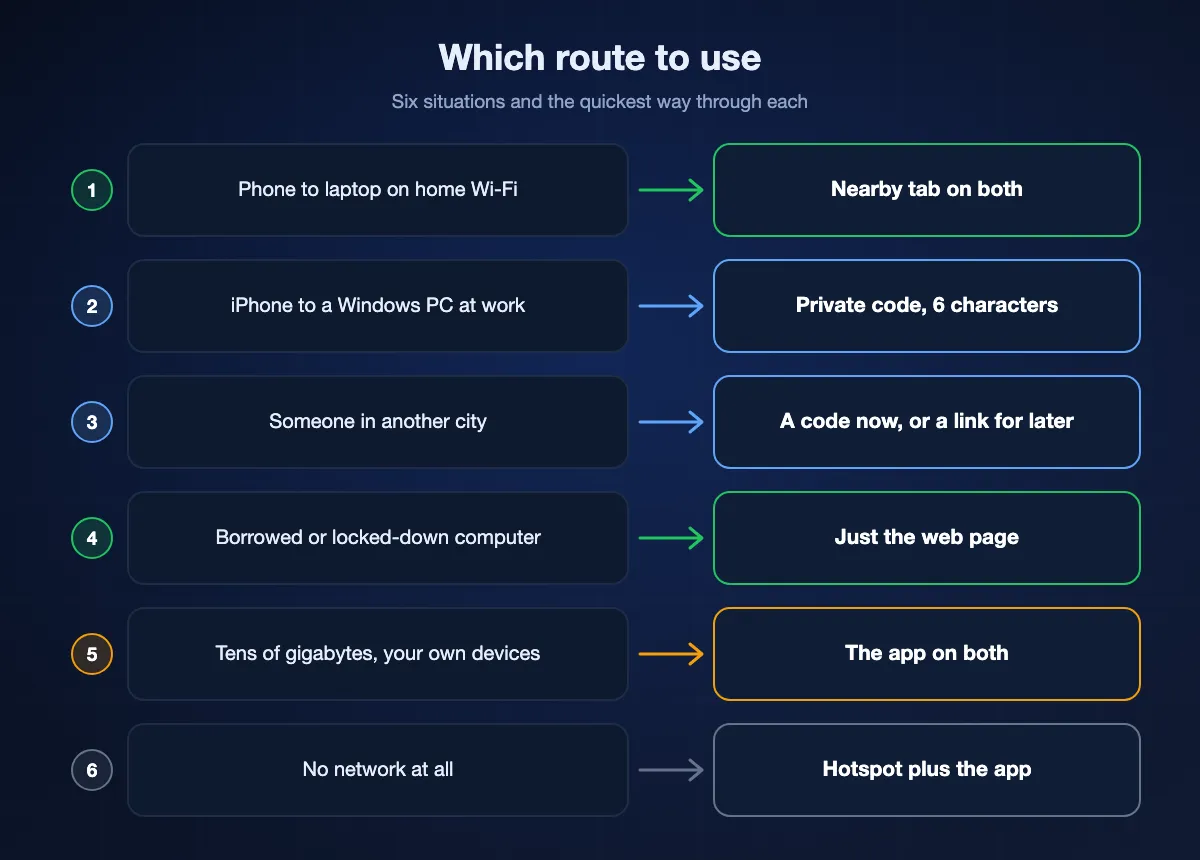
Nearby tab on both, same Wi-Fi. This is the case AirDrop was made for, and the browser version is just as short.
iPhone to a Windows PC at work
Office networks usually isolate devices, so go straight to Private code. Six characters on each side and the two are connected.
Someone in another city
If you are both free now, share a private code. If not, send a link: they open it in any browser whenever it suits them.
A borrowed or locked-down computer
Nothing to install and no account to sign out of afterwards, so a library PC or a client's laptop works. Save the file where you want it and close the tab.
Tens of gigabytes between your own devices
Install the app on both. It writes to disk as it goes, keeps running with the screen off, and handles files a browser tab should not be trusted with.
No network at all
A web page needs to reach its server once to make the introduction. With no internet, turn one phone into a hotspot and use the app on both. For a password or a short note, the QR Beam tab sends screen to camera with no network whatsoever.
What a browser tab cannot do that AirDrop can
A fair comparison has to include the places where the real thing is better.
It needs the page open on both sides
AirDrop is part of the system and is always listening. A web tool exists only while its tab is open, and a transfer stops if either side closes the tab, locks the phone or loses the connection.
It needs the internet for the first second
AirDrop finds devices over Bluetooth and works on a mountain. The browser version has to reach a signalling server before the two devices can connect, even though the file itself then stays local.
It is not in the share sheet
From a photo on an iPhone, AirDrop is one tap away. A web page means opening the browser first. The BIShare app does put itself in the share sheet on iPhone and Android, which is the reason to install it if you send files every day.
Is AirDrop online safe?
It depends on which page you open and which button you press.
Direct transfers are encrypted and leave no copy
WebRTC encrypts everything it carries. In BIShare's Nearby tab and in PairDrop the file goes from one browser to the other and is never stored on a server. A relay, when one is needed, passes on bytes it cannot read.
Links are a different thing, so check how they are sealed
A link means a copy sits on a server until it expires. BIShare encrypts the file in your browser first and keeps the key in the part of the link after the # sign, which browsers never send to a server. What we store cannot be opened without your link.
Accept only what you expect
On a shared network anyone on the same page can send you a request. Every tool here asks before it saves, so read the sender's name and decline what you did not ask for, exactly as you would with AirDrop set to Everyone.
AirDrop online: FAQ
Is there an official AirDrop online?
No. Apple offers AirDrop only on its own devices, and its support page asks for Wi-Fi and Bluetooth on both of them. The sites that appear for this search are independent web apps that copy the idea using WebRTC, a standard built into browsers. They work between any devices, including the ones AirDrop ignores.
How do I AirDrop from a PC?
A Windows or Linux PC cannot send to AirDrop itself. Open bishare.app/transfer or pairdrop.net on the PC and on the other device, pick the other device from the list and drop the file on it. If they do not see each other, enter the same pairing code on both.
Is AirDrop online free?
All five tools on this page are free. BIShare and PairDrop are open source with no paid tier. Snapdrop and ShareDrop are free as well, though both now belong to LimeWire and ShareDrop shows advertising.
Does AirDrop online work between iPhone and Android?
Yes, and in both directions. Open the same page in Safari on the iPhone and Chrome on the Android phone. The browser handles the transfer, so the make of the phone does not matter.
Do both devices have to be on the same Wi-Fi?
For automatic discovery, yes. To connect across two networks you need a tool with a code or a room: BIShare uses a 6-character code, PairDrop a 6-digit pairing code or a 5-letter room, ShareDrop a room link. Snapdrop and AirDrop Web work on one network only.
Where do my files go when I use AirDrop online?
In a direct transfer they go from one browser to the other, encrypted, and no server keeps a copy. The exception is any upload button: ShareDrop's Upload Files area stores the file with LimeWire, and a BIShare link stores an encrypted copy for up to 24 hours.
Is there a file size limit?
The tools state no limit for direct transfers. The practical limit is the browser: Chrome and Edge can write a file to disk while it arrives, and browsers that hold it in memory may fail on very large files. A BIShare link carries up to 100 GB.
Why can't the two devices see each other?
Usually the network isolates its clients, as guest and office Wi-Fi do, or one device is on a VPN or on mobile data and so appears to be somewhere else. Turn the VPN off and check both are on the same Wi-Fi. If that is not possible, connect them with a pairing code.
Does AirDrop online work without internet?
Not from a public web page, because the page must reach its server to introduce the two devices. Once connected on one network, the file does not use the internet. For transfers with no connection at all, use an installed app over a phone hotspot.
PairDrop, Snapdrop or BIShare: which should I open?
For two devices on one Wi-Fi, any of them works. PairDrop if you want a tool that only ever does direct transfers and can be self-hosted. BIShare if you also want a link for people who are not online now, or apps for daily use. Snapdrop if it is the one you already know and the ownership change does not concern you.
Open it on both devices and send
Free, open source, no account. The web page works now; the app is there when you want full Wi-Fi speed and background transfers.