
LocalSend alternative
The best LocalSend alternatives
LocalSend earned its reputation honestly: it is free, open source, runs on almost everything and moves files across a Wi-Fi network without an account or a cloud server. People go looking for something else for a handful of specific reasons. The other person is in a different building, the phone never appears on the laptop's screen because the router isolates devices, a group needs the same files at once, or an iPhone has to reach a Linux desktop without any fiddling. This guide explains what LocalSend does and where it stops, compares it side by side with BIShare, ranks seven alternatives by what each is best at, and fixes the discovery problems that send most people searching. BIShare is one of the seven: it works like LocalSend on a shared network, and adds an encrypted link of up to 100 GB for anyone who is not. Free, open source, no account.
BIShare is ours, and LocalSend is a project we respect. If every transfer happens on one network, LocalSend may be all you need, and this page says where it wins.
Quick answer
- Same experience, plus reach beyond your Wi-Fi: BIShare transfers device to device when you share a network, and turns into an encrypted 100 GB link for anyone who does not.
- Nothing to install on either side: PairDrop runs in the browser, and a 6-digit pairing code connects devices on different networks.
- Your phone as a remote for a Linux or Windows desktop: KDE Connect adds clipboard sync, notifications and media controls on top of file transfer.
- Huge files between your own devices across the internet: Blip sends any size directly and resumes after interruptions, free for non-commercial use with an account.
- Linux Mint machines on a home network: Warpinator is already installed and needs no setup.
- Apple-only or Android-and-Windows households: the built-in AirDrop and Quick Share are the least effort.
What LocalSend does well, and where it stops
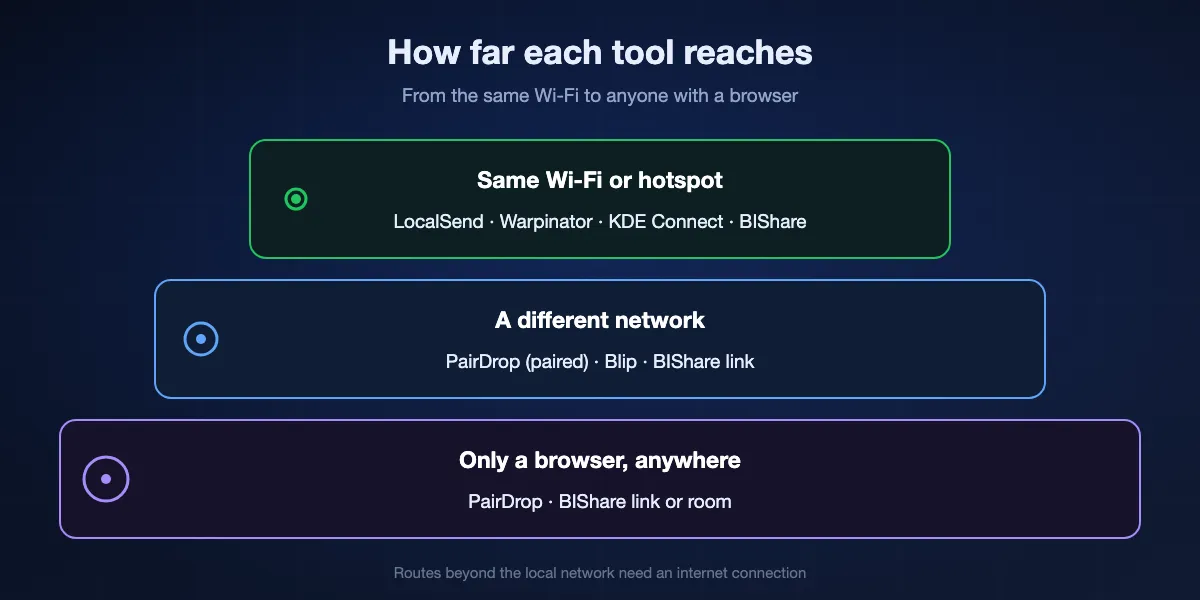
LocalSend is built around one idea: devices on the same local network find each other and talk directly over HTTPS, with no internet connection involved. That design is its strength and its boundary.
Where it shines
It runs on Android, iPhone, Mac, Windows, Linux and even Fire OS tablets, installs from app stores and package managers such as Winget, Homebrew and Flathub, and is licensed under Apache 2.0. Each device generates its own TLS certificate, so transfers are encrypted, and nothing passes through a company's server. For a household or office on one router, that is hard to improve on.
Where it stops
Both devices have to share a local network. A friend in another city, a phone on mobile data or a laptop on a guest network cannot be reached, and there is no relay to fall back on. Its share via link mode lets a browser download without the app, but the link points at the sending device on the local network, so it only helps someone already on the same Wi-Fi.
Why devices go missing
Discovery relies on multicast on port 53317. Routers with AP or client isolation, guest networks, Windows networks set to Public, firewalls and VPNs all block it, which is why the most common LocalSend complaint is simply that the other device never appears.
LocalSend and BIShare, side by side
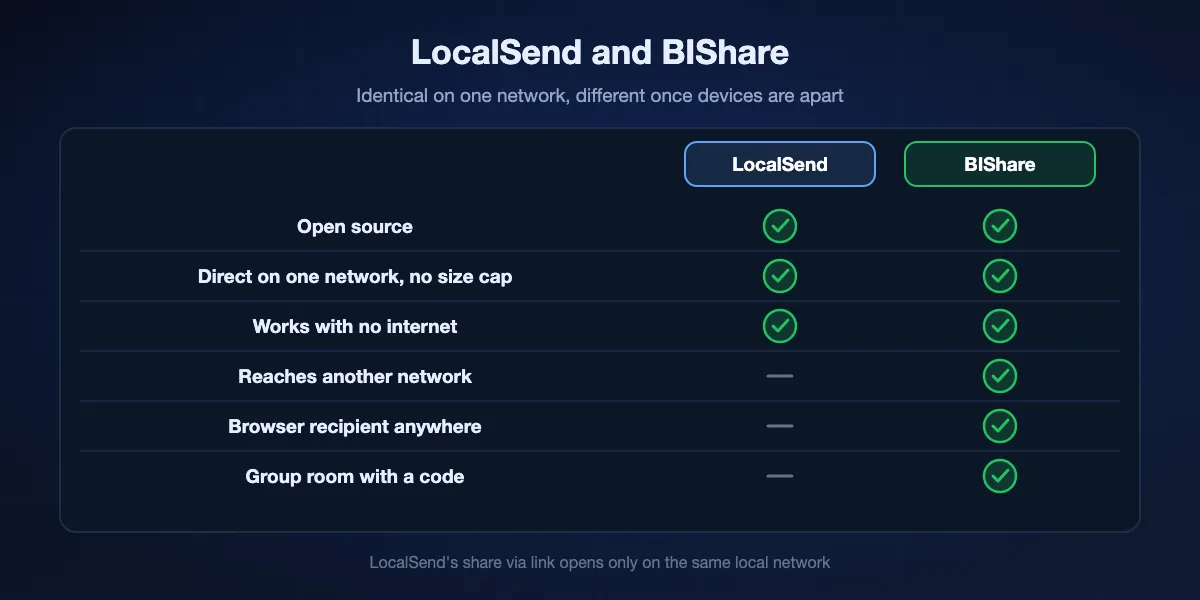
The two overlap more than they differ. Both are open source, both move files directly on a shared network with no size cap, and neither needs an account. The differences show up when devices are apart.
On the same network
Both move files straight between devices as fast as your router allows, and both keep working on a phone's hotspot when there is no internet. LocalSend lets you pick single recipient, multiple recipients or a share link; BIShare sends to one nearby device or to several people through a room code.
When the other person is elsewhere
This is where BIShare adds something. A BIShare link is encrypted on the sending device, holds up to 100 GB and opens in any browser for 24 hours, wherever the recipient is. LocalSend has no route off the local network.
Groups
BIShare rooms let several people join with a short code, from the app or a browser, and drop or grab files together; files in a room expire within 24 hours. LocalSend's multiple recipients mode covers a group only when everyone is on the same Wi-Fi.
Where LocalSend wins
LocalSend supports Fire OS tablets, ships through more package managers, and has no server component at all, which some people prefer on principle. If you never send outside your own network, it does the job with fewer moving parts.
Seven LocalSend alternatives, ranked
BIShare
Top pick: LocalSend-style local transfers, plus a link and rooms for everyone else
Apps for iPhone, Android, Windows, macOS and Linux, plus browser access to links and rooms · MIT-licensed · device to device on a shared network, unlimited size · encrypted links hold 100 GB and last a day · rooms joined with a short code · no sign-up
Install BIShare on both devices and they appear to each other on a shared Wi-Fi or a phone's hotspot, just as LocalSend devices do; pick one and the files go across directly, encrypted, with no size limit. When the recipient is not nearby, make a link instead: the files are encrypted before they leave your device, and the other person downloads in any browser within a day, without installing anything. For a class, a team or a family, a room collects everyone behind one short code.
Watch out for: Links and rooms rely on BIShare's server to hold the encrypted data, so they need an internet connection, unlike a purely local LocalSend transfer. There is no Fire OS app.
PairDrop
Best when nobody wants to install anything
Any modern browser, installable as a web app · open source (GPL-3.0) · 6-digit or QR pairing across networks · 5-letter public rooms · peer to peer, relayed through a TURN server when needed · no account
Open PairDrop in a browser on both devices and anything on the same network shows up automatically, much like LocalSend without the app. Pair two devices once with a 6-digit code or QR code and they keep finding each other on different networks, with the connection relayed through PairDrop's TURN server when a direct path is blocked. Files stay end-to-end encrypted either way, and the project can be self-hosted.
Watch out for: Both browser tabs must stay open during a transfer, very large files depend on the browser's memory handling, and the public service needs an internet connection for devices to find each other.
KDE Connect
Best when you want more than file transfer between phone and desktop
Linux, Windows, macOS, Android, iOS · open source (GPL) · same local network · file sending, clipboard sync, notifications, media and remote input · no account
KDE Connect pairs a phone with a computer on the same network and turns them into a team: send files either way, share the clipboard, answer notifications from the desktop and use the phone as a touchpad or media remote. On Linux desktops it is often already available, and on Android it is the most capable of the local tools.
Watch out for: The iOS app does much less than the Android one because of Apple's restrictions, pairing is per device, and like LocalSend it cannot reach a device on another network.
Blip
Best for sending huge files between your own devices across the internet
Mac, Windows, iPhone, Android, no Linux app yet · free for non-commercial use, paid plans for business · no size limit · resumes after interruptions · account with email verification
Blip sends files of any size straight to your other devices, or to other Blip users, without uploading them to a storage service first. It routes over the local network when both ends share one, falls back to the internet when they do not, and picks up where it left off after a dropped connection or a sleeping laptop. For moving a video project from a studio machine to a home one, it is remarkably smooth.
Watch out for: It is closed source, needs an account on both ends, has no Linux version, and business use requires a paid plan.
Warpinator
Best between Linux Mint machines on a home network
Linux Mint default, on Flathub for other distributions · unofficial ports for Windows and Android · open source · same local network · no account
Warpinator, built by the Linux Mint team, finds other Warpinator machines on the network and sends files between them after a quick accept. On Mint it is already installed, so two family computers can swap folders without downloading anything. Community ports extend it to Windows PCs and Android phones.
Watch out for: There is no iPhone app, the Windows and Android versions are unofficial, and it is local network only.
AirDrop and Quick Share
Best when your devices all come from one ecosystem
AirDrop: iPhone, iPad, Mac, and Android phones with AirDrop support in Quick Share · Quick Share: Android, Chromebooks, Windows PCs · built in · nearby, Bluetooth and Wi-Fi
If every device is Apple, AirDrop is already in the share sheet and needs no setup at all; the same goes for Quick Share between Android phones and Windows PCs. Both work when the devices are close together even without a shared Wi-Fi network, and recent Pixel and Galaxy models can also send to Apple devices through AirDrop.
Watch out for: They are closed and tied to their platforms, need the devices to be physically close, and do not reach Linux at all.
OnionShare
Best for sharing anonymously over Tor
Windows, Mac, Linux, Android, iOS · open source · shares through a Tor onion address · recipient uses Tor Browser · no account, no third-party server
OnionShare runs a small web server on your own computer and publishes it as an unguessable onion address; the recipient opens that address in Tor Browser and downloads straight from you. No company, not even a relay you control, sees the files, which is why journalists and activists use it. It can also receive files and host a simple chat.
Watch out for: Tor makes transfers slow, the recipient needs Tor Browser, and your computer has to stay on and connected until they finish downloading.
At a glance
| Feature | BIShare | LocalSend | PairDrop | KDE Connect | Blip | Warpinator |
|---|---|---|---|---|---|---|
| Open source | ||||||
| Reaches a device on another network | ||||||
| Recipient can use just a browser | ||||||
| Works with no internet connection | ||||||
| Native iPhone app | ||||||
| No account needed |
As of September 2026. BIShare reaches other networks through encrypted links and rooms, which need internet, while its direct transfers work offline on a shared network or hotspot. LocalSend's share via link opens in a browser on the same local network only. PairDrop reaches other networks after pairing and needs its signalling server, so it counts as needing internet; it runs in Safari but has no native iPhone app. KDE Connect's iOS app is limited. Blip needs an account on each device. Warpinator's Windows and Android versions are unofficial.
Which alternative for which situation
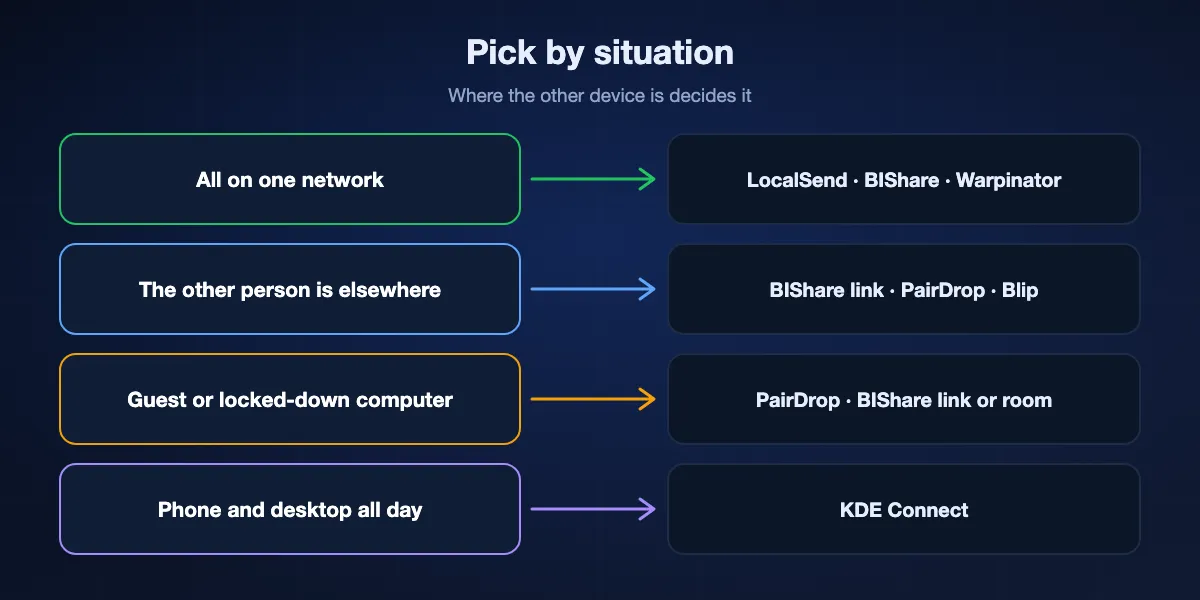
Pick by where the other device is and who is using it, not by feature lists.
Everyone is on one home or office network
Stay with LocalSend, or use BIShare if you also want links for people outside. On Linux Mint, Warpinator is already there.
The other person is somewhere else
A BIShare link opens in any browser for 24 hours with up to 100 GB. PairDrop works once both devices are paired, and Blip suits huge files between accounts you own.
A guest or locked-down computer
Use a browser-only route: PairDrop, or a BIShare link or room, so nothing has to be installed on a machine you do not control.
Phone and desktop working together all day
KDE Connect adds clipboard, notifications and remote control to file transfer, especially between Android and Linux.
Switching from LocalSend to BIShare
Install on the devices you use
BIShare is in Apple's and Google's app stores, the Microsoft Store and the Mac App Store, and there is a Linux build. Join the devices to one Wi-Fi or a phone's hotspot; an iPhone asks once for permission to see local devices, so tap Allow.
Send nearby the way you already do
Choose files, pick the other device from the nearby list and accept on the receiving side. Transfers stay on the local network and have no size limit, just like LocalSend.
Use a link or a room when someone is away
Create a link for one recipient anywhere, up to 100 GB and valid 24 hours, or open a room and share its code with a group. Recipients can use a browser with nothing installed.
When LocalSend, or any local app, cannot find the other device
The router isolates devices
Many routers, mesh systems and guest networks turn on AP or client isolation, which stops devices from seeing each other. Connect both to the main network rather than a guest one, or turn off isolation in the router settings.
Windows treats the network as Public
Set the network profile to Private in Windows settings, then allow the app through Windows Defender Firewall; LocalSend uses port 53317 for both TCP and UDP.
A VPN is running
VPNs often send traffic away from the local network, so nearby devices disappear. Pause the VPN, or enable its local network access option, while transferring.
The iPhone does not show up
Open iPhone Settings, find the app under Privacy and Security, Local Network, and switch it on. Keep the app in the foreground while sending.
Different bands or subnets
Some routers put 2.4 GHz and 5 GHz, or wired and wireless, on separate subnets that block multicast. Join both devices to the same band, or connect them through a phone's hotspot, which always works as a shared network.
You cannot change the network at all
On hotel, school or office Wi-Fi you do not control, switch to a route that does not depend on discovery: a BIShare link, a PairDrop pairing code or a cloud folder.
How private are these tools?
All of them encrypt transfers. The useful questions are whether anything is stored on someone else's server and who can see that it happened.
Local only
LocalSend, Warpinator and KDE Connect never leave the local network, and LocalSend encrypts every transfer with certificates generated on each device. Direct BIShare transfers on a shared network also stay local.
Relayed but still end-to-end encrypted
PairDrop relays through its TURN server only when a direct connection fails, and the data stays encrypted end to end. A BIShare link is encrypted on your device before upload, with the key kept in the link rather than on the server, and deleted after 24 hours.
Anonymous by design
OnionShare hides who is sharing with whom by routing through Tor. Blip and the built-in AirDrop and Quick Share encrypt data in transit but tie transfers to an account or device identity.
LocalSend alternatives: FAQ
What is the best alternative to LocalSend?
For local transfers plus reach beyond your network, BIShare, which adds encrypted links and rooms. For browser-only use, PairDrop. For Android and Linux integration, KDE Connect. For huge files across the internet between your own devices, Blip.
Does LocalSend work over the internet?
No. LocalSend only works between devices on the same local network, and its share via link mode opens in a browser on that network only.
Why can't LocalSend find my other device?
Usually the router isolates devices, Windows has the network set to Public, a firewall blocks port 53317 or a VPN is running. Put both devices on the same main network, set it to Private and allow the app through the firewall.
Is there a LocalSend alternative that works without installing an app?
Yes. PairDrop runs entirely in the browser, and a BIShare link or room can be opened in any browser by the recipient.
Is BIShare open source like LocalSend?
Yes. BIShare's source is published under the MIT licence, while LocalSend uses Apache 2.0.
Which LocalSend alternative works between iPhone and Linux?
BIShare has apps for both, and PairDrop works in Safari and any Linux browser. KDE Connect has an iOS app with fewer features, and Warpinator and Blip have no option for that pair.
Can I send files to someone in another city like LocalSend but remote?
Yes. A BIShare link reaches anyone for a full day and fits up to 100 GB; PairDrop reaches a paired device on another network; Blip connects accounts over the internet.
Does BIShare need the internet for local transfers?
No. When devices share a Wi-Fi network or a phone's hotspot, direct transfers run offline. Only links and rooms need a connection.
Is LocalSend safe?
LocalSend encrypts transfers over HTTPS with certificates generated on each device and keeps data on your local network. Accept transfers only from devices you recognise.
Is BIShare free?
Yes. There is nothing to pay for: BIShare's code is published under the MIT licence, it shows no ads, needs no sign-up and puts no cap on direct transfers.
Keep the local speed, add a link for everyone else
Open source and free. Send directly on your own network like LocalSend, or share an encrypted link or room with people who are not.