
No sign-up, either side
Share files without an account
Most of the friction in sending a file has nothing to do with the file. It is the sign-up form on your side, then the sign-in wall on theirs, then the email asking them to request access. It does not have to be that way, and it was never the norm before cloud drives made it one. Plenty of services take a file from anyone and hand it to anyone, no name asked. The differences are in what they let you send, how long the link lives, what you give up in control, and what still quietly identifies you. This guide goes through eight ways to share a file without an account, checked against each service's own pages in September 2026.
BIShare is our own product and needs no account on either side, which is why it opens the list. Where a rival keeps files longer, sends more for free or fits a job better, the text says so.
Quick answer
- One file, one person, nothing to sign up for on either side: open bishare.app/transfer, drop the file, share the link, QR code or 6-character code. Up to 100 GB, encrypted before upload, gone after 24 hours.
- Something the recipient may open late: SwissTransfer keeps up to 50 GB for 15 days and can extend to 30, with no account.
- Something private that must never sit readable on a server: Wormhole or a BIShare link, both encrypted in your browser with the key in the link itself.
- You have a Google, Microsoft or Dropbox account and only the recipient must stay out of one: an Anyone-with-the-link share works for them without signing in, at the cost of your name on the file and no expiry on the free plans.
- A group swapping files for an evening: a BIShare room with a short code, joined from a browser or the app, nobody registered.
- What you lose without an account: the ability to revoke, extend or track a link after sending. Pick the expiry you want at send time, and use a password where the service offers one.
No account for whom? The question has two sides
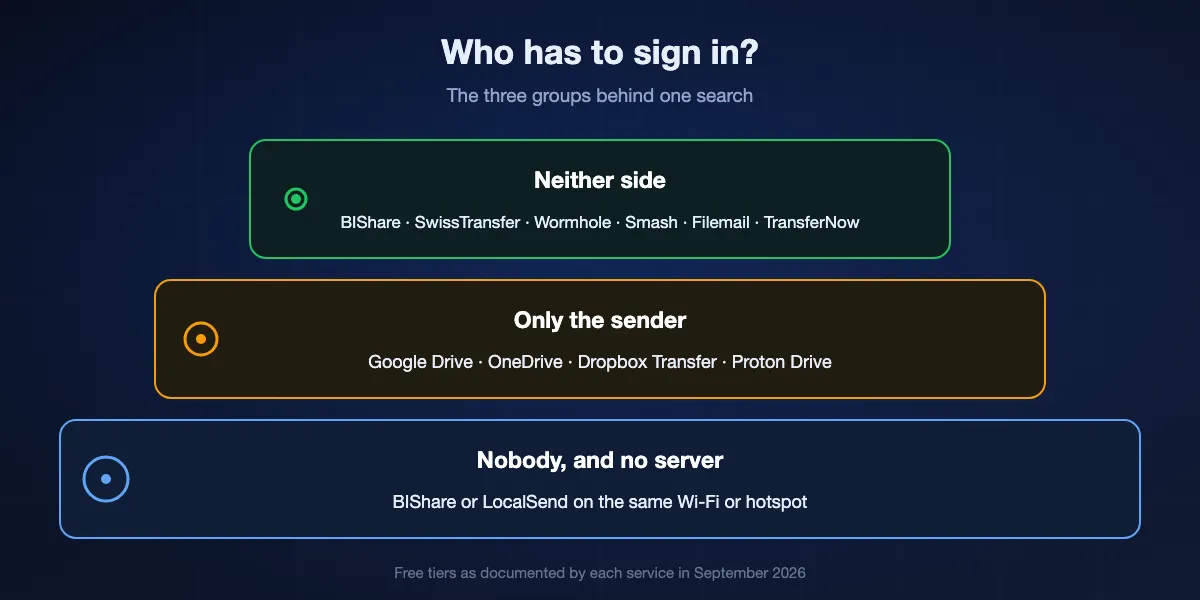
Search results for this query mix up two very different needs. Some people want to send without registering. Others already have an account somewhere and want the person on the other end to open the file without creating one. A few need both, because they are sending to a stranger from a machine that is not theirs. Each service falls into one of three groups, and knowing which group you need saves most of the searching.
Neither side signs up
Transfer sites in the WeTransfer tradition take a file from an anonymous browser tab and give an anonymous link back: BIShare, SwissTransfer, Wormhole, Smash, Filemail and TransferNow all work this way on their free tiers. There is no profile to fill in, no verification email, and nothing to remember afterwards. The price is that the link is the only key: lose it, and the transfer is gone; forward it, and anyone who gets it can download.
Only the recipient stays out
Google Drive, OneDrive, Dropbox Transfer and Proton Drive all need the sender to be signed in, but each can produce a link that opens without an account on the other end. Google's help page puts it plainly: anyone who has the link can use the file without signing in to a Google account. This is the right group when the file already lives in your drive and you would rather not upload it a second time.
Nobody at all, and no server either
When both devices are in the same building, the cleanest answer is to skip accounts and servers together. BIShare and LocalSend move files directly between devices on one Wi-Fi or hotspot, with nothing uploaded and no link to protect. It is not a share in the usual sense, because there is no URL, but it is the most private way to hand over a file.
Eight ways to share a file with no account, ranked
BIShare
Best all-round: no account on either side, encrypted before upload, links up to 100 GB
Browser, iPhone, Android, Windows, macOS, Linux · open source (MIT) · 100 GB per link, 24 hours · optional one-time download · encrypted on your device · no account, no ads
Nothing on BIShare asks who you are. You drop a file into the page or the app and get three ways to hand it over: a link, a QR code the other phone scans, and a six-character code made of letters and digits that is easy to read out over the phone. The recipient opens it in any browser and downloads. Before upload the file is encrypted in your browser and the key rides in the part of the link after the # sign, which browsers never send to servers, so what sits on BIShare's storage is unreadable to BIShare. A one-time option deletes the file after the first download, and every link expires after 24 hours whether or not it was used. When the other person is in the room, the app sends directly with no upload and no link at all.
Keep in mind: Twenty-four hours is short for a recipient who checks email once a week; send again if they miss it. Executables such as .exe, .msi and .sh are refused, which is deliberate.
SwissTransfer
Best when the file has to wait for the recipient
Browser, iOS and Android apps · free · 50 GB per transfer · kept 15 days, extendable to 30 · optional password · no account · run by Infomaniak in Switzerland
SwissTransfer is the service to reach for when you cannot control when the other person will look. Fifty gigabytes per transfer, a link or an email, and the files stay for 15 days, with an offer to extend to 30 before they expire. There is no sign-up at either end and no ads on the download page. The company behind it, Infomaniak, hosts everything in Switzerland, which some recipients in Europe will care about. For a video project or a photo shoot that a client opens next week, it is hard to beat.
Keep in mind: Files are encrypted on the way and at rest, but the service holds the keys, so it can read what it stores if compelled. Uploads are limited by your connection, and a 50 GB transfer takes as long as your line allows.
Wormhole
Best for a private file up to 10 GB with nothing to install
Browser only · free · up to 10 GB · links expire after 24 hours · files over 5 GB stream peer to peer · 128-bit AES-GCM in the browser, key in the link · no account
Wormhole does one thing carefully. Files are encrypted in the browser before anything leaves it, the key is added to the link fragment that never reaches the server, and the link stops working after 24 hours. Anything up to 5 GB is stored for that day; larger files, up to 10 GB, go straight from your browser to the recipient's while both tabs are open. There is no sign-up, no email and no app. For a contract or an ID scan going to one person today, it is the simplest private option that exists.
Keep in mind: Over 5 GB, you have to keep the tab open until the download finishes, and the 24-hour clock is fixed. Mobile apps are still listed as in the works.
Smash
Best when the file is big and nobody minds a wait
Browser, iOS, Android · free, no sign-up · 2 GB per transfer at full priority, larger transfers queued behind paid plans · kept up to 7 days · TLS and AES-256 at rest
Smash states the trade on its pricing page: no payment, no sign-up, and transfers beyond 2 GB join a queue behind Pro customers. Below that size it behaves like any transfer site, with a link or an email and a week of availability. Above it, the upload still completes; it just waits its turn before the recipient can fetch it, which at busy hours can mean a long pause. If you have a 30 GB folder and a patient recipient, it costs nothing.
Keep in mind: The queue makes delivery unpredictable for the files you most need it for. Password protection and download tracking belong to the paid tiers.
Filemail and TransferNow
Best for mid-size files that go to several people
Browser · free · 5 GB per transfer on both · kept 7 days · Filemail: no sign-up, unlimited downloads · TransferNow: account optional
Two services that quietly do what WeTransfer's free plan used to. Filemail takes up to 5 GB with no sign-up and puts no cap on how many times the link is downloaded, which makes it handy for a file going to a whole mailing list. TransferNow covers the same size with a seven-day link and an optional account for people who want history. Neither encrypts before upload, and neither needs anything from you beyond the file and, if you like, the recipient's address.
Keep in mind: Five gigabytes rules out most video projects. Both hold the encryption keys themselves, so they are for everyday files rather than sensitive ones.
Send, the open-source successor to Firefox Send
Best if you want to run your own no-account service
Browser · open source (MPL-2.0) · self-hostable with Docker · public instance send.vis.ee: up to 2.5 GB, links kept up to 3 days · encrypted in the browser · no account
Mozilla closed Firefox Send in 2020, but the code lived on as Send, a fork with the Mozilla branding removed so anyone can host it. The public instance run by the fork's maintainer accepts files up to 2.5 GB and keeps them for up to three days, encrypted in the browser before upload with the key in the link, exactly as the original did. For a small company that wants a no-account transfer page under its own domain, a Docker container of Send is an afternoon's work.
Keep in mind: The public instance is a volunteer service with no promises about uptime or how long it will exist. Self-hosting means you are the one keeping it patched.
Google Drive and OneDrive links
Best when the file already lives in your drive and only the recipient must skip the account
Sender signed in · recipient: Anyone with the link opens without signing in · Drive shows your name and email as the owner · OneDrive password and expiry only on Microsoft 365 plans
If the file is already in Google Drive or OneDrive, change the link to Anyone with the link and the other person downloads without an account. Google's help page says so directly, and Microsoft's adds that unchecking the sign-in box lets people view, copy or download without signing in, while editing still requires an account. The catch is on your side: Drive shows your name and email address as the owner of the file to whoever opens it, and on OneDrive the expiry date and password options are reserved for Microsoft 365 subscribers. Free links live until you remove them.
Keep in mind: Your identity travels with the file, and there is no automatic expiry on the free plans. Whoever the link reaches, by forwarding or by accident, gets the same access.
Dropbox Transfer and Proton Drive
Best when you already pay for the drive and want expiry built in
Sender needs an account · recipients need none · Dropbox Transfer Basic: 2 GB, 7 days; paid plans 50 to 250 GB with passwords · Proton Drive: end-to-end encrypted, password and expiry on public links, 5 GB free storage
Both take a different route from the drive links above: the recipient still needs nothing, but the sender gets controls. Dropbox Transfer on a free Basic account sends 2 GB with a seven-day expiry, and paid plans raise that to 50, 100 or 250 GB with passwords and custom expiry. Proton Drive encrypts everything on your device and lets you put a password and an expiry date on any public link, so the recipient opens it in a browser without a Proton account. For people who already live in one of these, it is the tidiest way to send to someone who does not.
Keep in mind: Neither is account-free for you. Proton's 5 GB of free storage fills fast with video, and Dropbox's useful sizes sit behind a subscription.
At a glance
| Free tier, September 2026 | BIShare | SwissTransfer | Wormhole | Smash | Drive link | Dropbox Transfer |
|---|---|---|---|---|---|---|
| Sender needs no account | ||||||
| Recipient needs no account | ||||||
| Encrypted before upload | ||||||
| More than 10 GB per transfer, free | ||||||
| Link expires by itself | ||||||
| Open source |
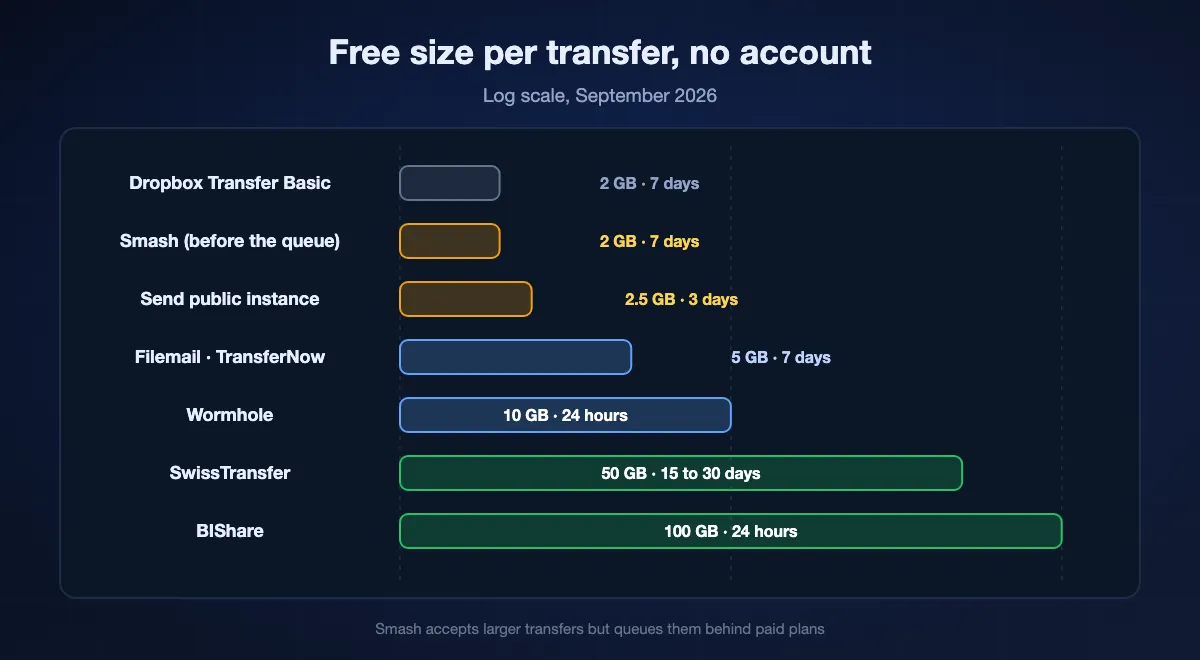
Read from each service's own pages in September 2026. BIShare: 100 GB links for 24 hours, encrypted in the browser, MIT-licensed. SwissTransfer: 50 GB for 15 to 30 days. Wormhole: 10 GB for 24 hours, encrypted in the browser. Smash: no size cap, transfers over 2 GB queued, 7 days. Google Drive: sender signed in, recipient not, no expiry on free plans. Dropbox Transfer Basic: 2 GB, 7 days, sender signed in.
What you give up without an account, and how to get it back
An account is not only a nuisance; it is where services keep the buttons that let you change your mind. Without one, the moment you press send is the last moment you control the file. That is fine for most transfers, as long as you set the terms up front.
Revoking a link
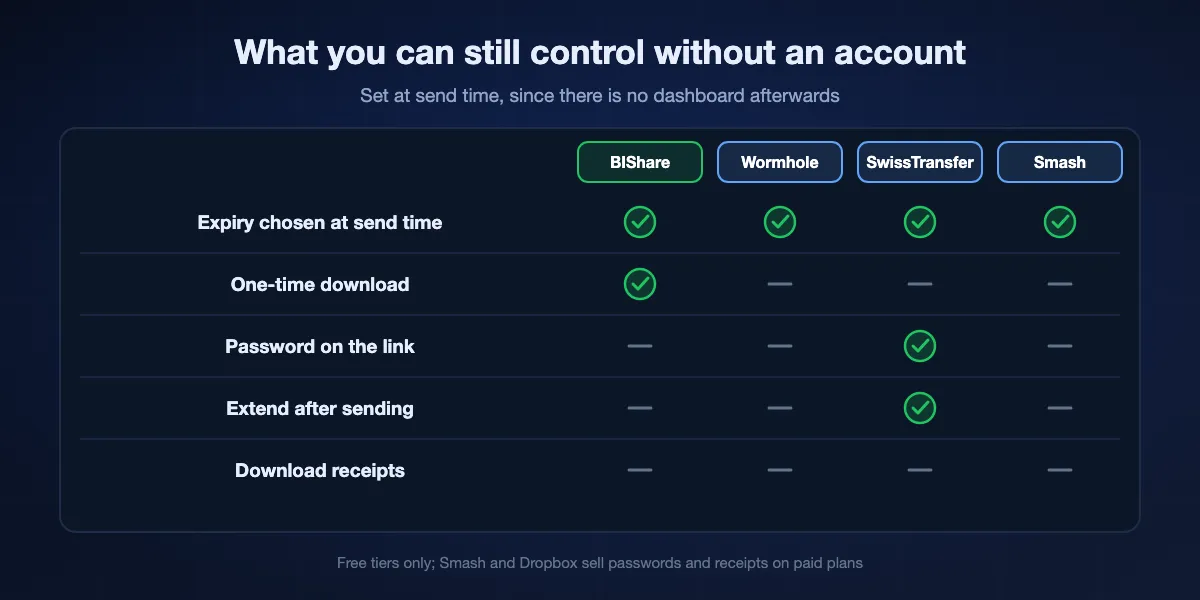
Signed-in services let you delete a transfer early. Anonymous ones mostly cannot, because nothing ties the transfer to you. The workaround is a short expiry chosen at send time: BIShare's 24 hours or Wormhole's 24 hours end the exposure whether or not you remember to act. If a link must be killable, use a one-time download so it dies with the first fetch.
Extending a deadline
Only SwissTransfer, among the account-free services here, offers more time after the fact, by email before the 15 days run out. Everywhere else, a missed deadline means sending again. For recipients who are slow to open mail, choose the longest expiry in the first place rather than the service you like most.
Knowing whether it was downloaded
Download counts and receipts are account features almost everywhere; Smash and Dropbox Transfer sell them on paid tiers. Without them, ask the recipient, or use a one-time link, which at least tells you that the first download happened when the link stops working.
A password
A password keeps a forwarded link from being useful. SwissTransfer and Proton Drive offer one on free links, OneDrive only with Microsoft 365, Smash and Dropbox only on paid plans. Encrypted-in-the-browser services take a different route: the link itself contains the key, so anyone with the full link can open the file, and the protection lies in sending the link privately.
What still identifies you
No account does not mean no trace. Each service sees a little, and some show more than you expect to the recipient. The encryption guide covers what a server can read; this is the shorter list of what points back at you.
Your name on cloud drive links
Google's own help page states that when you share a link, your name and email are visible as the owner of the file. OneDrive links show your account name too. For a file going to someone you would rather not hand your email to, use a transfer service instead of a drive.
File names and sizes
Even services that encrypt the contents in your browser usually see the file's name, size and type, because they need them to serve the download page. BIShare is one of them: contents are unreadable, the name is not. If the name itself is sensitive, rename the file or zip it under a bland name before uploading.
Your connection
Every upload comes from an IP address, and every service can log it. That is not something a sign-up changes either way; an account simply adds a name to the same log. Where that matters, a direct transfer between devices on one network leaves no server log at all, because there is no server.
Sharing without an account on BIShare, step by step
Open the page or the app
Go to bishare.app/transfer in any browser, or open BIShare on a phone or computer. No form appears at any point; the first screen is the drop zone.
Add files and pick the terms
Drop up to 100 GB. End-to-end encryption is on by default, and a one-time switch makes the link die after the first download. Uploads over a slow line resume if the connection drops.
Hand it over three ways
Copy the link, show the QR code to the phone next to you, or read out the six-character code. The recipient opens it in a browser and downloads, with nothing to install and nothing to join. The link stops working 24 hours later.
For a group, open a room instead
A room has a short code that several people can join from the app or a browser. Everyone in it can drop files and pick them up, which suits a class, a meeting or a family trip, and it needs no accounts either.
Which account-free route for which job
The right choice depends less on features than on who is on the other end and how quickly they act.
A client who opens email at their own pace
SwissTransfer, for the 15 to 30 days. A BIShare link is fine if you can ask them to open it today.
A confidential document to one person
Wormhole or a BIShare link with the one-time option, sent over a channel you trust. Both encrypt before upload, so the service cannot read the file and the link is the only key.
A very large folder
Over 50 GB the free choices narrow to BIShare's 100 GB links and Smash's queue. If the recipient is nearby, skip the upload and send directly instead.
Someone who cannot install anything
Any of the browser services on this page. The recipient only needs a browser tab, and on BIShare a code they can type on a locked-down machine that blocks pasting.
A team that needs history and receipts
This is the one case for an account. Dropbox Transfer or a paid transfer plan gives download logs and revocation that anonymous links cannot.
Staying safe with links nobody signed in for
A link that anyone can open is exactly as safe as the way you share it. Three habits cover most of the risk.
Send the link somewhere private
Not in a group chat, not in a forum post. A direct message or a phone call for the six-character code is enough. Wormhole and BIShare put the decryption key in the link, so the link is the secret.
Set the shortest expiry the recipient can live with
A link that dies tomorrow cannot leak next month. Use one-time downloads for anything you would not want found later in someone's inbox.
Treat incoming anonymous links with care
The same openness serves people distributing malware, which is what ended Firefox Send. BIShare refuses executable file types on links for that reason. When a link arrives from someone you do not know, check the file type before opening it, and never run an installer received this way.
Sharing files without an account: FAQ
How can I send a file to someone without creating an account?
Use a transfer service that works from an anonymous browser tab: BIShare, SwissTransfer, Wormhole, Smash, Filemail or TransferNow. Drop the file, copy the link it returns, and send that link. None of them asks you to register on the free tier.
Can the recipient download without an account?
On every service listed here, yes. Transfer sites hand out plain download links, and Google Drive, OneDrive, Dropbox Transfer and Proton Drive all let the sender create a link that opens without signing in.
What is the largest file I can send without signing up?
By link, BIShare at 100 GB, then SwissTransfer at 50 GB and Wormhole at 10 GB. Smash has no stated ceiling but queues free transfers above 2 GB. Between two devices on the same network, BIShare has no limit at all.
Is it safe to share files without an account?
As safe as the link you send. Choose a service that encrypts in the browser if the file is private, send the link over a private channel, and pick a short expiry or a one-time download. The absence of an account does not weaken the encryption.
Can I share files anonymously?
You can avoid giving a name or an email, and a browser-encrypted service cannot read the contents. Your IP address is still visible to the service, and file names usually are too. Cloud drive links are the least anonymous option, because they show your account name as the owner.
How do I share a Google Drive file with someone who has no Google account?
Open Share on the file, change General access to Anyone with the link, and choose Viewer. Google's help page confirms that anyone with the link can then use the file without signing in. Your name and email stay visible as the owner.
Does WeTransfer need an account?
WeTransfer's free plan now runs on a monthly allowance of 10 transfers or 3 GB in total, with links that last three days. If those limits are the problem, SwissTransfer sends 50 GB with no account and keeps it for weeks.
How long do account-free links last?
It varies more than people expect: 24 hours on BIShare and Wormhole, up to three days on the public Send instance, seven on Smash, Filemail and TransferNow, 15 to 30 on SwissTransfer. Cloud drive links on free plans do not expire at all.
Can I password-protect a file without an account?
SwissTransfer offers a password on free transfers. On BIShare and Wormhole the link carries the decryption key, so protection comes from sending the link privately and from one-time or 24-hour expiry. Smash, Dropbox and OneDrive reserve passwords for paid plans.
Is BIShare really free with no account?
Yes. The source code is public under the MIT licence, there are no ads and no paid tier, and nothing on the site or in the app asks you to register. Links carry up to 100 GB for 24 hours; nearby transfers between devices on one network have no limit.
Send it, no sign-up on either side
Drop a file, share a link or a six-character code, done. Encrypted before upload, up to 100 GB, gone in 24 hours. Free and open source.