
Every file transfer app was ad-free once. SHAREit was. Xender was. The apps that people now uninstall in frustration all launched as clean utilities that did one job well, and every one of them changed — not through betrayal, but through arithmetic.
Which means "ad-free" on a store listing is a statement about today. What you actually want to know is whether it will still be true in two years, and that question has an answer you can check before installing anything.
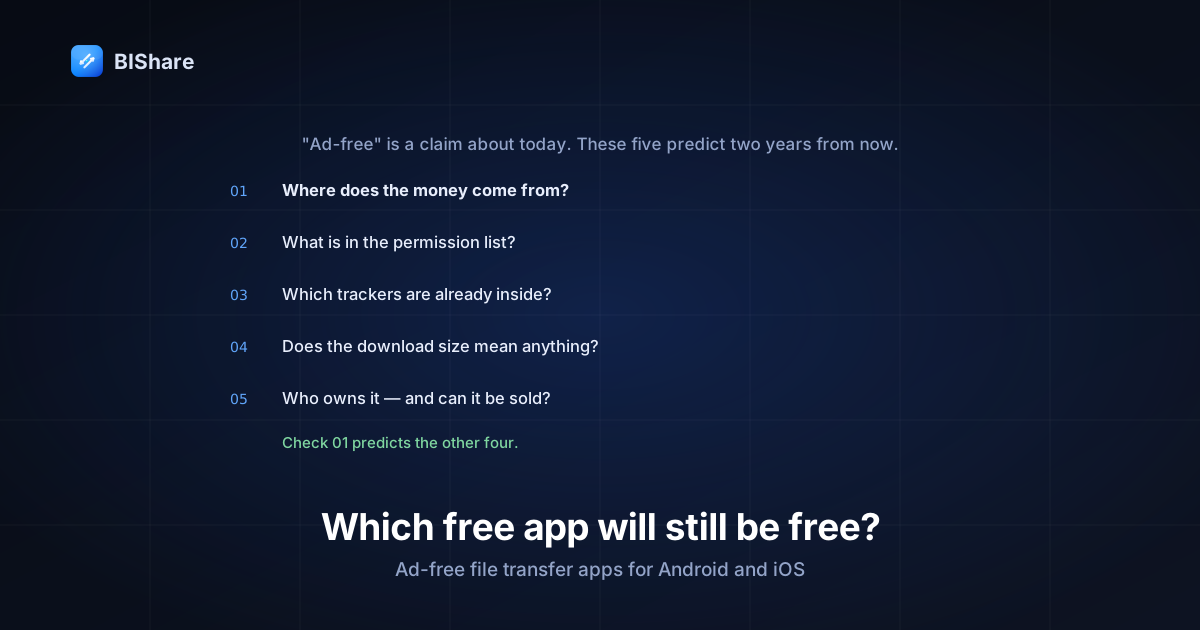
So this guide is a durability test first and a list second. Five checks that predict which free apps stay free, then five apps run through them — including mine, which I've tried to score as harshly as the others.
The arithmetic that turns utilities into ad platforms
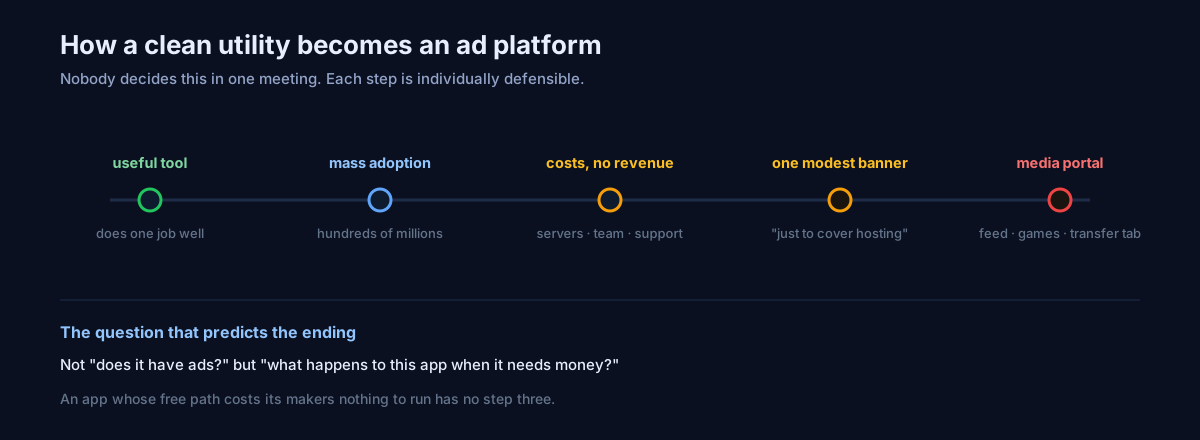
Nobody sits in a meeting and decides to ruin a good app. The sequence is more mundane than that, and it's the same every time.
A developer ships a transfer tool. It's genuinely useful, so it spreads — and because file transfer is a universal need, it spreads to hundreds of millions of phones. Now there are servers to run, three platforms to support, a support queue, and a team. The app is free and there is no revenue.
At that point exactly three doors exist: charge money, get acquired, or monetize attention. Charging is hard once free is the expectation. Acquisition hands the decision to someone whose spreadsheet you'll never see. So the third door opens: one modest banner, then a content feed to increase session time, then a games tab, then recommendations. Every step is individually defensible and the endpoint is an app where the transfer button lives inside a media portal.
The lesson isn't "beware greedy developers." It's that a free app with no revenue model has an unresolved tension, and unresolved tensions resolve themselves eventually — usually in the direction of whoever is paying. So the useful question isn't "does it have ads?" It's "what happens to this app when it needs money?"
Check 1 — Where does the money come from?
This is the check that predicts the other four, and most people never ask it.
The good answers are the boring ones. A paid tier for something that genuinely costs the developer money — cloud storage, relay bandwidth, team features — aligns the incentives: the free thing stays free because it isn't expensive to provide, and the money comes from people who opted into something more. Donations with no commercial layer is even more structurally stable, because there's no revenue mechanism that advertising could improve. Being a feature of a platform (a built-in OS sharing function) is stable too, though it means the feature exists at the platform owner's discretion.
The answer that should worry you is no answer at all — an app with millions of users, real infrastructure, and no visible way it sustains itself. That's not evidence of virtue; it's an unresolved tension with a clock on it.
You can usually find this in ninety seconds: look for a pricing page, a paid tier, a donation link, or a sponsor. If none of those exist and the app is large, you've learned something important.
Check 2 — Read the permission list
An app's permission list is a statement of intent that's hard to fake, because permissions have to be declared publicly and the store shows them.
What a transfer app genuinely needs is narrow and predictable: network and Wi-Fi state, local network discovery, notifications, camera if it scans QR codes, storage or media access for the files themselves. That's about it.
What should make you pause: location permissions when nothing in the app needs a location; access to the full list of installed apps; permission to install packages; anything about phone state or SMS. None of those are required to move a file between two devices, and each of them has an obvious advertising use.
For the sake of a concrete example rather than an abstraction, here is our complete Android list, which you can verify against the store listing or the manifest in our repository: internet, network state, Wi-Fi state, Wi-Fi multicast, nearby Wi-Fi devices, camera, microphone, contacts, media location, notifications, and storage. Eleven, each traceable to a visible feature you can find in the app — multicast for finding devices on the network, microphone for the voice-note feature, contacts for sending a contact card. Nothing that would make sense only to an advertiser.
The test isn't "few permissions." It's can you name the feature that each permission serves? If you can't, the app knows something about you that it doesn't need in order to do its job.
Check 3 — Look for the trackers
Permissions tell you what an app may do; trackers tell you what it already does. Analytics and advertising SDKs are libraries baked into the app, and they are detectable from the outside.
The practical tool is Exodus Privacy, which decompiles Android apps and lists the tracking libraries it finds. Search for the app you're considering. A transfer utility with a long list of advertising SDKs is not "ad-free with a plan to stay that way" — it is an app with the machinery already installed, waiting to be switched on.
Note the asymmetry that makes this check valuable: removing ads is a product decision that takes an afternoon, while adding the SDKs is the part that requires a build, a review, and an update. An app that already carries them has done the hard part. An app that carries none would have to ship a visible change to start, which is a change users notice.
Check 4 — Size, and why it lies
The lazy heuristic says a big download means bloat means ads. It's a bad signal, and I'll disprove it with our own numbers rather than someone else's.
Our universal Android APK — the one on our releases page — is 128 MB, which looks alarming. Break it open and 122 MB of that is native code compiled three times over: 42 MB for arm64, 33 MB for older 32-bit ARM, and 46 MB for x86_64. It's one app carrying machine code for three different processor architectures, because a single file on a download page has to run on any device that grabs it.
Delivered through the store as an App Bundle, a phone receives only the slice it can actually run — roughly a third of that figure. And the bulk isn't features nobody asked for; it's the Rust core that does the cryptography and protocol work, plus the Flutter engine.
Meanwhile an app can be genuinely bloated for the reasons people fear — bundled ad SDKs, video players for the content feed, recommendation engines — and it will sit in a similar size range. So size alone separates nothing. Use it only as a prompt for the better question: what is in there, and can the developer tell you?
Check 5 — Who owns it, and what happens if they sell?
The last check is about the future rather than the present.
Open-source under a permissive licence has a specific property here: even if the company behind it disappears or changes direction, the code that exists remains usable and forkable. That's not a guarantee of anything — plenty of open-source projects simply stop — but it removes the worst outcome, where a tool you rely on becomes something else overnight and you have no exit.
Closed-source apps are riskier in exactly one way that matters for this article: the product can be sold, and the new owner inherits your installed base along with the freedom to monetize it. It's the single most common way a clean app becomes a dirty one, and no promise on the current website survives that transaction.
So: is the source public? Is there a company, and can it be bought? Neither answer disqualifies an app. Both tell you what kind of bet you're making.
Android and iOS have different versions of this problem
The title of this piece names both platforms, and it's worth being clear that the ad problem is not symmetric between them.
On Android, the category is crowded and the incentives are loudest. Sideloading exists, the store's review bar is lower, and — most importantly — hundreds of millions of the users are in markets where mobile data is expensive and phones are inexpensive, which is precisely the audience that made offline transfer apps huge. That combination produced both the best apps in this category and the most aggressively monetized ones. Android is also where you can actually inspect things: permissions are enumerated in the listing, and tools can decompile an app and list its trackers.
On iOS, three things suppress the problem. AirDrop ships on every device, so the free-transfer-app market never grew as large. App Review is stricter about some of the more aggressive patterns. And Apple's tracking prompt made behavioural advertising materially less profitable on the platform, which quietly removed the business case for a lot of ad-funded utilities.
The consequence for you is practical. On iOS you have fewer candidates but they're cleaner on average, and the honest first question is whether AirDrop already covers you. On Android you have far more choice and need the checks above, because the range between the best and worst app in the same search results is enormous.
The one thing both platforms share: the moment your transfer has to cross between them, the built-in tools stop and you're back in the third-party market on both sides. That crossing is the entire reason this category exists, and why we wrote a separate guide about it.
The other currencies "free" is paid in
Ads are the visible cost. There are three quieter ones worth naming, because an app can be technically ad-free and still expensive.
Your data. An app doesn't need to show you a banner to be an advertising business — it can simply collect and sell signal. This is why the tracker check matters more than the "do you see ads?" test: the SDKs are the product, and the banner is optional.
Your attention. A content feed inside a transfer app isn't an ad, strictly. It's a mechanism to increase session time, which exists to make advertising more valuable later. If a utility is trying to keep you in it longer than the task requires, that's a signal about where it's heading.
Your files' quality and privacy. Some free tools pay for themselves in ways that show up in the file rather than the interface — recompressing your photos to cut bandwidth costs, or routing everything through servers because that's cheaper to build than genuine device-to-device transfer. Those are real costs, they're just charged in a currency you notice later. It's why where the file actually travels is a question worth asking of any transfer app, and why end-to-end encryption is a structural answer rather than a feature.
The five, scored
| App | Ads today | Where money comes from | Source | Structural risk |
|---|---|---|---|---|
| Quick Share (Android) | None | Part of the platform | Closed | Low — but Android-and-Windows only |
| AirDrop (Apple) | None | Part of the platform | Closed | Low — but Apple devices only |
| LocalSend | None | Donations, no commercial layer | Open (Apache 2.0) | Very low |
| PairDrop | None | Donations, small server cost | Open | Very low |
| BIShare | None | Optional paid cloud storage | Open (Apache 2.0) | Low — the free path costs us nothing to run |
Quick Share and AirDrop are the safest bets available, because neither is trying to make money from you at all — they exist to make their platform stickier. The cost is the wall each one stands behind: Quick Share won't talk to an iPhone, AirDrop won't talk to anything that isn't Apple. If everyone in your life is inside one ecosystem, stop reading and use the built-in tool.
LocalSend is the structurally cleanest third-party option. Open source, donation-funded, no commercial layer at all, and it does cross-platform transfer properly. There is no revenue mechanism that ads could improve, which is the strongest guarantee on this list. Its limits are scope: no browser path for someone without the app, no group rooms.
PairDrop runs in a browser, which makes it the one you can hand to anyone. Same structural safety — open, donation-funded, tiny server footprint. It won't work offline without self-hosting, and browser memory limits bite on very large files.
BIShare is mine, so weigh it accordingly. Transfers are free with no ads and no account, and the structural claim is specific: local transfers cost us nothing to operate, because nothing touches our servers. That's why "free forever" is a statement about our cost structure rather than a promise about our character. Revenue comes from optional cloud storage for people who want files to persist rather than expire. Where it's weaker than LocalSend on this particular test: there is a company, and a company can in principle be sold — the Apache 2.0 licence and public code are the mitigation, not an elimination.
The apps I left off, and why
Five is a short list, and some well-known names aren't on it. Skipping them without explanation would be the kind of omission I'd be annoyed by in someone else's article.
Xender is the closest structural twin to SHAREit and has followed a similar path: capable transfer engine, wrapped in an interface that now carries ads and a content layer. It works. It is not what someone searching for "ad-free" is asking for.
Send Anywhere deserves more credit than it usually gets — the six-digit key model is genuinely elegant, and cross-network transfer works well. It's on the paid-tier-plus-advertising model rather than the clean one, which is a legitimate business but doesn't meet this article's test.
Files by Google includes Nearby Share and a cleaning tool, and it's ad-free in the strict sense. I left it off because its transfer function is essentially Quick Share, already on the list, and the app's broader purpose is storage management rather than transfer.
Snapdrop was the original browser-based answer and deserves the credit — but the actively maintained successor is PairDrop, which is what I listed instead.
Syncthing comes up constantly in these discussions and is excellent, but it solves a different problem: continuous folder synchronisation between machines you control, not one-off sending to a person in front of you. If your actual need is "these folders should always match," it beats everything on this list; if it's "send this video to my friend," it's the wrong tool.
The wobble I owe you
Here's a thing that happened last week, which belongs in an article about how free products drift.
We added Google Analytics to our marketing website. Not to the app — the app has no analytics SDK of any kind — but to bishare.app, for the ordinary reason everyone does it: we wanted to know which pages were working.
Within a day the contradiction was obvious. Our own cookie notice said the site used "privacy-friendly, cookieless analytics." Google Analytics writes two cookies. So the notice was now false, and fixing the notice meant writing a sentence that admitted we'd taken on exactly the kind of tracking the rest of the site argues against. We tried the compliant version — consent mode, a real Decline button — and it worked, and it still felt wrong for a product whose entire pitch is that your files don't go through anyone else's infrastructure.
Four days later we removed it. No Google code on the site now, no consent banner, and the cookie notice says what is actually true: one cookie, for your language.
I'm telling you this not because it's flattering — it isn't, we shipped something and reversed it — but because it's the honest shape of the pressure this article describes. The pull toward instrumenting everything is constant and reasonable-sounding at every step. The only defence anyone has is noticing when a decision contradicts the thing they told users, and being willing to pay for the reversal. Any developer who claims they never feel that pull is either not running anything, or not telling you.
What to do if the app you already use went bad
If you're reading this because a transfer app you liked filled up with ads, the migration is straightforward but has one step people skip.
Move the archive before uninstalling. Most of these apps store received files inside their own directory, and on Android that directory can disappear with the app. Open a file manager, find it, and move anything you care about into normal folders — Downloads, Pictures, Movies. "I'll get it later" ends the moment you tap uninstall.
Check what it left running. An ad-supported app you've stopped using is still an app with permissions, background wake-ups, and possibly a notification channel selling you things. Uninstalling is better than disabling, and worth doing the same day rather than leaving it dormant "just in case."
Install the replacement on both phones while you're together. The most common failed migration isn't technical — it's installing it alone and discovering at the moment of need that the other person still has the old thing. Two minutes side by side and one test transfer.
Expect the first week to feel worse. A clean utility does less than a media portal, and "does less" registers as "missing something" for a few days before it registers as relief. That's not a reason to go back; it's just what removing accumulated noise feels like.
The two-minute version
If you only do one thing before installing a free transfer app, do Check 1: find out how it makes money. Everything else follows from that answer, and it takes ninety seconds on the website.
If you'll do three things, add the permission list and an Exodus lookup. Between them you'll know what the app wants access to and what it has already installed to watch you with — which is a better picture than any review, including this one.
And if you want the shortest possible answer: use your platform's built-in tool if everyone you share with is inside the same ecosystem, and pick an open-source cross-platform app if they aren't. Both of those are stable for structural reasons rather than promised ones — and structure is the only thing on this list that's still true in two years.