
There is a category of file that changes the question you should be asking. Not "how do I send this?" but "how few places can this exist?" A scan of a passport. A clinic's discharge summary. A lawyer's draft settlement. A source's recording. For these, every copy is a liability and every hop is a witness, and the ordinary advice — attach it, upload it, share a link — quietly multiplies both.
The strongest answer available to an ordinary person is also the oldest: don't let it leave the room. A file that crosses nine meters of air between two devices you own has a biography two sentences long. Nobody stored it. Nobody logged it. There is no account to breach, no retention policy to read, no jurisdiction to argue about.
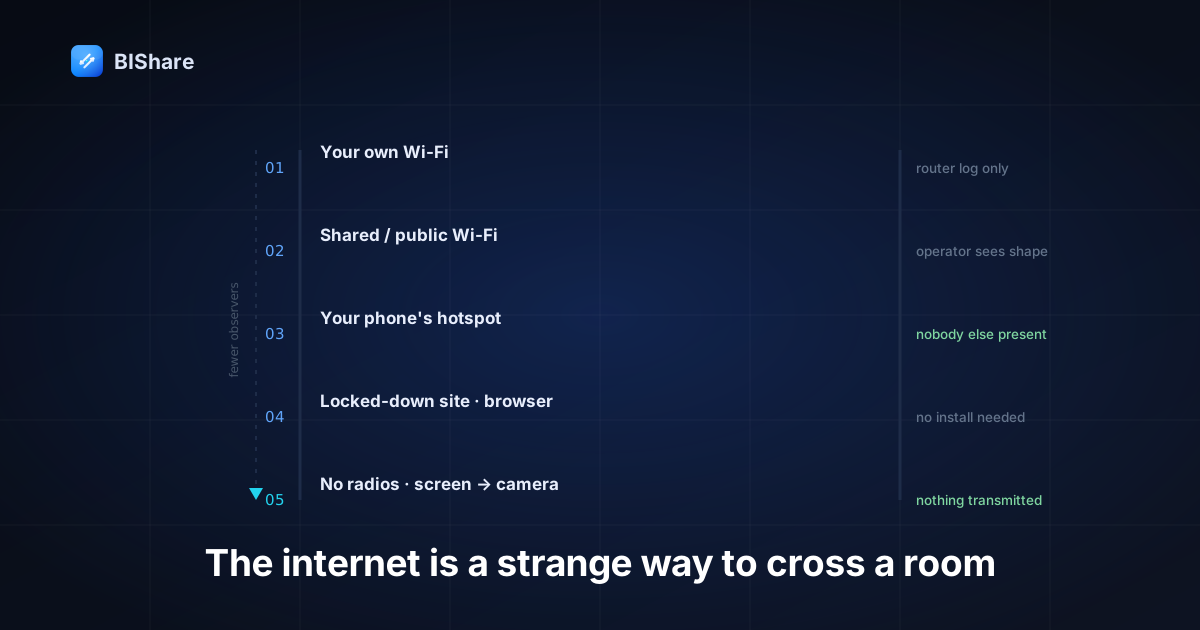
But "keep it local" is easy to say and surprisingly layered to do, because how disconnected you are turns out to be a ladder, not a switch. This guide climbs down it — five rungs, from a normal office to a room with no infrastructure at all — and at each rung asks the same two questions: what still works, and what have you actually stopped leaking?
Why locality is a privacy property, not just a speed trick
Most writing about local transfer sells speed. Speed is real — a router hop beats a round trip through a data center every time — but for sensitive material the more interesting property is jurisdictional. A file that never touches a third-party server is a file that no third party can be compelled to produce, breached out of, or asked to scan.
Consider what disappears when the route shortens. The provider's copy disappears, along with its backups and its search index. The metadata trail disappears — the record that this account sent that many bytes to that account at that hour, which is often more revealing than the file. The retention question disappears, because there is nothing to retain. And the "we updated our terms" risk disappears, because you are not a party to anything.
None of that requires trusting a company's privacy policy. It's the difference we drew out in our piece on end-to-end encryption: privacy by promise versus privacy by construction. Locality is the most constructive version there is — not "they can't read it" but "they were never in the room."
Rung 1 — The internet exists, you simply don't invite it
The first rung is the one most people never realize they're standing on. You are at home or at the office. There is a perfectly good internet connection. And you still don't need it, because both devices are already on the same Wi-Fi.
Here, a direct transfer sends the file through your own router and nowhere else. The packets go from your laptop to the access point and back down to your phone — two short hops inside equipment you can see. Nothing is uploaded; nothing traverses your ISP; nothing arrives at a company. Your internet connection is present but uninvolved, the way a road outside your house is present but uninvolved when you walk from the kitchen to the living room.
The practical consequence is that speed stops being about your broadband. Home upload is typically the narrowest pipe in a person's life — often a tenth of the download speed — which is why sending a large file to someone sitting beside you can take longer than sending it to another continent would take to arrive. On the local route, the ceiling is your Wi-Fi instead: 40–50 MB/s is ordinary on Wi-Fi 5 hardware, which turns a multi-gigabyte folder into a coffee-length wait rather than an evening.
What you've stopped leaking at this rung: everything a third party would have had. What you haven't: your router still sees that two devices exchanged a certain volume of data — a log almost nobody reads and you control anyway.
Rung 2 — A network you're on but don't trust
Now the café, the hotel, the coworking floor, the conference hall. You're connected, but the network belongs to someone else and so do the other machines on it. This rung is where local transfer gets genuinely interesting, because two very different problems hide behind the same symptom of "it isn't working."
The first problem is deliberate: many public networks enable client isolation (also called AP isolation), which prevents devices on the same access point from addressing each other at all. It's a sensible default for a hotel — it stops guests from poking at each other's laptops — and it also stops your own two devices from meeting. Nothing is broken; the network is doing its job. If your phone and laptop can both reach the internet but can't see each other, isolation is the usual culprit, and no amount of retrying will change it. Drop to rung 3.
The second problem is subtler and worth understanding because it looks identical from the outside: discovery can fail even when the path is fine.
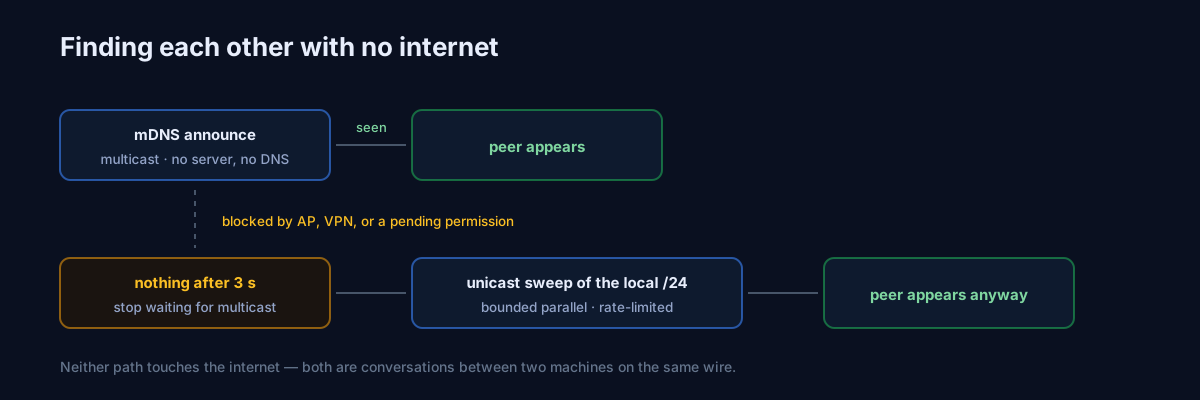
Here is how ours works, and what we learned building it. Devices announce themselves over mDNS — the same zero-configuration multicast protocol behind AirPlay and network printers — which is elegant precisely because it needs no server, no DNS, and no internet. But multicast is fragile in the real world: some access points filter it, VPN clients swallow it, and on a fresh iOS install the app can't send it at all until the user grants the local-network permission. So a transfer app that trusts mDNS alone will look broken in a meaningful minority of the places people actually stand.
Our fallback is deliberately unglamorous. Three seconds after discovery starts, if nothing has appeared, the app stops waiting for multicast and sweeps the local /24 directly — a bounded-parallel unicast probe that asks every address on the subnet a single question and adds anyone that answers like a peer. It is brute force with a leash: the sweep is rate-limited to one pass per cooldown so that a flaky peer repeatedly dropping and returning can't make the app storm the radio, while a genuine network change can still force a fresh pass immediately.
That fallback also produced my favorite kind of bug — the kind where everything works and is quietly worse. Devices found by the subnet sweep were joining the list without a QUIC port, because the probe response didn't carry one. Nothing failed. Transfers ran fine. They just silently ran on the older TCP path instead of the faster one, only for peers discovered by fallback — a performance regression invisible to every test that only checked whether files arrived. The fix was to stop treating the port as unknown: every BIShare device runs QUIC on a fixed port, so the probe path now fills it in rather than leaving a hole. The lesson generalizes past our codebase: when you build a fallback, audit what information it loses, not just whether it succeeds. Fallbacks that work are easy; fallbacks that work identically are the actual goal.
What you've stopped leaking at this rung: still everything third-party. What you haven't: other devices on that network can see that traffic is flowing between two hosts, and how much. They cannot read it — the payload is end-to-end encrypted — but shape is visible. If even that bothers you, the next rung removes it.
Rung 3 — No shared network, so make one
The moment you stop needing someone else's Wi-Fi, most of the remaining exposure evaporates. And you already carry the equipment: a phone's hotspot is a fully functional network with a guest list you control.
This is the rung people underuse, because the word "hotspot" has been colonized by the idea of sharing mobile data. It doesn't have to share anything. Turn it on, join your laptop to it, and you have a private wireless network containing exactly two devices — even if the phone has no signal, no data plan, or is in airplane mode with Wi-Fi switched back on. Nothing in a local transfer needs the internet: no DNS lookup, no clock sync, no license check, no server handshake. The two devices address each other directly and that is the whole conversation.
This is the case our no-internet transfer page exists for, and the one people are most surprised works at all.
The practical difference from rung 2 is total. There is no hostile network, because there is no third party on the network. Client isolation isn't a risk, because you own the access point. Nobody can observe the traffic shape, because nobody else is present. For genuinely sensitive material — the passport scan, the case file, the medical record — this is the rung I'd default to rather than treat as a fallback. It costs one toggle and about fifteen seconds.
Two practical notes. First, phones sometimes route app traffic over cellular when the Wi-Fi they're on has no internet, so it's worth confirming the transfer is actually running at local speed — if a multi-gigabyte file crawls, that's the tell. Second, the machine joining the hotspot may complain about no internet connectivity. That warning is correct and irrelevant: you didn't want any.
Rung 4 — Infrastructure exists, but you can't use it
A field site with a locked-down network. A client's office where guest Wi-Fi requires a portal login you're not going to complete for a five-second transfer. A secure facility. A plane. In these places the rung-3 answer usually still works — a hotspot is your own infrastructure, and it travels with you — but you may run into an environment where radios are restricted or the other person simply cannot install anything.
The install problem has an underrated answer: the browser is a receiver. On a shared network, a laptop with nothing installed can open a page and send or receive against a phone running the app, which collapses the "I'd have to set something up on their machine" objection that kills most local-transfer plans in practice. It's the same reason our web transfer tool exists at all — the software you have to install is software the other person often won't.
The restricted-radio problem is harder and deserves an honest answer rather than a workaround. If Wi-Fi and hotspots are genuinely prohibited where you are, most transfer tools have nothing to offer. That's the bottom rung.
Rung 5 — The bottom: no network of any kind
At the last rung there is no shared Wi-Fi, no hotspot, no Bluetooth — nothing but two devices in the same room. There is exactly one channel left, and it's the one nobody thinks of as a channel: light.
A file can be encoded as a sequence of QR codes, animated on one screen and read by the other device's camera. Screen to lens, with no radio involved at any point. It is not a party trick; it is a genuine air gap, and it's the only method on this ladder where "nothing was transmitted" is literally, physically true — the only thing that crossed the space was photons carrying a picture of your data.
The honesty required here is about bandwidth. A QR code holds a couple of kilobytes at best, and a camera reads maybe a few per second, so this channel moves text, keys, credentials, configuration, and small documents — not a video. Anyone who tells you they'll air-gap a gigabyte through a camera is selling something. But for exactly the payloads where air-gapping matters most — a recovery phrase, a password, a signed key, a one-page document — the ceiling is irrelevant and the property is priceless.
Verifying things when you can't look anything up
Disconnection takes away a comfort you may not have noticed you were leaning on. Online, trust is largely outsourced: a certificate authority vouches for a server, a revocation list says whether that vouching still holds, a badge in an interface says an account is who it claims. All of it depends on being able to reach somewhere and ask. Cut the internet and the entire apparatus is unreachable.
The surprise is that what replaces it is stronger, not weaker.
Identity becomes physical. The device you're sending to is the one in your hand, or the one your colleague is holding across the desk. Its accept prompt lights up on a screen you are looking at, in front of a person you can see. No certificate chain in the world establishes identity as convincingly as that — this is the out-of-band verification channel security engineers spend enormous effort trying to approximate, and offline transfer gets it for free simply because both parties are in the room.
Integrity is self-checking. Authenticated encryption verifies every chunk as it lands, so a file that was truncated, reordered, or altered doesn't arrive slightly wrong — it refuses. You don't need to fetch a checksum from a website you can't reach, because the proof travels welded to the data itself.
Freshness is the one thing to watch. Without a network, devices can drift on things like clock time, which matters if you rely on an expiring link — so on the fully offline rungs, prefer direct sends and codes over anything time-boxed.
For the highest-stakes payload, there is still one habit worth keeping: read a short device fingerprint aloud and have the other person confirm it matches. It takes five seconds, uses a channel — your voice, across a table — that no attacker on any network can touch, and it closes the only gap physical presence leaves open, which is the possibility that the device in front of you is not the one that answered.
What "local" still doesn't hide
A guide like this owes you the limits, because a false sense of invisibility is worse than none.
The devices are still devices. Local transfer protects the file between two machines. It does nothing about a machine that's already compromised, a phone with no lock screen, or an unencrypted laptop disk. Turn on full-disk encryption; it is the cheapest security control in existence and the one that survives theft, and it pairs with the transport guarantees we document rather than duplicating them.
Arrival isn't deletion. The file now exists in one more place, and that place tends to be a Downloads folder that never gets cleaned. For sensitive material, the transfer is not the end of the workflow — filing it and clearing the landing spot is.
Local doesn't mean anonymous on the LAN. As noted at rung 2, other devices on a shared network can see that two hosts exchanged data and roughly how much, even when they can't read a byte of it. Rung 3 removes those observers entirely.
The other person is a human. Cryptography ends where forwarding begins. Once someone has the file, discretion is a social property, not a technical one — the same boundary we drew in the guide to sending confidential business documents.
The ladder at a glance
| Rung | Situation | What carries the file | Who can observe |
|---|---|---|---|
| 1 | Your own Wi-Fi | Direct hop through your router | Only your own router logs |
| 2 | Public or shared Wi-Fi | Direct hop, if the AP allows peer traffic | Network operator sees traffic shape |
| 3 | No trusted network | A phone hotspot with two members | Nobody — you own the network |
| 4 | Locked-down site | Hotspot, or browser on the other machine | Same as the network you had to use |
| 5 | No radios at all | Animated QR, screen to camera | Nobody — nothing is transmitted |
Read it as a descent: start at the rung your situation forces on you, and drop lower whenever the material is sensitive enough that the observers at your current rung bother you.
Setting it up before you need it
The failure mode with local transfer isn't technical — it's that nobody prepares, so at the moment of need they reach for the cloud out of muscle memory. Fifteen minutes now removes that.
Install on both sides in advance. BIShare runs on iPhone, Android, Mac, Windows, and Linux, so "both sides" usually means your own two or three devices. The wireless setup walkthrough covers pairing every phone-and-computer combination. On first launch, grant the local-network permission when asked — that prompt is exactly what lets a device announce itself, and declining it is the single most common reason discovery looks broken later.
Do one practice run at each rung you're likely to need. Send a small file across your home Wi-Fi. Then turn on your phone's hotspot, join your laptop, and send it again. That second drill is the one worth having in your hands, because you'll do it under pressure someday, and knowing it takes fifteen seconds is the difference between using it and emailing the file to yourself "just this once."
Know your escape hatches. If devices don't appear on a shared network, don't debug it — assume client isolation and go to the hotspot. If the other machine can't install anything, use the browser. If there's a group involved, a transfer room is faster than pairwise sends. And if the payload is small and the room is truly disconnected, QR beaming is there.
The shortest biography wins
Every method in this article does the same thing in different terrain: it shortens the list of places your file has been. That list is the only privacy metric that survives contact with reality — not what a policy promises, not what a company says it deletes, but how many machines actually held a readable copy and how long they kept it.
Send a sensitive document by email and the honest answer is four durable copies across infrastructure you don't control, indefinitely. Hand it across a hotspot you turned on for the occasion and the honest answer is two devices, both yours, for as long as you choose. Both took about the same amount of effort. Only one of them will still be true in five years, whatever happens to whichever company you would have trusted.
The internet is a magnificent way to reach across the world. It is a strange way to cross a room.