
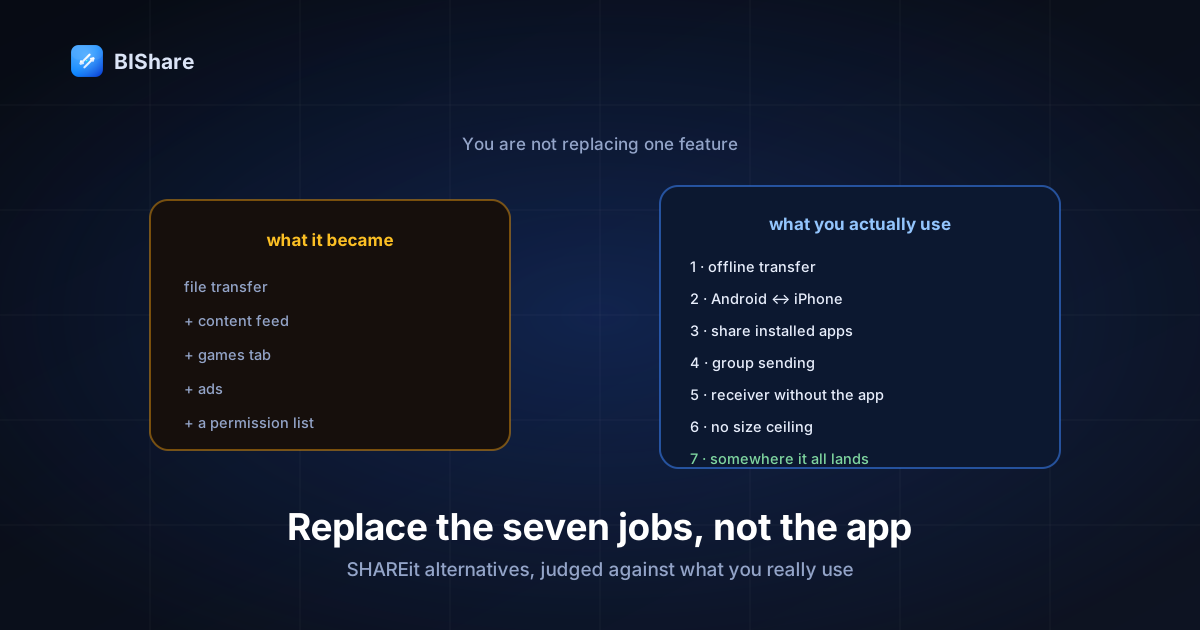
Most "SHAREit alternatives" lists get the assignment wrong. They line up five apps, compare transfer speeds, and declare a winner — as if you were replacing a single feature. You're not. Over the years SHAREit quietly became a bundle of about seven different jobs, and the reason people bounce off replacements is almost always that job number four or five silently disappeared.
So this guide starts from the opposite end. First we take inventory of what SHAREit actually does for you, including the parts nobody lists. Then we hold each alternative against that inventory and mark honestly where it wins, where it loses, and where it simply doesn't compete. And then, because leaving an app you've used for years has logistics, there's a migration section for the files you already have.
Fair warning about my position: I work on one of the alternatives, and it's in the comparison. I've tried to make that visible rather than pretend otherwise — every claim about our app is one you can check, and the section on what SHAREit still does better is not a formality.
Why people are leaving in the first place
Credit where it's owed: SHAREit solved a genuinely hard problem years before the platforms did. In an era when moving a video between two Android phones meant a cable and a laptop, it offered offline device-to-device transfer that worked, on cheap hardware, on networks that barely existed. Hundreds of millions of installs were earned, not tricked.
What changed is what the app became. Somewhere along the way the transfer tool grew a content feed, a games section, and an advertising layer, until the file-sending function — the reason anyone installed it — became a tab inside a media portal. The download is now hundreds of megabytes for a job that needs a fraction of that. And it accumulated the kind of permission footprint that made people uneasy enough that several governments, India most prominently, banned it outright in 2020.
You don't need a scandal to justify switching. "I want an app that transfers files and does nothing else" is a complete reason, and it's the one most people actually have.
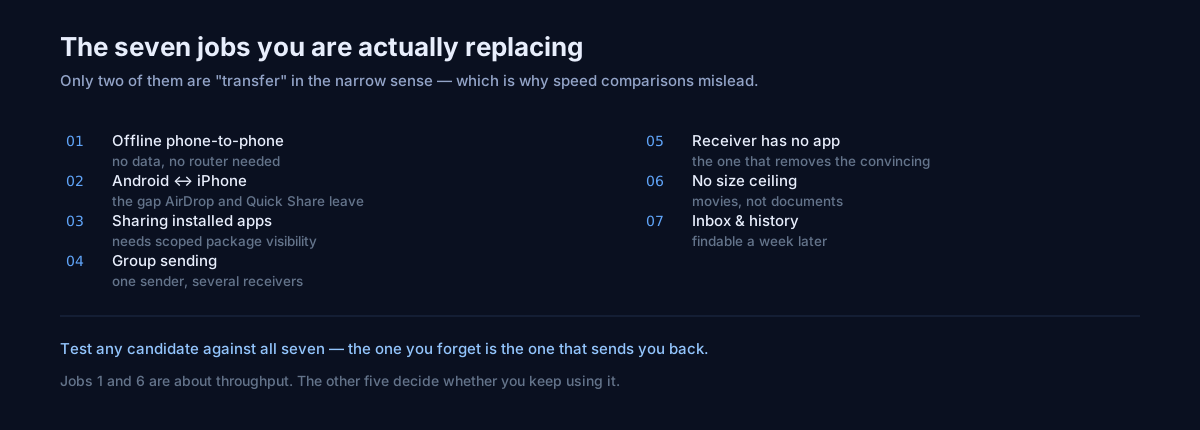
The inventory: seven jobs, not one
Before comparing anything, write down what you're replacing. Most disappointment with a new app traces back to a job on this list you forgot you relied on.
- Offline phone-to-phone transfer. Files move with no internet and no mobile data — the original promise, still the load-bearing one, and the subject of its own guide to working with no connection at all.
- Android to iPhone. Cross-platform sending, which neither AirDrop nor Quick Share will do for you.
- Sharing installed apps. Sending an APK of a game to a friend with no data — heavily used in places where bandwidth is expensive.
- Group sharing. One sender, several receivers, without repeating the transfer five times.
- Receiving from someone who doesn't have the app. In practice this is "my friend hasn't installed it and won't."
- Large files without a ceiling. Movies, not documents.
- Somewhere for it all to land. A gallery and history that makes received files findable a week later.
Notice that only jobs one and six are about transfer in the narrow sense. That's why speed-only comparisons mislead.
The permissions question — and what job three really costs
Job three deserves its own section, because it's where the most interesting engineering constraint in this whole category lives, and no comparison article I've read explains it.
To let you pick from your installed apps and send one, an Android app must be able to see your installed apps. There's a permission for that — QUERY_ALL_PACKAGES — and it does exactly what it sounds like: full visibility into every package on the device. Since Android 11, Google Play treats it as a restricted permission, granted only to apps whose core function genuinely requires a complete inventory. A file-transfer app doesn't qualify, and requesting it anyway is a reliable way to get a release rejected.
So how do you build app sharing without it? You ask a narrower question. Android's package visibility system lets an app declare, in its manifest, the kind of apps it needs to see — and "apps with a launcher icon" is expressible as an intent filter. That's the approach in our manifest: a <queries> block matching MAIN/LAUNCHER, with a comment sitting next to it explaining that the broad permission is Play-restricted and unnecessary. You get the list a person would recognize — the apps in their drawer — and nothing else. No system packages, no inventory of everything installed.
The second half of the same problem is installation on the receiving end. Handing someone an APK is easy; installing it requires REQUEST_INSTALL_PACKAGES, another permission that draws scrutiny and, more importantly, puts a file-transfer app in the business of installing software. We declare neither. A received APK lands as a file, and tapping it hands off to the system installer through the file manager, exactly as if you'd downloaded it. One more tap for the user; one entire category of risk that isn't ours to hold.
I'm spelling this out because it explains something you'll notice while comparing: app sharing is either seamless-and-permission-hungry or slightly-more-manual-and-narrow. There isn't a third option, and any app that makes it seamless is holding permissions worth knowing about.
Judging the candidates against the inventory
| Job | LocalSend | Quick Share | PairDrop | BIShare |
|---|---|---|---|---|
| 1. Offline, no data | ✓ | ✓ | partial | ✓ |
| 2. Android ↔ iPhone | ✓ | ✗ | ✓ | ✓ |
| 3. Share installed apps | ✗ | ✓ | ✗ | ✓ (scoped) |
| 4. Group sharing | partial | ✗ | ✓ | ✓ |
| 5. Receiver without the app | ✗ | ✗ | ✓ | ✓ |
| 6. No size ceiling | ✓ | ✓ | browser limits | ✓ |
| 7. Inbox & history | basic | system files | ✗ | ✓ |
| Ads | none | none | none | none |
LocalSend is the honest, excellent open-source answer and the one I'd recommend without hesitation to someone whose needs stop at jobs one, two and six. It's cross-platform, it has no ads and no account, its code is public, and it does the core thing cleanly — we compare the two directly on our LocalSend alternative page if you want that head-to-head in isolation. What it doesn't attempt: app sharing, and the case where the other person has nothing installed. If those never come up for you, the comparison is basically over — install it and stop reading.
Quick Share (formerly Nearby Share) is the platform answer on Android, and being built into the OS is an advantage no third-party app can match: nothing to install, nothing to update, and it handles app sharing natively because the OS is allowed to. Its disqualifying gap is job two — it does not talk to iPhones, and it never will, because that's a decision rather than a limitation. If that single gap is your whole problem, the Nearby Share alternative page covers the workarounds.
PairDrop (the well-maintained successor to Snapdrop) is browser-only, which makes it superb at job five: send someone a URL and they can receive with nothing installed. The same architecture is its ceiling — no offline operation without a local instance, no app sharing, and browser memory limits on very large files. As a "works everywhere for a one-off" tool it's excellent; as a daily replacement it isn't trying to be one.
BIShare — mine, so weigh accordingly — is the one that aims at the whole inventory: offline device-to-device, Android ↔ iPhone ↔ desktop, scoped app sharing, rooms for group sends, a browser path for people with nothing installed, no ceiling on local transfers, and an inbox with history. Free, no account, no ads, open source. Where it's currently weaker than SHAREit: no media hub, and a much smaller install base, which matters more than it should — see below.
The speed question, answered honestly
Every comparison in this category leads with throughput, so let me defuse it: on the same Wi-Fi network, all of these apps are within noise of each other, because none of them is the bottleneck.
The ceiling is the radio. On ordinary Wi-Fi 5 hardware a well-built transfer app sustains roughly 40–50 MB/s, and that number is set by the access point, the distance, the interference in the room, and how many neighbours share your channel — not by which of these four apps you installed. When one app appears dramatically faster in a review, the usual explanation is that the comparison ran the two apps on different paths: one negotiated a direct device-to-device link, the other went through the router, or one fell back to a slower transport without saying so.
That last case is worth knowing about, because it's invisible. We hit it in our own app: peers discovered through a fallback path were joining without the port for our faster transport, so transfers quietly ran on the older one. Nothing failed, every test passed, and the only symptom was a number nobody was watching. If an app is meaningfully slower than its own marketing, a silent transport downgrade is a likelier explanation than bad engineering.
The practical consequence for you: don't choose on speed. Choose on the inventory above, then verify the app you picked isn't doing something pathological — a rough sanity check is that a 1 GB file should take somewhere in the region of twenty to thirty seconds on a healthy home network. If it takes five minutes, something is routing through the internet that shouldn't be.
How these apps make money — and why it matters
"Ad-free" is a promise with an expiry date unless you know what replaces the ads. SHAREit's trajectory is the cautionary tale of this entire category: a clean utility, then a modest banner, then a content feed, then a portal with a transfer tab. Nobody planned that in one meeting; it's what happens when a free app with hundreds of millions of users has no other revenue.
So before adopting a replacement, ask where its money comes from:
- LocalSend is a community open-source project supported by donations, with no commercial layer to grow. That's the strongest structural guarantee on this list — there's no revenue mechanism that ads could improve.
- Quick Share is a feature of Android. Google isn't monetizing the transfer itself; it's monetizing the platform. Stable, but it also means the feature exists at Google's discretion and covers exactly the devices Google cares about.
- PairDrop is open source and donation-funded, with running costs limited to a small signalling server.
- BIShare — ours — is free for transfers, forever, with no ads and no account, and the local path costs us nothing to run because nothing touches our servers. Revenue comes from optional paid cloud storage for people who want sync and long-term storage. That's the honest structure: the free thing is free because it isn't expensive for us, not because we're waiting to monetize your attention later.
None of this is a character judgment. It's just that a free app's future behaviour is more reliably predicted by its business model than by its current feature set — and "how would this app make money if it needed to?" is the question that would have predicted SHAREit's last five years.
What SHAREit still does better
An alternatives article that finds no upside in the incumbent isn't being honest.
Everyone already has it. This is the real one. The transfer that actually happens is the one where both people already have the app, and in many regions SHAREit is the default nobody has to be talked into. Every alternative asks you to convince a second person, which is a social cost, not a technical one. It's also why job five — receiving without the app — matters so much more than its position in most feature lists suggests: it's the only feature that removes the convincing.
The media hub is genuinely useful to some people. If your phone is your primary computer and you use SHAREit not just to move files but to browse and manage them afterwards, most alternatives will feel bare. That's a real loss, even if it's the same feature set others describe as bloat.
App sharing is one tap. As explained above, ours is deliberately narrower and adds a step. If sending APKs is a daily activity for you, be aware you're trading convenience for a smaller permission footprint — that trade is the right one in my view, but it is a trade.
A ten-minute test before you commit
Feature tables are a starting point; the app that survives is the one that works in your specific room, on your specific network, with your specific second person. This is the shortest test that actually predicts that.
Minute 1–2: install on both devices. Not one. The most common failed migration is a single-sided install, discovered at the worst moment.
Minute 3: send a photo, both directions. Sending is usually well tested; receiving is where permission prompts and save-location bugs live. Do both, and grant the local-network permission when asked — declining it is the number-one reason devices "can't see each other" later.
Minute 4–6: send something big. A 1 GB video or a folder — the mechanics of which we walk through for 10 GB files. This is where you find out whether the app streams or stages, whether it survives the screen locking mid-transfer, and whether the speed is sane for your network.
Minute 7: break it on purpose. Walk out of Wi-Fi range or toggle airplane mode halfway through. A good tool either resumes or fails clearly; a bad one hangs at 97% forever and tells you nothing. How an app behaves when something goes wrong is more predictive of your daily experience than how it behaves when everything works.
Minute 8–9: find the file a different way. Close the app, reopen it, and locate what you received. If you can't find it in under fifteen seconds, job seven isn't covered, and in a month you'll have a folder full of things you can't locate.
Minute 10: try the no-install case. Ask the other person to receive something without their app open — via a browser, or a link. If your circle includes people who won't install anything, this minute decides whether the app survives contact with them.
Ten minutes now, or a month of discovering these one failure at a time, usually while someone waits.
Migrating without losing anything
Switching costs less than people expect, provided you handle the archive rather than abandoning it.
Find the old folder before uninstalling. SHAREit stores received files in its own directory on internal storage. Open your file manager, locate it, and move anything you care about into normal folders — Downloads, Pictures, Movies. Files inside an app's own directory can vanish with the app, and "I'll get it later" ends the moment you tap uninstall.
Install the replacement on both phones while you're together. The single biggest cause of failed migrations is installing it alone, then discovering at the moment of need that the other person doesn't have it. Two minutes side by side, one test transfer, done.
Do one practice run. Send a photo, confirm it lands, and open it from the new app's inbox. That's the whole ritual, and having done it once is the difference between reaching for the new app under pressure and reaching for the old habit.
Uninstall properly. Once the archive is moved, remove the old app rather than leaving it dormant — a background app with a broad permission footprint you're no longer using is pure downside. On Android, Settings → Apps → SHAREit → Uninstall, and check whether it left a folder behind.
Keep the browser fallback in your pocket. For the friend who won't install anything, remember you can send them a link that opens in any browser. It's the escape hatch that makes the switch survivable in the messy real cases.
Choosing in one paragraph
If everything you own is Apple, you already have AirDrop and this whole category is moot. If you're Android-only and never send to an iPhone, Quick Share is built in and free and you should use it. If your needs are cross-platform file transfer and nothing more, LocalSend is the clean, open-source answer. If you need someone with nothing installed to receive right now, PairDrop in a browser tab is unbeatable for that one job. And if you want the full inventory — cross-platform, offline, app sharing, groups, a browser path, and a place for it all to land — that's the gap BIShare was built for, which is the honest reason it's the last one on the list rather than the first.
Whichever you pick, the test that matters isn't a benchmark. It's whether, three weeks from now, you and the person you send files to most often both still have it installed. Adoption is the feature that makes every other feature usable, and it is the one no comparison table can score for you — it depends entirely on how easy the app makes it for the second person to say yes.
The thing worth keeping from SHAREit
There's a reason this app got installed on a billion phones, and it wasn't marketing. It took a problem that platforms had ignored — moving your own files between your own devices, without data, without a cable, without an account — and made it work on the cheapest hardware in the hardest conditions. That idea was right, and every app in this comparison inherits it.
What people are leaving isn't the idea. It's what accumulated on top of it. A replacement earns its place by keeping the first part and refusing the second — which, conveniently, is a standard you can hold every app here to, including mine.