
Let's establish the obvious thing first: this is not a third-party review. I work on BIShare. You are reading the makers' own account of their product, published on their own blog, and no amount of balanced tone changes that structural fact.
So rather than pretend to an objectivity I don't have, I've written the piece I'd want to read from a vendor — one that opens with the reasons not to use the thing, states every capability claim in a form you can check yourself, and names the gaps by name instead of calling them "coming soon." If you're evaluating BIShare against LocalSend or Quick Share, my honest suggestion is to read this for the specifics and then go verify them, because specifics are the only part of a self-review worth anything.
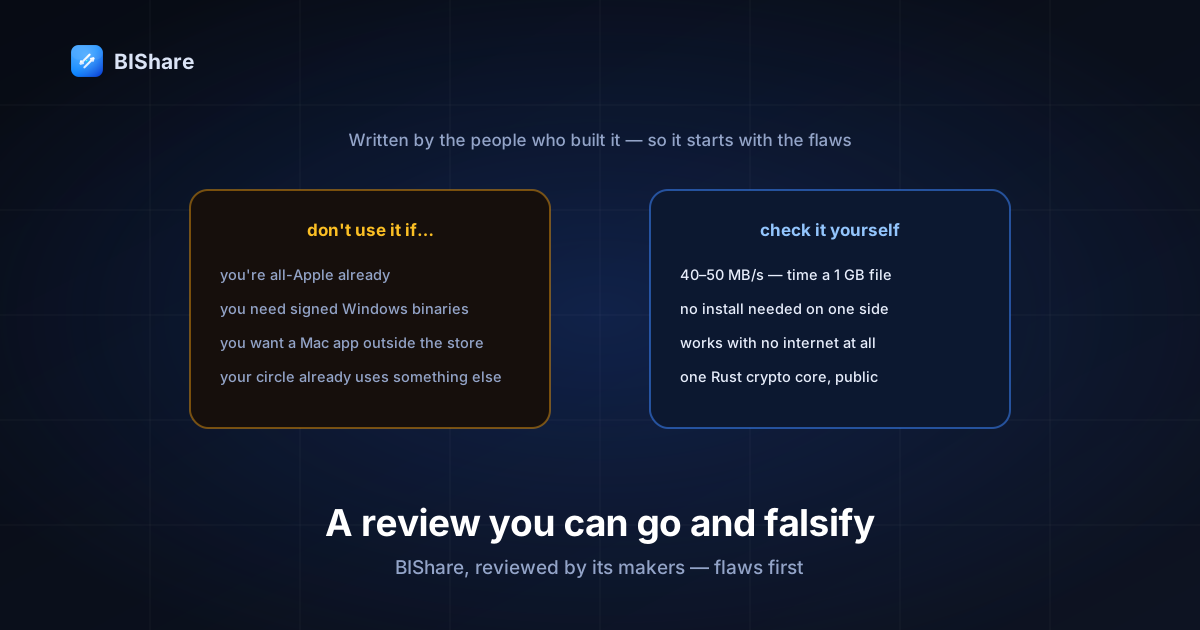
Start here: five reasons to not use BIShare
If any of these describe you, save yourself the download.
1. Everything you own is Apple. AirDrop is already on your devices, it's deeply integrated, and it works. Installing a third-party app to replicate it is a downgrade in convenience for zero gain. BIShare only becomes interesting the moment a Windows PC, an Android phone, or a Linux machine enters the picture — which is the entire reason it exists, and also the reason it's pointless if that never happens to you.
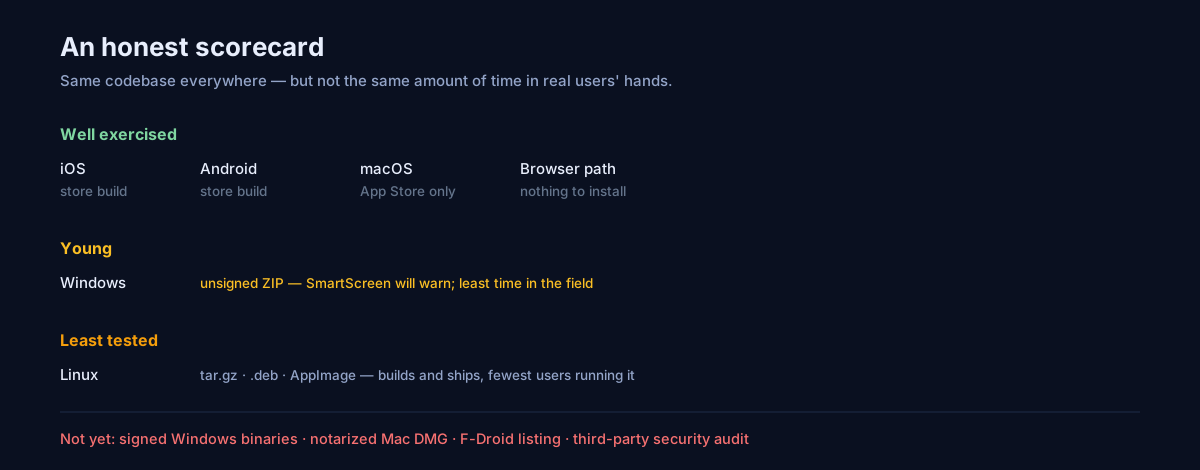
2. You need a signed Windows installer. Our Windows build ships as an unsigned ZIP from GitHub Releases. That means SmartScreen will warn your users, and any organization that blocks unsigned executables will block ours. This isn't an oversight I'm going to spin — code signing for Windows is on the list, it isn't done, and if your environment requires it then today the answer is no.
3. You want a Mac app from outside the App Store. We ship the Mac app through the App Store only. There is no notarized DMG at the moment: an unsigned one would trip Gatekeeper in ways that produce a worse first impression than not shipping it, so the release pipeline deliberately skips it. If you avoid the App Store on principle, that's a real dead end right now.
4. You want continuous folder sync, not transfers. BIShare moves files when you tell it to; it does not watch a folder and mirror it across your devices the way Syncthing or a cloud drive does. Those are different products solving a different problem, and if what you actually want is "this folder, always identical everywhere," you want one of them instead. Sending is deliberate here, which is a feature for some people and a dealbreaker for others.
5. The person you send files to most has never heard of it. This is the honest one. A transfer app is only as useful as its adoption in your specific circle, and BIShare is new: the repository has a handful of stars, not thousands. SHAREit and LocalSend have installed bases we don't. The browser fallback exists precisely to soften this, but "your friend already has it" is a genuine advantage that we simply do not have yet.
Still here? Then the rest is what it actually does, with the evidence attached.
The claim that matters, and how to check it
The pitch is one sentence: send files directly between iPhone, Android, Mac, Windows, and Linux, at local network speed, with nothing uploaded anywhere.
The measurable part is the speed. On ordinary Wi-Fi 5 hardware, release builds sustain roughly 40–50 MB/s — a gigabyte in something like twenty to thirty seconds. That is not a benchmark you should take on faith, so here's how to falsify it in three minutes: put two devices on the same Wi-Fi, send a 1 GB file, and watch the clock. If it takes five minutes, something is routing through the internet and you've disproven the claim on your own hardware, which is worth more than any number I publish.
What that speed is not: a property of our software being clever. On a local transfer, the ceiling is the radio. Any competently built app on the same network lands in the same range, and I said as much in the SHAREit alternatives comparison. The interesting engineering isn't in going fast; it's in not accidentally going slow — which is a real hazard, and one we've been bitten by.
Where we've been wrong before
A self-review with no failures in it is marketing. Three we've written about, because they're instructive:
Encryption was accidentally running in software for months. Our cryptography lives in a Rust core, and the compiler flags that enable hardware AES on ARM sat in a config file the build helper never found — because it invoked the compiler from a different working directory. Every iOS and macOS release shipped with software AES, roughly eleven times slower, until we caught it. Benchmarks run from the crate directory looked perfect. The full autopsy is a better read than any performance claim.
A fallback path silently downgraded the transport. When multicast discovery is blocked, we fall back to sweeping the local subnet. Peers found that way were joining without the port for our faster transport, so transfers quietly ran on the older one. Nothing failed; every test passed. Discovery has its own writeup.
The app once told users a transfer had succeeded when it hadn't. A handoff path dropped the decryption key from a link and then saved the still-encrypted container to disk, reporting success. Nothing leaked — the failure fell on the safe side — but the app lied, and it pointed people at the wrong suspect. It now fails loudly and saves nothing, with cross-implementation test vectors so the two ends can't drift apart again.
I list these because "what does it do when something goes wrong?" is the question that separates tools, and the only credible answer is a track record of having been wrong and said so.
What it does that the alternatives mostly don't
Three things, stated narrowly enough to be checkable.
The other person doesn't need the app. On the same network, a device with nothing installed can send and receive from a browser tab. This is the feature that determines whether a transfer app survives contact with real life, because the constraint is almost never technical — it's that the other person won't install anything. Most competitors, including ones I admire, don't cover this case.
It works with no internet at all. Not "works offline" in the marketing sense — the protocol needs no DNS, no clock sync, no server handshake. Two devices on one phone's hotspot, in airplane mode, with no SIM, transfer normally. There's a whole guide to the degrees of disconnection, down to sending a small file as animated QR codes with no radio involved at all.
The cryptography is one implementation, not five. X25519 and AES-256-GCM live in a single Rust crate shared by every platform, so there's one code path to review rather than one per operating system. It's public, it's small enough to actually read, and — to be precise about what that does and doesn't mean — it has not had a formal third-party audit. Open source is not an audit. It's the precondition for one.
The feature list, minus the adjectives
Everything below either works today or isn't mentioned.
- Local transfer between iOS, Android, macOS, Windows, Linux, and browsers, with automatic device discovery.
- Browser send and receive, no install required on one side.
- Expiring links for when the two devices aren't on the same network, with the file encrypted before it leaves your device and the key kept out of our server logs.
- Transfer rooms for group sharing — one sender, several receivers, a short code.
- QR Beam: small files as an animated QR stream, screen to camera, no network of any kind.
- Universal clipboard between your own devices.
- Inbox and history with a gallery, search, and save-to-Photos.
- Desktop citizenship: system tray, drag and drop, launch at login.
- 13 languages, and community translations are the easiest way to contribute.
- Free, no account, no ads, no tracking, MIT licensed.
What's deliberately absent: any ad layer, any content feed, any signup wall on transfers, and any analytics inside the app that runs without your say-so.
How it makes money, since you should ask
Free apps with no revenue model become ad-supported apps eventually — that's the arc that produced most of this category's problems, and it's a fair thing to interrogate before adopting anything.
Local transfers cost us nothing to operate, because nothing touches our servers: the file goes device to device and we never see it. That's what makes "free forever, no ads" a structural statement rather than a promise. The parts that do cost money — relay bandwidth for expiring links when devices aren't on the same network — are subsidized today and are the natural home for a paid tier later, alongside optional cloud storage for people who want their files to persist rather than expire.
If that changes, the change will be visible in the same public repository as everything else. I'd rather you hold us to that than to an adjective.
The hands-on part: what using it actually looks like
Feature lists hide the texture, so here is the sequence, including the friction.
First launch asks for permissions, and one of them matters more than the rest. On iOS you'll get a local-network prompt; on Android, nearby-devices. Granting it is what lets your device announce itself and see others — and declining it produces the single most common support question in this entire category, which is "why can't my devices see each other?" The onboarding explains each request before the system dialog appears, mostly because App Review made us: our pre-permission screen originally used the word "Allow" on its button, which Apple flagged for looking like the system prompt it precedes. It says "Continue" now.
The home screen is a device list and a staging tray. Devices on your network appear on their own within a second or two — no pairing, no codes for the local case. Below that sits the tray: photos, files, text, contacts, a voice note, or whatever's on your clipboard, all staged until you pick a destination. That ordering is deliberate. Most transfer apps make you choose a device first and then hunt for content in a system picker; staging first means you can gather five things from four places and send them as one act.
Sending is a tap, and receiving is a prompt. You tap a device, the other side gets an accept prompt showing who's sending and what, and the transfer runs. Nothing lands on anyone's disk without an explicit yes — which is also the addressing safeguard I keep recommending, since watching the prompt appear on the right screen is stronger confirmation than reading a name off a list.
The first run after installation includes a short guided tour, pointing at the device card, the staging tray, and the tabs. It appears once, on first launch, and never again.
Where it lands is the part most apps get wrong. Received files go to an inbox with a gallery, search, and a save-to-Photos action, plus a file browser that groups by folder, sender, and date. A week later you can still find the thing, which sounds unremarkable until you've used a tool where you can't.
Platform by platform, with the rough edges named
The apps are one codebase, but they are not equally battle-tested, and pretending otherwise would waste your time.
iOS and Android are the most exercised by far — the store builds, the ones most people run, and where nearly all the field bugs have been found and fixed. If you're on either, you're on the well-trodden path.
macOS ships through the App Store and is solid, with one deliberate limitation already covered: no DMG outside the store, so if you avoid the App Store you're stuck.
Windows is the newest of the five. The first successful build landed only recently, and while it works — desktop drag-and-drop, tray, discovery — it has had the least time in real users' hands, and it ships unsigned. Treat it as capable but young.
Linux builds and ships as a tar.gz, a .deb, and an AppImage, and the platform-specific gaps we found during an audit (camera scanning, opening files with the desktop's default handler) are fixed. It is nonetheless the platform where I'd expect an unreported bug to be hiding, simply because fewer people are running it. If you find one, the issue tracker is the fastest way to make it my problem instead of yours.
Browsers are the fifth surface and the one most reviews miss entirely — send and receive from a tab, on the same network or via an expiring link, on a machine where you can't install anything.
What we collect, stated precisely
"No tracking" is a phrase every app uses, so here is the specific version, which you can check against the source.
There is no analytics SDK in the app. No Firebase, no Google Play Services dependency, no third-party measurement library — a fact we had to enforce deliberately while preparing the free-software build, and the same fact is what makes that build possible at all.
What does exist is a small first-party counter. When a transfer completes, the app can report three things to our API: that a transfer happened, how many bytes it carried, and which platform it ran on. No IP address is stored, no file name, no device name, nothing about content. It exists so the public counters on our stats page reflect real usage rather than invention, and it can be switched off in Settings. In the free-software build the default is inverted — it's off until you turn it on.
For the parts that do touch a server — expiring links when devices aren't on the same network — the file is encrypted on your device before upload, and the decryption key travels in the link's fragment, the portion of a URL that browsers never transmit. What sits on our infrastructure is a sealed container with an expiry date. If our database were stolen tomorrow, the thief would have headers and noise. The security page states the same thing in more detail, and the protocol crate is where you'd go to disagree with me.
What we're working on, without dates
Roadmaps in vendor posts are usually a way of answering criticism with a promise. These are listed only because each one is a gap named earlier in this article, and it's fair to say whether it's being worked on.
Windows code signing is the one I'd fix first if I could buy it with money alone. The obstacle is not cost but eligibility: the modern certificate options require an organization with a verifiable operating history in a supported country, and the alternative distribution route — shipping through the Microsoft Store, which signs on your behalf — is the path most likely to actually happen. Until one of those lands, SmartScreen will keep warning, and I'd rather say so than bury it.
A notarized Mac DMG needs a Developer ID certificate and a notarization step in the release pipeline. It's mechanical work rather than hard work; it simply hasn't been done.
Linux packaging beyond the tarball now covers a .deb and an AppImage, which is enough for most people; a distro-repository presence is a bigger commitment and isn't planned.
A third-party security audit is the honest gap in the claims above. Open code is a precondition for review, not a substitute for it, and until someone qualified has actually looked, "auditable" is the accurate word rather than "audited."
More languages, which is the one place outside help genuinely accelerates things: adding a locale is a text file and about fifteen minutes, needs no build environment, and is the contribution I'd point a first-time contributor at.
What is deliberately not on this list: anything that would add an ad layer, a signup wall on transfers, or a third-party analytics SDK. Those aren't unscheduled — they're excluded.
Verdict, in the form of who it's for
Use it if you regularly move files between platforms that don't talk to each other — iPhone to Windows, Android to Mac, phone to Linux — and you'd rather those files not take a round trip through somebody's data center on the way across your desk. Use it if the person on the other end is unpredictable and might have nothing installed. Use it if "no account" and "no ads" are requirements rather than preferences.
Don't use it if you're entirely inside one ecosystem, if your organization requires signed Windows binaries today, or if the deciding factor is that your friends already use something else — because they probably do, and that's a real answer.
Try it before deciding by doing the ten-minute drill: install on two devices, send both directions, send something large, break the network mid-transfer on purpose, and then find the file again a day later. That sequence tells you more than this article can, and it works the same way on every app in the category, including the ones we'd lose to.
The standard we'd like to be held to
The temptation in a piece like this is to end on a flourish. Instead, here's the thing I'd want a skeptical reader to take away: every number in this article is falsifiable on your own hardware in under ten minutes, every weakness named is one you can confirm by trying to do the thing, and every architectural claim points at source code rather than at a marketing page.
That's the only kind of self-review worth publishing — not because it's more persuasive, but because it's the only version that stays true after you go and check.