
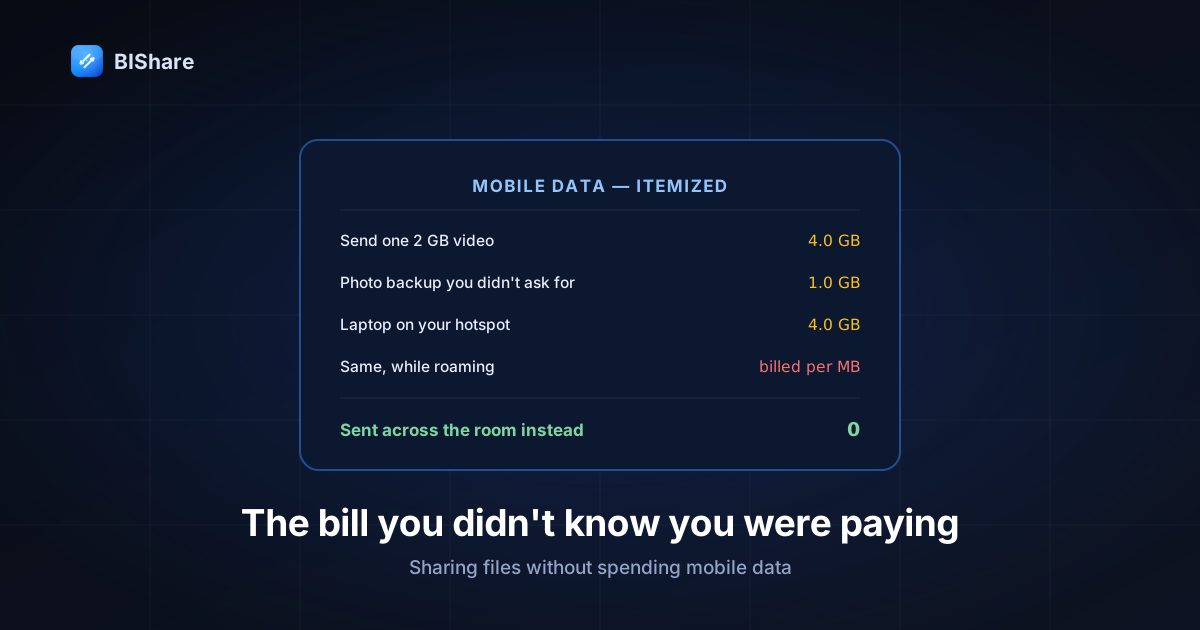
Your mobile plan has a number on it, and almost nobody knows where that number actually goes. Not in the vague sense of "video uses a lot" — in the specific sense of this action, on this day, cost me this many megabytes, and I could have paid nothing.
File sharing is the clearest case, because it's where the arithmetic is both large and completely avoidable. So this is an itemized bill: every line is a way sharing files quietly draws down your allowance, with the numbers, and at the end the version where the same actions cost zero.
Nothing here is about privacy or working offline — that argument has its own guide. This one is purely about money.
Line item 1: the transfer you paid for twice
Send a 2 GB video to a friend through any cloud service and here is the ledger.
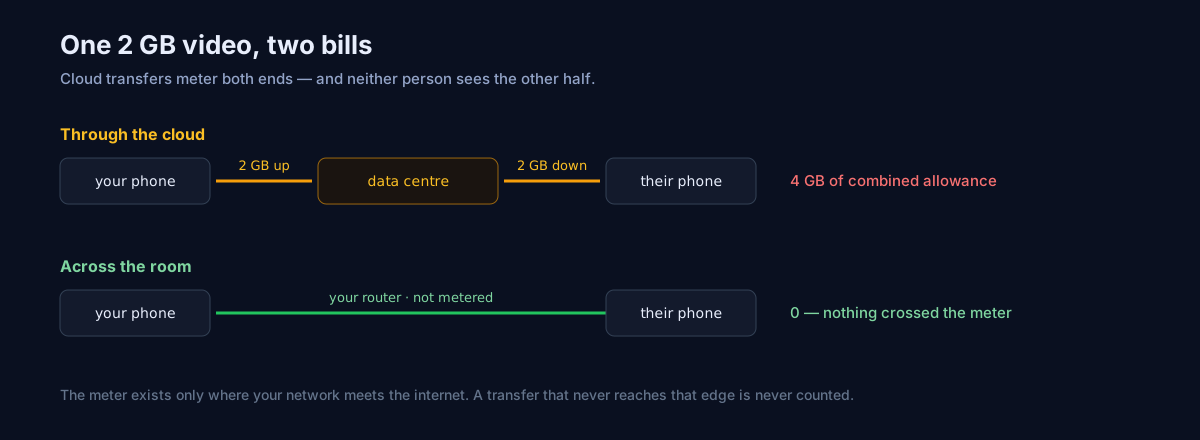
You upload 2 GB. That's your quota. Then your friend downloads 2 GB. That's their quota. One file, one intention, 4 GB of combined mobile allowance — and neither of you sees the other half of the bill, which is exactly why nobody notices it happening.
The asymmetry is worse than the total suggests. Mobile plans meter upload and download against the same bucket, but your upload speed is typically a fraction of your download speed, so the sender pays the same quota and waits several times longer. On a 10 Mbps uplink, 2 GB takes about twenty-seven minutes of continuous transmission — during which the phone's radio is at full power, which is its own smaller bill in battery.
Now consider that the two of you may be sitting in the same room while this happens. The file travels to a data center possibly on another continent, then comes back, and both of you are charged for the journey. That's the line item worth staring at.
Line item 2: the backup you didn't ask for
Open your camera roll to share a photo, and there's a reasonable chance that photo is already being uploaded — because automatic cloud backup is on by default in most photo apps, and by default many will use cellular when Wi-Fi isn't available.
The consequence is a quiet doubling. The photo goes up once to your backup provider, then again through whatever you use to send it. A weekend of holiday photos at 4 MB each, plus a couple of 4K videos, and you've spent a gigabyte before deliberately sharing anything.
This is the single highest-value setting in this entire article, so here it is precisely: on iPhone, Settings → Photos → Mobile Data, and turn it off (or at least turn off unlimited updates). On Android, open your backup app's settings and restrict backup to Wi-Fi only. Both take fifteen seconds and both keep working the way you expect the moment you're home.
Line item 3: the chat app that charges you repeatedly
Messaging apps look cheap because they aggressively recompress: your 12 MB photo arrives as 800 KB. That saving is real, and it's why they became the default sharing tool for most of the world.
What isn't visible is the repetition. Media in chats is typically downloaded again when viewed rather than kept indefinitely, group chats multiply every send by the number of recipients, and "save to gallery" produces another copy that your backup then uploads. The per-item cost is small; the frequency is enormous.
There's also a quality bill hiding inside the data saving, which we've measured in detail elsewhere: what arrives is not the file you sent. For a snapshot that's fine. For anything you'll edit, print, or keep, you've paid data to receive a worse version of something you already had.
Line item 4: tethering, where somebody else spends your allowance
Turn your phone into a hotspot for your laptop and something underappreciated happens: your laptop does not know it's on a metered connection, unless you tell it. It resumes cloud sync. It downloads the operating system update it was politely waiting for. It backs up. It refreshes every open browser tab.
People discover this as a mystery — "I only checked email for twenty minutes and lost four gigabytes." The email wasn't the problem.
Two fixes, both one-time. On Windows, open Wi-Fi settings for that network and switch on Metered connection, which tells Windows Update and Store to hold off. On macOS there's an equivalent low-data-mode setting per network. Then, on the phone side, remember that a hotspot with no internet is still a perfectly good network for transferring files between the two devices — which is the entire trick this article is building toward.
Line item 5: roaming, where the numbers become money
Everything above is quota. Abroad, it's currency.
Roaming outside a bundled zone is charged per megabyte at rates that make a single 2 GB video transfer genuinely expensive — the sort of thing that produces a memorable bill rather than a slower month. And it's precisely the situation where people share the most files: photos from a trip, documents with a colleague in a hotel, a video with family at home.
The relevant fact is that none of that requires the internet. Two phones in a hotel room can exchange the entire trip's photos at full quality for exactly zero, using a network neither of them pays for, because they can make one themselves.
Why local sharing genuinely costs nothing
It's worth being precise about why the alternative is free, because "it doesn't use data" sounds like a marketing claim rather than a mechanism.
When two devices are on the same Wi-Fi, a direct transfer sends packets to the router and the router sends them to the other device. Your ISP is not involved: nothing crosses the boundary between your network and the internet, and the meter only exists at that boundary. The router doesn't count, your plan doesn't see it, and the transfer is bounded by the radio rather than by anything anyone bills for.
The version that matters when you're out of the house is subtler: a phone hotspot is a network even with no data. Turn on the hotspot, join the other device to it, and you have created a private network of two. You can put the phone in airplane mode with Wi-Fi back on, have no SIM at all, be in a plane or a basement — the two devices still talk to each other. Nothing in a local transfer needs the internet: no DNS lookup, no clock synchronisation, no server handshake, no licence check. The other machine may complain that this network "has no internet connection." It is correct, and it does not matter.
That's the whole mechanism. Speed follows from the same fact — a router hop runs at 40–50 MB/s on ordinary Wi-Fi 5, which is many times a typical mobile uplink — but speed is a side effect here. The point is the zero.
The feature that saves data all day without you noticing
One thing worth calling out because it's invisible: clipboard sync between your own devices.
Copy a link on your phone, paste it on your laptop. Every cloud implementation of this routes the text through an account somewhere, which means a network round trip for each copy — small individually, constant in aggregate, and unavailable when you're offline.
Ours runs entirely on the local network. Text changes are broadcast as a UDP datagram to peers already discovered on your Wi-Fi, and images use a pull model: the image is staged locally and announced in the same datagram with a one-shot token, so the other device fetches the bytes directly from yours over the LAN. No account, no server, no cellular data, and it keeps working on a hotspot with no internet at all.
That design also produced my favourite kind of bug. The clipboard originally used UDP port 58318 — which turned out to collide with the always-on QUIC endpoint the app runs for transfers. The socket never bound. Clipboard sync appeared to be enabled, reported no error, and silently did nothing at all, because the thing that failed was a bind at startup rather than an action a user could see fail. Moving it to its own port fixed it, and the lesson stuck: a feature that fails at initialization is far harder to notice than one that fails in use, because there's no moment where anybody is watching.
Audit your own bill in two minutes
Generic advice is easy to ignore; your own numbers aren't. Both platforms will tell you exactly which apps spent your allowance, and almost nobody looks.
On iPhone: Settings → Mobile Data (or Cellular), then scroll. You get a per-app list with a figure beside each one, and the same screen has the master switch for every app that shouldn't have cellular access at all. Apple's own walkthrough for viewing cellular data usage covers the reset behaviour, which matters: the counter runs since you last reset it, not since your billing period, so reset it on your billing date once and the numbers become meaningful.
On Android: Settings → Network & internet → Mobile network → App data usage, with a date-range selector that actually matches your billing cycle. The system also has Data Saver, which restricts background data for everything except apps you allow — a blunt instrument, but effective if you're close to a cap.
What to look for, in order of how often it surprises people: the photos or backup app near the top of the list (line item 2 above); a messaging app with a figure larger than your memory of using it (line item 3, the re-downloads); and any app you don't recognise using hundreds of megabytes, which is almost always something syncing in the background that could be Wi-Fi only.
Do this once and the abstract argument in this article becomes a number with your name on it. In my experience the biggest single entry is almost never the thing people would have guessed — it is usually something running in the background that nobody chose, on a schedule nobody set.
When you can't be local: the cheapest remote route
Sometimes the other person genuinely isn't in the room, and you still don't want to spend a gigabyte. The routes are not equally priced.
Send a link, not a file. This is the single biggest saving in remote sharing and it's structural: you upload once, and the recipient downloads once. Attach the same file to a message thread with five people and you have paid one upload while triggering up to five downloads — and if the group is on mobile, that's five people's allowance, not yours, which is why nobody notices the cost.
Let the recipient choose when to download. A link lets them wait until they're on Wi-Fi. A pushed file does not: it lands whenever the app decides, frequently over cellular, frequently while they're doing something else. Choosing the route that defers the download is a courtesy that happens to be measured in megabytes.
Send the right file, not the big one. For review rather than archival, a smaller export is genuinely the correct answer — the mistake is letting a chat app make that decision silently and irreversibly. Exporting a 200 MB review copy deliberately beats sending 4 GB and receiving mush.
Group sharing has better arithmetic than it looks. If everyone is in the same room — a meeting, a classroom, a family gathering — a transfer room on the local network means one sender and many receivers with zero data spent by anyone. The cloud version of that same moment costs one upload plus one download per person. Six people in a meeting sharing a 500 MB deck is 3.5 GB of combined allowance through the cloud, and nothing at all across the room.
Why faster networks made this worse, not better
There's a counterintuitive twist worth naming: the arrival of 5G did not make data cost less. It made it possible to spend far more of it, far faster, without noticing.
On a slow connection, sending a 2 GB video is self-limiting — it takes long enough that you think about whether you want to. At 100 Mbps that same transfer finishes in under three minutes, quietly, in the background. The friction that used to make you pause is gone, and friction was doing a lot of unacknowledged work as a budget control.
The same applies to quality defaults. Faster networks encouraged apps to send higher-resolution media by default, phones to shoot in formats that produce larger files, and backup services to stop asking. Every one of those decisions is individually reasonable and collectively expensive.
This is why the fix has to be structural rather than behavioural. "Be careful with data" fails for the same reason "be careful with the recipient field" fails — it depends on vigilance at the exact moment when nothing feels risky. Changing the route, so the common case simply doesn't touch the meter, works whether or not you're paying attention that day.
The one case where local sharing costs data
Honesty check, because a guide that claims zero everywhere is not a guide.
Local transfer is free when both devices are on the same network. It is not free the moment the route falls back to the internet — and the fallback can happen without an announcement. Two situations to know about:
The devices are on different networks and you didn't notice. A guest network and a main network in the same house are different networks. The 2.4 GHz and 5 GHz bands of some routers are configured as separate, isolated networks. If the app can't find the other device and quietly offers you a link instead, that link is an internet transfer with an internet transfer's cost. The tell is the transfer taking minutes at a speed that looks like your uplink rather than seconds at Wi-Fi speed.
The phone prefers cellular over a Wi-Fi network with no internet. This is the one that catches people using a hotspot. Some phones, seeing a Wi-Fi network that fails their connectivity check, will keep sending app traffic over the mobile radio instead. The result looks like the transfer working — because it is working — while quietly being billed. If a hotspot transfer runs noticeably slower than a same-room transfer at home, that's worth investigating before you trust it with a large file.
The practical guard is the same in both cases: watch the speed. A local transfer of a gigabyte finishes in well under a minute. If it doesn't, you are not on the route you think you're on, and the meter is running. That single check catches every version of this mistake without needing to understand any of the underlying networking.
The receipt
| What you're doing | Via cloud or chat | Local transfer |
|---|---|---|
| Send one 2 GB video | 2 GB yours + 2 GB theirs | 0 |
| Share 200 holiday photos (≈1.5 GB) | 1.5 GB up, 1.5 GB down, plus backup | 0 |
| Move a 10 GB project folder to a laptop | often impossible on mobile quota | 0, about 4 minutes |
| Copy text between your own devices | a round trip per copy | 0 |
| Same, while roaming abroad | charged per megabyte | 0 |
The right-hand column isn't a discount. It's the absence of a transaction — nothing was bought more cheaply, because nothing crossed the boundary where buying happens. That distinction matters when you compare tools: a service can only compete on how little data it uses, while a local route competes by not being on the meter at all.
Setting it up so zero is the default
Four things, once, and the savings become automatic rather than something you have to remember.
Restrict background uploads to Wi-Fi. Photo backup is the big one (iPhone: Settings → Photos → Mobile Data; Android: your backup app's settings). While you're there, check app updates too — both stores default to Wi-Fi only, but it's worth confirming.
Mark hotspots as metered on the computer. Windows: Wi-Fi network settings → Metered connection. macOS: the low-data-mode toggle for that network. This is what stops a laptop from spending your phone's allowance on an operating system update.
Install a local transfer app on both devices before you need it. BIShare is free and runs on iPhone, Android, Mac, Windows and Linux — including the iPhone-to-Windows case with no built-in answer; the person receiving can also just open a browser tab on the same network if they'd rather not install anything. The trap is installing it alone, then discovering at the moment of need that the other side doesn't have it.
Practise the hotspot case once. Turn on your phone's hotspot, join your laptop, send a file. Fifteen seconds, and it's the drill you'll actually need — in a hotel, on a trip, in the back of a car — because that's where the cloud route is both slowest and most expensive.
What this is worth over a year
Run your own numbers rather than mine, but a rough shape: one large video shared per week is a hundred gigabytes a year of transfer that had no reason to cross the internet, and that's before counting the receiver's half or the backup that ran alongside it. For most people the practical effect isn't hitting the cap; it's the throttling, the "you have used 80% of your data" message on the twentieth, and the specific unpleasantness of a roaming bill after a good holiday.
The fix is not discipline. It's a route change: the file goes across the room instead of across the world, and the meter — which exists only at the edge of your network — never sees it happen. Every other saving in this article is a setting you have to remember; this one is a habit that pays whether or not you're thinking about it, which is the only kind that survives a busy month.